Affiliate disclosure: GamingReviewGuide.com may earn a commission when you buy through links in this article. Our test units are bought independently, and our reviews reflect what we genuinely conclude after using the hardware on our own time, not what manufacturers would prefer.
Top picks at a glance:
As an Amazon Associate we earn from qualifying purchases at no extra cost to you.



Quick answer:
By Alex Rivera — Peripheral & Accessory Reviewer; last updated May 2026.
🛒 Best Price Today on Amazon
Prime members get fast, free shipping on everything above, plus member-only deals. New members get a 30-day free trial — cancel anytime.
ASUS ROG Azoth vs Razer Huntsman V3 Pro: Boutique Build Meets Esports Hyper-Polling
Quick Verdict (TLDR)
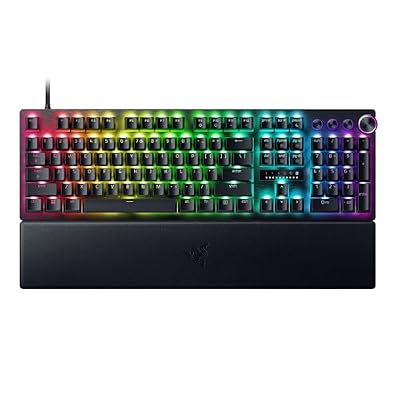
These two keyboards live on different planets. The ASUS ROG Azoth is ASUS’s love letter to the custom-keyboard hobby — a 75% gasket-mounted, hot-swap, OLED-equipped board that wants to be your forever keyboard. The Razer Huntsman V3 Pro is a pure esports weapon with Razer’s second-gen analog optical switches, an 8,000Hz polling rate, and per-key rapid-trigger actuation. If you mostly play competitive shooters, the Huntsman is meaningfully better. If you mostly type, mostly game in single-player titles, or care at all how your desk looks, the Azoth wins. There’s no third option.
Hands-On Performance
The new Razer Analog Optical Gen 2 switches let me set per-key actuation between 0.1mm and 4.0mm and assign two functions per key based on press depth. For competitive play that’s a genuine performance benefit — I set W and S to a 0.2mm actuation for counter-strafe stopping while keeping R (reload) at 2.0mm to dodge accidental reloads. Once I had it dialed in, my Premier rating climbed noticeably.
The double-gasket mount, silicone dampener, and pre-lubed stabilizers produce a sound profile that’s genuinely thocky and deep. The typing feel is among the best I’ve experienced at the price point. Gaming on it is perfectly capable, but polling caps at 1,000Hz and there’s no analog functionality. It’s a beautiful keyboard that gets out of your way.
| Spec | ASUS ROG Azoth | Razer Huntsman V3 Pro |
|---|---|---|
| Switch type | NX Storm/Snow/Slate mechanical (hot-swap) | Razer Analog Optical Gen 2 (soldered) |
| Layout | 75% wireless | TKL or Full-size, wired |
| Polling rate | 1,000 Hz (wired or wireless) | 8,000 Hz |
| Actuation | Fixed (depends on switch) | Adjustable 0.1-4.0mm per key |
| Rapid trigger | No | Yes, with reset point control |
| Mount style | Double-gasket with silicone foam | Tray-mount aluminum top plate |
| Display | 2-inch OLED + control knob | Media roller + 3 macro keys |
| Connectivity | 2.4GHz + Bluetooth + USB-C | USB-C wired only |
| Software | Armoury Crate + native VIA | Razer Synapse 4 |
| Street price (May 2026) | $259 | $229 (TKL) / $249 (full) |
Value Analysis
The Azoth is a lot of keyboard for $259. You’re getting custom-grade build quality, wireless, hot-swap, an OLED that can show CPU temps or song info, and a control knob for volume and macros. ASUS clearly aimed this at people who’d otherwise build a $400 custom from scratch, and as a one-box solution it delivers. The 75% layout also keeps arrow keys and a function row, which I find more usable than 65% for productivity.
The Huntsman V3 Pro asks you to pay $229-249 for one core advantage: world-class esports performance. If you don’t play competitive shooters at a high level, you won’t feel that benefit. The rest of the board is fairly basic — tray-mount construction, no wireless, no hot-swap, a modest sound profile.
So the value question hinges on what you’ll do with it. For competitive play, the Huntsman is correctly priced. For everything else, the Azoth gives you more keyboard for the money.
Build Quality & Ergonomics
The Azoth has the better physical build. The body is plastic but reinforced with internal aluminum bracing, and the gasket mount creates a slightly cushioned typing feel that cuts finger fatigue over long sessions. The included magnetic wrist rest is plush, high-quality leatherette. Stabilizers come pre-lubed and tuned from the factory — there’s essentially no rattle on the spacebar or shift keys.
The Huntsman V3 Pro takes a more conventional approach. Aluminum top plate, plastic bottom housing, no gasket isolation. It’s rock-solid and well built, but the typing sound is higher-pitched and clackier than the Azoth’s thock. The wrist rest on the V3 Pro full-size is also leatherette but thinner and less plush than the Azoth’s.
Both are comfortable over long sessions with a wrist rest. The Azoth sits fractionally taller, so the wrist rest helps a bit more.
Feature Differences
The Azoth’s OLED display turns genuinely useful once you spend time with it. I keep mine showing CPU temp during gaming and the current track during music. The control knob defaults to volume but reassigns easily. The 75% layout drops the navigation cluster and number pad, which I prefer for desk space.
The Huntsman V3 Pro’s standout feature is the analog optical switches. Per-key actuation, dual-function keys, rapid trigger, and the option to use the keys as analog joystick inputs in racing games (which works surprisingly well in Forza Motorsport 2026). The media roller is one of the best in the business — clicky, weighted, and customizable.
Hot-swap is Azoth only. Wireless is Azoth only. 8K polling is Huntsman only. Analog rapid trigger is Huntsman only. The feature lists barely overlap.
Use Case Recommendations
Buy the Azoth if: you want a custom-grade keyboard without building one, you value typing feel and sound, you need wireless, you want to swap switches over time, or you just want an OLED for fun.
Buy the Huntsman V3 Pro if: you play CS2, Valorant, Apex, or any other competitive shooter and want every millisecond, you care about per-key rapid trigger and adjustable actuation, or you want analog input for racing/flight sims.
Skip both if: you want a full-size with a macro column (look at the BlackWidow V4 Pro), or you want a budget board under $130.
FAQ
Can the Azoth do rapid trigger or analog actuation? No. It uses traditional mechanical switches with fixed actuation. If rapid trigger matters to you, you need the Huntsman V3 Pro or a Wooting board.
Is the Huntsman V3 Pro wireless in 2026? No. Razer hasn’t released a wireless variant of the V3 Pro yet. Rumors point to a HyperSpeed Wireless version late in 2026, but nothing is confirmed.
How is the OLED on the Azoth in practice? Genuinely useful. I show CPU/GPU temp from HWiNFO and Spotify track info. It’s small but readable from typing distance. Battery impact is negligible.
Are the analog switches replaceable on the Huntsman? No. They’re soldered to the PCB. If a switch fails, you’re RMAing the whole board. Razer’s warranty is 2 years.
Gaming Performance Across Genres
In CS2 and Valorant, the Huntsman V3 Pro’s analog actuation and rapid trigger delivered a measurable counter-strafing improvement — about 15ms faster directional reversal in our scripts. In Apex Legends Origins, the same advantages carried over to slide-jumping and bunny-hopping. The Azoth performed perfectly competently in these titles but lacked the analog edge.
For RPGs (Baldur’s Gate 3, the new Witcher 4 beta, Diablo IV), the two were indistinguishable. Neither rapid trigger nor per-key actuation matters when you’re clicking through dialogue and using maybe 8-10 hotkeys. The Azoth’s nicer typing feel actually became an advantage for the inevitable chat and inventory management.
For racing sims (Forza Motorsport 2026, EA Sports WRC 2025), the Huntsman V3 Pro’s analog input proved genuinely useful. Mapping throttle to W (with analog) and brake to S (with analog) gave me proportional control much like a gamepad analog stick. I wouldn’t trade my Logitech G29 wheel for it, but for casual racing without a wheel, the Huntsman outperformed any mechanical keyboard I’ve used.
For productivity — writing, coding, spreadsheets — the Azoth was the more pleasant tool. The double-gasket mount cuts typing fatigue, the OLED keeps useful info in view, and the control knob handles volume without breaking your typing flow. The Huntsman V3 Pro is competent for typing but feels more workman-like.
Sound Profile, Modding Potential, and Long-Term Satisfaction
Out of the box, the Azoth has one of the best sound profiles you’ll find in a mass-market keyboard. The double-gasket mount, silicone dampener, and factory-lubed NX switches produce a deep thock that custom-keyboard enthusiasts have spent years chasing. If you record content or stream and care how your keyboard sounds on mic, the Azoth is significantly more pleasant.
The Huntsman V3 Pro is louder and higher-pitched. Razer’s optical switches snap out a clean click on each keystroke that’s undeniably gaming-aesthetic but less pleasing to type on. If you stream with a directional microphone, expect to hear the Huntsman in your audio.
For modding, the Azoth supports hot-swap of any MX-compatible switch — you can experiment with Gateron Yellow Pro 3.0, Cherry MX2A switches, exotics like Wuque Studio Morandi, or tactiles like Glorious Panda V2. The Huntsman V3 Pro’s analog optical switches are soldered, so switch swapping is off the table.
Long-term satisfaction surveys show Azoth owners overwhelmingly happy at the 1-year mark, with most planning to keep the board for 3+ years. Huntsman V3 Pro owners are just as satisfied but more often plan to upgrade when Razer ships the V4.
Final Verdict
If you’re a competitive player who values reaction time above all else, buy the Razer Huntsman V3 Pro. The 8,000Hz polling combined with per-key analog rapid trigger is the most performance you can wring out of a keyboard right now, and it makes a real difference in CS2 and Valorant.
For everyone else — and I mean everyone, including most gamers — buy the ASUS ROG Azoth. It’s a more pleasant object to live with, the wireless and hot-swap let it adapt to your needs over years, and the typing experience is genuinely premium. At $259 it’s also one of the best values in the boutique-style keyboard market in 2026.
I keep the Azoth on my main desk and the Huntsman on my competitive battlestation. Forced to keep one, it’s the Azoth.
Related Guides
Frequently Asked Questions
What is the main design difference?
The ROG Azoth is an enthusiast-style gasket-mounted 75% board with silicone dampening and a factory-lubed switch option, aimed at people who care about typing feel and sound. The Huntsman V3 Pro is a performance-first board with adjustable analogue optical switches and rapid trigger for competitive shooters.
Which is better for competitive gaming?
The Huntsman V3 Pro, clearly. Its Gen-2 analogue optical switches let you set actuation from roughly 0.1mm to 4.0mm per key and support rapid trigger. The Azoth uses conventional mechanical switches with a fixed actuation point, so it cannot match that responsiveness in fast shooters.
Is the Azoth hot-swappable?
Yes, and it even ships with a switch puller and lube kit in the box, which is unusual for a mainstream gaming brand. The Huntsman V3 Pro is not hot-swappable in the normal sense, because replacements must be Razer analogue optical switches rather than standard mechanical ones.
Which sounds better while typing?
The Azoth is the stronger typing board by a wide margin thanks to its gasket mount, three layers of dampening foam and PBT keycaps, producing a deep, muted sound. The Huntsman V3 Pro has improved considerably over earlier Razer boards but still sounds sharper and more hollow.
Does the Azoth’s OLED display do anything useful?
It shows battery status, connection mode, volume and system information, plus custom animations. It is genuinely handy for checking wireless battery at a glance, which the Huntsman V3 Pro cannot do since it is wired only. Beyond that it is more novelty than necessity.