Gaming on a laptop brings the freedom to play anywhere, but built-in speakers rarely do your games justice. A dedicated gaming headset transforms the experience, delivering immersive positional audio, a clear microphone for online teamwork, and comfort that laptop speakers simply can’t match. The right headset also blocks out distractions, letting you focus whether you’re at a desk, in a dorm, or gaming on the go.
Because laptops vary in their ports and power, choosing the right connection matters, along with weight, mic quality, and overall value. Below we walk through the key factors for pairing a headset with your laptop, then review the best options across USB, wireless, and versatile designs so you can find a great fit for your setup and budget.


As an Amazon Associate we earn from qualifying purchases at no extra cost to you.







🎮 Get More From Your Setup — Free
Prime Gaming gives you free PC games every month, in-game loot, and a free Twitch channel sub — plus fast free shipping on all the gear above. New members get a 30-day free trial.
Watch: Best Gaming Headset For Laptop — Video Review
How to Choose the Right Gaming Headset for Your Laptop
- Connection type: USB headsets offer plug-and-play convenience with built-in audio processing, while 3.5mm suits laptops with a combo jack, and wireless frees you from cables.
- Microphone quality: A noise-canceling or detachable mic keeps your voice clear for online matches and video calls without picking up background noise.
- Comfort and weight: Lightweight designs with soft ear cushions matter for long sessions, especially if you game away from a fixed desk.
- Surround sound: Virtual 7.1 surround can enhance immersion and help you locate in-game audio cues in competitive titles.
- Compatibility: Confirm the headset works with your laptop’s operating system and also check console support if you play on multiple devices.
The Best Gaming Headsets for Laptops Reviewed
EKSA E1000 USB Headset
The EKSA E1000 is a fantastic budget USB option, delivering 7.1 surround sound and a clear mic through a single convenient connection. It’s a great plug-and-play pick for laptop gamers who want immersive audio without spending much.
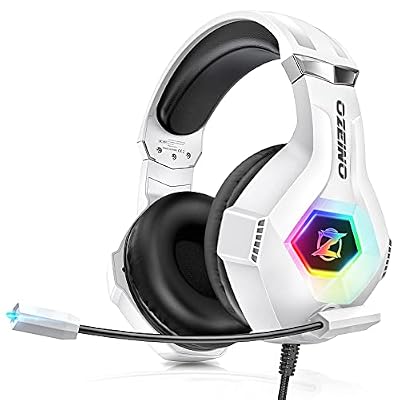
Ozeino Wireless Gaming Headset
For cable-free play, the Ozeino wireless headset offers lossless audio and up to 40 hours of battery across PC, PS5, and Switch. Its versatility makes it ideal if your laptop is just one of several devices you game on.
Razer Kraken V3 X
The lightweight Kraken V3 X connects via USB and brings Razer’s tuned drivers and comfortable cushions to your laptop. Its low weight and durable build make it a comfortable, reliable choice for extended sessions.
Logitech G335 Wired Headset
The G335 is a stylish, lightweight wired headset with a flip-to-mute mic and a 3.5mm connection that works with virtually any laptop. Its comfortable suspension band suits players who value simplicity and all-day wearability.
EKSA E900 Pro USB Headset
The E900 Pro steps up with a detachable noise-canceling mic, 7.1 surround, and 50mm drivers for richer audio. It’s a strong value pick for laptop gamers who want clearer comms and more immersive sound.
Related Guides
- Steam VR Headset Vs Meta Quest 3: Full Comparison (2026)
- Best Ear Buds For Gaming (2026)
- Best Gaming Headsets Best Buy (2026)
- Best Wireless Gaming Headset For PS5 (2026)
Frequently Asked Questions
Should I use USB or 3.5mm with my laptop?
USB headsets include their own audio processing and often sound better, while 3.5mm works with any combo jack. Choose USB for convenience or 3.5mm for broad compatibility.
Do wireless headsets have lag on laptops?
Modern 2.4GHz wireless headsets have negligible latency for gaming. Avoid relying on Bluetooth alone for competitive play, as it can introduce noticeable delay.
Is surround sound useful for laptop gaming?
Virtual surround can improve immersion and help locate enemies, though well-tuned stereo often works just as well for accurate directional audio.
Will these headsets work with consoles too?
Many do, especially wireless multi-platform models. Always check the listed compatibility to ensure the headset supports every device you plan to use.
Final Thoughts
For laptop gamers on a budget, the EKSA E1000 and upgraded E900 Pro deliver excellent USB value, while the Ozeino wireless headset is the top pick for multi-device freedom. If you prefer a lightweight wired option, the comfortable Logitech G335 is hard to beat.
Top picks from this guide
 EKSAEKSA E900 Pro USB Gaming Headset for PC, 7.1 Surround…$50 \xc2\xb7 99/100
 FOXXRAYFOXXRAY HAU-37 USB Gaming Headset for PC, Computer Headphones with…$32 \xc2\xb7 99/100OzeinoOzeino Gaming Headset for PC, Ps4, Ps5, Xbox Headset with…$19 \xc2\xb7 98/100
 Aceracer Wireless Gaming Headset, PS5 Headset with 2.4GHz for Ps5,…$33 \xc2\xb7 98/100