
🛒 Best Price Today on Amazon
Prime members get fast, free shipping on everything above, plus member-only deals. New members get a 30-day free trial — cancel anytime.
- Best Monitors for Sim Racing at a Glance
- Samsung Odyssey Neo G9 G95NC — Best for Maximum Coverage
- LG UltraGear 45GX950A-B — Best 5K2K OLED for Sim Racing
- Samsung Odyssey OLED G9 G95SC — Best 32:9 OLED Experience
- MSI MPG 491CQPX QD-OLED — Best 49-Inch All-Rounder
- Alienware AW3425DW — Best Compact Monitor for Sim Racing
- Which Sim Racing Monitor Should You Choose?
- Buying Guide for a Sim Racing Monitor
- FAQ
- Conclusion
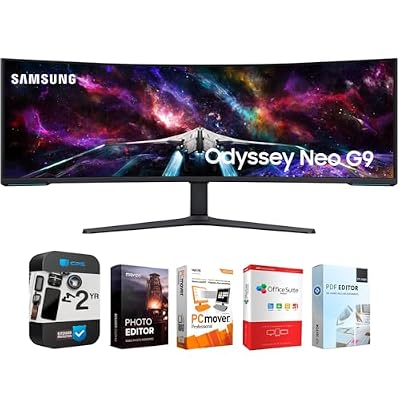
Samsung 57" Odyssey Neo G9 Dual 4K UHD Quantum Mini-LED Curved Gaming Monitor Bundle with Tech Smart USA Elite Suite 18 Standard Editing Software Bundle + 2 Year CPS Enhanced Protection Pack
Included for 'Best Monitor for Sim Racing: 5 Immersive Picks for 2026' as a relevant option in this category; details come from the product listing.
View on Amazon
SAMSUNG 49-inch Odyssey G9 (G91F) DQHD, 144Hz, Curved Gaming Monitor, Ultra-Wide 32:9 Screen, DisplayHDR 600, AMD FreeSync™ Premium Pro, Ergonomic Stand, LS49FG910ENXZA, 2025
Included for 'Best Monitor for Sim Racing: 5 Immersive Picks for 2026' because the listing specifies 144Hz and Curved Gaming Monitor, details this guide uses to compare options.
View on AmazonThe best monitor for sim racing should widen your field of view without sacrificing motion clarity, cockpit fit, or GPU practicality. For most dedicated rigs, a curved ultrawide or super ultrawide makes more sense than a standard 16:9 screen because it keeps mirrors, apexes, and nearby cars visible with less head movement.
Quick answer: For most people in 2026, the best monitor for sim racing is the Samsung Odyssey Neo G9 G95NC — our #1 rated choice. See the full ranked comparison, alternatives and buying advice below.
Best Monitors for Sim Racing at a Glance
| Monitor | Screen | Resolution | Refresh Rate | Curvature | Best For |
|---|---|---|---|---|---|
| Samsung Odyssey Neo G9 G95NC | 57-inch | 7680 x 2160 | 240Hz | 1000R | Maximum single-screen coverage |
| LG UltraGear 45GX950A-B | 45-inch | 5120 x 2160 | 165Hz / 330Hz Dual Mode | 800R | High-resolution OLED immersion |
| Samsung Odyssey OLED G9 G95SC | 49-inch | 5120 x 1440 | 240Hz | 1800R | Fast 32:9 OLED racing |
| MSI MPG 491CQPX QD-OLED | 49-inch | 5120 x 1440 | 240Hz | 1800R | Gaming and productivity rigs |
| Alienware AW3425DW | 34.2-inch | 3440 x 1440 | 240Hz | 1800R | Compact sim racing setups |
Samsung Odyssey Neo G9 G95NC — Best for Maximum Coverage
Samsung’s 57-inch Odyssey Neo G9 G95NC is built for drivers who want maximum horizontal coverage from one panel. Its 7680 x 2160 Dual UHD resolution, 32:9 aspect ratio, 1000R curve, 240Hz refresh rate, and Mini LED backlight create a wide, sharply detailed view that suits cockpit-mounted racing setups.
The trade-off is GPU demand. Dual UHD contains far more pixels than 5120 x 1440, so maintaining very high frame rates in Assetto Corsa Competizione, iRacing, or heavily modded simulators requires substantial graphics performance. It fits best on a deep, rigid rig where the screen can sit close behind the wheel base.
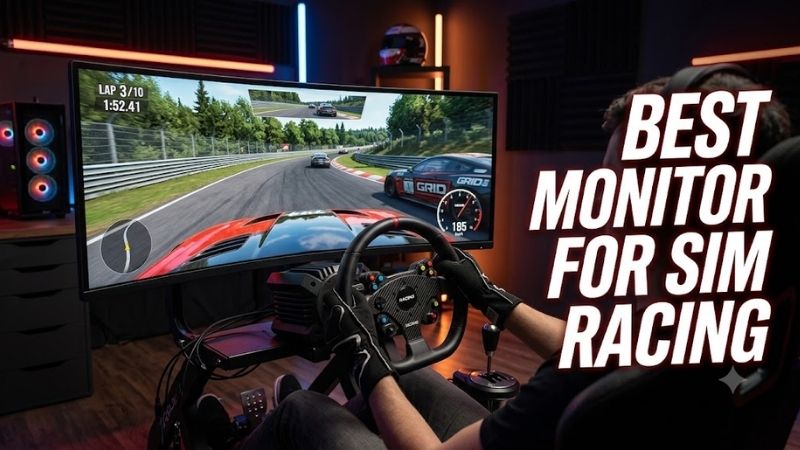
Best For: Dedicated high-end sim racing cockpits
Key Features:
- 57-inch 32:9 VA panel
- 7680 x 2160 Dual UHD resolution
- 1000R curvature
- Up to 240Hz refresh rate
- Quantum Mini LED backlight
- DisplayHDR 1000
- DisplayPort 2.1 and HDMI 2.1
- AMD FreeSync Premium Pro
What Makes It Different: It combines the width of two UHD displays into one continuous 57-inch panel, avoiding the center bezel and alignment work associated with a traditional dual-monitor arrangement.
Pros:
- Extremely wide field of view
- High vertical and horizontal resolution
- Tight 1000R curve suits close cockpit placement
- 240Hz refresh ceiling
- Mini LED avoids OLED burn-in concerns
Cons:
- Very demanding at native resolution
- Requires substantial physical mounting space
- Full Dual UHD 240Hz support depends on suitable GPU output capability
Use Case: Permanent aluminum-profile rigs and premium single-monitor cockpits.
Who It’s For: Drivers prioritizing maximum single-panel immersion and image detail over hardware cost and rendering efficiency.
LG UltraGear 45GX950A-B — Best 5K2K OLED for Sim Racing
LG’s UltraGear 45GX950A-B takes a different approach with a 45-inch 21:9 OLED panel, 5120 x 2160 resolution, and an aggressive 800R curve. The 165Hz native mode favors image detail, while Dual Mode can switch to a lower-resolution 330Hz mode when frame rate matters more than pixel density in faster titles.
For sim racing, the extra vertical resolution helps dashboards, trackside detail, and distant braking markers look cleaner than on 3440 x 1440 ultrawides. The 21:9 format is not as wide as a 49-inch 32:9 display, but its taller image can feel more natural for drivers who also use the monitor for other games or desktop work.
Best For: Racers wanting high pixel density with strong OLED contrast
Key Features:
- 45-inch OLED
- 5120 x 2160 5K2K resolution
- 21:9 aspect ratio
- 800R curvature
- 165Hz native refresh rate
- 330Hz lower-resolution Dual Mode
- 0.03ms GtG specification
- DisplayPort 2.1
- G-SYNC Compatible and FreeSync Premium Pro
What Makes It Different: Its 5K2K resolution provides substantially more vertical workspace than common 5120 x 1440 super ultrawides while retaining an immersive curved OLED format.
Pros:
- Sharp 125 PPI image
- Deep OLED black levels
- Tight curve for close seating
- Flexible Dual Mode
- Strong option for racing and desktop use
Cons:
- Less horizontal coverage than 32:9 screens
- Native 5K2K mode requires considerable GPU power
- Static racing HUDs require sensible OLED care
Use Case: Premium rigs where image clarity matters as much as peripheral width.
Who It’s For: Players who race, play other PC games, and work on the same monitor rather than building a single-purpose 32:9 cockpit.
Samsung Odyssey OLED G9 G95SC — Best 32:9 OLED Experience
The Samsung Odyssey OLED G9 G95SC pairs a 49-inch 32:9 canvas with 5120 x 1440 resolution and a 240Hz refresh rate. Its OLED panel delivers very fast pixel response and deep blacks, while the 1800R curve keeps the display broad rather than wrapping tightly around the driver like a 1000R or 800R screen.
That combination works well for racers who value smooth motion and strong contrast but do not want the extreme GPU load of 7680 x 2160. The main ownership consideration is OLED image retention risk with long sessions that keep static HUD elements visible, so built-in panel care features and sensible usage habits remain important.
Best For: High-refresh 32:9 sim racing
Key Features:
- 49-inch OLED panel
- 5120 x 1440 Dual QHD
- 32:9 aspect ratio
- 1800R curve
- Up to 240Hz
- 0.03ms GtG specification
- FreeSync Premium Pro
- G-SYNC Compatible
- DisplayHDR True Black 400
What Makes It Different: The G95SC combines super-ultrawide peripheral coverage with OLED response characteristics and a refresh ceiling suited to powerful racing PCs.
Pros:
- Wide 32:9 field of view
- 240Hz refresh rate
- Fast OLED pixel response
- Strong contrast for night racing
- Lower rendering load than Dual UHD
Cons:
- 1800R curvature is less aggressive than some cockpit-focused alternatives
- OLED requires attention to static interface elements
- Large 49-inch chassis still needs substantial mounting width
Use Case: Single-monitor cockpits focused on high frame rates, racing immersion, and OLED image quality.
Who It’s For: Sim racers who want a premium 32:9 experience but prefer 5120 x 1440 over the heavier rendering demands of 7680 x 2160.
MSI MPG 491CQPX QD-OLED — Best 49-Inch All-Rounder
MSI’s MPG 491CQPX QD-OLED is another 49-inch 32:9 option, but it combines 5120 x 1440 resolution with a 240Hz refresh rate, 1800R curvature, HDMI 2.1, DisplayPort 1.4a, USB-C, and variable refresh support. It gives sim racers a broad cockpit view without moving into the heavier Dual UHD hardware demands.
It is especially appealing for a mixed-use setup because the monitor also includes USB-C power delivery, KVM, picture-by-picture, and picture-in-picture functions. For pure sim rigs, those extras matter less than its 240Hz QD-OLED motion performance, but they make the screen easier to share between a gaming PC and work system.
Best For: Sim racing rigs that double as desktop workstations
Key Features:
- 49-inch QD-OLED
- 5120 x 1440 resolution
- 32:9 aspect ratio
- 1800R curve
- 240Hz refresh rate
- 0.03ms GtG specification
- G-SYNC Compatible
- FreeSync Premium Pro
- HDMI 2.1, DisplayPort 1.4a and USB-C
- KVM and PBP/PIP support
What Makes It Different: Its combination of 240Hz QD-OLED performance and extensive multi-device connectivity makes it easier to integrate into a rig that also functions as a normal PC workstation.
Pros:
- Wide 32:9 racing view
- 240Hz refresh ceiling
- QD-OLED contrast and response
- Useful USB-C and KVM functions
- Supports multiple display inputs
Cons:
- Less tightly curved than 800R or 1000R monitors
- OLED ownership considerations remain
- Connectivity features may add little value on a dedicated racing-only rig
Use Case: Hybrid gaming, racing, streaming, and productivity stations.
Who It’s For: Drivers who want 49-inch racing immersion but need one monitor to handle several PCs or everyday desktop tasks.
Alienware AW3425DW — Best Compact Monitor for Sim Racing
Alienware’s AW3425DW is the compact choice in this group. Its 34.2-inch QD-OLED panel runs at 3440 x 1440 and 240Hz, giving drivers fast motion and a useful 21:9 field of view without demanding the physical width of a 49-inch super ultrawide or the graphics load of a 5K2K or Dual UHD display in modern sims.
A 34-inch ultrawide works best when desk space is limited, the wheel stand is portable, or the monitor must serve general PC gaming as well as racing. It cannot show as much side vision as a 32:9 panel, so drivers chasing maximum single-screen peripheral coverage should prioritize the larger Samsung or MSI options instead.
Best For: Smaller desks and portable wheel setups
Key Features:
- 34.2-inch QD-OLED
- 3440 x 1440 resolution
- 21:9 format
- 1800R curvature
- 240Hz refresh rate
- HDMI 2.1 and DisplayPort 1.4
- G-SYNC Compatible
- FreeSync Premium Pro
- VESA AdaptiveSync
What Makes It Different: It delivers high-refresh ultrawide racing without requiring the width, mounting hardware, or rendering power associated with 45-inch, 49-inch, and 57-inch displays.
Pros:
- Easier to fit on standard desks
- 240Hz refresh rate
- Lower pixel load than larger options
- QD-OLED panel
- Practical for racing and general gaming
Cons:
- Narrower peripheral view than 32:9
- Less immersive on large dedicated cockpits
- OLED panel still requires attention to static content
Use Case: Desk-mounted wheels, folding rigs, and compact bedrooms or gaming rooms.
Who It’s For: Players who want an ultrawide sim racing monitor but cannot accommodate a 49-inch or 57-inch display.
Which Sim Racing Monitor Should You Choose?
For most single-screen rigs, 49-inch 5120 x 1440 monitors strike the easiest balance between width, refresh rate, and GPU load. The 57-inch Neo G9 favors maximum detail and coverage, the LG 45GX950A-B favors a taller 5K2K OLED image, while the 34-inch Alienware saves space without giving up high refresh performance.
Buying Guide for a Sim Racing Monitor
Screen Size and Viewing Distance
Screen size affects more than immersion. A monitor mounted close to the wheel can fill more of your vision than a larger panel placed farther away, so rig depth and mounting position matter alongside diagonal size. Before buying, measure the distance from your eyes to the screen and confirm that the chassis can support the panel’s width.
21:9 vs 32:9 for Sim Racing
Aspect ratio changes how much peripheral information you can see. A 32:9 monitor can show more track, mirrors, and nearby cars than 21:9 when the simulator supports the resolution correctly. A 21:9 screen uses less desk width and usually needs fewer GPU resources, making it easier to drive at high settings and refresh rates.
Resolution and GPU Requirements
Resolution determines both sharpness and rendering load. 3440 x 1440 is the easiest of these ultrawide formats to run, 5120 x 1440 adds substantial horizontal detail, 5120 x 2160 raises vertical clarity, and 7680 x 2160 is the heaviest. Match the panel to the GPU performance you can sustain in your actual simulator.
Refresh Rate and Variable Refresh
Refresh rate matters most when the GPU can feed the display enough frames. Moving from 60Hz to 144Hz or higher can make steering inputs, passing cars, and camera motion look more immediate, while 240Hz gives additional headroom for powerful systems. Variable refresh support also helps smooth frame-rate swings during busy races.
Monitor Curvature
Curvature affects how naturally a wide panel wraps around the cockpit. Tighter curves such as 800R or 1000R can bring the edges closer to your eyes, while 1800R feels flatter and may suit mixed desktop use better. The ideal curve depends on viewing distance, screen width, and whether the monitor stays permanently mounted to a racing rig.
OLED vs Mini LED for Racing
OLED and QD-OLED panels offer fast pixel response and strong contrast, which can make night races and rapid motion look especially clean. Mini LED LCD options avoid OLED burn-in concerns and can deliver high brightness, but may show blooming around bright objects on dark backgrounds. Long static HUD use is the main OLED trade-off to consider.
FAQ
What monitor size is best for sim racing?
A 49-inch 32:9 monitor is often the practical sweet spot for a dedicated single-screen sim rig because it provides broad peripheral vision without the enormous pixel load of 7680 x 2160. A 34-inch 21:9 model is easier to place and run, while 45-inch and 57-inch screens suit larger rigs and more powerful PCs.
Is 240Hz worth it for sim racing?
A 240Hz monitor is useful for sim racing when your PC can produce high frame rates consistently, especially in lighter simulators or reduced settings. It does not automatically improve racing if the game runs far below 240 fps, so resolution, GPU capability, and variable refresh support should be considered together rather than in isolation.
Is OLED good for sim racing?
OLED is a strong fit for sim racing because its fast pixel response keeps moving scenery and nearby cars clear, while deep blacks improve night stages and dark cockpits. The trade-off is possible image retention from static dashboards or HUD elements, so racers who run very long sessions should use the monitor’s panel-protection features.
Can a 32:9 monitor replace triple monitors?
A 32:9 monitor can replace triples for drivers who want a simpler setup, fewer bezels, and easier configuration, but it does not provide the same wraparound geometry as three separate screens. Triple monitors can cover more peripheral vision when aligned correctly, while a super ultrawide uses one panel, one cable path, and less physical space.
Conclusion
The best monitor for sim racing depends on rig size, GPU strength, and how much peripheral vision you want from one screen. Samsung’s 57-inch Neo G9 maximizes resolution, 49-inch OLED models balance width and speed, LG’s 45GX950A-B adds 5K2K detail, and Alienware’s 34-inch option suits compact setups.
Ready to decide? Our #1 pick for 2026 is the Samsung Odyssey Neo G9 G95NC.
Live price & availability on Amazon.









