🛒 Best Price Today on Amazon
Prime members get fast, free shipping on everything above, plus member-only deals. New members get a 30-day free trial — cancel anytime.
- Quick Answer: What Storage Setup Works for Editing?
- SSD Scratch Disk vs HDD Archive: Why Editors Use Both
- Best Hard Drives for Video: SSDs for Active Projects
- Best Media Hard Drives: HDD and RAID Archives
- Best Hard Drives for Plex and Media Servers
- Best Hard Drives for Movies, Music and Multimedia
- Best Footage Hard Drives: Speed, Interfaces and Bit Rates
- Compatibility and Fit Notes
- Pick X If… Decision Table
- Alternatives to Consider
- Understanding Maker Speed Figures
- Match Drive Speed to Your Footage
- Cables, Ports and Power
- Backup Strategy for Editors
- Hard Drive Types: Bus-Powered, Desktop and RAID Compared
- Handling Large Capacity Drives Safely
- Frequently Asked Questions
Updated November 2026 – The best hard drives for video editing are a fast external SSD such as the Samsung T9, SanDisk Professional PRO-G40, or OWC Envoy Pro EX for active projects, paired with a high-capacity hard drive or RAID such as the SanDisk Professional G-DRIVE, LaCie 2big Dock, OWC ThunderBay 4, or WD My Book Duo for archives and footage you are not cutting right now.
When people search for the best hard drives for video editing, the honest answer is that one drive rarely does everything. Editors usually split storage into tiers: a fast scratch or project drive, a large working library, and a backup or archive. Spinning hard drives are still the economical choice for the last two, while solid-state drives make timelines smooth. This guide explains the tiers, then covers specific products from SanDisk Professional, LaCie, OWC, WD, and Samsung, and what the same advice means for Plex servers and media libraries.
Quick Answer: What Storage Setup Works for Editing?
Edit from an SSD, store from a hard drive. Use a Thunderbolt or fast USB SSD for the project and cache files, a RAID enclosure for finished and ongoing footage, and a second copy somewhere else. A single bus-powered portable hard drive can cope with proxies and light 1080p work, but reviewers report that it struggles with native high-bitrate 4K.
| Product | Best for | Key stated or reported specs | Limits |
|---|---|---|---|
| Samsung T9 portable SSD | Fast portable scratch drive | Named best overall portable drive in one roundup (2TB) | SSD, so capacity costs more |
| SanDisk Professional PRO-G40 SSD | Thunderbolt-class SSD | Write speed around 2,604 MB/s reported by Digital Camera World | Smaller capacities than HDDs |
| OWC Envoy Pro EX | Thunderbolt SSD for 4K workflows | Around 2,780 MB/s reported in one roundup | Needs a Thunderbolt-capable computer for top speed |
| SanDisk Professional G-DRIVE | High-capacity single HDD archive | 26TB model named best professional by one outlet; write speed about 284 MB/s reported | Single drive, no redundancy |
| LaCie 2big Dock | Two-bay RAID plus card slots | Up to 40TB per Wex; CFexpress slots; Thunderbolt 3 (v2) | Not portable |
| OWC ThunderBay 4 | Four-bay Thunderbolt RAID | Listed up to 96TB (Thunderbolt 3) by a retailer | Large and pricier tier |
| SanDisk Professional G-RAID Shuttle 4 | Four-bay RAID for teams | 4-bay, 48TB listed by Expert Photography | Heavier setup |
| WD My Book Duo | Consumer two-bay RAID | USB 3.2 Gen 1; one benchmark site reports about 120 MB/s | Too slow for native high-bitrate 4K |
SSD Scratch Disk vs HDD Archive: Why Editors Use Both
Editing software reads many streams of footage while writing caches, previews, and render files. A solid-state drive responds to that random access far better than a spinning disk, which is why editors put the active project and cache on an SSD. A hard disk, by contrast, is cheaper per terabyte and works well for sequential reads such as copying, archiving, and playing back a single stream.
A practical layout looks like this: an internal or Thunderbolt SSD for the current project; a RAID or large HDD for footage libraries; and a separate copy, ideally off-site, for the 3-2-1 backup rule of three copies on two types of media with one stored elsewhere.
Best Hard Drives for Video: SSDs for Active Projects
Samsung T9 – Best for a Fast Portable Scratch Drive
Samsung T9 · portable SSD · USB-C · one roundup names the 2TB model best overall portable drive · maker lists capacities up to several terabytes
The T9 suits editors on laptops who move between locations. It is a general-purpose portable SSD rather than a Thunderbolt model, so its top speed depends on your computer’s USB port.

Samsung T9 Portable SSD 2TB, USB 3.2 Gen 2x2 External SSD, Up to 2,000 MB/s | External Solid State Drive for Gaming, Students and Professionals, MU-PG2T0B/AM, Black
Included for 'Best Hard Drives for Video Editing in 2026 (Scratch Disks, Archives and Portable)' as a representative home product in this roundup; selection reflects the product set returned for this topic.
View on AmazonSanDisk Professional PRO-G40 – Best for Thunderbolt-Class SSD Speed
SanDisk Professional PRO-G40 · portable SSD · Thunderbolt and USB · write speed about 2,604 MB/s as reported by Digital Camera World
The PRO-G40 is the comparison point used by one reviewer to show how slow a large HDD is for writing. It is aimed at photographers and video shooters who offload large files quickly.
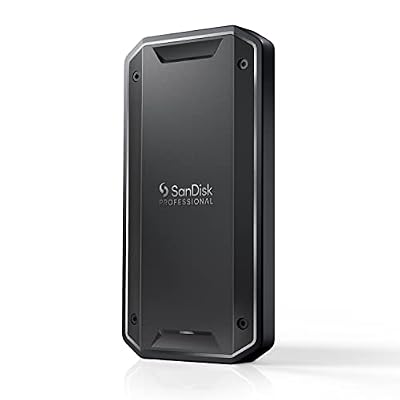
SanDisk Professional 2TB PRO-G40 SSD - Up to 2700MB/s, Thunderbolt 3 (40Gbps), USB-C (10Gbps), IP68 dust/Water Resistance, External Solid State Drive - SDPS31H-002T-GBCND
Included for 'Best Hard Drives for Video Editing in 2026 (Scratch Disks, Archives and Portable)' as a representative home product in this roundup; selection reflects the product set returned for this topic.
View on AmazonOWC Envoy Pro EX – Best for 4K Thunderbolt Workflows
OWC Envoy Pro EX · portable Thunderbolt SSD · one roundup reports about 2,780 MB/s
OWC’s Envoy Pro EX is a rugged-style Thunderbolt SSD. It suits editors on Thunderbolt-equipped Macs and PCs who want a fast project drive that travels.
Best Media Hard Drives: HDD and RAID Archives
SanDisk Professional G-DRIVE – Best for Large Single-Drive Archives
SanDisk Professional G-DRIVE · external HDD · a 26TB model named best professional by Digital Camera World · TechRadar reports newer 22TB and 44TB SanDisk Professional launches · write speed about 284 MB/s reported
The G-DRIVE gives a lot of space in one desktop unit. Because there is only one drive, a failure means data loss unless you keep a second copy. It is a good fit for footage archives and project handoffs where speed is not the main concern.

Sandisk Professional 12Tb G Drive Desktop HDD | 7200RPM
Included for 'Best Hard Drives for Video Editing in 2026 (Scratch Disks, Archives and Portable)' as a representative home product in this roundup; selection reflects the product set returned for this topic.
View on AmazonLaCie 2big Dock – Best for Two-Bay RAID With Card Slots
LaCie 2big Dock · two-bay RAID · Thunderbolt 3 on the v2 · Wex reports capacities up to 40TB · CFexpress card slots
Expert Photography names the LaCie 2big Dock 16TB RAID as its top pick. The card slots let you ingest camera media directly, and the RAID design suits editors who need a large, expandable library with some protection. It is not portable.

Seagate LaCie 2big Dock 20TB External HDD - Thunderbolt and USB4 Compatibility, Data Recovery (STLG20000400)
Included for 'Best Hard Drives for Video Editing in 2026 (Scratch Disks, Archives and Portable)' as a representative home product in this roundup; selection reflects the product set returned for this topic.
View on AmazonOWC ThunderBay 4 – Best for a Four-Bay Thunderbolt Array
OWC ThunderBay 4 · four-bay Thunderbolt RAID · retailer listing shows up to 96TB with Thunderbolt 3
The ThunderBay line lets you fill the bays with your own drives or buy it populated, depending on the configuration. It is suited to studios that outgrow two-bay units and want to choose between RAID levels.

OWC ThunderBay 4 Thunderbolt 40Gb/s Four-Bay SATA Enclosure w/ SoftRAID | Add up to four 3.5-inch or 2.5-inch SATA drives - Up to 1527MB/s - SoftRAID Premium (3 Year) - RAID 0/1/4/5/1+0 (10)/JBOD
Included for 'Best Hard Drives for Video Editing in 2026 (Scratch Disks, Archives and Portable)' as a representative home product in this roundup; selection reflects the product set returned for this topic.
View on AmazonSanDisk Professional G-RAID Shuttle 4 – Best for Teams and Larger Libraries
SanDisk Professional G-RAID Shuttle 4 · four-bay RAID · 48TB model listed by Expert Photography
This is a larger desktop-class RAID for editing teams that need a shared, resilient place for footage. Rely on the maker’s page for connection types and warranty.

SanDisk Professional 24TB G-RAID Shuttle 4 - Enterprise-Class 4-Bay External Hard Drive, Thunderbolt 3 and USB-C, Transportable, Hardware RAID - SDPH34H-024T-NBAAB
Included for 'Best Hard Drives for Video Editing in 2026 (Scratch Disks, Archives and Portable)' as a representative home product in this roundup; selection reflects the product set returned for this topic.
View on AmazonWD My Book Duo – Best for Budget Consumer RAID Storage
WD My Book Duo · two-bay desktop RAID · USB 3.2 Gen 1 · one benchmark site reports about 120 MB/s
TechRadar describes the My Book Duo as the budget consumer RAID option compared with SanDisk’s professional G-RAID Mirror, with a shorter warranty. One benchmark site says it is fine for 1080p proxies but not enough for native 4K H.265 editing. Use it as a library or backup rather than a timeline drive.

Western Digital 20TB My Book Duo Desktop RAID External Hard Drive HDD, USB 3.1, With Password Protection and Auto Backup Software - WDBFBE0200JBK-NESN
Included for 'Best Hard Drives for Video Editing in 2026 (Scratch Disks, Archives and Portable)' as a representative home product in this roundup; selection reflects the product set returned for this topic.
View on AmazonLaCie Rugged – Best for Field Transport
LaCie Rugged · portable drive · named the durable field option in one roundup · check the exact model (HDD or SSD)
The Rugged line is for editors who carry footage from set to studio. Choose the SSD version if you plan to edit directly from it.

LaCie Rugged USB-C, 4TB, Portable External Hard Drive, Drop, Shock, Dust, Rain Resistant, for Mac & PC (STFR4000800)
Included for 'Best Hard Drives for Video Editing in 2026 (Scratch Disks, Archives and Portable)' as a representative home product in this roundup; selection reflects the product set returned for this topic.
View on AmazonBest Hard Drives for Plex and Media Servers
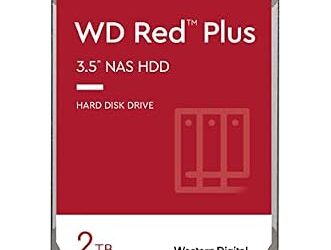
Plex and similar media servers stream a few simultaneous video files, which is a sequential workload that hard disks handle well. For a media server, a NAS drive such as WD Red Plus or Seagate IronWolf in a NAS or always-on PC is a common choice, since those families are built to run continuously. Capacity matters more than speed here, and a 1080p or 4K library fits comfortably on a large HDD. Always keep a second copy of anything you cannot re-rip or re-download.
Best Hard Drives for Movies, Music and Multimedia
For movie collections, large CMR hard drives from the BarraCuda, IronWolf, or WD Red Plus families provide cheap bulk storage. For music libraries, capacity needs are modest, so any reliable 1TB to 4TB drive works; keep a backup since music collections are often irreplaceable. For general multimedia use across a family, a two-bay RAID such as WD My Book Duo gives space with some protection.
Best Footage Hard Drives: Speed, Interfaces and Bit Rates
- USB 3.2 Gen 1: Limited to roughly the speed of a single hard disk in practice; fine for proxies and 1080p.
- Thunderbolt 3 and later: Needed to get the most from multi-bay RAID and fast SSDs.
- RAID 0 and RAID 1: RAID 0 stripes for speed with no protection; RAID 1 mirrors for protection at half the capacity. RAID 5 appears on larger arrays.
- Bit rate: High-bitrate codecs, such as RAW and ProRes, demand more sustained throughput than compressed H.264 or H.265.
- Power: Desktop drives need a power adapter; portable drives are usually bus-powered.
Compatibility and Fit Notes
- Mac and Windows both read most of these drives, but format choice matters. exFAT is common for sharing between the two, while Mac-specific formats work best on Macs.
- Thunderbolt drives need a Thunderbolt port. Connecting to USB-only ports works at lower speeds.
- Desktop RAID units need desk space, airflow, and a power outlet; check the fan noise if you edit in a quiet room.
- A RAID enclosure is not a backup. Keep another copy.
Pick X If… Decision Table
| Pick this | If you need |
|---|---|
| Samsung T9 | A portable SSD for laptop editing |
| SanDisk Professional PRO-G40 or OWC Envoy Pro EX | Thunderbolt SSD speed for 4K projects |
| SanDisk Professional G-DRIVE | A big single-drive archive |
| LaCie 2big Dock | Two-bay RAID plus card ingest |
| OWC ThunderBay 4 or G-RAID Shuttle 4 | A four-bay array for a studio or team |
| WD My Book Duo | Budget consumer RAID for libraries and backups |
| LaCie Rugged | Durable carry-around footage storage |
Alternatives to Consider
Internal NVMe SSD
If your computer has a free M.2 slot, an internal NVMe SSD is often the fastest scratch disk available.
A NAS for shared footage
A NAS with NAS-rated drives lets several editors share a library over the network, with the trade-off of network speed limits.
Cloud archive
A cloud service gives the off-site copy in the 3-2-1 approach, though uploading large video files takes time.
Understanding Maker Speed Figures
Makers print maximum transfer figures on packaging, usually described as up to a certain speed, and those figures come from best-case conditions. Reviewers report results that depend on the computer, the cable, the file sizes, and the drive’s fill level. A hard disk slows as it fills and when it reads small files, while SSDs may slow when a cache is exhausted. The reported figures in this guide, such as about 284 MB/s write on a large G-DRIVE or about 120 MB/s on a USB 3.2 Gen 1 My Book Duo, come from outlets and benchmark sites rather than the makers, so treat them as indicative only.
Match Drive Speed to Your Footage
Different cameras and codecs produce very different data rates. Compressed H.264 and H.265 clips from phones and mirrorless cameras are often manageable from a fast USB drive, while ProRes, RAW, and multi-camera timelines need much more sustained throughput. If your camera lists a bit rate in its specification sheet, compare it with the drive’s sustained write speed and leave generous headroom, because several streams, audio tracks, and effects layers add up.
- Proxy workflow: Edit with lightweight proxy files from a modest drive and relink to originals for export.
- Native workflow: Edit original files from an SSD or Thunderbolt RAID.
- Archive workflow: Move finished projects to HDD or RAID storage and keep a second copy.
Cables, Ports and Power
A fast drive can be held back by a slow cable or port. Use the cable supplied by the maker, plug into the fastest port on your computer, and avoid cheap hubs for editing drives. Thunderbolt drives need a Thunderbolt port, which looks like USB-C but is not guaranteed on every USB-C port, so read the computer’s specifications. Desktop RAID units draw power from a wall adapter and may include fans, so consider noise in a quiet edit suite. Keep the drive on a stable surface, eject it safely before unplugging, and follow the maker’s guidance on temperature and ventilation.
Backup Strategy for Editors
Footage is hard to replace, so assume every drive will fail eventually. A sensible plan keeps the original camera cards until the footage is copied to two places, stores one copy in a different location, and refreshes the archive periodically. RAID 1 and RAID 5 give continuity during a drive failure, while RAID 0 doubles the risk of loss. None of these replaces a separate backup, because accidental deletion, corruption, and theft affect every copy inside one enclosure.
Hard Drive Types: Bus-Powered, Desktop and RAID Compared
| Type | Typical role | Strength | Weakness |
|---|---|---|---|
| Bus-powered portable HDD | Transfer and small archive | Light and simple | Slow for high-bitrate editing |
| Desktop single HDD | Large archive | Big capacity in one box | No redundancy |
| Two-bay RAID | Working library | Mirror protection or striped speed | Needs desk space and power |
| Four-bay or larger RAID | Studio library | High capacity and options | Cost and size |
| Portable or Thunderbolt SSD | Active project and cache | Fast and quiet | Less capacity per spend |
Handling Large Capacity Drives Safely
High-capacity drives hold a lot of work, so handle them with care. Do not move a spinning desktop drive, leave room around it for airflow, and eject it through the operating system before unplugging. Label each drive with its contents and date, keep an index of which projects live where, and schedule a periodic check that archived files still open. When a RAID unit reports a degraded array, replace the failed drive promptly and follow the maker’s rebuild instructions, since a second failure during that window can cost the whole volume.
Frequently Asked Questions
What is the best hard drive for video editing?
Use an SSD such as the Samsung T9, SanDisk Professional PRO-G40, or OWC Envoy Pro EX for active projects, and a hard drive or RAID for archives. No single hard disk does both well.
Can I edit video directly from a hard drive?
You can, especially with proxies or 1080p footage. Reviewers report that a single USB hard drive struggles with native high-bitrate 4K, so an SSD or fast RAID is better.
Do I need a RAID for video editing?
Not strictly. RAID adds speed or protection, and RAID 1 or RAID 5 can keep work going after a drive failure. It still needs a separate backup.
What is the best hard drive for Plex?
A large CMR NAS drive such as WD Red Plus or IronWolf is a common choice for a Plex library because it is built for continuous use. Capacity matters more than raw speed.
Is USB 3.2 Gen 1 fast enough for editing?
For proxies and 1080p it is generally adequate. For native 4K or RAW, Thunderbolt or fast SSDs are the safer choice.
How should I back up footage?
Follow the 3-2-1 approach with three copies, two media types, and one off-site. Do not treat a single drive or a RAID as the only copy.