🛒 Best Price Today on Amazon
Prime members get fast, free shipping on everything above, plus member-only deals. New members get a 30-day free trial — cancel anytime.
- Top 3 Picks
- Quick Comparison
- How We Chose
- 1. WD_BLACK SN7100 4TB – Best for Efficient Laptops, Handhelds, and Consoles
- 2. WD Blue SN5000 4TB – Best for Bulk Game Storage with Moderate Speed
- 3. WD_BLACK SN850X 4TB – Best for All-Round Gaming PCs
- 4. Samsung 990 PRO 4TB – Best for Sustained Performance with a DRAM Cache
- 5. Lexar NM790 4TB with Heatsink – Best for High Capacity at a Value Position
- 6. Samsung 990 PRO 2TB – Best for Gamers Who Do Not Need 4TB
- 7. Samsung 9100 PRO 4TB – Best for PCIe 5.0 Platforms and Content Creation
- 8. Samsung 9100 PRO 2TB – Best for PCIe 5.0 at a Smaller Capacity
- 9. Samsung 990 EVO Plus 4TB – Best for a Cool-Running, Efficient 4TB
- 10. WD_BLACK SN850X 4TB with Heatsink – Best for PS5 and Open-Slot Builds
- DRAM Versus Host Memory Buffer: Does It Matter for Gaming?
- Heatsinks, Thermals, and Console Notes
- How to Choose a 4TB NVMe SSD for Gaming
- Frequently Asked Questions
- Final Recommendation by Situation
The best 4TB NVMe SSD for gaming is the WD_BLACK SN850X 4TB. It is a PCIe 4.0 drive with onboard DRAM, rated up to 7,300 MB/s read, backed by a 2,400 TBW endurance rating and a five-year warranty, and it comes in both bare and heatsink versions to suit desktops and consoles. That mix of speed, proven design, and flexibility makes it the safest all-round pick. If you want similar speed with a long track record of strong sustained performance and DRAM caching, the Samsung 990 PRO 4TB is the closest rival. For value, the Lexar NM790 4TB with a heatsink offers a 3,000 TBW rating and fast speeds without DRAM. For a cool-running laptop or handheld, the WD_BLACK SN7100 and Samsung 990 EVO Plus are the efficient choices, and for a new PCIe 5.0 platform, the Samsung 9100 PRO is the fastest drive here. A 4TB drive holds well over two dozen modern games, so it is a long-term upgrade worth getting right.
Top 3 Picks
Best overall: WD_BLACK SN850X 4TB. It combines up to 7,300 MB/s reads, DRAM caching, and a 2,400 TBW rating, which is why it has been a standard recommendation for gaming PCs. Choose the heatsink version for a console or a motherboard slot without cooling.

WD_Black SN7100 4TB NVMe SSD - Gen4 PCIe, M.2 2280, Up to 7,000 MB/s Read Speed, Up to 6,700 MB/s Write Speed, Next Gen TLC 3D NAND, for Laptops, Handheld Gaming Devices - WDS400T4X0E
Included for 'Best 4TB NVMe SSD for Gaming in 2026' because the listing specifies Gen4 PCIe and M.2 2280, details this guide uses to compare options.
View on Amazon![Western Digital 4TB WD Blue SN5000 NVMe Internal Solid State Drive SSD - PCIe Gen 4.0, M.2 2280, Up to 5,500 MB/s - WDS400T4B0E [New Generation]](https://m.media-amazon.com/images/I/31nPv-dYopL._SL400_.jpg)
Western Digital 4TB WD Blue SN5000 NVMe Internal Solid State Drive SSD - PCIe Gen 4.0, M.2 2280, Up to 5,500 MB/s - WDS400T4B0E [New Generation]
Included for 'Best 4TB NVMe SSD for Gaming in 2026' because the listing specifies PCIe Gen 4.0 and M.2 2280, details this guide uses to compare options.
View on Amazon
WD_BLACK SN850X 4TB NVMe SSD - M.2 2280, Up to 7,300 MB/s Read speeds, Up to 6,300 MB/s write speeds, Gaming Expansion, High Performance Internal Solid State Drive - WDS400T2X0E
Included for 'Best 4TB NVMe SSD for Gaming in 2026' because the listing specifies M.2 2280 and Up to 7, details this guide uses to compare options.
View on Amazon
Samsung SSD 990 PRO 4TB, PCIe 4.0 M.2 2280, Up to 7,450 MB/s | NVMe Internal Solid State Hard Drive for High End Computing, Gaming, and Heavy Duty Workstations (MZ-V9P4T0B/AM)
Included for 'Best 4TB NVMe SSD for Gaming in 2026' because the listing specifies PCIe 4.0 M.2 2280 and Up to 7, details this guide uses to compare options.
View on Amazon
WD_Black SN850X 4TB NVMe SSD with Heatsink - M.2 2280, Up to 7,300 MB/s Read speeds, Up to 6,300 MB/s Write speeds, Gaming Expansion, High Performance Internal Solid State Drive - WDS400T2XHE
Included for 'Best 4TB NVMe SSD for Gaming in 2026' because the listing specifies M.2 2280 and Up to 7, details this guide uses to compare options.
View on AmazonBest value: Lexar NM790 4TB with Heatsink. It uses fast TLC flash with a 7,400 MB/s read rating, a 3,000 TBW endurance rating, and an included heatsink. It is DRAM-less, relying on the host memory buffer, which is a fair trade for the price position reviewers describe.
Best premium: Samsung 9100 PRO 4TB. A PCIe 5.0 drive rated up to 14,800 MB/s with 4GB of DRAM and 2,400 TBW. It is the fastest here, but it runs hot and its real-world gaming advantage over a good Gen4 drive is small.
Quick Comparison
| Product | Best for | Key specs |
|---|---|---|
| WD_BLACK SN7100 4TB | Efficient laptops, handhelds, and consoles | PCIe Gen4, M.2 2280, up to 7,000 MB/s read, 6,700 MB/s write, TLC, DRAM-less, 2,400 TBW |
| WD Blue SN5000 4TB | Bulk game storage with moderate speed | PCIe Gen4, up to 5,500 MB/s read, QLC, DRAM-less, 1,200 TBW |
| WD_BLACK SN850X 4TB | All-round gaming PCs | PCIe Gen4, up to 7,300 MB/s read, 6,300 MB/s write, TLC, DRAM cache, 2,400 TBW |
| Samsung 990 PRO 4TB | Sustained performance with a DRAM cache | PCIe 4.0 x4, up to 7,450 MB/s read, TLC, 4GB DRAM, 2,400 TBW |
| Lexar NM790 4TB with Heatsink | High capacity at a value position | PCIe Gen4 x4, 7,400/6,500 MB/s, TLC, DRAM-less, heatsink, 3,000 TBW |
| Samsung 990 PRO 2TB | Gamers who do not need 4TB | PCIe 4.0 x4, up to 7,450 MB/s read, TLC, DRAM cache, 1,200 TBW |
| Samsung 9100 PRO 4TB | PCIe 5.0 platforms and content creation | PCIe 5.0 x4, up to 14,800 MB/s read, TLC, 4GB DRAM, 2,400 TBW |
| Samsung 9100 PRO 2TB | PCIe 5.0 at a smaller capacity | PCIe 5.0 x4, up to 14,700 MB/s read, TLC, DRAM cache, 1,200 TBW |
| Samsung 990 EVO Plus 4TB | Cool-running, efficient 4TB | PCIe 4.0 x4 or 5.0 x2, up to 7,250 MB/s read, TLC, DRAM-less, 2,400 TBW |
| WD_BLACK SN850X 4TB with Heatsink | PS5 and open-slot builds | PCIe Gen4, up to 7,300 MB/s read, TLC, DRAM cache, heatsink, 2,400 TBW |
How We Chose
This guide is based on research rather than personal use claims. We compared manufacturer specification sheets, product listings, and independent professional coverage of each drive, and we resolved conflicting numbers by favoring the maker’s own figures and noting disagreements. The core criteria were interface and rated speed, flash type (TLC versus QLC), whether the drive has onboard DRAM or relies on the host memory buffer, endurance in terabytes written, thermal behavior, form factor and heatsink support, and warranty. We also considered fit for the main gaming scenarios: desktop PCs, laptops, and consoles. The list includes some 2TB models because they are close siblings of the 4TB drives, and we label them clearly so you can see the difference capacity makes. Prices change frequently and are left out; use the endurance and feature comparisons to judge value yourself.
1. WD_BLACK SN7100 4TB – Best for Efficient Laptops, Handhelds, and Consoles
As an Amazon Associate we earn from qualifying purchases at no extra cost to you.
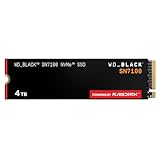
The WD_BLACK SN7100 4TB is a PCIe Gen4 M.2 2280 drive built around power efficiency. The listing quotes up to 7,000 MB/s sequential read and 6,700 MB/s sequential write for the 4TB model, uses TLC 3D NAND, and is aimed at laptops, handheld gaming devices, and consoles as well as desktops. It is DRAM-less, using the system’s host memory buffer for primary caching, with part of the NAND operating as faster single-bit cache.
The SN7100 is rated at 2,400 TBW, which works out to 600 TBW per terabyte, and it has a five-year warranty. Independent reviewers have praised it for chart-topping power efficiency and for being among the fastest DRAM-less Gen4 drives. Coverage of the 4TB size specifically is thinner than for the 1TB and 2TB sizes, since most detailed reviews covered the smaller capacities.
- Interface: PCIe Gen4 x4, M.2 2280
- Rated speed (4TB listing): up to 7,000 MB/s read, 6,700 MB/s write
- Flash: TLC 3D NAND (218-layer in published coverage)
- Cache design: DRAM-less with host memory buffer plus pseudo-SLC cache
- Endurance: 2,400 TBW, five-year warranty
What it does well. Efficiency is its defining trait. Lower power draw means less heat and better battery life in laptops and handhelds, and the drive has been recommended for PlayStation 5 use. Speed is strong for everyday gaming, and the endurance rating matches the SN850X 4TB.
What to watch. Without DRAM, random performance trails DRAM-equipped drives such as the SN850X in demanding mixed workloads, and writes can slow during very long transfers once caches fill. The WD_BLACK Dashboard software is Windows-only.
Pros
- Excellent power efficiency
- 2,400 TBW and five-year warranty
- Strong Gen4 speeds for gaming
- Suits laptops, handhelds, and consoles
Cons
- DRAM-less design with weaker random performance than DRAM drives
- Sustained writes slow after cache exhaustion
- Thin independent coverage of the 4TB size
Where it fits in a build. The SN7100 is a good match when thermals or battery life matter: a thin laptop with a single 2280 slot, a handheld gaming PC that takes a full-size drive, or a console where you want a cool-running upgrade. In a desktop it behaves like any other fast Gen4 drive during installs, and its low power draw gives the motherboard heatsink an easy job. The 4TB size is newer than the 1TB and 2TB versions, so check the exact listing for form factor, capacity, and heatsink status before ordering, and look at the manufacturer’s firmware page after installation.
Compared with the nearest alternative. The Samsung 990 EVO Plus 4TB is its closest rival, also DRAM-less and efficient, with a 2,400 TBW rating. The SN7100 lists faster write speeds, while the Samsung offers flexible PCIe 4.0 x4 or 5.0 x2 operation.
Who should skip it. If you run heavy mixed workloads or want a DRAM cache, the SN850X or 990 PRO are better fits.
2. WD Blue SN5000 4TB – Best for Bulk Game Storage with Moderate Speed

The WD Blue SN5000 4TB is the mainstream member of this lineup. It is a PCIe Gen4 NVMe drive in the M.2 2280 size with rated speeds up to 5,500 MB/s read. At 4TB, published coverage says it uses QLC flash, specifically Kioxia 162-layer BiCS6 NAND, paired with a DRAM-less design and the host memory buffer. It is a single-sided drive that fits laptops and consoles.
Endurance is the trade-off. Reviewers report a 1,200 TBW rating for the 4TB, half of the 2,400 TBW of the TLC drives in this group, with a five-year warranty. Independent reviewers consider it one of the best-performing QLC drives they have seen and among the best 4TB DRAM-less models, but it slows significantly once its fast cache is exhausted and does not match TLC-based drives like the NM790 or the SN7100.
- Interface: PCIe Gen4 x4, M.2 2280, single-sided
- Rated speed: up to 5,500 MB/s read
- Flash: QLC (162-layer BiCS6 in published coverage), DRAM-less with HMB
- Endurance: 1,200 TBW at 4TB, five-year warranty
What it does well. It provides 4TB of fast-enough storage for a game library, runs cool, and draws little power. For a library of installed games, where reads dominate, its speeds are more than adequate.
What to watch. Sustained writes drop sharply after the cache fills, and the endurance rating is lower than TLC rivals. At 100 GB of writes per day, 1,200 TBW lasts 12,000 days, over 32 years, so wear is not a practical worry for gaming, but speed during bulk copies is.
Pros
- 4TB capacity with modest power draw
- Runs cool and fits tight spaces
- Good QLC performance while the cache lasts
Cons
- Lower endurance than TLC drives
- Slow sustained writes after the cache fills
- Lower top speed than the SN7100 or SN850X
Where it fits. A common pattern is to keep the operating system and your most-played games on a faster TLC drive and use the SN5000 as a 4TB bulk library for everything else. In that role the QLC trade-offs matter little, since you install a game once and read it many times. If it is your only drive, leave 10 to 15 percent free so the pseudo-SLC cache has room to work; on a drive with about 3,725 GiB of usable space, that still leaves roughly 3,200 GiB for games.
Compared with the nearest alternative. The SN7100 4TB uses TLC and rates 2,400 TBW with faster speeds. The SN5000 makes sense when you find it at a lower price point and mostly read from the drive.
Who should skip it. If you copy huge files often, or want the strongest PS5 performance margin, choose a TLC drive.
3. WD_BLACK SN850X 4TB – Best for All-Round Gaming PCs

The WD_BLACK SN850X is a long-running favorite for gaming PCs, and the 4TB version brings its strengths to large libraries. It is an M.2 2280 PCIe Gen4 drive rated up to 7,300 MB/s read and 6,300 MB/s write on the listing, with onboard LPDDR4 DRAM and TLC NAND. Published specs list 112-layer BiCS5 flash and a proprietary eight-channel controller, a 2,400 TBW rating for the 4TB size, and a five-year warranty.
This listing is the bare drive without a heatsink. Many motherboards include M.2 heatsinks, and in a desktop with decent airflow the bare drive is fine. For a PlayStation 5 or a board with an open slot, consider the heatsink version covered in section 10. Note that the 4TB drive carries chips on both sides of the board, which can matter in laptops or tight spaces.
- Interface: PCIe Gen4 x4, M.2 2280
- Rated speed: up to 7,300 MB/s read, 6,300 MB/s write (listing)
- Flash and cache: TLC with LPDDR4 DRAM
- Endurance: 2,400 TBW, five-year warranty
- Build: double-sided at 4TB
What it does well. DRAM caching helps consistent performance under mixed workloads, and the drive’s speeds are well above what any current game requires. Reviewers consistently describe it as a high-value Gen4 drive, and one published review of the 4TB size was very positive.
What to watch. It draws more power and runs hotter than DRAM-less efficiency drives like the SN7100, and the double-sided 4TB form may not fit very thin slots. The drive lacks hardware encryption, according to one reviewer.
Pros
- DRAM cache and strong sustained performance
- 2,400 TBW and five-year warranty
- Widely supported and well documented
Cons
- Higher power draw than the SN7100
- Double-sided at 4TB
- No heatsink in this bare version
Where it fits. This is the default recommendation for a desktop gaming PC with a Gen4 slot because it has few compromises: DRAM, TLC, high endurance, and mature firmware. If your motherboard has a built-in M.2 heatsink, the bare drive is the logical purchase rather than the heatsink version. For a creator who also edits video, the DRAM cache helps with mixed read and write workloads. Because the 4TB version is double-sided, check clearance under thin laptop covers before ordering.
Compared with the nearest alternative. The Samsung 990 PRO 4TB matches it on DRAM and endurance and has a slightly higher read rating, in a single-sided layout. The SN850X is the more broadly recommended option in published coverage, while the Samsung wins on thickness and brand support tools.
Bottom line. If you want a single drive that handles games, project files, and the occasional large transfer without drama, this is the safest high-capacity Gen4 choice in the list.
Who should skip it. If your laptop or handheld needs a single-sided, low-power drive, choose the SN7100 or 990 EVO Plus.
4. Samsung 990 PRO 4TB – Best for Sustained Performance with a DRAM Cache

The Samsung 990 PRO 4TB is a PCIe 4.0 x4 M.2 2280 drive rated up to 7,450 MB/s read, with Samsung’s rated write speed up to 6,900 MB/s. It uses Samsung’s Pascal controller, TLC V-NAND, and the maximum 4GB of LPDDR4 DRAM at this capacity. Endurance is 2,400 TBW with a five-year warranty. The controller is nickel plated to help with heat dissipation, and Samsung’s Dynamic Thermal Guard keeps temperatures in check.
Independent coverage describes the 4TB model as a powerful single-sided TLC SSD with top-tier performance across many measurements, and notes that it has the same large TurboWrite cache, about 442GB, as other 4TB Samsung drives in published coverage. That cache means a 150 GB game install fits entirely inside the fast region.
- Interface: PCIe 4.0 x4, M.2 2280, single-sided
- Rated speed: up to 7,450 MB/s read, 6,900 MB/s write
- Cache: 4GB LPDDR4 DRAM and a large SLC cache
- Endurance: 2,400 TBW, five-year warranty
What it does well. It has the highest read rating among the Gen4 drives here and a DRAM cache that supports consistent behavior. The single-sided layout fits a wider range of slots than the double-sided SN850X, and Samsung provides its own management software.
What to watch. One reviewer found its endurance rating average for a flagship Gen4 SSD, and this bare version needs a heatsink in a console or an open slot; Samsung also sells a separate heatsink model designed to fit the PS5. Check that you are ordering the version you want.
Pros
- Top-tier Gen4 performance with 4GB DRAM
- Single-sided design
- 2,400 TBW and Samsung management software
Cons
- Bare drive has no heatsink
- Endurance only average per one reviewer
- Higher positioning in the lineup
Where it fits. Samsung’s drive suits buyers who want first-party management software, a single-sided layout, and a DRAM cache. The large SLC cache, about 442GB in published coverage, means two 100 GB game installs back to back both land inside the fast region before speeds could fall. Samsung Magician handles firmware updates and health monitoring, and the heatsink edition, sold separately, is the one to pick if you are buying for a PlayStation 5.
Compared with the nearest alternative. The SN850X 4TB matches the endurance and DRAM, with a slightly lower read rating. Both are excellent; pick on slot fit, software preference, and availability.
Bottom line. The 990 PRO 4TB is the choice for buyers who prefer Samsung’s tooling and a single-sided drive, and who want to be confident about sustained performance thanks to its generous DRAM and cache.
Who should skip it. If you want the heatsink included, consider the Lexar NM790 with Heatsink or the heatsink version of the SN850X.
5. Lexar NM790 4TB with Heatsink – Best for High Capacity at a Value Position

The Lexar NM790 4TB with Heatsink is the value-minded high-capacity drive in this group. It is a PCIe Gen4 x4 M.2 2280 SSD rated at 7,400 MB/s read and 6,500 MB/s write, and this listing includes a heatsink. Published coverage identifies a Maxio MAP1602 controller with YMTC 232-layer TLC flash, no DRAM, and host memory buffer 3.0 backed by dynamic SLC caching.
Endurance is the standout: Lexar rates the 4TB at 3,000 TBW, higher than the 2,400 TBW of the other 4TB drives here, with a five-year limited warranty. Independent coverage describes the NM790 as good value and a pleasant surprise in performance, noting that the controller still gets warm under load, so the included heatsink and some case airflow are worthwhile.
- Interface: PCIe Gen4 x4, M.2 2280
- Rated speed: 7,400 MB/s read, 6,500 MB/s write
- Flash and controller: YMTC TLC, Maxio MAP1602, DRAM-less with HMB
- Endurance: 3,000 TBW, five-year warranty
- Extras: heatsink included
What it does well. It matches the headline speeds of premium Gen4 drives and offers the highest endurance rating among the 4TB drives in this list. The included heatsink removes one extra purchase for a desktop build.
What to watch. The DRAM-less design means writes can slow during intense workloads. A published caution on console use says the PlayStation 5 does not support host memory buffer, and Sony indicates that such drives may run slower than expected, with the reviewer noting stutter in the most demanding games. Heatsink height also needs checking for your slot, particularly in a console or a laptop.
Pros
- 3,000 TBW endurance rating
- Included heatsink
- Strong rated speeds at a value position
Cons
- DRAM-less with the usual limits under heavy writes
- PS5 use comes with a caution because of HMB
- Heatsink adds thickness
Where it fits. The NM790 with Heatsink is a good choice for a build that has a spare M.2 slot without a cooler. At 3,000 TBW, the rating works out to about 1.6 TB of writes per day across a five-year warranty, which is far above what any gamer produces. Before installing, check that the heatsink’s height does not clash with a graphics card backplate or an M.2 cover on your board. If your motherboard already has its own heatsink, the bare NM790, sold separately, may be the better fit.
Compared with the nearest alternative. The WD_BLACK SN850X 4TB has DRAM and better-documented console support, while the NM790 offers higher endurance and an included heatsink. For a PC build, the Lexar is attractive; for a console, the WD or Samsung is safer.
Who should skip it. Console owners and anyone who needs the most consistent sustained writes should choose a DRAM drive.
6. Samsung 990 PRO 2TB – Best for Gamers Who Do Not Need 4TB

The Samsung 990 PRO 2TB is the half-capacity sibling of the 4TB drive and is included here because many shoppers searching for a 4TB drive discover that 2TB covers their library. It is the same PCIe 4.0 x4 M.2 2280 design with the Samsung Pascal controller, TLC V-NAND, and a DRAM cache, rated at up to 7,450 MB/s read. Endurance scales with capacity: the 2TB model is rated at 1,200 TBW, half of the 4TB, with the same five-year warranty.
The performance experience is essentially the same as the 4TB drive, since both use the same controller and rated read speed, though larger capacities have more NAND chips working in parallel and larger caches.
- Interface: PCIe 4.0 x4, M.2 2280
- Rated speed: up to 7,450 MB/s read
- Flash and cache: Samsung TLC V-NAND with DRAM
- Endurance: 1,200 TBW, five-year warranty
- Capacity: 2TB
What it does well. It gives you flagship Gen4 behavior and DRAM caching at a lower capacity, which suits a gamer with a library of 15 to 20 big titles. At 1,200 TBW and 50 GB of writes per day it would take 24,000 days to reach the rating.
What to watch. The title of this guide is 4TB, so if you know you will outgrow 2TB within two years, buy the larger drive now rather than paying for two. Bare-drive heatsink considerations are the same as for the 4TB.
Pros
- Flagship Gen4 speeds and DRAM
- 1,200 TBW and five-year warranty
- Suits many libraries at a lower capacity
Cons
- Half the capacity of a 4TB drive
- Bare drive without heatsink
- Endurance rating is half the 4TB’s
Where it fits. The 990 PRO 2TB offers about 1,860 GiB of usable space. At an average install of 60 GB, that is roughly 31 games, or about 28 once you leave 10 percent free for the cache. It is a good primary drive for most players and works well in a laptop with a single slot. If you expect to outgrow 2TB within two years, buy 4TB now, because migrating data later costs time and a second purchase.
Compared with the nearest alternative. Next to the 990 PRO 4TB, it is identical in speed rating but half the size and endurance. Against the 9100 PRO 2TB, it offers lower speed but runs cooler and works in any Gen4 slot.
Bottom line. It is the sensible pick when 2TB covers your library, delivering flagship Gen4 behavior without the extra capacity you may never fill.
Who should skip it. If your library already exceeds 1.5TB, go straight to 4TB, because filling a 2TB drive to the brim also slows it down and leaves no room for the cache.
7. Samsung 9100 PRO 4TB – Best for PCIe 5.0 Platforms and Content Creation

The Samsung 9100 PRO 4TB is a PCIe 5.0 x4 M.2 2280 drive rated at up to 14,800 MB/s read and 13,400 MB/s write. It uses Samsung’s Presto controller built on a 5nm process, 236-layer TLC V-NAND, and 4GB of LPDDR4 DRAM, in a single-sided layout. Endurance is 2,400 TBW with a five-year warranty, and the TurboWrite cache is about 442GB at this capacity in published coverage.
Independent reviewers rank it among the fastest consumer SSDs ever made. They also warn that it runs hot: one source reports temperatures near 81 degrees Celsius under sustained workloads, which calls for active cooling or a heatsink. Samsung sells a heatsink version separately, so confirm that your slot has proper cooling if this listing is the bare drive.
- Interface: PCIe 5.0 x4, M.2 2280, single-sided
- Rated speed: up to 14,800 MB/s read, 13,400 MB/s write
- Flash and cache: TLC, 4GB DRAM
- Endurance: 2,400 TBW, five-year warranty
What it does well. For file-heavy work such as video editing, large dataset handling, or moving huge game libraries, its transfer speeds are in a class of their own. On a PCIe 5.0 motherboard it future-proofs the system.
What to watch. Games rarely benefit from more than Gen4 speed, since loading is limited by the processor and decompression. Heat is the main drawback, and you need a Gen5 slot to reach the rated speeds. In a Gen4 slot it works at Gen4 speeds, about half of its rating. Many consider the price premium hard to justify for gaming alone.
Pros
- Fastest drive in this roundup
- 4GB DRAM and 2,400 TBW
- Single-sided design
Cons
- Runs hot and needs strong cooling
- Gaming gains over Gen4 are small
- Requires a PCIe 5.0 slot for full speed
Where it fits. The 9100 PRO needs a motherboard slot wired for PCIe 5.0, which is often a specific slot marked in the manual. Check whether populating that slot changes the lane assignments of other slots on your board, and plan for a heatsink, because published figures put active power near 9 watts and sustained temperatures can climb toward 80 degrees Celsius. A heatsink edition is sold separately by Samsung, and some motherboards ship with suitable Gen5 coolers.
Compared with the nearest alternative. The Samsung 990 PRO 4TB runs cooler and delivers nearly the same gaming experience on a Gen4 board. The 9100 PRO is for creators and for builders who want a Gen5-ready platform.
Bottom line. Buy this drive for a PCIe 5.0 platform, heavy file work, or the satisfaction of having the fastest storage available, and budget for cooling. For gaming alone, a Gen4 drive is the more balanced choice.
Who should skip it. Gamers on Gen4 boards, laptops, or consoles should save the premium and buy a Gen4 drive.
8. Samsung 9100 PRO 2TB – Best for PCIe 5.0 at a Smaller Capacity
The Samsung 9100 PRO 2TB offers the same PCIe 5.0 platform at half the capacity, with a rated read speed of up to 14,700 MB/s. It shares the Presto controller, TLC V-NAND, and DRAM cache of the 4TB, and its endurance rating is 1,200 TBW with a five-year warranty. As with the 4TB drive, it is aimed at users with PCIe 5.0 motherboards who want the highest transfer rates.
For gamers, 2TB is often the more sensible size, as it leaves room for 20 or more modern titles while limiting cost. Heat remains a concern at any capacity, so plan for a heatsink and airflow.
- Interface: PCIe 5.0 x4, M.2 2280
- Rated speed: up to 14,700 MB/s read
- Flash and cache: TLC with DRAM
- Endurance: 1,200 TBW, five-year warranty
What it does well. It delivers the fastest consumer-grade speeds at a more manageable capacity, which suits workstation drives, scratch disks, and enthusiasts building a Gen5 machine.
What to watch. Same heat story as the 4TB, and the performance gains over Gen4 do not show up in game load times. Capacity of 2TB can fill quickly if you also use the system for creative work.
Pros
- Gen5 speeds in a 2TB drive
- DRAM cache and five-year warranty
- Single-sided design
Cons
- Runs hot; needs cooling
- Little advantage for gaming over Gen4
- 1,200 TBW rating
Where it fits. The difference between 14,000 MB/s and 7,000 MB/s sounds dramatic, but the practical saving is small. A 100 GB transfer takes about 7 seconds at 14,000 MB/s and about 14 seconds at 7,000 MB/s, so moving 500 GB every week would save only about 35 seconds. Where the 9100 PRO earns its place is in workloads that stream huge files all day, such as video editing, large dataset handling, and scratch disks. As a gaming-only drive, a Gen4 model gives nearly the same experience with less heat. If you do build a Gen5 system, 2TB is a sensible size because it keeps the lineup cooler and the cost lower than 4TB, and you can add a second drive later. Make sure your case has airflow across the M.2 area, because a Gen5 drive that throttles gives up the speed you bought it for.
Compared with the nearest alternative. The Samsung 990 PRO 2TB is cooler and more broadly compatible. The 9100 PRO 2TB is for a Gen5 build where you want the fastest drive available.
Bottom line. Choose it only if you are building around PCIe 5.0 and want the platform’s headroom at a more practical capacity.
Who should skip it. Anyone without a PCIe 5.0 slot or with a thermally limited chassis.
9. Samsung 990 EVO Plus 4TB – Best for a Cool-Running, Efficient 4TB

The Samsung 990 EVO Plus 4TB is the efficiency-focused Samsung drive. It is an M.2 2280 SSD that can run as PCIe 4.0 x4 or PCIe 5.0 x2 with NVMe 2.0, rated at up to 7,250 MB/s read and 6,300 MB/s write. It uses Samsung’s Piccolo controller and 236-layer V8 TLC NAND, with no DRAM and a host memory buffer instead. The 4TB model carries a 2,400 TBW rating with a five-year warranty, and published coverage notes a large write cache of about 442GB at this capacity, matching the 990 PRO.
Because it uses PCIe 5.0 x2, it can be interesting for future laptop slots that provide two Gen5 lanes. In a Gen5 x2 link the bandwidth equals Gen4 x4, so there is no speed gain, but it opens compatibility. Reviewers describe it as a cool-running, power-efficient, single-sided drive suited to laptops, handhelds, and consoles, and several note it would make a good PlayStation 5 upgrade.
- Interface: PCIe 4.0 x4 or PCIe 5.0 x2, M.2 2280, NVMe 2.0
- Rated speed: up to 7,250 MB/s read, 6,300 MB/s write
- Flash and controller: 236-layer TLC, Samsung Piccolo, DRAM-less with HMB
- Endurance: 2,400 TBW, five-year warranty
What it does well. It combines 4TB capacity, TLC flash, and a 2,400 TBW rating in a drive that stays cool. It is the best choice when thermal headroom is limited, and it matches the fastest Gen4 drives in everyday gaming.
What to watch. Once the write cache fills, a DRAM-less drive can see write speeds fall sharply, and independent coverage suggests it sometimes lands under Samsung’s claimed figures. Reviewers have also described it as pricey for a DRAM-less model compared with rivals.
Pros
- Cool, efficient, and single-sided
- 2,400 TBW and TLC flash
- Works in PCIe 4.0 x4 and 5.0 x2 slots
Cons
- DRAM-less, with slower sustained writes
- May fall short of rated write speeds
- Positioned higher than some DRAM-less rivals
Where it fits. Its single-sided layout and efficiency also suit small-form-factor PCs with limited airflow. The read rating of 7,250 MB/s sits only a few percent below the 990 PRO’s 7,450 MB/s, a difference you will not feel in games. Pair it with a motherboard heatsink for sustained installs and it will stay comfortably cool.
Compared with the nearest alternative. The WD_BLACK SN7100 4TB is its closest competitor, with similar efficiency and endurance. Pick between them on availability and brand preference, or choose the Samsung when you want its x2 Gen5 flexibility.
Bottom line. The 990 EVO Plus 4TB is a quiet, cool, efficient way to get 4TB of TLC storage into a laptop, a small PC, or a console.
Who should skip it. Those who need the strongest sustained write performance should choose a DRAM drive such as the 990 PRO.
10. WD_BLACK SN850X 4TB with Heatsink – Best for PS5 and Open-Slot Builds

This is the SN850X 4TB with a heatsink attached. It shares the core specifications of the bare drive: PCIe Gen4 x4, M.2 2280, up to 7,300 MB/s read and 6,300 MB/s write on the listing, TLC flash, DRAM cache, and 2,400 TBW with a five-year warranty. The difference is the metal heatsink, which helps the drive keep its speed during long transfers and makes it suitable for slots that lack cooling, including the PlayStation 5’s expansion bay.
Older coverage said there was no heatsink option at 4TB because of the double-sided layout, and newer retail listings show a 4TB heatsink version marketed for PS5 use, so the product has evidently been updated since those reviews. Because sources conflict on exact dimensions, confirm the height of the heatsink version against Sony’s published size limits before installing it in a console.
- Interface: PCIe Gen4 x4, M.2 2280
- Rated speed: up to 7,300 MB/s read, 6,300 MB/s write
- Cache: DRAM; flash: TLC
- Endurance: 2,400 TBW, five-year warranty
- Extra: heatsink included
What it does well. It gives you the best-supported high-capacity Gen4 drive in a ready-to-install package for consoles and builds without motherboard heatsinks. Sony recommends a drive with at least 5,500 MB/s read speed, and this drive exceeds that comfortably.
What to watch. A heatsink adds thickness and may conflict with a motherboard’s own M.2 cover or with a laptop chassis. If your motherboard has its own heatsink, use the bare drive instead and avoid stacking two coolers.
Pros
- DRAM cache and 2,400 TBW
- Heatsink included for open slots and consoles
- Well-supported platform and software
Cons
- Added height; verify console and slot clearance
- Double-sided 4TB layout
- Duplicates a motherboard heatsink if you have one
Installation notes. For a PlayStation 5, remove the expansion bay cover, move the standoff screw to the 2280 position, seat the drive, secure it, refit the cover, and format the drive from the console menu. Check the heatsink dimensions against Sony’s published limits first. In a desktop, make sure there is clearance for the heatsink beneath a graphics card or a motherboard cover, and remember that a motherboard with its own heatsink does not need this version.
Compared with the nearest alternative. Against the Lexar NM790 with Heatsink, it adds a DRAM cache and stronger console support, while the Lexar offers a higher endurance rating. For a PS5, the WD is the safer choice.
Bottom line. For a PlayStation 5 or any slot that has no cooling, this is the ready-to-install version of the best-supported 4TB Gen4 drive in the list; just verify the fit before you order.
Who should skip it. Desktop builders with motherboard heatsinks should buy the bare SN850X.
DRAM Versus Host Memory Buffer: Does It Matter for Gaming?
Four of the ten listings in this roundup (the SN7100, SN5000, NM790, and 990 EVO Plus) skip the dedicated DRAM chip that the SN850X, 990 PRO, and 9100 PRO carry. DRAM on an SSD stores the map between logical addresses and physical flash locations, which the controller consults on nearly every read and write. A DRAM-less drive keeps a small piece of that map in the host’s memory through a feature called the host memory buffer, or HMB, and the rest in the flash itself.
For gaming the impact is small. Games issue mostly reads, and modern DRAM-less controllers handle those well with a modest HMB allocation, often 64 MB in published specifications. The differences show up in heavy mixed workloads, sustained random writes, and long transfers when the SLC cache is full. If you only install and play games, you are unlikely to notice. If you also edit video, run virtual machines, or copy hundreds of gigabytes regularly, a DRAM drive keeps performance steadier.
One platform caveat: a PlayStation 5 does not use HMB, as noted in published coverage of the NM790, which means a DRAM-less drive there relies entirely on its own internal handling and may run slower than its rating suggests. For consoles, a DRAM drive such as the SN850X or 990 PRO is the lower-risk choice, though several DRAM-less drives have been recommended for PS5 use by independent reviewers as well.
Heatsinks, Thermals, and Console Notes
Heat is the main thing that separates a drive that holds its rated speed from one that throttles. Most Gen4 drives run fine with the heatsink that ships with a modern motherboard. Gen5 drives like the 9100 PRO produce much more heat and need a dedicated heatsink and airflow. Laptops and handhelds have little thermal room, which is why efficient drives such as the SN7100 and 990 EVO Plus are recommended there.
- Desktop with motherboard heatsink: use a bare drive. The SN850X, 990 PRO, SN7100, and 990 EVO Plus all fit.
- Desktop without a cooler: choose a drive with a heatsink, such as the NM790 with Heatsink or the SN850X with Heatsink, or add a separate one.
- PlayStation 5: Sony requires a PCIe Gen4 drive with a recommended read speed of at least 5,500 MB/s and a heatsink within published size limits. The SN5000 only just meets the recommendation, so a faster drive leaves more margin.
- Laptop: favor single-sided drives such as the 990 PRO, 990 EVO Plus, and SN5000, and check the layout of any other model before ordering. The 4TB SN850X is double-sided.
- PCIe 5.0 board: plan on a substantial heatsink for the 9100 PRO and good case airflow.
Whatever you choose, keep an eye on the drive temperature during the first few large installs. Temperatures in the 60s Celsius are typical under load; sustained readings near 80 degrees suggest you need better cooling.
How to Choose a 4TB NVMe SSD for Gaming
1. Decide whether you need 4TB or 2TB
Work out your library. Say you have 12 large games at 110 GB each, 15 medium games at 45 GB, and 20 small games at 10 GB. That is 1,320 GB, plus 675 GB, plus 200 GB, for 2,195 GB in total. A 2TB drive formats to roughly 1,860 GiB of usable space, so it cannot hold that, while a 4TB drive offers about 3,725 GiB and holds it comfortably with a free margin of well over 1,000 GB. If your total is under 1,500 GB, the 2TB drives in this list are enough, and you could use the savings elsewhere.
2. Match the interface to your board
Check whether your motherboard or laptop has a PCIe 4.0 or 5.0 M.2 slot. A Gen4 drive in a Gen3 slot will work at roughly half speed. A Gen5 drive like the 9100 PRO in a Gen4 slot also runs at Gen4 speed, so there is no point buying Gen5 for a Gen4 board unless you plan to upgrade soon.
3. Decision matrix
| Your situation | Best match | Why |
|---|---|---|
| Gaming desktop on a Gen4 board | WD_BLACK SN850X 4TB or Samsung 990 PRO 4TB | DRAM cache, 2,400 TBW, and strong sustained speed |
| Desktop build with no M.2 heatsink | Lexar NM790 4TB with Heatsink or SN850X with Heatsink | Heatsink included |
| PlayStation 5 upgrade | WD_BLACK SN850X 4TB with Heatsink | DRAM cache and PS5 positioning; verify clearance |
| Laptop or handheld | WD_BLACK SN7100 4TB or Samsung 990 EVO Plus 4TB | Low power, single-sided, cool |
| Mostly reading, large library, want bulk space | WD Blue SN5000 4TB | QLC capacity at moderate speed |
| Library under 1.5TB | Samsung 990 PRO 2TB | Same speed class at half the capacity |
| PCIe 5.0 workstation and gaming | Samsung 9100 PRO 4TB or 2TB | Fastest transfers; needs heatsink |
4. Flash type and endurance
TLC drives store three bits per cell and handle writing better than QLC, which stores four. Convert TBW to years: a 2,400 TBW drive could absorb 1.3 TB of writes per day for five years (2,400 divided by 1,826 days). A 1,200 TBW QLC drive such as the SN5000 4TB could take about 0.66 TB per day. A typical gamer writes less than 0.1 TB a day, so endurance is rarely the limit, but creators who record and edit video should weigh it. The Lexar NM790 stands out at 3,000 TBW.
5. DRAM and sustained writes
Games install quickly onto any of these drives. Drives with a large SLC cache, like the 4TB Samsung models at around 442GB, can absorb a 150 GB install entirely at full speed. DRAM-less QLC drives like the SN5000 slow down sooner. If you routinely move several hundred gigabytes at a time, prefer a DRAM drive.
6. Thermals and fit
Check slot clearance, heatsink height, and single- versus double-sided layout. The 4TB SN850X chips sit on both sides, which matters in laptops. Samsung’s 990 PRO, 990 EVO Plus, and 9100 PRO are described as single-sided.
7. Warranty and software
All of these drives carry five-year warranties. Samsung and WD both provide management software for firmware updates and health monitoring. Lexar offers a tool as well, though the experience varies by platform.
8. Speed expectations in real games
A 100 GB game copies in about 14 seconds at 7,000 MB/s and about 7 seconds at 14,000 MB/s, but loading a level depends far more on the CPU, memory, and how the game decompresses assets. Do not expect a Gen5 drive to cut loading screens in half compared with a good Gen4 drive.
9. Migrating your library without starting over
Moving to a new drive does not mean redownloading everything. On a PC, Steam lets you add a new library folder on the new drive and move installed games to it from each game’s properties, which avoids hundreds of gigabytes of downloads. Disk-cloning tools can copy an entire drive, and the new drive should be at least as large as the data being copied. A 1.5TB library moving over a 3,000 MB/s effective copy takes about 500 seconds in ideal conditions, and longer if the old drive is slower than the new one. Update the new drive’s firmware afterward, check that the operating system recognizes the full 4TB, and leave the old drive untouched for a week before wiping it.
Frequently Asked Questions
Is a 4TB SSD worth it for gaming?
If your library is larger than about 1.5TB, yes. Modern games often take 50 to 150 GB each, so 4TB holds more than two dozen of them at once. If you only keep a handful installed, a 2TB drive is enough.
Do I need a PCIe 5.0 SSD for gaming?
No. Games are limited by the processor, memory, and decompression, not by drive bandwidth above Gen4 speeds. A Gen5 drive helps with very large file transfers and creative workloads, and it runs hotter.
What is the difference between TLC and QLC?
TLC stores three bits per cell and QLC stores four. QLC offers more capacity per chip but writes more slowly once its cache fills and has lower endurance ratings. For a mostly-read game library, both work.
Will a DRAM-less SSD work fine in my PC?
Yes. DRAM-less drives use host memory buffer technology and perform well for gaming. They fall behind DRAM drives mainly in sustained mixed workloads and long transfers.
Which of these drives is best for a PlayStation 5?
The WD_BLACK SN850X 4TB with Heatsink is the most straightforward choice because of its DRAM cache and PS5 positioning, and the Samsung 990 PRO with its heatsink version is also designed for it. Check the heatsink dimensions against Sony’s limits before buying.
Can I use a Gen4 SSD in a Gen3 slot?
Yes, it will work but at Gen3 speed, which is around 3,500 MB/s in practice. Games will still load well, but you will not use the drive’s rated speed.
Do I need a heatsink for an NVMe SSD?
For Gen4 drives in a well-ventilated desktop, the motherboard heatsink is usually enough. Gen5 drives and drives in consoles or open slots need a proper heatsink. Check temperatures during long installs.
How long will a 4TB SSD last?
Under normal gaming, many years. A 2,400 TBW drive can take over a terabyte of writes a day for five years, and typical gamers write a small fraction of that. The warranty period is the practical limit.
Final Recommendation by Situation
For most gaming PCs, buy the WD_BLACK SN850X 4TB or the Samsung 990 PRO 4TB and enjoy fast, consistent performance. For a value build with a heatsink included, take the Lexar NM790 4TB with Heatsink. For laptops and handhelds, pick the WD_BLACK SN7100 4TB or the Samsung 990 EVO Plus 4TB. For a PS5 or an open slot, choose the SN850X with Heatsink and confirm the clearance. For bulk storage that is mostly read, the WD Blue SN5000 4TB works. Choose the 2TB drives if your library is smaller than 1.5TB, and reserve the Samsung 9100 PRO for a PCIe 5.0 platform where its heat is under control. Whichever you pick, confirm the exact capacity and heatsink option on the listing, install the drive in the correct slot, and update its firmware before moving your library.