Our Short List of 3

- Best for: Gamers running iCUE who use a wired 3.5mm headset.
- Model: CA-9011167-NA
- Lighting: Dynamic RGB across 9 zones, controlled in Corsair iCUE
- Audio: 3.5mm analog input with stereo and 7.1 surround sound
- USB ports: 2 x USB 3.1 (Gen 1)

- Best for: Shared desks where the stand also becomes the charging point for phones and controllers.
- Lighting: 9 RGB effects, up to 16.8 million colours, touch switch
- Capacity: Two headsets, headbands up to 2.1 inches wide
- USB charging: 1 x USB-C + 2 x USB-A, up to 2.4A per port, 4A overall
- AC outlets: 2, 1250W total output
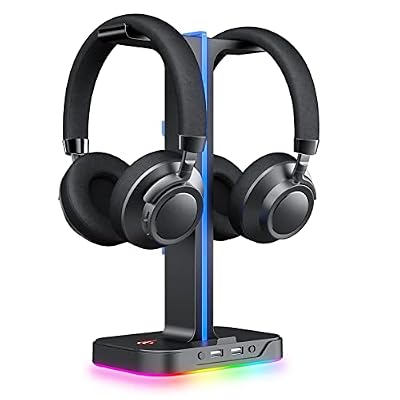
- Best for: Two-headset desks that also want a phone slot and tidy cable routing.
- Model: TH650
- Lighting: 7 RGB lighting modes, one-button control
- Hangers: Dual headset hangers
- USB ports: 2, data transfer and charging
All 4 Picks at a Glance
| Product | Specs | Action |
|---|---|---|
| Corsair ST100 RGB Premium Headset Stand |
| Check price on Amazon |
| KAFRI RGB Dual Headphone Stand |
| Check price on Amazon |
| Havit TH650 RGB Gaming Headset Stand |
| Check price on Amazon |
 Havit TH630 RGB Headphones Stand |
| Check price on Amazon |
🛒 Best Price Today on Amazon
Prime members get fast, free shipping on everything above, plus member-only deals. New members get a 30-day free trial — cancel anytime.
Buying a headset stand with LED lights is really two purchases in one: a place to park your headset, and a powered desk accessory that has to match your ports, your power source, and the rest of your lighting. Pick on looks alone and you can end up with a stand whose lights need a PC USB connection you do not have spare, or whose ports charge when you actually needed data transfer. The real decision is which combination of lighting control, hub features, and hanger shape fits the way your desk already works.
This guide is for PC gamers building a coordinated RGB setup, players who share a desk with a second headset, and wired-headset users who want an audio pass-through at the stand. Every product below was chosen from the names and specifications on its Amazon product page, and each one has built-in LED or RGB lighting rather than a plain post.
Quick Picks
As an Amazon Associate we earn from qualifying purchases.
| Product | Best for | Key spec from title |
|---|---|---|
| Corsair ST100 RGB Premium Headset Stand | iCUE setups with a wired headset | 9-zone RGB lighting, 7.1 surround via 3.5mm |
| Redragon Scepter Pro HA300 | Desks short on free USB ports | 4 USB 2.0 ports, 10 RGB modes |
| KAFRI RGB Dual Headphone Stand | Two headsets plus desk charging | Dual hanger, 2 AC outlets |
| Havit TH650 RGB Gaming Headset Stand | Two headsets and a phone on one stand | Dual hangers, phone holder slot |
| Havit TH630 RGB Headphones Stand | A single wired headset on a PC desk | 3.5mm AUX port, 5 RGB modes |
How to Choose
Lighting Modes and How You Control Them
The listings here span two very different control styles. The Corsair ST100 spreads its lighting across nine zones and hands control to Corsair iCUE software, which suits a desk where the keyboard, fans, and headset already sync through the same app. The other four stands use onboard controls: the KAFRI cycles nine effects from a touch switch with a long press to turn the lights off, the Redragon offers ten modes, the Havit TH650 seven, and the Havit TH630 five. Count the off switch as carefully as the mode count, because a stand that cannot go dark will glow through films and late-night work.
USB Ports: Charging-Only vs Data Hub
Port counts in the titles hide the important detail, which is what each port actually does. The Redragon HA300 lists four USB 2.0 ports for charge and sync, fine for dongles, mice, and topping up a wireless headset, but slow for moving files. The Corsair ST100 lists two USB 3.1 ports, the fastest data path here. The KAFRI takes a third route: its three USB ports are a smart charger, up to 2.4 amps per port, and its base adds two AC outlets rated at 1250 watts total. Decide whether you need data, charging, or mains power before comparing headline numbers.
Base Stability and Headband Support Shape
A lit stand still has to do the plain job well. Check the hanger height against your headset first: the stands below run from 9.45 inches for the Redragon bar to 10.6 inches for the Havit TH650, and a tall headset on a short post leaves the ear cups resting on the base. Look at the cradle shape too. The KAFRI dual hanger accepts headbands up to 2.1 inches wide, while narrow hooks can crease a padded band at one point. Weighted or rubberized non-slip bases matter most on dual stands, where two headsets double the leverage when you grab one quickly.
Power Source and Cable Reach
Every light and hub feature in this guide runs on power, and the source is not interchangeable. The Havit TH630 listing states plainly that the stand must be powered from a computer USB port and will not work from a wall charger or power strip, because the connection carries audio and data as well as power. The Havit TH650 listing carries a similar note that its RGB light does not switch on from a wall socket. The Corsair includes a 1.8-metre USB cable, the longest stated reach here. Measure the run from your PC to the stand’s spot before ordering.
The 5 Best Options
Corsair ST100 RGB Premium Headset Stand
- Best for: Gamers running iCUE who use a wired 3.5mm headset.
- Model: CA-9011167-NA
- Lighting: Dynamic RGB across 9 zones, controlled in Corsair iCUE
- Audio: 3.5mm analog input with stereo and 7.1 surround sound
- USB ports: 2 x USB 3.1 (Gen 1)
Gamers running iCUE who use a wired 3.5mm headset.
The DAC and surround features only serve wired headsets; a wireless headset uses none of the audio hardware you are paying for.
The ST100 is the pick for a desk already invested in Corsair gear. Its aluminum body carries dynamic RGB lighting across nine zones, set in iCUE alongside compatible keyboards, mice, and fans, so one app runs the whole desk’s colour scheme. It is also the only stand here with real audio hardware: a 3.5mm analog input feeds stereo or 7.1 surround sound to a wired headset, turning the stand into the sound device instead of a passive post. Two USB 3.1 ports handle fast data and charging for the gear parked next to it, and the rubberized base keeps the tall frame planted.
Redragon Scepter Pro HA300
The HA300 answers a specific desk problem: no free ports. Its base packs four USB 2.0 ports with charge and sync, the highest count in this guide, so a wireless dongle, mouse receiver, and charging cable can all live at the stand instead of competing for the PC’s front panel. The aluminum supporting bar stands 9.45 inches tall, and the lighting strip offers ten RGB effect modes, more than any other model here, switched from the stand itself with no software to install. A non-slip rubberized base keeps the narrow footprint steady, and the stand connects to the PC over a Type-C USB connector.
Specs
- Model: HA300
- Lighting: 10 RGB light effect modes
- USB ports: 4 x USB 2.0, charge and sync
- Connector: Type-C USB
- Construction: Aluminum supporting bar
- Height: 9.45 inches
- Base: Non-slip rubberized base
Best for: Players whose PC front panel is already full of dongles and receivers.
Watch out for: All four ports are USB 2.0, so file transfers to a drive will be slow; treat them as peripheral and charging ports.
ASIN: B07W5T9ZCV
KAFRI RGB Dual Headphone Stand
- Best for: Shared desks where the stand also becomes the charging point for phones and controllers.
- Lighting: 9 RGB effects, up to 16.8 million colours, touch switch
- Capacity: Two headsets, headbands up to 2.1 inches wide
- USB charging: 1 x USB-C + 2 x USB-A, up to 2.4A per port, 4A overall
- AC outlets: 2, 1250W total output
Shared desks where the stand also becomes the charging point for phones and controllers.
The AC outlets share a 1250W ceiling, so they suit laptop chargers and speakers, not high-draw appliances.
The KAFRI is part hanger, part power strip. The dual bar holds two headsets at once, with headbands up to 2.1 inches wide, and the base works as a small charging station: one USB-C and two USB-A smart charging ports, delivering up to 2.4 amps per port and 4 amps overall, plus two AC outlets with a combined 1250-watt rating for a laptop brick or desktop speakers. Lighting runs to nine RGB effects with up to 16.8 million colours, selected by a touch switch, and a three-second long press turns the LEDs fully off. The shell is fire-resistant hardened plastic with built-in multi-protection circuitry.
Havit TH650 RGB Gaming Headset Stand
- Best for: Two-headset desks that also want a phone slot and tidy cable routing.
- Model: TH650
- Lighting: 7 RGB lighting modes, one-button control
- Hangers: Dual headset hangers
- USB ports: 2, data transfer and charging
Two-headset desks that also want a phone slot and tidy cable routing.
The listing notes the RGB light does not switch on when the stand is plugged into a wall socket, so power it from a PC USB port.
The TH650 takes the dual-hanger idea in a lighter, simpler direction. Two headsets hang from the double-ended bar while the wide base adds a phone holder slot and side hooks for cable organising, which makes it the natural pick for a desk that also serves as a phone-charging spot during matches. The RGB base offers seven lighting modes, including multi-colour flowing and single-colour breathing effects, changed with a single button that also turns the light off. Two USB ports transfer data and charge plug-and-play devices such as a keyboard or mouse. At 10.6 inches tall, it clears most full-size gaming headsets.
Havit TH630 RGB Headphones Stand
- Best for: PC players with a wired headset who want the cable managed at the stand.
- Model: TH630-B
- Lighting: 5 RGB lighting modes
- Audio: Built-in 3.5mm AUX port
- USB ports: 2 x USB 2.0, data and power
PC players with a wired headset who want the cable managed at the stand.
The listing states it will not work from a USB wall charger, power strip, or adapter; it needs a computer USB port.
The TH630 is the wired player’s single stand. Alongside its two USB 2.0 ports, it builds in a 3.5mm AUX port, so a wired headset plugs into the stand and the cable run to the PC happens once, behind the desk, instead of across it every session. Five RGB lighting modes set the glow from the stand, with no software involved. The design stays compact and single-purpose compared with the dual hangers above: one headset, a small hub, and an audio pass-through. Because the USB connection carries the audio, the listing is explicit that the stand must be powered from a computer.
Which One Fits Your Situation
Your Whole Desk Already Runs on iCUE
Pick the Corsair ST100. Its nine lighting zones join the same iCUE profiles as your Corsair keyboard, fans, and mouse, so the stand stops being a separate lighting island. The built-in 3.5mm DAC with 7.1 surround also earns its place here if your main headset is wired, giving you one purchase that covers lighting sync and audio in a single base.
You Share a Desk or Own Two Headsets
Pick the Havit TH650 if the second headset just needs a home, or the KAFRI dual stand if both headsets are wireless and need charging where they hang. The TH650 adds the phone slot and cable hooks for a tidier shared surface, while the KAFRI adds three USB charging ports and two AC outlets, turning the hanger into the desk’s power point.
Your PC Has No Spare USB Ports
Pick the Redragon HA300. Four USB 2.0 ports on the base absorb the wireless dongles, receivers, and charging leads that usually fight over a front panel, and the stand itself needs only its Type-C connection to the PC. The trade is speed: keep storage drives on the PC’s own USB 3 ports and let the stand handle peripherals.
You Play on PC With a Wired Headset
Pick the Havit TH630. Its 3.5mm AUX port means the headset plugs in at the stand, so the long cable run to the PC is fixed and hidden instead of draped across the desk each night. The two USB 2.0 ports cover a mouse or dongle, and the five lighting modes give the setup its glow without any software.
Common Mistakes
- Comparing port counts without checking what the ports do, then finding the hub charges when you needed data transfer, or the reverse.
- Skipping the hanger height and headband width figures, so a tall headset rests its ear cups on the base or a wide padded band gets creased by a narrow hook.
- Plugging a USB-powered stand into a wall charger when the listing requires a computer USB port, leaving the lights and audio dead.
- Forgetting the cable run: the stand needs to reach the PC, and a short included cable can force a worse desk position.
- Leaving the lighting on overnight because the chosen model has no off switch or long-press power control.
Frequently Asked Questions
Do these stands still hold a headset when the power is off?
Yes. The post and hanger are passive, so every stand here stores a headset with no power connected at all. Power only runs the extras: the LED lighting, the USB ports, the KAFRI’s AC outlets, and the audio hardware in the Corsair ST100 and Havit TH630. Unplugging simply turns a lit hub stand back into a plain stand.
Can a headset stand charge my wireless headset?
Only through its USB ports, with the headset’s own cable. The KAFRI is the strongest charger here, listing up to 2.4 amps per port across its USB-C and USB-A ports. The Redragon, Havit TH650, and Havit TH630 ports charge at standard USB rates while also moving data. None of these stands has a wireless charging pad, so a cable is always involved.
Will my headset fit on these stands?
Check two figures on the listing before ordering: hanger height and supported headband width. The stands here run from 9.45 to 10.6 inches tall, which covers most gaming headsets, and the KAFRI dual hanger lists headbands up to 2.1 inches wide. Very tall headsets or extra-thick padded bands are the ones to measure carefully against those numbers.
Do I need software to control the lighting?
Only on the Corsair ST100, which uses iCUE for its nine-zone effects and syncing with other Corsair gear. The Redragon, KAFRI, and both Havit stands change modes from a button or touch switch on the stand itself, so they work the same with any PC and need nothing installed.