🛒 Best Price Today on Amazon
Prime members get fast, free shipping on everything above, plus member-only deals. New members get a 30-day free trial — cancel anytime.
- Herman Miller Aeron Specifications
- Design and Build Quality
- 8Z Pellicle Seat and Back
- PostureFit SL Back Support
- Harmonic 2 Tilt and Recline
- Armrest Adjustability
- Aeron Size A, B, and C
- Comfort During Long Computer Sessions
- Performance for Office Work
- Performance for Gaming
- Adjustment Learning Curve
- What Makes the Herman Miller Aeron Different?
- Pros and Cons
- Who Should Buy the Herman Miller Aeron?
- FAQ
- Conclusion

Herman Miller Aeron Ergonomic Chair - Size B, Graphite
Included for 'Herman Miller Aeron Ergonomic Office Chair Review' because the listing specifies Size B and Graphite, details this guide uses to compare options.
View on Amazon
Herman Miller Classic Aeron Chair-Aluminum, Size B
Included for 'Herman Miller Aeron Ergonomic Office Chair Review' because the listing specifies Size B, details this guide uses to compare options.
View on Amazon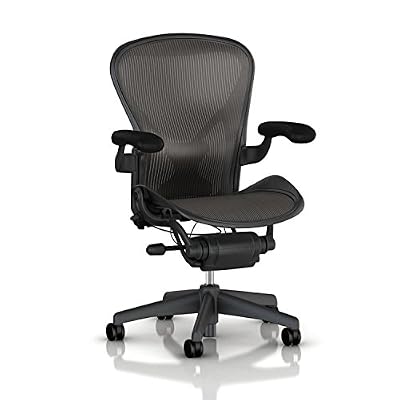
Herman Miller Classic Aeron Chair - Size B, Posture Fit
Included for 'Herman Miller Aeron Ergonomic Office Chair Review' because the listing specifies Size B and Posture Fit, details this guide uses to compare options.
View on AmazonHerman Miller Aeron Executive Office Chair-Stainless Steel, Size B-Fully Adjustable Arms-lumbar Support Open Box
Included for 'Herman Miller Aeron Ergonomic Office Chair Review' because the listing specifies Size B-Fully Adjustable Arms-lumbar Support Open Box, details this guide uses to compare options.
View on AmazonThe Herman Miller Aeron ergonomic office chair is built around breathable suspension, three size options, adjustable back support, and a responsive recline system rather than thick foam padding. It is especially suited to long computer sessions, but choosing the correct size and configuration matters because the seat depth itself is not adjustable.
Herman Miller Aeron Specifications
The current Aeron is available in three sizes: A, B, and C. Herman Miller uses different seat dimensions and overall proportions for each size rather than trying to fit every user with one frame. Depending on configuration, the chair can include PostureFit SL, adjustable arms, a tilt limiter, and forward seat-angle control.
| Specification | Herman Miller Aeron |
|---|---|
| Chair Type | Ergonomic office chair |
| Available Sizes | A, B, C |
| Seat Material | 8Z Pellicle suspension |
| Back Support | PostureFit SL, lumbar, or other configurations |
| Recline | Harmonic 2 Tilt |
| Arm Options | Fixed, height-adjustable, fully adjustable |
| Seat Height | Varies by chair size |
| Seat Depth | Fixed by selected size |
| Tilt Limiter | Available |
| Forward Seat Angle | Available on selected configuration |
| Best Use | Office work, gaming, long computer sessions |
Design and Build Quality
The Aeron looks different from conventional executive chairs because it does not rely on a padded seat or upholstered backrest. Instead, the seat and back use Herman Miller’s 8Z Pellicle suspension material, supported by a rigid frame that gives the chair its distinctive technical appearance.
This design keeps the chair visually light while still creating a clearly defined seating position. The frame feels more structured than a soft cushion chair, so users sit inside a shaped support system rather than sinking into foam. That sensation can feel unfamiliar at first, especially for people moving from heavily padded gaming chairs.
The materials and mechanical construction are designed for long-term workplace use rather than decorative softness. Depending on configuration, the chassis and base use polymer or aluminum components, while the suspension seat eliminates thick foam that can compress over time. The result is a chair that feels engineered rather than luxurious in the traditional sense.
8Z Pellicle Seat and Back
The 8Z Pellicle suspension is one of the Aeron’s defining features. Herman Miller describes it as eight zones with different levels of tension across the seat and back. The intent is to distribute support where it is needed while reducing concentrated pressure and allowing air to move through the material.
For long computer sessions, breathability is a major advantage. Foam seats can retain heat around the back and thighs, particularly in warm rooms. The Aeron’s open suspension allows substantially more airflow, making it attractive for users who work or game for many hours and dislike the warmth of conventional upholstery.
The trade-off is that Pellicle does not feel soft in the same way as thick foam. The seat has a firm, suspended character, and the rigid outer frame is always present around its edges. Users who frequently sit cross-legged or tuck one leg under themselves may find this less forgiving than a broad padded seat.
PostureFit SL Back Support
PostureFit SL uses two adjustable support pads positioned around the sacral and lumbar regions. Herman Miller designed the lower pad to help stabilize the pelvis while the upper section supports the lumbar region, encouraging the spine to maintain a more natural supported shape while seated.
Unlike a large lumbar cushion that pushes strongly into one point of the lower back, PostureFit SL feels more like structured support across two regions. The intensity can be adjusted, allowing users to choose lighter contact or more pronounced support depending on their posture and personal preference.
The system works best when the user actually sits back against the chair. Someone who spends most of the day perched on the front edge will receive much less benefit from the rear support. Proper chair height, desk position, and monitor placement therefore remain important even with an expensive ergonomic chair.
Harmonic 2 Tilt and Recline
The Aeron’s Harmonic 2 Tilt system is designed to let the chair recline smoothly while maintaining support through the movement. Rather than functioning as a simple office chair that suddenly tips backward, the mechanism provides controlled resistance as the user’s weight shifts into a more relaxed position.
This makes the chair particularly effective for people who change posture frequently. You can sit upright while typing, recline slightly while reading, and move farther back during calls or breaks without losing contact with the backrest. The movement feels more natural when the tilt tension is adjusted correctly for body weight.
Configurations with the tilt limiter allow users to restrict how far the chair reclines. An additional seat-angle option can support a slightly more forward working posture. These controls are useful for users who move between focused keyboard work and more relaxed tasks throughout the day.
Armrest Adjustability
Aeron armrests vary depending on the version selected. Fully adjustable arms can move vertically, shift forward or backward, and pivot to alter their angle. Simpler configurations may offer only height adjustment, while some versions use stationary arms or omit them entirely.
The fully adjustable configuration is the most useful for computer work. Proper arm height can reduce the tendency to raise the shoulders while typing, while depth adjustment lets the user move closer to the desk without the arm pads becoming an obstacle.
For gaming, adjustable armrests are also helpful because mouse and keyboard positions differ from ordinary office work. Players who use a large mouse pad may want the armrests lower or farther back, while productivity users may prefer more direct forearm support during typing.
Aeron Size A, B, and C
Unlike many ergonomic chairs with adjustable seat depth, the Aeron solves fit through three physical sizes. Size A is the smallest, Size B is the medium and most broadly suitable option, and Size C provides a wider and deeper seat for larger users. Herman Miller changes dimensions across the chair rather than only widening the seat.
Size A has the shortest and shallowest seat, while Size C provides substantially more depth and width. Size B sits between them and is commonly the logical starting point for average-sized adults. However, the manufacturer’s size guidance should be checked rather than assuming B is automatically correct.
Choosing the correct size is critical because the seat depth cannot be adjusted independently. A seat that is too deep can press behind the knees, while one that is too shallow may provide inadequate thigh support. This makes proper sizing more important on the Aeron than on chairs with sliding seat pans.
Comfort During Long Computer Sessions
The Aeron is especially strong during long sessions when airflow, back support, and movement matter more than plush cushioning. The suspended seat distributes weight across a broad surface, while the recline mechanism encourages the user to change position instead of remaining locked into a single rigid posture.
Its comfort is therefore functional rather than immediately soft. A heavily padded chair may feel more luxurious during the first few minutes, while the Aeron focuses on remaining supportive as the hours pass. Users accustomed to foam seating may need time to adjust to this different type of comfort.
The rigid seat perimeter can still be a limitation. People who enjoy unusual sitting positions may notice the frame against their legs. The Aeron is at its best when used as intended: feet supported, hips positioned toward the rear of the seat, and the back making contact with the backrest.
Performance for Office Work
For productivity, the Aeron offers an excellent combination of ventilation, arm positioning, recline control, and back support. The chair works especially well when paired with a properly adjusted desk and monitor because its controls allow the upper body to stay supported without forcing the user into a completely static position.
The forward seat-angle option can also be useful during concentrated keyboard work because it slightly changes the relationship between the pelvis and work surface. When the task changes, the user can return to a neutral position or recline rather than remaining pitched forward continuously.
The main limitation is that the chair will not automatically correct a poorly arranged workstation. A monitor positioned too low or a desk that forces the shoulders upward can still create discomfort. The Aeron provides a strong ergonomic foundation, but the entire workstation must be adjusted around the user.
Performance for Gaming
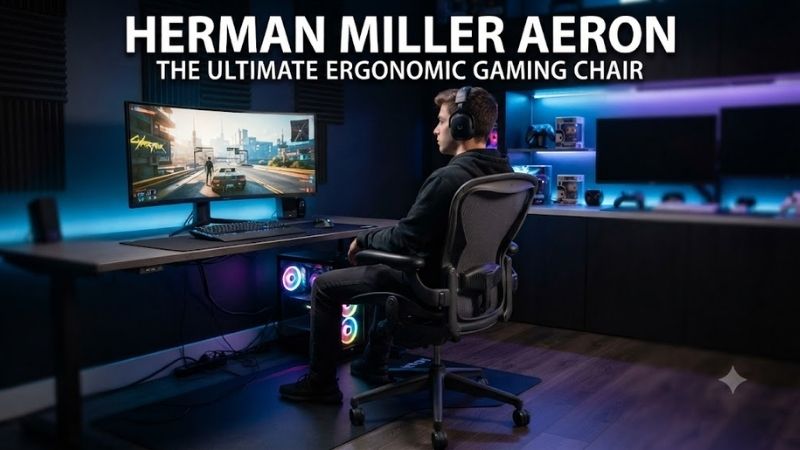
The Aeron can work extremely well as a gaming chair, especially for players who prefer ergonomic office seating over high-back racing-style designs. Breathable suspension is useful during long sessions, while the adjustable arms and recline let the chair adapt between mouse-heavy competitive gaming and more relaxed controller use.
It does not include gaming-specific features such as RGB lighting, oversized side bolsters, head pillows, or a dramatic bucket-seat shape. For many users, that is an advantage. The seat leaves the upper body relatively unrestricted, which can be helpful when making repeated mouse movements across a large desk surface.
However, players who want an integrated headrest should look elsewhere or consider aftermarket solutions carefully. The standard Aeron is designed around upper-back support without a built-in headrest, which feels different from gaming chairs intended for deeply reclined entertainment.
Adjustment Learning Curve
Aeron provides enough adjustments that first-time setup deserves attention. Chair height, tilt tension, recline limit, PostureFit support, and arm positions can all affect comfort. Simply unboxing the chair and leaving every control at its default setting can prevent the user from experiencing the fit the chair is capable of providing.
Start with seat height and foot support, then adjust the arms so the shoulders remain relaxed. Next, set the PostureFit SL pressure and recline tension. Finally, adjust monitor and desk placement around the chair rather than using the chair to compensate for a poorly positioned workstation.
Once configured correctly, day-to-day adjustment becomes much simpler. Most users will only change recline or arm position occasionally rather than constantly modifying every control.
What Makes the Herman Miller Aeron Different?
The Aeron’s biggest distinction is that fit is engineered through suspension, multiple chair sizes, pelvic and lumbar support, and a dynamic tilt system instead of thick cushioning. Herman Miller has effectively designed the seat, back, and recline as one connected ergonomic system rather than treating each feature independently.
This approach creates a chair that rewards users who sit in a conventional working posture and change position naturally throughout the day. It is less accommodating of cross-legged or sideways sitting than broad cushion chairs, but substantially more refined for supported computer work.
Its three-size strategy is also unusual. Instead of making one seat slide forward and backward to fit everyone, Aeron changes physical proportions between A, B, and C. That can produce a better fit when the correct size is chosen, but it also makes buying the wrong size more consequential.
Pros and Cons
Pros
- Breathable 8Z Pellicle suspension
- Three physical sizes
- Excellent recline mechanism
- PostureFit SL support option
- Highly adjustable armrests
- Strong long-session comfort
- Suitable for office work and gaming
- Multiple tilt configurations
- High-quality construction
- Extensive fit options
Cons
- Premium price
- Seat depth is not independently adjustable
- Rigid seat frame may bother cross-legged sitters
- Correct size selection is important
- No integrated headrest
- Configuration options can be confusing
Who Should Buy the Herman Miller Aeron?
The Aeron is best for people who spend many hours at a computer and prioritize ventilation, structured support, adjustability, and smooth recline over soft cushioning. Office professionals, programmers, designers, remote workers, and gamers who sit for extended periods are the strongest candidates.
It is also a good choice for warm environments because the suspended seat and back allow air circulation. Users who dislike foam compression or heat buildup may appreciate this design more than someone primarily looking for a plush executive chair.
It is less suitable for users who regularly sit cross-legged, prefer thick cushioning, want a built-in headrest, or need easily adjustable seat depth. Those buyers may find another ergonomic chair more naturally compatible with their sitting habits.
FAQ
Is the Herman Miller Aeron Good for Long Hours?
Yes. Its breathable suspension, adjustable back support, recline system, and multiple size options are specifically suited to extended seated work. Comfort still depends on correct sizing and workstation adjustment.
Is Aeron Better Than a Gaming Chair?
For users prioritizing ergonomics, airflow, and office-style adjustability, the Aeron can be a better choice than many conventional gaming chairs. Gaming chairs may offer more cushioning, head support, and visual styling.
Does the Aeron Have Adjustable Lumbar Support?
Depending on configuration, the chair can include adjustable PostureFit SL or other lumbar-support options. PostureFit SL uses two support pads around the sacral and lumbar regions.
Does the Aeron Seat Depth Adjust?
No. Seat depth is determined by the selected chair size. This is why choosing between Size A, B, and C correctly is particularly important.
Is the Aeron Good for Large Users?
Size C is designed for larger users and provides increased seat dimensions compared with Sizes A and B. Herman Miller also specifies different capacity and dimensional figures across the sizes.
Conclusion
The Herman Miller Aeron ergonomic office chair remains a compelling choice for long computer sessions because its 8Z Pellicle suspension, PostureFit SL support, responsive recline, and three-size design address comfort through structure rather than padding. Choose the correct size and configuration, and it can serve equally well for demanding office work or gaming.