
🛒 Best Price Today on Amazon
Prime members get fast, free shipping on everything above, plus member-only deals. New members get a 30-day free trial — cancel anytime.
- How We Compared the Best iPhone Controllers
- Best iPhone Game Controllers at a Glance
- Best Game Controllers for iPhone Compared: Full Spec Table
- The Telescoping Clip-On Champions
- Using Your Xbox, PS5, or 8BitDo Controller Over Bluetooth
- USB-C vs Lightning: What iPhone 15+ Owners Need to Know
- Best iPhone Controller Under $50
- Best iPhone Controller From $50 to $100
- Best Premium iPhone Controller (Over $100)
- Buying Guide: Fit, Sticks, Ports and Battery
- Which iPhone Controller Fits Your Situation?
- Verdict: Which iPhone Controller Should You Buy?
- Frequently Asked Questions
- Related Articles
Mobile gaming on the iPhone has grown up. Console-quality ports like Resident Evil 4, Assassin’s Creed Mirage, and Death Stranding now run natively on modern hardware, and cloud services such as Xbox Cloud Gaming, GeForce NOW, and PlayStation Remote Play have turned your phone into a legitimate gaming device. The problem? Touchscreen controls still ruin the experience. Smudged glass, fingers blocking the action, and no tactile feedback make precision gaming frustrating. A dedicated game controller fixes every one of those complaints in a single accessory.
But 2026 is a confusing year to buy an iPhone controller. Apple’s move to USB-C on the iPhone 15, 16, and 17 lines killed the old Lightning standard, which means the controller you bought in 2023 may not physically fit your new phone. Meanwhile, the field has split into two camps: clip-on telescoping controllers that wrap around your phone like a Nintendo Switch, and full-size Bluetooth gamepads (including your existing Xbox and PS5 controllers) that pair wirelessly. Add passthrough charging, latency differences, and cloud-gaming compatibility to the mix, and picking the right one takes real research.

Mocagen MC1 Phone Controller for iPhone & Android – Ergonomic Grip, Low Latency, Case Friendly, Bluetooth Mobile Controller with Hall Effect Joysticks, Turbo, Portable Travel Companion for Car/Leisure
Included for '17 Best Game Controllers for iPhone in 2026' because the listing specifies Ergonomic Grip and Low Latency, details this guide uses to compare options.
View on Amazon
8Bitdo Ultimate Mobile Gaming Controller for iPhone, Apple, Android & Xbox Cloud Gaming, Bluetooth Gamepad with Hall Effect Joysticks, 2 Pro Back Buttons, Officially Licensed (Black)
Included for '17 Best Game Controllers for iPhone in 2026' because the listing specifies Apple and Android & Xbox Cloud Gaming, details this guide uses to compare options.
View on Amazon
Wireless Phone Controller for iPhone/Android with Hall Joystick, Moblie Controller for iPhone Support Xbox Game Pass, Steam Link, Call of Duty, Roblox, Handheld Gaming Gamepad, Nintendo DS Consoles
Included for '17 Best Game Controllers for iPhone in 2026' because the listing specifies Moblie Controller for iPhone Support Xbox Game Pass and Steam Link, details this guide uses to compare options.
View on Amazon
Bluetooth Mobile Game Controller for Nintendo Switch 2 & iOS & Android & Tablets, Wireless Gamepad Grip with Hall Effect Trigger Joystick, Ergonomic Phone Controller for iPhone, iPad Pro, Samsung
Included for '17 Best Game Controllers for iPhone in 2026' because the listing specifies Wireless Gamepad Grip with Hall Effect Trigger Joystick and Ergonomic Phone Controller for iPhone, details this guide uses to compare options.
View on Amazon
Mocagen MC1 Phone Controller for iPhone & Android – Ergonomic Grip, Low Latency, Case Friendly, Bluetooth Mobile Controller with Hall Effect Joysticks, Portable Travel Companion for Car/Leisure(Blue)
Included for '17 Best Game Controllers for iPhone in 2026' because the listing specifies Ergonomic Grip and Low Latency, details this guide uses to compare options.
View on Amazon
abxylute M4 Snap-On Mobile Gaming Controller for Android & iPhone, Switch 1&2, Portable Bluetooth Controller, Pocket-Sized Retro Arcade Phone Gamepad Kickstand, Dual Joystick Turbo Pro Gaming Magnetic (Black)
Included for '17 Best Game Controllers for iPhone in 2026' because the listing specifies Switch 1&2 and Portable Bluetooth Controller, details this guide uses to compare options.
View on Amazon
Mocagen MC1 Phone Controller for iPhone & Android – Ergonomic Grip, Low Latency, Case Friendly, Bluetooth Mobile Controller with Hall Effect Joysticks, Portable Travel Companion for Car/Leisure(Black)
Included for '17 Best Game Controllers for iPhone in 2026' because the listing specifies Ergonomic Grip and Low Latency, details this guide uses to compare options.
View on Amazon
Bcofo Wireless Mobile Game Controller for iOS/iPhone/Android/Cell Phone/Switch/Laptop, Gaming Gamepad with Phone Clip for Gamers, Hall Effect Triggers, Wired PC Control, with RGB LED Lighting/Vibration/6-Axis Gyro/Turbo (White)
Included for '17 Best Game Controllers for iPhone in 2026' because the listing specifies Gaming Gamepad with Phone Clip for Gamers and Hall Effect Triggers, details this guide uses to compare options.
View on AmazonThis guide compares the best iPhone game controllers you can buy in 2026 across both categories, drawing on maker specifications and published reviews. Whether you want the lowest-latency wired connection for competitive shooters or a couch-friendly wireless pad for streaming AAA games, this guide breaks down exactly which controller fits your phone, your games, and your budget.
As an Amazon Associate we earn from qualifying purchases…
How We Compared the Best iPhone Controllers
Not every controller is right for every player. We evaluated each option on five factors that actually matter when you’re gaming on a phone:
- Connection type & fit: USB-C models plug directly into iPhone 15 and newer for zero-latency wired play. Lightning versions still exist for iPhone 14 and older. Bluetooth pads work with recent iPhones regardless of port but add a small amount of wireless latency.
- Latency: Wired clip-on controllers have effectively no input lag, which matters enormously for fighting games, platformers, and shooters. Bluetooth adds some wireless latency, usually fine for cloud gaming but noticeable in twitchy titles.
- Passthrough charging: Streaming games drains your battery fast. Controllers with a passthrough charging port let you power your phone while you play, essential for long sessions.
- Cloud gaming support: The best controllers include companion apps that launch Xbox Cloud Gaming, GeForce NOW, and other services directly, and map buttons correctly out of the box.
- Ergonomics & build: Full-size grips, hall-effect sticks, and quality face buttons separate premium pads from cheap plastic.
Best iPhone Game Controllers at a Glance
| Controller | Connection | Best For | Standout Feature | Price |
|---|---|---|---|---|
| Backbone One (USB-C, 2nd Gen) | Wired USB-C | Overall best / cloud gaming | Polished Backbone app + low-profile design | Check price |
| Razer Kishi V3 Pro | Wired USB-C | Large phones & iPad mini | TMR sticks + console-feel buttons | Check price |
| GameSir G8 Galileo | Wired USB-C | Best value telescoping | Hall-effect sticks + phone case compatible | Check price |
| Xbox Wireless Controller | Bluetooth | Cloud gaming on a stand | Familiar layout + universal support | Check price |
| 8BitDo Ultimate 2 Bluetooth | Bluetooth | Retro & emulation | Hall-effect sticks + huge value | Check price |
Best Game Controllers for iPhone Compared: Full Spec Table
The quick table above covers five favorites. This one compares every main controller in this guide on the specs that decide fit and feel on an iPhone. Picks are research-based, drawn from maker specifications and independent reviews, not from in-person trials.
| Controller | Type | Connection | iPhone fit | Sticks / triggers | Passthrough charging | 3.5mm jack | Price tier |
|---|---|---|---|---|---|---|---|
| Backbone One (2nd Gen, USB-C) | Clip-on | Wired USB-C | iPhone 15 and newer | Standard sticks and triggers | Yes | Yes | Check price |
| Backbone Pro | Clip-on + standalone | USB-C or Bluetooth LE | iPhone 15 and newer | Full-size ALPS sticks, Hall effect triggers | Yes | Yes | Varies |
| Razer Kishi V3 Pro | Clip-on | Wired USB-C | iPhone 15 and newer (iOS 18+), iPad mini | TMR sticks, Hall effect triggers | Yes | Yes | Varies |
| Razer Kishi V3 | Clip-on | Wired USB-C | iPhone 15, 16, 17 | TMR sticks, Hall effect triggers | Yes | Yes | Check price |
| GameSir G8 Galileo | Clip-on | Wired USB-C | USB-C iPhones, 110-185 mm long, case 1 mm or thinner | Hall effect sticks and triggers | Yes | Yes | Check price |
| GameSir X5 Lite | Clip-on | Wired USB-C | USB-C iPhones and iPad mini, 105-213 mm long | Hall effect sticks, membrane triggers | Yes | No | Varies |
| SCUF Nomad | Clip-on | Bluetooth 5.0 | iPhone only, iOS 16 or later | Hall effect sticks, 2 back paddles | No | No | Varies |
| 8BitDo Ultimate Mobile | Clip-on | Bluetooth | Phones 100-170 mm | Hall effect sticks and triggers, 2 back buttons | No | No | Varies |
| Xbox Wireless Controller | Full-size pad | Bluetooth | Any recent iPhone (needs a clip or stand) | Standard sticks, rumble | Phone port stays free | Not supported over Bluetooth | Check price |
| PlayStation DualSense | Full-size pad | Bluetooth | Any recent iPhone (needs a clip or stand) | Standard sticks, adaptive triggers (limited on iOS) | Phone port stays free | Not supported over Bluetooth | Check price |
Two rules fall out of the table. If you want to charge while you play, choose a wired USB-C clip-on; the Bluetooth clip-ons (SCUF Nomad, 8BitDo Ultimate Mobile) leave the phone’s port free but have no passthrough of their own. And if stick drift worries you, look for Hall effect or TMR sticks: the GameSir G8 Galileo, GameSir X5 Lite, SCUF Nomad, 8BitDo Ultimate Mobile and both Kishi V3 models have them, while the Backbone One and Backbone Pro use conventional sticks.
The Telescoping Clip-On Champions
Clip-on controllers are the purest form of mobile gaming. They wrap around your iPhone, plug into the USB-C port, and turn the whole thing into a handheld console. Because they’re wired, latency is essentially zero, which makes them the top choice for anything requiring precision.
The Backbone One (2nd Gen, USB-C) remains our overall favorite for most iPhone owners. The app aggregates your games across App Store, Xbox Cloud, GeForce NOW, and more into one launcher, and a single press jumps you into a streaming session. It has a 3.5mm headphone jack and a passthrough USB-C port for charging while you play. The USB-C model fits every iPhone 15, 16, and 17.
If you own a larger iPhone Pro Max and want something that feels closer to a real console pad, the Razer Kishi V3 Pro is the premium pick. It’s overkill for casual players, but for someone who games for hours it’s the most comfortable option.
For value hunters, the GameSir G8 Galileo uses Hall effect thumbsticks that resist stick drift and includes a passthrough charging port. GameSir recommends no case or one 1 mm or thinner, so plan to remove a thick case. It’s the smart-money choice.
Using Your Xbox, PS5, or 8BitDo Controller Over Bluetooth
Here’s the part many iPhone owners don’t realize: you may not need to buy a new controller at all. Apple has supported Xbox Wireless Controllers and PlayStation DualSense (PS5) controllers natively for several years, along with many other Bluetooth gamepads. Pairing takes seconds in Settings, and the buttons map correctly across the App Store, Apple Arcade, and cloud services.
The Xbox Wireless Controller is arguably the best value in the entire guide if you already own one. Paired with a simple phone clip or stand, it’s the ideal setup for cloud gaming from your couch, since you’re not physically tethering a heavy phone to your hands. The familiar layout and rock-solid Bluetooth make it a no-brainer for Xbox Cloud Gaming subscribers. The DualSense works just as well and adds superior triggers, though its adaptive-trigger and haptic features don’t carry over to most iPhone games.
For retro fans and emulation enthusiasts, the 8BitDo Ultimate 2 Bluetooth has Hall effect sticks, a charging dock, and a compact form factor that’s perfect for classic 2D games and emulators. If your gaming leans toward pixel-art indies and old-school titles rather than AAA streaming, it’s the most fun-per-dollar controller available. 8BitDo lists Apple support starting with iOS 26, so confirm compatibility on the maker’s page before buying.
The trade-off with all Bluetooth pads is latency and portability. You’ll feel a slight delay versus a wired clip-on, and you need a separate mount to hold your phone. But for cloud gaming, where the network is already the main source of lag, that small added latency rarely matters.
USB-C vs Lightning: What iPhone 15+ Owners Need to Know
This is the single most important compatibility check in 2026. Apple switched the iPhone 15 and every model since to USB-C. That means:
- iPhone 15, 16, and 17 (all models): Buy a USB-C clip-on controller. The old Lightning versions physically will not fit.
- iPhone 14, 13, SE, and older: You need a Lightning version. Both Backbone and Razer still sell Lightning models, but stock is shrinking as the standard is phased out.
- Any recent iPhone: Bluetooth controllers (Xbox, PS5, 8BitDo) work regardless of port, since they don’t plug in at all.
The good news: if you buy a USB-C clip-on now, it will follow you to future iPhones and even work with USB-C Android phones, Steam Deck, and other devices. USB-C is the future-proof choice, which is one more reason the Backbone One (2nd Gen), Razer Kishi V3 Pro, and GameSir G8 Galileo are among our top picks.
A quick note on passthrough charging: because cloud gaming and graphically intense native titles heat up and drain the battery quickly, prioritize a controller with a dedicated charging port. All three of our recommended USB-C clip-ons include one, so you can keep a cable plugged in during marathon sessions without interruption.
Best iPhone Controller Under $50
What to expect at this tier:
- Hall effect sticks are now common even at this price
- Membrane face buttons and triggers instead of clicky, premium parts
- Usually no headphone jack; passthrough charging varies
- Few or no back buttons, and no rumble
GameSir X5 Lite — Best Budget Wired Controller for USB-C iPhones
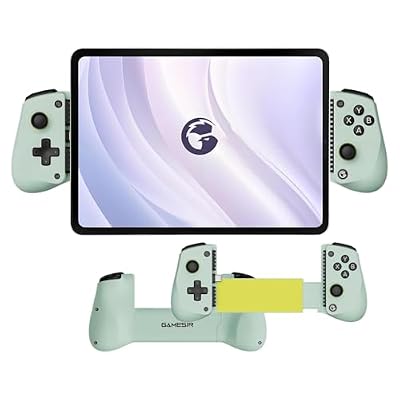
GameSir X5 Lite Type-C Mobile Gaming Controller for iPhone (USB-C), Android & HarmonyOS Phones,Lightweight Design, Hall Effect Sticks, Supports Radiator & Pass-Through Charging (Wasabi Cyan)
Included for '17 Best Game Controllers for iPhone in 2026' because the listing specifies Android & HarmonyOS Phones and Lightweight Design, details this guide uses to compare options.
View on AmazonKey specs: wired USB-C · Hall effect sticks · fits phones 105-213 mm · passthrough charging · 135 g
- Connection: wired USB-C only, no Bluetooth or Lightning version
- Fit: phones 105-213 mm long with no width limit, plus iPad mini 6 and 7; silicone pads included for camera bumps
- Sticks: Hall effect; triggers, face buttons and D-pad are membrane
- Ports: USB-C passthrough charging, no 3.5mm jack
- Weight: about 135 g with no battery
The GameSir X5 Lite is the cheapest way to get a wired, zero-lag controller with drift-resistant sticks on an iPhone 15 or newer. If it does not connect on an iPhone, GameSir advises updating to iOS 18 or later.
Pros:
- Very low price for Hall effect sticks
- Fits large phones and the iPad mini
- Light enough for long sessions
Cons:
- No headphone jack or back buttons
- You may need to remove your phone case
Skip it if: you use wired headphones or play competitive shooters that benefit from back buttons.
SCUF Nomad — Best Bluetooth Clip-On for Any iPhone

SCUF NOMAD Wireless iPhone Mobile Gaming Controller – Customizable Paddles – Anti-Drift Thumbsticks – Bluetooth 5.0 Connectivity – PS Remote, Xbox Game Pass, Apple Arcade, Steam Link – Black
Included for '17 Best Game Controllers for iPhone in 2026' because the listing specifies Customizable Paddles and Anti-Drift Thumbsticks, details this guide uses to compare options.
View on AmazonKey specs: Bluetooth 5.0 · Hall effect sticks · 2 back paddles · up to 16 hours battery · iPhone only
- Connection: Bluetooth 5.0, so the port type on your iPhone does not matter
- Compatibility: iPhone only (iOS 16 or later), not Android
- Sticks and paddles: full-size Hall effect sticks with swappable tops and two remappable back paddles
- Battery: rated up to 16 hours, charged over USB-C
- Cases: works with most cases, but not with wallet or loop accessories attached
The SCUF Nomad is the best pick for Lightning iPhones and anyone who keeps a case on, because nothing plugs into the phone.
Pros:
- Works with both Lightning and USB-C iPhones
- Back paddles and premium Hall effect sticks
- Case friendly
Cons:
- No passthrough charging or headphone jack
- Bluetooth adds a little latency compared with a wired clip-on
Skip it if: you use Android too, or you want to charge your phone while you play.
Best iPhone Controller From $50 to $100
What to expect at this tier:
- Wired USB-C clip-ons with passthrough charging and a headphone jack
- Hall effect or TMR sticks on most GameSir and Razer models
- Polished companion apps (Backbone is the standout)
- Full-size console pads (Xbox, DualSense) also land here
Backbone One (2nd Gen, USB-C) — Best Overall iPhone Controller

BACKBONE One Mobile Gaming Controller, USB-C, 2nd Gen | For Android & iPhone 18/17/16/15, 2nd Gen, Play Xbox, Fortnite, Call of Duty, & More
Included for '17 Best Game Controllers for iPhone in 2026' because the listing specifies USB-C and 2nd Gen, details this guide uses to compare options.
View on AmazonKey specs: wired USB-C · iPhone 15 and newer · passthrough charging · 3.5mm jack · 138 g
- Connection: wired USB-C; a separate Lightning version exists for iPhone 14 and older
- Ports: USB-C passthrough charging and a 3.5mm headset jack
- Size and weight: about 176 x 94 x 34 mm, 138 g, no internal battery
- 2nd Gen changes: refined D-pad and magnetic adapters for better fit with larger phones and many cases
The Backbone One stays the default recommendation because its app pulls App Store, Apple Arcade and cloud-gaming titles into one launcher. It is light, has no battery to charge, and fits most phones in slim cases.
Pros:
- Best-in-class companion app
- Passthrough charging and headphone jack
- Light, with nothing to charge
Cons:
- Conventional sticks, not Hall effect
- No back buttons or rumble
Skip it if: stick drift resistance matters most; choose the GameSir G8 Galileo or a Kishi V3.
GameSir G8 Galileo — Best Hall Effect Controller for USB-C iPhones

GameSir G8 Galileo Type-C Mobile Gaming Controller for Android & iPhone 15 Series (USB-C), Plug and Play Gamepad with Hall Effect Joysticks/Hall Trigger, 3.5mm Audio Jack
Included for '17 Best Game Controllers for iPhone in 2026' because the listing specifies 3.5mm Audio Jack, details this guide uses to compare options.
View on AmazonKey specs: wired USB-C · Hall effect sticks and triggers · 2 back buttons · passthrough charging · 3.5mm jack
- Fit: phones 110-185 mm long and up to 13 mm thick; GameSir recommends no case or one 1 mm or thinner
- Sticks and triggers: Hall effect, with three interchangeable stick caps
- Extras: two programmable back buttons, swappable magnetic faceplates, movable USB-C plug
- Size and weight: 217 x 107 x 54 mm, 252 g
The GameSir G8 Galileo is the most full-featured clip-on at this price and is ranked best overall by several mobile-gaming sites.
Pros:
- Hall effect sticks and triggers resist drift
- Back buttons at a mid-range price
- Large grips suit long sessions
Cons:
- Bulky, and large camera bumps can block the fit
- GameSir’s companion app is Android only
Skip it if: you refuse to take off your phone case.
Razer Kishi V3 — Best TMR-Stick Controller Under $100

Razer Kishi V3 Gaming Controller for iPhone & Android, USB-C, Black | Compatible with iPhone 15, 16, 17 Series, Full Sized TMR Thumbsticks, Dual Back Buttons, PC Remote Play
Included for '17 Best Game Controllers for iPhone in 2026' because the listing specifies USB-C and Black, details this guide uses to compare options.
View on AmazonKey specs: wired USB-C · TMR sticks · Hall effect triggers · 2 back buttons · passthrough charging + 3.5mm jack
- Compatibility: iPhone 15, 16 and 17 series and many Android phones
- Sticks: full-size TMR (tunnel magnetoresistance) sticks, built to resist drift
- Triggers and buttons: Hall effect triggers, quiet tactile face buttons, 4-way D-pad
- Ports: USB-C passthrough charging and 3.5mm audio
The Pro’s haptics do not work on iOS anyway, so for an iPhone-only player this is the better value.
Pros:
- TMR sticks and Hall effect triggers
- Back buttons, passthrough and headphone jack
- Also works as a wired PC controller
Cons:
- No rumble, no swappable stick caps
- Thick cases such as rugged models may not fit
Skip it if: you also want to use it on an iPad mini; the V3 Pro fits devices up to 8 inches.
Xbox Wireless Controller — Best for Cloud Gaming From the Couch
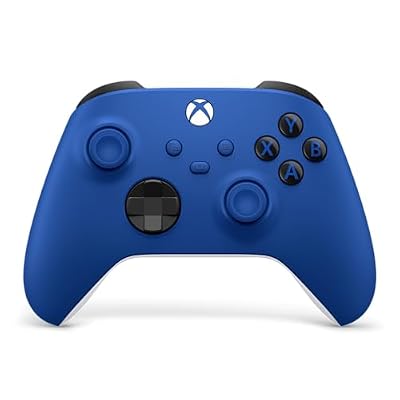
XBOX Wireless Gaming Controller | Shock Blue | Textured triggers and bumpers, Hybrid D-pad, XBOX Wireless, Bluetooth, USB-C, Play across Console & PC & Cloud Devices
Included for '17 Best Game Controllers for iPhone in 2026' because the listing specifies Shock Blue and Textured triggers and bumpers, details this guide uses to compare options.
View on AmazonKey specs: Bluetooth · full-size Xbox layout · AA batteries · works with any iPhone port
- Connection: Bluetooth, pairs in iPhone Settings with no app needed
- Power: AA batteries (or an optional rechargeable pack)
- Audio: the controller’s headset jack does not pass audio over Bluetooth, so use the phone or wireless earbuds
- Layout: the same button labels Xbox Cloud Gaming expects
If you stream Game Pass titles to an iPhone propped on a stand, the Xbox Wireless Controller is the most comfortable and widely supported option. Add a phone clip if you want to hold everything in your hands.
Pros:
- Full-size comfort for long sessions
- Works with any iPhone port type
- Doubles as your PC or console controller
Cons:
- Needs a separate clip or stand
- Bulky to travel with
Skip it if: you play mostly on the go; a clip-on is far more portable.
PlayStation DualSense — Best for PS Remote Play
Key specs: Bluetooth · built-in rechargeable battery · USB-C charging · PlayStation layout
- Connection: Bluetooth, supported natively by iOS
- Power: built-in battery charged over USB-C
- Features: adaptive triggers and haptics work fully only in supported games; most iPhone titles ignore them
- Best use: PS Remote Play from a PS5 to your iPhone
The PlayStation DualSense is the obvious match for PS Remote Play, where PlayStation button prompts appear on screen. It also works in Apple Arcade and cloud apps.
Pros:
- Rechargeable battery, no AAs
- Natural fit for PS Remote Play
- Comfortable full-size grips
Cons:
- Signature PS5 features mostly unused on iPhone
- Needs a clip or stand
Skip it if: you play Game Pass titles; the Xbox pad matches the prompts.
Best Premium iPhone Controller (Over $100)
What to expect at this tier:
- Clicky mechanical-style face buttons and premium D-pads
- Back buttons, Hall effect triggers and, on Razer, TMR sticks
- Extra modes: Bluetooth for TVs and PCs (Backbone Pro) or tablet fit (Kishi V3 Pro)
- Diminishing returns for casual players; worth it for daily, long sessions
Razer Kishi V3 Pro — Best Console-Feel Controller for iPhone and iPad mini

Razer Kishi V3 Pro Gaming Controller for iPhone, Android & Tablets, USB-C | iPhone 15, 16, 17 Series & iPad mini up to 8", Full Sized TMR Thumbsticks, Back Buttons, PC Remote Play, Haptics
Included for '17 Best Game Controllers for iPhone in 2026' because the listing specifies Android & Tablets and USB-C, details this guide uses to compare options.
View on AmazonKey specs: wired USB-C · TMR sticks · Hall effect triggers · 8-way D-pad · fits devices up to 8 in
- Compatibility: iPhone 15 and newer on iOS 18 or later, iPad mini and other USB-C devices up to 8 inches
- Controls: TMR sticks with two swappable caps, Hall effect triggers, mecha-tactile face buttons, 8-way D-pad, claw-grip bumpers, two back buttons
- Ports: USB-C passthrough charging and 3.5mm audio
- Weight: about 268 g
The Razer Kishi V3 Pro is the most console-like clip-on you can attach to an iPhone. Its Sensa HD haptics work on Android only, so iPhone buyers pay mainly for the better buttons, D-pad and iPad mini fit.
Pros:
- Best buttons and D-pad in this guide
- Fits an iPad mini as well as large iPhones
- Drift-resistant TMR sticks
Cons:
- Haptics do not work on iPhone
- Heaviest clip-on here
Skip it if: you only game on an iPhone; the base Kishi V3 covers the essentials for less.
Backbone Pro — Best for Playing on Phone, TV and PC

BACKBONE Pro Gaming Controller | For iPhone 15/16/17/18 & Android, USB-C/ Bluetooth Controller Stream Xbox, Play Call of Duty, PlayStation via iOS Remote Play
Included for '17 Best Game Controllers for iPhone in 2026' because the listing specifies For iPhone 15/16/17/18 & Android and USB-C/ Bluetooth Controller Stream Xbox, details this guide uses to compare options.
View on AmazonKey specs: USB-C or Bluetooth LE · up to 40 hours battery · Hall effect triggers · 2 back buttons · passthrough charging + 3.5mm jack
- Connection: wired USB-C on the phone, or Bluetooth to switch between phone, tablet, PC and smart TV
- Battery: up to 40 hours of wireless play (maker figure); no battery drain when plugged into the phone
- Controls: full-size ALPS sticks, Hall effect triggers, two app-mappable back buttons
- Weight: about 200 g
The Backbone Pro turns the Backbone formula into a two-in-one: a clip-on for the iPhone and a wireless controller for cloud gaming on a TV or laptop. It keeps the excellent Backbone app.
Pros:
- Works as a standalone Bluetooth controller
- Long battery life and back buttons
- Full-size sticks are more comfortable than the Backbone One
Cons:
- Expensive for a mobile controller
- Sticks are not Hall effect
Skip it if: you only play on your phone; the Backbone One costs far less.
Buying Guide: Fit, Sticks, Ports and Battery
Check phone length and case thickness first
Clip-ons list a supported phone length. Most handle 6.1- to 6.9-inch iPhones, but the limits differ: the GameSir G8 Galileo takes 110-185 mm and a case of 1 mm or less, while the GameSir X5 Lite stretches to 213 mm. If you never remove your case, choose a Bluetooth clip-on such as the SCUF Nomad or a Backbone with its magnetic adapters.
Pick drift-resistant sticks if you play daily
Hall effect and TMR sticks use magnets instead of rubbing contacts, so they resist the drift that eventually affects conventional sticks.
Match the port to your iPhone and your habits
iPhone 15 and newer need USB-C; iPhone 14 and older need Lightning or Bluetooth. If you play sessions longer than an hour, especially cloud gaming, prioritize passthrough charging. If you use wired earbuds, confirm a 3.5mm jack; the GameSir X5 Lite and SCUF Nomad lack one, and full-size Xbox and PlayStation pads do not pass audio over Bluetooth.
Decide whether you want a battery
Wired clip-ons draw a small amount of power from the phone and never need charging. Bluetooth models need their own battery: the SCUF Nomad is rated up to 16 hours and the Backbone Pro up to 40 hours.
Which iPhone Controller Fits Your Situation?
- iPhone 15, 16 or 17, first controller: Backbone One (2nd Gen, USB-C).
- iPhone 14 or older: SCUF Nomad over Bluetooth, or the Lightning version of the Backbone One.
- Competitive Call of Duty: Mobile or shooters: Razer Kishi V3 or GameSir G8 Galileo for back buttons and drift-resistant sticks.
- Cloud gaming on a TV and phone: Backbone Pro, or an Xbox Wireless Controller you may already own.
- PS5 Remote Play: PlayStation DualSense.
- Tightest budget: GameSir X5 Lite.
- iPhone plus iPad mini: Razer Kishi V3 Pro.
Verdict: Which iPhone Controller Should You Buy?
For the majority of iPhone 15, 16, and 17 owners, the Backbone One (2nd Gen, USB-C) is the best all-around controller. It balances price, build quality, low latency, and the best software experience for cloud gaming. If you have a large Pro Max and want the most console-like comfort, step up to the Razer Kishi V3 Pro. Budget-conscious players who don’t want to compromise on stick quality should grab the GameSir G8 Galileo.
And if you already own an Xbox or PS5 controller, try Bluetooth pairing before spending anything, paired with a cheap clip, it’s the most cost-effective way to game on your iPhone, especially for cloud streaming. Retro lovers should look no further than the 8BitDo Ultimate 2. Whichever you choose, ditching the touchscreen is the single biggest upgrade you can make to iPhone gaming in 2026.
Frequently Asked Questions
Do Xbox and PS5 controllers work with the iPhone?
Yes. iPhones natively support Xbox Wireless Controllers and PlayStation DualSense (PS5) controllers over Bluetooth. Just put the controller in pairing mode, open Settings > Bluetooth on your iPhone, and connect. Buttons map automatically in the App Store, Apple Arcade, and cloud gaming apps like Xbox Cloud Gaming and GeForce NOW.
Will a Lightning controller work with my iPhone 15 or newer?
No. The iPhone 15 and all newer models (16 and 17 lines) use a USB-C port, so a Lightning clip-on controller will not physically fit. You must buy the USB-C version. Bluetooth controllers work with any iPhone regardless of the charging port since they connect wirelessly.
Which iPhone controller has the lowest latency?
Wired telescoping controllers that plug into the USB-C port, such as the Backbone One, Razer Kishi V3 Pro, and GameSir G8 Galileo, have effectively zero latency because there’s no wireless connection. This makes them the best choice for precision games like shooters, fighters, and platformers. Bluetooth pads add some latency, which is usually unnoticeable for cloud gaming.
Can I charge my iPhone while using a game controller?
Yes, if the controller has a passthrough charging port. The Backbone One, Razer Kishi V3 Pro, and GameSir G8 Galileo all include a USB-C passthrough port so you can plug in a charging cable and power your phone during long sessions. This is especially important for battery-hungry cloud gaming. Bluetooth controllers don’t affect charging at all since your phone’s port stays free.
Do I need an MFi controller for iPhone?
No. iPhones support Xbox and PlayStation Bluetooth controllers natively (the PS5 DualSense since iOS 14.5), and modern clip-ons like the Backbone One and Razer Kishi V3 work without MFi branding. Check that a controller lists iPhone or iOS support, and for USB-C models, the iOS version it needs.
Can I use an iPhone controller with an iPad?
Only some can. Bluetooth pads such as the Xbox Wireless Controller and DualSense work with any iPad, while clip-ons fit phones only, except the Razer Kishi V3 Pro and GameSir X5 Lite, which also fit the iPad mini.
Do I have to take my phone case off to use a clip-on controller?
Often yes. Thin cases usually fit the Backbone One with its adapters, but the GameSir G8 Galileo recommends a case of 1 mm or less, and rugged cases block most USB-C clip-ons. Bluetooth clip-ons like the SCUF Nomad are the most case friendly.
Which controller is best for Xbox Cloud Gaming on iPhone?
The Backbone One is the best clip-on for Xbox Cloud Gaming because its app launches cloud sessions directly. If you play from a stand, an Xbox Wireless Controller matches the on-screen prompts and needs no setup beyond Bluetooth pairing.









