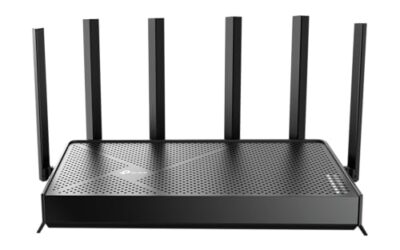
- Top Pick: TP-Link Tri-Band BE11000 Wi-Fi 7 Gaming Router Archer GE650 | 6-Stream 11 Gbps supports 320MHz | 2×5G + 3×2.5G Ports USB 3.0 | Game Acceleration, Dedicated Gaming Port & Panel, RGB Lighting|HomeShield
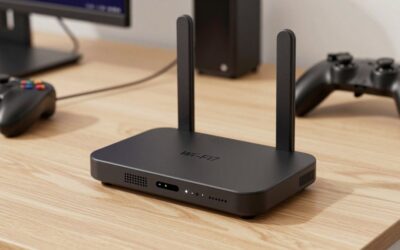
- Best Value: TP-Link BE6500 Dual-Band WiFi 7 Router (BE400) – Dual 2.5Gbps Ports, USB 3.0, Covers up to 2,400 sq. ft., 90 Devices, Quad-Core CPU, HomeShield, Private IoT, Free Expert Support
- Premium Choice: ASUS ROG Rapture GT-BE98 Pro WiFi 7 Gaming Router – Quad-Band, 30Gbps, Mesh
Your DNS server is one of the most overlooked settings in gaming, yet switching to a faster, gaming-friendly DNS can shave milliseconds off matchmaking, speed up game downloads, and reduce the connection hiccups that come from a slow or unreliable ISP resolver. In 2026, with online play more competitive than ever, understanding DNS is a genuinely easy way to make your whole setup feel snappier.
This guide explains what DNS actually does for gaming, which public DNS services are worth using, and how to change it on your PC, console, and router. Because the biggest gains come from configuring DNS at the router level, we have also pointed to the router hardware that makes these tweaks stick across every device in your home.
As an Amazon Associate we earn from qualifying purchases at no extra cost to you.





⚡ Save on Your Next PC — Amazon Prime
Prime members get fast free shipping on the systems above, plus early access to Prime Day & Black Friday PC deals. New members get a 30-day free trial.
Watch: Best DNS For Gaming 2026 — Video Review
What DNS Does and Why It Matters for Gaming
DNS, or Domain Name System, translates the human-readable server addresses your games use into the numeric IP addresses machines understand. Every time you launch matchmaking, connect to a lobby, or start a store download, your device makes DNS lookups. A slow ISP DNS server adds delay to each of these steps, while a fast public resolver like Cloudflare’s 1.1.1.1 or Google’s 8.8.8.8 responds almost instantly, making menus, logins, and downloads feel more responsive.
Does DNS Actually Lower Your Ping?
It is important to be realistic: DNS does not change the raw latency to a game server once you are connected, because that depends on distance and routing. What a better DNS improves is everything around the connection, such as how quickly you resolve and reach servers, how fast content delivery networks serve downloads, and how reliably you avoid failed lookups. For competitive players, faster and more consistent DNS resolution means less time stuck on loading screens and fewer connection errors.
The Best DNS Servers for Gaming in 2026
- Cloudflare (1.1.1.1): Consistently among the fastest resolvers with a strong privacy stance, making it a top all-round choice for gamers.
- Google Public DNS (8.8.8.8): Extremely reliable and globally distributed, a safe default that rarely fails and resolves quickly worldwide.
- Quad9 (9.9.9.9): Adds security filtering that blocks malicious domains, useful if you want protection alongside solid speed.
- OpenDNS: Offers customizable filtering and stability, handy for family setups that share a gaming network.
How to Change DNS on Your Devices
You can set DNS in three places. On a PC, edit the adapter’s IPv4 properties and enter your chosen primary and secondary addresses. On consoles, both PlayStation and Xbox let you set custom DNS under the network settings menu. The most powerful option, however, is changing it once on your router, which applies your preferred DNS to every device automatically. A capable router with an easy admin interface makes this a two-minute job that benefits your whole home.
Router Hardware That Makes DNS Tweaks Effortless
Applying DNS at the router level requires hardware with a clean, modern interface and enough power to route many devices smoothly. The GL.iNet GL-MT6000 Flint 2 is a standout for tinkerers thanks to its open firmware and granular network controls, letting you set custom or encrypted DNS with ease. For plug-and-play households, the TP-Link Archer GE650 and TP-Link Archer AXE75 offer straightforward apps to change DNS network-wide, while the flagship ASUS ROG Rapture GT-BE98 Pro and NETGEAR Nighthawk RS90 pair simple DNS settings with the throughput to keep every console and PC responsive.
Frequently Asked Questions
Will changing my DNS reduce lag?
It will not lower your in-game ping to a server, but it speeds up lookups, matchmaking connections, and downloads, which makes the overall experience feel faster and more reliable.
What is the best free DNS for gaming?
Cloudflare’s 1.1.1.1 and Google’s 8.8.8.8 are the most popular free options, offering excellent speed, worldwide reliability, and strong uptime for gamers.
Should I set DNS on my console or router?
Setting it on your router applies the change to every device at once, which is the most convenient approach, though per-console settings work well if you only game on one system.
Is a custom DNS safe to use?
Reputable public resolvers like Cloudflare, Google, and Quad9 are safe and widely trusted; some, like Quad9, even add security filtering that blocks known malicious domains.
Conclusion
Changing your DNS is one of the simplest, cheapest tweaks you can make to a gaming setup in 2026. It will not magically drop your ping, but a fast resolver like Cloudflare or Google makes matchmaking, downloads, and menus noticeably snappier and more dependable. Set it once at the router level on capable hardware like the GL.iNet Flint 2 or a TP-Link Archer, and every device in your home instantly enjoys quicker, more reliable connections.