Our Short List of 3


All 3 Picks at a Glance
| Product | Specs | Action |
|---|---|---|
| HT03XL L11119-855 Laptop Battery for HP Pavilion 14, 15, and 17 Series | Check price on Amazon | |
| Gomarty JC04 Laptop Battery for HP Notebook 15-BS, 15-BW, and 17-BS Series | Check price on Amazon | |
 Wymisnit WDX0R 42Wh Battery for Dell Inspiron 13 and 15 Series | Check price on Amazon |
🛒 Best Price Today on Amazon
Prime members get fast, free shipping on everything above, plus member-only deals. New members get a 30-day free trial — cancel anytime.
- Method 1: Read the Label on the Battery
- Method 2: Run a Battery Report on Windows
- Method 3: Check System Information on macOS
- Method 4: Look It Up by Laptop Serial Number
- What the Codes on the Label Mean
- How to Choose a Replacement Laptop Battery
- The Five Replacement Batteries in This Guide
- Comparison Table
- Frequently Asked Questions
- Conclusion
You find out your laptop battery model by reading the part number printed on the battery label, the single most reliable source. If the battery is sealed inside the laptop, get the same information from a battery report on Windows, System Information on macOS, or the laptop maker’s support site using the laptop serial number. Once you have the part number, match it exactly to a replacement battery built for that code.
Most people ask this question when a battery stops holding a charge and a replacement is on the table. The laptop model alone is not enough, because one laptop series often ships with two or three different batteries. The battery part number is the code that removes the guesswork. This guide walks through every way to find it, explains what each code on the label means, and compares five replacement batteries that cover the most common HP, Dell, and MacBook Air part numbers.
Method 1: Read the Label on the Battery
The label on the battery is the definitive answer. On laptops with a removable battery, shut the machine down, flip it over, slide the release latch, and lift the battery out. The label lists the part number, the voltage, the capacity, and the chemistry. Look for a code in large type near the top, such as HT03XL, JC04, 357F9, WDX0R, or A1496 — that code is the battery model.
On laptops with a sealed battery, the label sits inside the case. Remove the bottom panel with a small Phillips screwdriver, after powering off and unplugging the charger. The battery is the large flat pack filling much of the base. Photograph the label before you put anything back.
Two cautions apply. Never puncture, bend, or heat a swollen battery. If the pack is puffed up, the trackpad feels raised, or the bottom panel no longer sits flat, stop and have the battery handled by a repair shop. Copy the part number exactly, including every letter and digit: a single wrong character can point to a battery with a different connector.
Method 2: Run a Battery Report on Windows
Windows can generate a detailed battery report without opening the laptop. Press the Windows key, type cmd, and open Command Prompt. Type powercfg /batteryreport and press Enter. Windows saves battery-report.html in your user folder; open it and look at the Installed batteries section.
The report shows the manufacturer, the chemistry, the design capacity, the full charge capacity, and the cycle count. Design capacity is what the battery held when new, full charge capacity what it holds now. When the second number has fallen far below the first, the battery is worn.
The report does not always print the battery part number itself. On many HP and Dell machines it lists the manufacturer and the serial number of the pack, which you can search on the maker’s support site. A cycle count above 500 and a full charge capacity below 70 percent of design capacity means the battery is near the end of its useful life.
On Windows 11, Settings > System > Power and battery shows battery health if your machine supports it, but it does not name the battery model.
Method 3: Check System Information on macOS
On a MacBook, click the Apple menu, choose About This Mac, then More Info, then System Report. In the sidebar, select Power under Hardware. The Battery Information section shows the serial number, the manufacturer, the device name, and the cycle count, plus the condition: Normal, Replace Soon, Replace Now, or Service Battery.
The device name field is the useful one. On a MacBook Air 13-inch from 2010 to 2017, the battery part numbers are A1496, A1405, and A1377, and the model identifier is A1466 for mid-2012 through 2017 machines and A1369 for late-2010 and mid-2011 machines. If the condition reads Replace Soon or Service Battery and the cycle count is above 1,000, the pack is worn.
Apple also prints the battery part number on the pack itself, inside the bottom case. The same cautions apply: power off, unplug, and do not disturb a swollen pack.
Method 4: Look It Up by Laptop Serial Number
When the battery is sealed in and you would rather not open the case, the laptop serial number can lead you to the battery part number. It is printed on a sticker on the bottom of the laptop, or you can find it in software: on Windows, type wmic bios get serialnumber in Command Prompt; on macOS, it appears in About This Mac.
Enter that serial number on the support site of the laptop maker and open the parts section for your machine. The parts list names the battery part number that shipped with your exact configuration, which makes this the most reliable method short of reading the label.
What the Codes on the Label Mean
A battery label carries several codes. The part number, such as HT03XL or WDX0R, identifies the battery pack itself. The laptop model, such as HP Pavilion 15-DA or Dell Inspiron 15 5570, identifies the machine. The serial number identifies your individual pack. The voltage, such as 11.55V or 11.4V, must match the original. The capacity, such as 41.7Wh or 74Wh, measures how much energy the pack stores.
Two packs can share a laptop model and still differ. HP ships the Pavilion 15 series with both the HT03XL and the JC04 across different sub-models, and Dell ships the Inspiron 15 5000 and 7000 series with both the 357F9 and the WDX0R. That is why the part number matters more than the laptop name. Match the part number first, then the voltage, then a capacity equal to or higher than the original.
A higher watt-hour figure means longer runtime, provided the pack physically fits and the voltage matches. A lower figure means shorter runtime. Never use a battery with a different voltage, even if the connector fits, because the charging circuit is built for the original voltage.
How to Choose a Replacement Laptop Battery
Begin with the part number. Compare the voltage and the capacity against the original pack. Read the compatibility list on the listing and confirm your laptop model appears on it. Check the connector shape in the listing photos against your original battery.
Look at what comes in the box. Several replacement batteries ship with the small screwdrivers needed to open the laptop and swap the pack. A clear installation guide in the box is also useful if this is your first swap.
Third-party brands such as NinjaBatt, ZAYAUPVL, Wymisnit, and Gomarty build replacement packs to match the original specifications, and their listings spell out the voltage, capacity, cell count, and compatibility. The cells inside are lithium-ion or lithium-polymer, the same chemistry as the original, and the packs include protection against overcharge and short circuits.
Finally, plan for the first charge. After installing a new battery, run the laptop on battery until it shuts down, then charge it fully without interruption. Repeat that full cycle two or three times to calibrate the battery gauge.
The Five Replacement Batteries in This Guide
The five batteries below cover the part numbers most readers look for: two for HP machines, two for Dell Inspiron machines, and one for the MacBook Air 13-inch. Match the part number on your label to the part number in the heading, and confirm your laptop model before ordering.
HT03XL L11119-855 Laptop Battery for HP Pavilion 14, 15, and 17 Series
HT03XL L11119-855 Laptop Battery for HP Pavilion
The HT03XL is the most widely used battery in this guide, and it fits a large spread of HP Pavilion machines: the 14-CE, 14-CF, and 14-DF series, the 15-CS, 15-DA, 15-DB, and 15-DW series, and the 17-BY and 17-CA series. It is a 3-cell lithium-ion pack rated at 11.55V and 41.7Wh, and it replaces part numbers HT03XL, L11119-855, L11421-542, and the HSTNN-DB8R family. The listing ships with two screwdrivers for the swap.
This pack suits a Pavilion owner whose battery drains fast or dies the moment the charger is unplugged. The 41.7Wh capacity matches the original HP specification, so runtime after the swap should feel like the laptop did when new. Check carefully: confirm your exact Pavilion sub-model appears on the list, and confirm the part number on your old battery reads HT03XL rather than a similar code such as HW03XL, which is a different pack.
One point needs a direct check before ordering. Some listings for this same part number give the capacity as 41.9Wh instead of 41.7Wh. The Amazon listing used here states 41.7Wh, and this guide follows that figure. Verify the capacity printed on the listing you open before you buy.
Gomarty JC04 Laptop Battery for HP Notebook 15-BS, 15-BW, and 17-BS Series
Gomarty JC04 Laptop Battery for HP Notebook 15-BS and 15-BW Series
The JC04 is the battery for the older HP Notebook line: the 15-BS and 15-BW series, the 17-BS series, and the HP 240, 250, and 255 G6 machines. It is a lithium-ion pack rated at 14.8V and 38Wh, and it replaces part numbers JC04, JC03, 919700-850, 919701-850, and the HSTNN-DB8E family.
This pack suits a 2017-era HP Notebook owner whose original battery has faded. The 38Wh capacity matches the original specification, and the 14.8V figure is the one to confirm against the label on the old pack. The JC04 and JC03 codes are closely related and often listed together; the listing covers both, but your old battery should carry one of the part numbers named above.
The limitation here is the age of the listing. The most recent Amazon crawl referenced for this pack is 237 days old, so the listing deserves a direct check before ordering to confirm it is still live and that the pack shipped is the JC04 rather than a related variant. Also note that the listing’s own model-name field reads JC03 while the title and the compatibility list name JC04; treat the title and the part-number list as the guide.
ZAYAUPVL 357F9 74Wh Battery for Dell Inspiron 15 7000 Gaming Series
ZAYAUPVL 357F9 74Wh Battery for Dell Inspiron 15 7000 Gaming
The 357F9 is the large-capacity battery for the Dell Inspiron 15 7000 Gaming line: the 7559, 7557, 7566, and 7567, plus the 5576 and 5577. It is a 4-cell lithium-ion pack rated at 11.1V and 74Wh, the highest capacity in this guide, and it replaces part numbers 357F9, 0GFJ6, 71JF4, 0357F9, and P65F. The listing ships with two screwdrivers and an instruction sheet, and ZAYAUPVL states a 60-day refund window with a free exchange within 12 months.
This pack suits a Dell Inspiron 15 7000 Gaming owner who wants the longest runtime available for the machine. The 74Wh capacity is a real step above the 42Wh packs used in the slimmer Inspiron models, and it fits the gaming chassis that has room for the larger pack. Do not try to fit it into a slim Inspiron 15 5000 machine that takes the 42Wh WDX0R instead; the two packs are different sizes.
One conflict in the listing deserves a direct check. The listing’s model-number field reads WDXOR while the model name and the title read 357F9. WDX0R is a different Dell battery, the 42Wh pack covered next, so the model-number field appears to be an error. The title, the compatibility list, and the 74Wh capacity all point to the 357F9. Confirm the part number printed on the pack when it arrives.
Wymisnit WDX0R 42Wh Battery for Dell Inspiron 13 and 15 Series
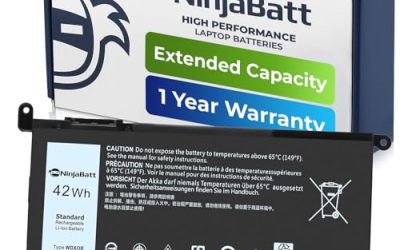
Wymisnit WDX0R 42Wh Battery for Dell Inspiron 13 and 15 Series
The WDX0R is the slim-battery counterpart to the 357F9, and it fits a wide spread of Dell Inspiron machines: the 13 5378 and 7375 series, the 15 5565 through 5579 series, and the 15 7569, 7570, 7573, and 7579 series. It is a lithium-ion pack rated at 11.4V and 42Wh, and it replaces part numbers WDX0R, WDXOR, FW8KR, Y3F7Y, 3CRH3, and P69G001.
This pack suits a slim Dell Inspiron owner whose battery no longer lasts through a work session. The 42Wh capacity matches the original specification, and the pack matches the original dimensions. The long compatibility list is helpful, but Dell uses the same series names across different years, so check the specific laptop model number rather than the series name alone.
The limitation is the age of the verification. The most recent Amazon crawl referenced for this pack is 356 days old, the oldest in this guide, so the listing needs a direct check before ordering. The capacity is consistent across sources at 42Wh, and the voltage is consistently 11.4V.
NinjaBatt A1466 Battery for Apple MacBook Air 13-Inch (2010–2017)
NinjaBatt A1466 Battery for Apple MacBook Air 13-Inch
The A1466 is the battery for the MacBook Air 13-inch from late 2010 through 2017, covering model identifiers A1369 and A1466 and battery part numbers A1496, A1405, and A1377. It is a lithium-polymer pack rated at 7.6V and 54.4Wh with a 7160mAh capacity, and it ships with the screwdrivers needed to open the MacBook Air bottom case. The listing describes a 12-month warranty.
This pack suits a MacBook Air owner whose battery condition reads Replace Soon or Service Battery. The 54.4Wh capacity matches the original Apple specification, and the pack fits the exact screw layout and connector of the A1466 chassis. Because these machines are now several years old, a fresh battery is often the single most effective way to extend their useful life.
One conflict needs a direct check. The Amazon listing title gives the capacity as 7160mAh and 54.4Wh, while other listings for the same NinjaBatt A1466 pack give 7200mAh and 55Wh. The article follows the Amazon listing title. Confirm the capacity printed on the pack when it arrives, and confirm your MacBook Air model identifier is A1369 or A1466 before ordering.
Comparison Table
| Battery | Part Number | Voltage | Capacity | Fits |
|---|---|---|---|---|
| HT03XL L11119-855 | HT03XL | 11.55V | 41.7Wh | HP Pavilion 14, 15, 17 series |
| Gomarty JC04 | JC04 | 14.8V | 38Wh | HP Notebook 15-BS, 15-BW, 17-BS |
| ZAYAUPVL 357F9 | 357F9 | 11.1V | 74Wh | Dell Inspiron 15 7000 Gaming |
| Wymisnit WDX0R | WDX0R | 11.4V | 42Wh | Dell Inspiron 13 and 15 slim series |
| NinjaBatt A1466 | A1466 | 7.6V | 54.4Wh | MacBook Air 13-inch, 2010–2017 |
Frequently Asked Questions
Where is the battery model number on a laptop?
The battery model number is printed on a label on the battery itself. On a removable battery, slide it out and read the label. On a sealed battery, the label is inside the bottom case, or find the part number through the laptop serial number on the maker’s support site.
Can I find the battery model in Windows without opening the laptop?
Yes, partly. Run powercfg /batteryreport in Command Prompt and open the battery-report.html file. The report shows the manufacturer, chemistry, design capacity, full charge capacity, and cycle count, but it does not always print the part number. Use the report to judge battery health, and the label or the serial-number lookup for the exact part number.
Does the laptop model number tell me which battery to buy?
Not by itself. One laptop series often ships with two or three different batteries, such as the HP Pavilion 15 series with the HT03XL and the JC04, or the Dell Inspiron 15 series with the 357F9 and the WDX0R. Always match the battery part number, then the voltage and the laptop sub-model.
Can I use a battery with a higher watt-hour capacity?
Yes, provided the voltage matches and the pack physically fits. A higher watt-hour figure means longer runtime. Never use a battery with a different voltage, even if the connector fits.
How do I know my battery needs replacing?
The clearest signs are a battery report showing full charge capacity far below design capacity, a cycle count above 500 on Windows or above 1,000 on a MacBook, and a macOS condition reading of Replace Soon or Service Battery. A swollen pack, a raised trackpad, or a bottom panel that no longer sits flat means the battery should be handled by a repair shop.
Conclusion
Finding out your laptop battery model comes down to one code: the part number on the battery label. Read it directly when you can, or reach it through a battery report, System Information, or a serial-number lookup. Match that part number exactly, confirm the voltage, and check your laptop sub-model against the compatibility list before ordering. The HT03XL covers most HP Pavilion machines, the JC04 the older HP Notebook line, the 357F9 the Dell Inspiron 15 7000 Gaming machines, the WDX0R the slim Dell Inspiron models, and the A1466 the MacBook Air 13-inch from 2010 to 2017.
Disclosure: As an Amazon Associate, we may earn from qualifying purchases.