🛒 Best Price Today on Amazon
Prime members get fast, free shipping on everything above, plus member-only deals. New members get a 30-day free trial — cancel anytime.
Introduction
The best gaming keyboard and mouse under 100 is a complete set that gives you a full-size or compact keyboard and a matching gaming mouse in one box, without asking you to buy each piece separately. A good set covers the basics well: comfortable keys, a mouse that tracks smoothly, lighting you can adjust or turn off, and a connection that stays stable during long sessions. This guide compares four complete sets that fit that budget, including wired options for a fixed desk and a wireless option for a cleaner setup.
Buying a set instead of two separate pieces has a clear advantage. The keyboard and mouse are designed to work together, they share one style, and you only need to learn one layout and one set of controls. The trade-off is that you accept the maker’s pairing, so the mouse is rarely the lightest esports mouse available, and the keyboard is rarely a premium mechanical board. That trade-off is sensible when the goal is a complete, ready-to-play desk rather than a single flagship piece.
The four sets below were chosen because each one is sold as a single keyboard-and-mouse set, each one includes a gaming mouse with adjustable sensitivity, and each one covers a different need: a brand-name wired set, a low-cost wired starter set, a wireless set, and a compact newer set with a high-sensitivity mouse. Read the buying guide first, then match the set to your desk, your games, and your tolerance for cables.
How to Choose
1. Wired or wireless
A wired set connects with USB cables and never needs charging. It suits a fixed desk, a shared family computer, and players who want the simplest setup. A wireless set connects over a 2.4GHz receiver, Bluetooth, or a USB-C cable, and it suits a tidy desk, a living-room setup, and anyone who moves the set between rooms. Wireless sets need charging, so check how the keyboard and mouse charge and whether they can keep working while plugged in.
2. Keyboard layout and size
Full-size keyboards include a number pad and dedicated media keys, which help with work, school, and games that use many bindings. Compact keyboards free up desk space for wide mouse sweeps, which helps in shooters played at low sensitivity. Before choosing, count the keys you actually use. If you type numbers often or use the number pad for in-game controls, a compact board will feel cramped. If your desk is small, a full-size board can push the mouse too far to the right.
3. Switch feel and key type
Most sets in this budget use membrane keys or mechanical-feel membrane keys rather than true mechanical switches. Membrane keys are usually quieter and softer, with a shorter travel that feels familiar to anyone coming from a standard office keyboard. Mechanical-feel keys aim for a crisper press without the cost of individual mechanical switches. If you type for long hours, look for a board with a wrist rest or a gentle typing angle. If you play late at night in a shared room, a quieter membrane board is usually the kinder choice.
4. Mouse sensitivity and shape
Mouse sensitivity is listed as DPI, and every set here lets you change it. A lower setting gives fine control for aiming, while a higher setting lets you cross the screen with a small hand movement. Look for a mouse with a dedicated DPI button so you can change sensitivity without opening software. Shape matters just as much. A larger ergonomic mouse suits palm grip and long sessions, while a smaller symmetrical mouse suits claw and fingertip grips. If possible, compare the mouse length and weight with the mouse you already use.
5. Lighting and software
RGB lighting is common in this budget, and it ranges from a single backlight colour to multi-zone lighting with several effects. Lighting does not change how a set plays, but it does change how a desk looks at night, and bright lighting can be distracting in a dark room. Check whether lighting can be dimmed or turned off from the keyboard itself. Software, where offered, lets you remap keys, record macros, and adjust mouse sensitivity in finer steps. Software is useful, but a set should still work well with its basic controls if you never install it.
6. Anti-ghosting and extra keys
Anti-ghosting describes how many keys the keyboard can register at once. A set with 25-key or 26-key anti-ghosting handles common gaming combinations, such as moving while pressing several action keys, without dropping inputs. Extra keys also matter. Dedicated media keys let you change volume and skip tracks without leaving a game, and macro keys let you assign a sequence of actions to one press. A Windows lock key is a small but useful feature, because it stops an accidental press from minimising a game at the wrong moment.
7. Build, cable, and desk fit
A set that stays under this budget still needs a solid frame. Look for a keyboard with a stable base that does not flex when you type firmly, and a mouse with side grips that stay comfortable after an hour of play. Check the cable length on wired sets, because a short cable can pull against a tower kept on the floor. For wireless sets, check whether one receiver controls both pieces, because a single receiver frees a USB port and reduces clutter. Finally, measure your desk. A full-size keyboard, a mouse, and a mousepad need more room than many first-time buyers expect.
Top Picks
MSI Vigor GK30 Combo White

The MSI Vigor GK30 Combo White puts the Vigor GK30 gaming keyboard and the Clutch GM11 gaming mouse in one box. The keyboard uses mechanical-like plunger switches with a stated lifespan of over 12 million keystrokes, and the floating keycap design is water-repellent and easy to clean. The mouse uses Omron switches rated for over 10 million clicks and a PixArt optical sensor that delivers up to 5000 DPI. Lighting covers six zones on the keyboard, with up to 10 lighting effects available through MSI Center software, and the mouse lighting can be changed without software.
This set suits players who want a brand-name wired set with a clean white look and a comfortable, full-size layout. The keyboard feels familiar to anyone moving from a standard keyboard, while the mouse is light enough for long sessions at 89 grams. The white finish also suits a light-coloured desk or a setup where the peripherals are part of the room design rather than hidden away.
One point to note is that this is a wired set, so both pieces need a USB connection and cable space on the desk. The keyboard is a membrane-style board with a mechanical feel, not a true mechanical keyboard, so players who want individual mechanical switches should look at a different kind of board. Check the exact model, selected variant and seller on Amazon before ordering, because this combo is also sold in black and in other regional layouts.
Redragon S101-3 PRO

The Redragon S101-3 PRO is a wired RGB keyboard and mouse set built around a full-size keyboard and a programmable mouse. The keyboard has six RGB backlight effects, independent macro record keys, and a wrist rest. The mouse adjusts from 800 to 7200 DPI, with a dedicated DPI button for changing sensitivity during play, and all six mouse buttons can be programmed through Redragon software. The keyboard also includes dedicated media keys and a foldable stand for adjusting the typing angle.
This set suits first-time PC gamers who want a complete wired setup with macro keys and a wrist rest included. The macro keys are useful for games with repeated sequences, and the wrist rest helps during long sessions at a fixed desk. The white version suits a light desk, while the black version suits a darker setup, and both use the same layout and controls.
One point to note is that the keyboard uses membrane keys, so the typing feel is softer and quieter than a mechanical board. The mouse is a full-size ergonomic shape, which suits palm grip better than a small fingertip grip. Check the exact model, selected variant and seller on Amazon before ordering, because Redragon sells several S101 versions, and the S101-3 PRO is the updated programmable version.
Redragon S101M-KS Wireless

The Redragon S101M-KS is the wireless set in this guide, and it is the only one here that works in three modes: 2.4GHz wireless, Bluetooth, and wired over USB-C. A single 2-in-1 receiver controls both the keyboard and the mouse, so one USB port covers the whole set. The keyboard is full-size, with RGB backlighting in eight patterns, 10 independent multimedia keys, and 12 combination multimedia keys. The mouse offers five DPI levels from 800 to 4800, with seven remappable buttons and a polling range from 125 to 1000Hz through software. The keyboard is rechargeable and is listed with up to 300 hours of use with RGB lighting turned off, plus a battery indicator.
This set suits players who want a cable-free desk without buying a keyboard and mouse separately. The three connection modes also help if you move the set between a desktop and a laptop, or if you want to keep playing while the keyboard charges over USB-C. The full-size layout keeps the number pad and media keys, so the set works for work and study as well as games.
One point to note is that battery life depends heavily on lighting. With RGB lighting on, the keyboard needs charging much more often than the headline figure suggests, so keep the USB-C cable within reach. The keyboard uses membrane keys, and the set is listed for Windows PCs, so players on other systems should confirm compatibility before ordering. Check the exact model, selected variant and seller on Amazon before ordering.
MSI Forge GK110 Combo US
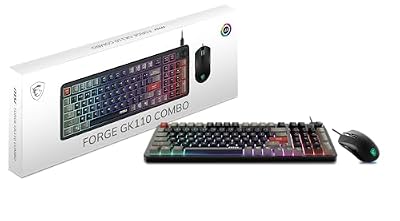
The MSI Forge GK110 Combo US pairs the Forge GK110 membrane keyboard with the GM320 gaming mouse in a compact wired set. The keyboard uses a 97-key US layout, which keeps the number pad in a narrower frame than a standard full-size board, and it includes media hotkeys, a volume wheel, and RGB lighting. Anti-ghosting covers 26 keys. The GM320 mouse uses a 12,800 DPI optical sensor, seven buttons, and switches rated for 20 million clicks, with a symmetrical RGB design. The keyboard weighs 540 grams and the mouse weighs 126 grams, according to MSI.
This set suits players who want a newer, compact wired set with a high-sensitivity mouse and a volume wheel on the keyboard. The 97-key layout frees a little desk space for mouse movement while keeping the keys most players use every day. The volume wheel is useful during play, because it lets you adjust sound without opening a menu or reaching for a separate control.
One point to note is that the keyboard is a membrane board with quiet typing, not a mechanical board, and the compact layout may feel tight if you rely on a full set of navigation keys. The mouse is symmetrical, which suits a range of grips, but players with very large hands may prefer a larger ergonomic shape. Check the exact model, selected variant and seller on Amazon before ordering, because the Forge GK110 is also sold in other regional layouts.
Comparison Table
| Set | Connection | Keyboard | Mouse DPI | Lighting | Best For |
|---|---|---|---|---|---|
| MSI Vigor GK30 Combo White | Wired USB | Full-size, mechanical-feel membrane, floating keycaps | Up to 5000 | 6-zone RGB, up to 10 effects | Brand-name wired set with a clean look |
| Redragon S101-3 PRO | Wired USB | Full-size, membrane, macro keys, wrist rest | 800 to 7200 | 6 keyboard effects, 10 mouse effects | First wired setup with macros |
| Redragon S101M-KS Wireless | 2.4GHz, Bluetooth, wired USB-C | Full-size, membrane, 10 multimedia keys | 800 to 4800 in 5 levels | RGB, 8 patterns | Cable-free desk and moving between computers |
| MSI Forge GK110 Combo US | Wired USB | 97-key US layout, membrane, volume wheel | Up to 12800 | RGB | Compact wired set with a high-sensitivity mouse |
Which One Is Right for You?
If you want a brand-name wired set and you like a light-coloured desk, start with the MSI Vigor GK30 Combo White. Its floating keycaps are easy to clean, its mouse is light, and its lighting can be adjusted through software or from the mouse itself. It is a straightforward choice for a fixed desk where both pieces stay in one place.
If you are building your first gaming setup and you want macro keys and a wrist rest included, the Redragon S101-3 PRO is the practical pick. Its full-size keyboard covers work and play, its mouse reaches 7200 DPI, and its software lets you remap buttons and record macros. It is best for players who sit at one desk and want every control in the box.
If cables bother you, or if you move your setup between rooms, the Redragon S101M-KS Wireless is the set to choose. Its three connection modes and single receiver keep the desk tidy, and its full-size keyboard keeps the number pad and media keys. Plan for charging, and keep the USB-C cable handy if you play with lighting on.
If you want a newer set with a compact layout and a high-sensitivity mouse, the MSI Forge GK110 Combo US is the set to choose. Its 97-key layout saves desk space, its volume wheel is handy during play, and its GM320 mouse reaches 12,800 DPI. It suits players who want a modern wired set without a full-size frame.
In short, choose the Vigor GK30 for a clean brand-name wired desk, the S101-3 PRO for a first setup with macros, the S101M-KS for wireless freedom, and the Forge GK110 for a compact wired set with a high-sensitivity mouse. Any of the four gives you a keyboard and mouse that work together from the first session, so the deciding factor is how you play, how much desk space you have, and whether you want cables or not.
FAQ
Do I need a wireless set for gaming?
No. A wired set is fine for most players, and it never needs charging. Wireless sets suit tidy desks and setups that move between rooms, but they need charging and a receiver. Choose wired if your desk stays in one place, and wireless if you value a cable-free desk or you move the set often.
Is a membrane keyboard good enough for gaming?
Yes, for most players. Membrane keyboards in this budget are quiet, familiar, and comfortable for long sessions, and they handle common gaming key combinations with anti-ghosting. A true mechanical keyboard offers a different key feel and individual switches, but it is not required to play well. If you type a lot or play late at night, a quiet membrane board is often the more comfortable choice.
What DPI should I use on the mouse?
Start in the middle of the range and adjust from there. A lower DPI gives fine control for aiming, while a higher DPI lets you cross the screen quickly. Most players settle on a setting that lets them turn comfortably in their main game without lifting the mouse often. Use the DPI button to try different levels in a practice session before changing it during a match.
Can one set work for both gaming and work?
Yes. Every set here is a full-size or near-full-size keyboard with a number pad or media keys, so each one handles typing, browsing, and school work as well as games. The wireless set is the most flexible for mixed use, because it moves easily between a desktop and a laptop. The wired sets are best if the computer stays in one place and you want the simplest daily setup.
Disclosure: As an Amazon Associate, we may earn from qualifying purchases.