Our Short List of 3


All 4 Picks at a Glance
| Product | Specs | Action |
|---|---|---|
| 1. PNY GeForce RTX 4060 8GB Verto Dual Fan Graphics Card (B0C8Y619R1) | Check price on Amazon | |
| 2. ASRock Radeon RX 7600 Challenger 8GB OC Graphics Card (B0C626FFG2) | Check price on Amazon | |
| 3. MSI GeForce RTX 4060 Ti Ventus 3X 8G OC Graphics Card (B0C5BBWWJP) | Check price on Amazon | |
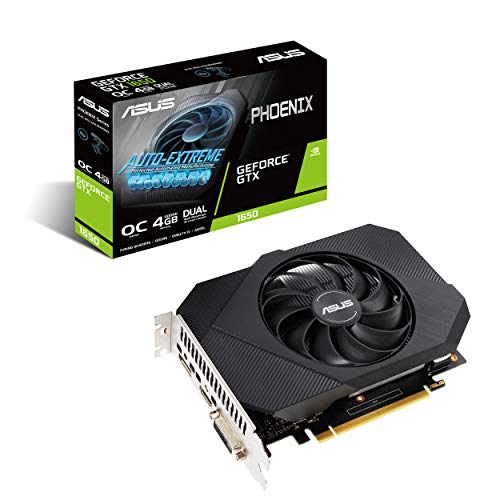 5. ASUS Phoenix GeForce GTX 1650 OC Edition Graphics Card (B08G5CH316) | Check price on Amazon |
🛒 Best Price Today on Amazon
Prime members get fast, free shipping on everything above, plus member-only deals. New members get a 30-day free trial — cancel anytime.
The best GPU for battery life is the card that gives you the frame rate you need while drawing as little power as possible. Most roundups rank graphics cards by raw speed alone, yet a benchmark winner can still be a poor choice for a laptop or a small desktop that stays on all day. Battery life is shaped by the whole system, but the GPU is often the hungriest part of a gaming machine.
A low-power, efficient card can stretch unplugged time, run cooler, and keep fans quiet. A high-power card can do the opposite, even on a desktop or a video.
Quick answer: For most buyers, the PNY GeForce RTX 4060 8GB Verto Dual Fan is the strongest all-round pick. It pairs Ada Lovelace efficiency with 8GB of GDDR6 memory, a 115-watt graphics power rating, and DLSS 3 upscaling, which renders at a lower internal resolution and reconstructs a sharper image. For the lowest power draw here, look at the ASUS Dual GeForce RTX 3050 6GB OC Edition or the ASUS Phoenix GeForce GTX 1650 OC Edition. Both suit light gaming and everyday use rather than demanding titles at high settings.
Quick Picks
| Product | Best For | Key Spec |
|---|---|---|
| PNY GeForce RTX 4060 8GB Verto Dual Fan | Best overall efficiency | 8GB GDDR6, 115-watt graphics power, DLSS 3 |
| ASRock Radeon RX 7600 Challenger 8GB OC | Best AMD efficiency pick | 8GB GDDR6, boost clock up to 2695 MHz, RDNA 3 |
| MSI GeForce RTX 4060 Ti Ventus 3X 8G OC | Best for 1440p on a modest power budget | 8GB GDDR6, Ada Lovelace, triple-fan cooler |
| ASUS Dual GeForce RTX 3050 6GB OC Edition | Lowest power draw for light gaming | 6GB GDDR6, low board power, dual-fan cooler |
| ASUS Phoenix GeForce GTX 1650 OC Edition | Best for compact and low-power builds | 4GB GDDR6, 75-watt board power, single-fan design |
How to Choose the Best GPU for Battery Life
Choosing a GPU for battery life differs from choosing one for maximum frame rate. Weigh power draw at idle and under load, cooling, memory, and real-world use.
Total Graphics Power and Board Power
Total graphics power, often shortened to TGP, is the headline number to check first. It describes how much power the GPU subsystem is designed to draw under load, and board power is a closely related figure for desktop cards. A lower number usually means less heat, less fan noise, and less drain on a battery. Do not compare TGP across brands without context, because NVIDIA and AMD report power differently, and a laptop chip can have a very different TGP from the desktop version with the same name. As a rough guide, the GTX 1650 draws around 75 watts, the RTX 3050 6GB around 70 watts, the RTX 4060 around 115 watts, the RX 7600 around 165 watts, and the RTX 4060 Ti around 160 watts.
Laptop GPUs and Desktop GPUs Are Not the Same
Laptop GPUs are usually soldered to the motherboard or built into a laptop as part of a complete system. They are not sold as separate, swappable cards on Amazon the way desktop graphics cards are. Desktop cards plug into a PCIe slot and can be bought, fitted, and replaced on their own. All five products here are desktop graphics cards, the verifiable graphics cards available on Amazon US, and their efficiency lessons apply directly to the laptop versions of the same chips. A desktop RTX 4060 and a laptop RTX 4060 share the same Ada Lovelace architecture and DLSS features, even though their power limits differ. If you are buying a laptop, compare GPU families here, then check the exact laptop TGP, battery capacity, display, and power modes.
Idle Power, Video Playback, and Everyday Use
A gaming GPU spends most of its life doing very little: showing a desktop, playing a video, or waiting on a menu screen. Idle power therefore matters as much as full-load power. A card that idles efficiently and drops its clocks quickly will save more energy over a day than a card that is efficient only at full load. Modern NVIDIA and AMD cards include low-power states, fan-stop modes, and hardware video decoding, which lets the GPU play video without waking the full 3D pipeline. Look for a fan-stop feature, and use a balanced power mode rather than maximum performance at all times.
DLSS, FSR, and Upscaling
Upscaling lets a GPU do less work for the same on-screen result. NVIDIA DLSS and AMD FSR render a game at a lower internal resolution and then reconstruct a higher-resolution image, so the GPU draws less power and runs cooler. DLSS 3, on the RTX 40 series cards here, adds frame generation in supported games. It can lift smoothness further, although it adds a small amount of latency, so it suits single-player games more than fast competitive play. FSR is available on AMD cards such as the RX 7600. If battery life is your priority, enable upscaling before you raise resolution or detail settings.
Memory Size and Memory Bandwidth
Video memory, or VRAM, affects how well a card handles modern games at higher resolutions. A card with too little memory will stutter or fall back to lower textures. For 1080p gaming, 6GB to 8GB is sensible. The RTX 4060, RX 7600, and RTX 4060 Ti all carry 8GB of GDDR6 memory, which is enough for most 1080p titles at high settings and for many 1440p titles at balanced settings. The RTX 3050 6GB suits lighter games and lower settings, while the GTX 1650, with 4GB of GDDR6 memory, is best for older games, esports titles, and everyday use, not demanding new releases.
Cooling, Fan Noise, and Case Airflow
A hot GPU draws more power and spins its fans faster. A well-cooled GPU holds its clocks at a lower voltage and stays quieter. Dual-fan and triple-fan coolers, such as those on the RTX 4060, RX 7600, and RTX 4060 Ti, spread heat across a larger heatsink. Single-fan cards, such as the GTX 1650 Phoenix, are more compact and suit small cases, but they have less thermal headroom and can run warmer under sustained load. In a laptop, a thin chassis with limited airflow will throttle sooner. Check the length and slot width of a desktop card before you buy it, and make sure your case has enough airflow.
Frame-Rate Caps, Resolution, and Power Modes
The most effective battery-life setting is often the simplest: cap the frame rate. A GPU rendering 200 frames per second in a light game works far harder than needed if your display only shows 60 or 120 frames per second. Capping the frame rate to match the display can cut power draw sharply. Playing at 1080p instead of 1440p also reduces the work in every frame. In a laptop, use the balanced power plan for everyday use, and enable hybrid graphics if available, so integrated graphics handle light tasks and the dedicated GPU runs only for games.
The Best GPU for Battery Life Reviewed
The five cards below are all desktop graphics cards, ranked by power efficiency. The best pick depends on the games you play, the resolution you use, and how much power you are willing to spend.
1. PNY GeForce RTX 4060 8GB Verto Dual Fan Graphics Card (B0C8Y619R1)
The PNY GeForce RTX 4060 8GB Verto Dual Fan is the best overall pick for battery life and efficiency. It is built on NVIDIA Ada Lovelace architecture, carries 8GB of GDDR6 memory on a 128-bit interface, and uses a PCIe 4.0 connection with HDMI and DisplayPort outputs. Its graphics power rating is around 115 watts, modest for a card that handles 1080p gaming comfortably and can stretch to 1440p in lighter titles. Ada Lovelace is more efficient than the previous Ampere generation, and DLSS 3 helps the card do more with less power. The dual-fan Verto cooler is compact enough for many smaller cases and keeps the card quiet at light loads. Ray tracing is supported, although it raises power draw. This card suits a buyer who wants a modern, efficient GPU for 1080p gaming and everyday use. It is less suited to demanding titles at 1440p with maximum detail, or to heavy creative work needing more than 8GB of memory.
2. ASRock Radeon RX 7600 Challenger 8GB OC Graphics Card (B0C626FFG2)
The ASRock Radeon RX 7600 Challenger 8GB OC is the best AMD pick in this roundup. It uses AMD RDNA 3 architecture, carries 8GB of GDDR6 memory, and lists a boost clock of up to 2695 MHz, with a game clock of 2280 MHz and a base clock of 1770 MHz. It uses a PCIe 4.0 interface, a single 8-pin power connector, three DisplayPort 1.4 outputs, and one HDMI 2.1 output. Its dual-fan design includes 0dB silent cooling, so the fans can stop at low loads. The RX 7600 is a strong 1080p card for esports titles and many modern games at high settings, and FSR upscaling helps it stretch further. Its board power is around 165 watts, higher than the RTX 4060, so it is less efficient in absolute terms. This card suits a buyer who prefers AMD and plays at 1080p. It is less suited to a buyer who wants the lowest possible power draw, or the best ray tracing performance, where NVIDIA cards here have an edge.
3. MSI GeForce RTX 4060 Ti Ventus 3X 8G OC Graphics Card (B0C5BBWWJP)
The MSI GeForce RTX 4060 Ti Ventus 3X 8G OC is the most capable card here for higher-resolution play on a still-modest power budget. It is built on the same Ada Lovelace architecture as the RTX 4060, carries 8GB of GDDR6 memory, and uses a triple-fan Ventus cooler with TORX fans. Its extreme clock is listed at 2580 MHz, and it uses a PCIe 4.0 interface. Its graphics power rating is around 160 watts. That higher rating brings a clear gain in frame rate, especially at 1440p, where the RTX 4060 can start to feel limited. DLSS 3 is included, and the triple-fan cooler gives the card more thermal headroom. The trade-off is direct: the RTX 4060 Ti uses more power than the RTX 4060 in the same game at the same settings. This card suits a buyer who plays at 1440p and will spend more power for smoother play. It is less suited to a buyer who wants the longest unplugged time or the lowest heat output.
4. ASUS Dual GeForce RTX 3050 6GB OC Edition Graphics Card (B0CVCG2VPK)
The ASUS Dual GeForce RTX 3050 6GB OC Edition is the lowest-power modern NVIDIA card in this roundup. It carries 6GB of GDDR6 memory, uses a PCIe 4.0 interface, and includes HDMI 2.1 and DisplayPort 1.4a outputs in a two-slot design. Its dual-fan cooler uses Axial-tech fans and 0dB technology, so the fans can stop when the card is idle. Its board power is around 70 watts, far below the RTX 4060 and the RX 7600. That low draw is the point of this card. It is not the fastest card here, and its 6GB of memory limits it in demanding new titles, but it suits light gaming, esports titles, older games, and everyday use. It supports ray tracing and DLSS, although both should be used at modest settings. This card suits a buyer who values low power draw above maximum frame rate. It is less suited to demanding titles at high settings, or to a buyer who needs 8GB of memory or strong 1440p performance.
5. ASUS Phoenix GeForce GTX 1650 OC Edition Graphics Card (B08G5CH316)
The ASUS Phoenix GeForce GTX 1650 OC Edition is the most compact and lowest-draw card in this roundup for very light use. It carries 4GB of GDDR6 memory, uses a PCIe 3.0 interface, and includes HDMI, DisplayPort, and DVI-D outputs. Its single Axial-tech fan is designed for small cases, and its board power is around 75 watts, with many configurations drawing power from the PCIe slot alone. The GTX 1650 is an older Turing-generation card, and it shows its age in demanding games. It does not support DLSS, and its 4GB of memory is the most limited in this guide. Its strength is simplicity for light workloads: esports titles, older games, video playback, and everyday desktop use without the heat of a larger card. This card suits a buyer with a small case or a modest power supply. It is less suited to new releases at high settings, or to a buyer who needs ray tracing, DLSS, or comfortable 1440p play.
What to Check Before You Buy
Before you buy, check the details that determine whether the card will save power in your machine. Confirm the TGP or board power, the power connector type, and the recommended power supply capacity. A card needing a single 8-pin connector, such as the RX 7600, differs from a card drawing most of its power from the PCIe slot, such as many GTX 1650 configurations. Measure the length, height, and slot width of the card against the space in your case, and leave room for airflow. Make sure the card has the HDMI or DisplayPort version your monitor needs. If you are buying a laptop, look for the exact GPU TGP, the battery capacity in watt-hours, the display resolution and refresh rate, and whether the laptop supports hybrid graphics. After you install the card, enable a balanced power mode, cap the frame rate to match your display, and enable DLSS or FSR in supported games.
Frequently Asked Questions
Does a more powerful GPU always reduce battery life?
Not always, but it often does. A more powerful GPU can finish a frame faster and then drop to a low-power state, which can be efficient in short bursts. In sustained gaming, a higher-power card will usually draw more energy, produce more heat, and shorten unplugged time. The best balance is a card fast enough for your games at your resolution, without power headroom you never use.
Can a desktop GPU improve laptop battery life?
A desktop GPU cannot be fitted into most laptops, because laptop GPUs are built into the system. The desktop cards here are useful for comparing GPU families, architectures, and power ratings. If you are buying a laptop, look for the laptop version of an efficient GPU, such as a laptop RTX 4060 with a modest TGP, paired with a large battery and a power-saving display mode.
Is the RTX 4060 good for battery life?
The RTX 4060 is a good choice for battery life among current gaming GPUs. Its Ada Lovelace architecture is efficient, its graphics power rating is around 115 watts, and DLSS 3 helps it deliver smooth 1080p gaming without running at full load all the time. In a laptop, the exact TGP matters, so check the configuration. In a desktop, its modest draw means less heat and quieter operation than larger cards.
Should I choose an NVIDIA or AMD GPU for efficiency?
Both brands make efficient cards, and the right choice depends on the specific model and power rating. Here, the NVIDIA RTX 4060 draws less power than the AMD RX 7600 at full load, while the RX 7600 is competitive at 1080p. If you value DLSS and ray tracing, NVIDIA has an edge. If you prefer AMD drivers and display features, the RX 7600 is a capable alternative. Compare TGP, memory, and the games you play, rather than the brand alone.
How can I make any GPU last longer on battery?
Cap the frame rate to match your display, lower the resolution or detail settings in demanding games, enable DLSS or FSR, and use a balanced power plan. Enable hybrid graphics on a laptop so the dedicated GPU stays off during light tasks. Update the graphics driver, and close background apps that use the GPU.
Bottom Line
The best GPU for battery life is not the fastest card you can buy. It is the card that meets your gaming needs with the least power, heat, and noise. For most buyers, the PNY GeForce RTX 4060 8GB Verto Dual Fan is the best balance here, with modern efficiency, 8GB of memory, and DLSS 3 support in a 115-watt package. The ASRock Radeon RX 7600 Challenger is the best AMD alternative for 1080p play, the MSI GeForce RTX 4060 Ti Ventus 3X is the best step up for 1440p, and the ASUS Dual GeForce RTX 3050 6GB and ASUS Phoenix GeForce GTX 1650 are the best choices when low power draw and a compact fit matter most. All five cards here are desktop graphics cards. Laptop GPUs are sold as part of a complete laptop, not as separate cards, so use the power ratings here to compare laptop configurations, and check the exact TGP, battery capacity, and display of the laptop you choose.
Disclosure: As an Amazon Associate, we may earn from qualifying purchases.