🛒 Best Price Today on Amazon
Prime members get fast, free shipping on everything above, plus member-only deals. New members get a 30-day free trial — cancel anytime.
Call of Duty gunfights are decided in moments that punish a slow mouse: the flick onto a player who slides around a corner, the steady ADS tracking while a target strafes across a rooftop, and the click that has to land before an opponent finishes the same motion. Weight decides how fast you can stop a swipe on target, click latency decides whether your first shot registers when you expect it to, and sensor behaviour at your chosen sensitivity decides whether small corrections stay smooth instead of jittering. Those three decisions matter far more here than lighting or extra software features.


This guide is for multiplayer and Warzone players on PC who want a mouse shaped around those fast fights, whether you play fingertip flicks on low sensitivity or palm-grip tracking on a higher setting. Every model below was chosen from the name and specifications stated on its own Amazon product page, and the specs lists copy only what that listing states for that exact model.
Quick Picks
As an Amazon Associate we earn from qualifying purchases.
| Product | Best for | Key spec from title |
|---|---|---|
| Razer Viper V3 Pro | Lowest weight for repeated flick shots | 54g Lightweight – 8K Polling |
| Logitech G Pro X Superlight 2 | Balanced shape for mixed multiplayer and Warzone | 60g Pro-Grade with 44k DPI Sensor |
| Logitech G502 X Plus | Extra controls for loadout and ping inputs | 13 Buttons, Infinite Scroll Toggle |
| Razer Basilisk V3 Pro | Ergonomic grip with many programmable controls | 13 Programmable Controls, 30K DPI Optical Sensor |
How to Choose
Weight and how fast you can stop a swipe
Weight is the first filter for Call of Duty because most fights start with a fast swipe and end with a hard stop on a moving target. A lighter mouse needs less force to start and less force to brake, which helps when you snap between two players crossing a doorway in multiplayer. Heavier ergonomic models feel steadier during long ADS tracking in Warzone, where you hold an angle and make small corrections instead of constant flicks. Match the weight to your dominant fight type rather than chasing the lowest number on a spec sheet.
Polling rate and click response
Polling rate describes how often the mouse reports its position, and the listings here range from standard wireless reporting up to the 8K polling named in the Viper V3 Pro and Superlight 2 titles. Higher reporting can smooth fast cursor movement on high-refresh monitors, but it also tends to shorten battery life, so treat it as a setting to test at your monitor refresh rate rather than a number to maximise blindly. Click switch type matters alongside it: optical and hybrid switches, both named on these listings, are built around fast, consistent actuation for repeated firing inputs.
Sensor behaviour at your sensitivity
Call of Duty players split between low sensitivity with wide arm movements and higher sensitivity with wrist movement, and the sensor has to stay accurate across both styles. Look at the sensor name and maximum sensitivity stated on the listing, such as the HERO 2 sensor on the Superlight 2 or the Focus Pro 35K Optical Sensor Gen-2 described for the Viper V3 Pro. Maximum DPI figures far exceed what anyone uses in game; what matters is clean tracking without smoothing at the few hundred to few thousand DPI most players actually set.
Shape, grip and button layout
A symmetrical shell suits claw and fingertip grips and lets either style drive quick direction changes, while a sculpted right-handed shell supports a palm grip through long Warzone sessions. Count the buttons you will genuinely map: a lean layout keeps weight down for pure gunfight play, whereas extra programmable controls help if you want melee, ping, or loadout actions under your thumb instead of on the keyboard. Check the button count and hand orientation stated on the listing, and be honest about your grip before choosing between the two shapes here.
The 4 Best Options
Razer Viper V3 Pro
Fingertip and claw players who live on flick shots get the clearest case here. At 54 grams in black, this is the lightest mouse in the guide, and its symmetrical shape is built for quick lifts and re-centres between targets in close multiplayer fights. The listing pairs that shape with 8K polling through the included HyperPolling Wireless Dongle and optical switches, which suits players who run a high-refresh monitor and want every part of the input chain kept fast. Warzone players who mostly track at range will use less of that flick advantage, but the shape still works for mixed play.
Specs
- Weight: 54 grams for the black version, stated as 54 g in the listing title and item details
- Sensor: Focus Pro 35K Optical Sensor Gen-2, with 35,000 maximum DPI stated in the comparison table
- Polling: up to 8000 Hz wireless polling with the included Razer HyperPolling Wireless Dongle
- Switches: Gen3 Optical Switches, listed as Optical Switches Gen-3
- Buttons: 8 Programmable Buttons in the title; the comparison table lists 6 programmable buttons
- Battery: 95 Hr Battery in the title; up to 95 hours at 1000 Hz in the comparison table
- Connectivity: Wireless (2.4GHz) and Wired, per the comparison table
Best for: fingertip and claw players who want the lightest flick-shot mouse in this guide.
Watch out for: battery life drops sharply at the highest polling settings, and the dongle needs a clear desk position near the mousepad for the fastest connection.
ASIN: B0CW25XR5R
Logitech G Pro X Superlight 2
This is the balanced pick for players who split time between multiplayer and Warzone and want one safe, symmetrical shape rather than an extreme in either direction. The listing describes a 60g pro-grade mouse with a low-profile symmetrical shape that enables fast movement and stable control, language that maps well onto mixed play: quick turns in tight maps, then settled tracking on longer sightlines. LIGHTFORCE hybrid switches and the HERO 2 sensor headline the spec sheet, and USB-C charging keeps the cable situation simple between sessions.
Specs
- Weight: 60g, stated in the title and as 60 Grams in item details
- Sensor: 44k DPI Sensor in the title; HERO 2 gaming sensor in the product description
- Report rate: 8kHz Report Rate in the title
- Switches: LIGHTFORCE hybrid switches, per the product description
- Buttons: 5 Programmable Buttons in the title; Button Quantity 5 in the spec section
- Battery: Battery Average Life 95 Hours in the spec section
- Charging: USB-C Charging, with USB A to C charging and data cable listed in the box contents
- Connectivity: Radio Frequency and USB, per the spec section
Best for: players who want one proven symmetrical shape covering both multiplayer and Warzone.
Watch out for: only five buttons leaves little room for extra mapped actions beyond core gunfight inputs.
ASIN: B09NBWL8J5
Logitech G502 X Plus
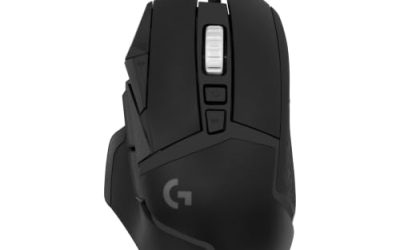
Choose this one when your Call of Duty inputs go beyond aiming and firing. The title lists 13 buttons and an infinite scroll toggle, and the description confirms 13 programmable controls with side buttons for easy access, which gives you room for melee, ping, equipment, or push-to-talk without moving your keyboard hand. The shape is a larger ergonomic design rather than a flick-first shell, and the listed weight of 3.68 ounces reflects that. LIGHTSPEED wireless, LIGHTFORCE switches, and the HERO 25K sensor keep the core tracking and clicking hardware in the same family as the lighter Logitech pick above.
Specs
- Sensor: HERO 25K Sensor in the title; HERO 25K sub-micron sensor in the product description
- Sensitivity: Mouse Maximum Sensitivity 25600 Dots per Inch in the spec section
- Buttons: 13 Buttons in the title; 13 programmable controls in the product description
- Switches: LIGHTFORCE hybrid optical-mechanical switches on primary buttons
- Battery: under 130 hr Battery Life in the title; Battery Average Life 140 Hours in the spec section
- Lighting: LIGHTSYNC RGB with 8 LED lighting, per the product description
- Charging: USB-C, and PowerPlay Wireless Charging Capable in the title
- Weight: Item Weight 3.68 ounces in item details
Best for: players who map several extra actions to the mouse and prefer a fuller ergonomic grip.
Watch out for: the heavier, taller shape works against the fastest repeated flicks, so low-sensitivity arm aimers may find it tiring.
ASIN: B092CB69Q4
Razer Basilisk V3 Pro
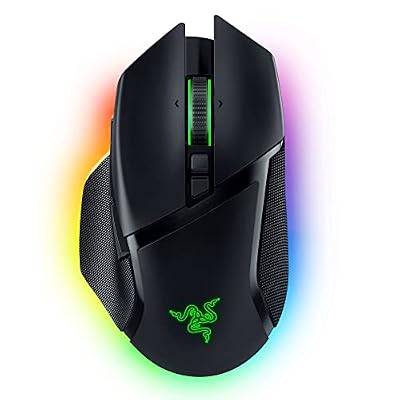
Ergonomic players who still want a serious FPS specification should look here. The listing title names a 30K DPI optical sensor, Gen-3 optical switches, a HyperScroll tilt wheel, and 13 programmable controls across 3 connection modes, so the mouse covers both gunfight inputs and the extra bindings Warzone players often want for vehicles, pings, and equipment. The item details give an average battery life of 90 hours and a weight of 3.84 ounces, which places it near the G502 X Plus as a fuller, heavier option rather than a lightweight flick mouse.
Specs
- Sensor: 30K DPI Optical Sensor in the title
- Switches: Gen-3 Optical Switches, listed as Fast Optical Switches Gen-3 in the title
- Controls: 13 Programmable Controls in the title
- Wheel: HyperScroll Tilt Wheel in the title
- Lighting: 13-Zone Chroma RGB in the title
- Connection modes: 3 Connection Modes in the title
- Battery: Average Battery Life 90 Hours in the item details table
- Weight: Item Weight 3.84 ounces in the item details table
Best for: palm-grip players who want an ergonomic shell without giving up extra programmable controls.
Watch out for: at 3.84 ounces it is one of the heavier options here, and the tilt wheel features matter little if you only play close-range multiplayer.
ASIN: B0B6Y3XYFG
Which One Fits Your Situation
You play close-quarters multiplayer on a fingertip grip
Pick the Razer Viper V3 Pro. Its 54-gram weight and symmetrical shell are built for the constant snap, stop, and re-centre rhythm of small maps, and the 8K polling option keeps fast swipes smooth on a high-refresh monitor. The Superlight 2 is the fallback if you prefer a slightly larger symmetrical shape.
You split evenings between multiplayer and Warzone
Take the Logitech G Pro X Superlight 2. The 60g symmetrical shape handles quick multiplayer turns and still settles for Warzone tracking, and the 95-hour battery figure in its spec section means charging rarely interrupts a run of sessions. It is the least specialised and most forgiving choice in the guide.
You map melee, ping and equipment to your mouse hand
The Logitech G502 X Plus fits this habit best, with 13 programmable controls confirmed in its listing description and side buttons placed for quick access. If you prefer Razer software and a tilt wheel instead, the Basilisk V3 Pro offers the same control count in a different ergonomic shape.
Your hand aches with small, flat mice during long sessions
Choose between the two ergonomic models. The Basilisk V3 Pro gives you 13 programmable controls and a 90-hour average battery life in a sculpted shell, while the G502 X Plus adds an infinite scroll toggle and PowerPlay charging support. Either gives your palm full support that the two light symmetrical mice do not.
Common Mistakes
- Buying the lightest mouse available even though you palm-grip and mostly track targets in Warzone, then fighting a shape that never lets your hand relax during long holds.
- Turning polling up to the maximum setting on day one and blaming the mouse for short battery life, when the listing figures for battery are quoted at standard polling rates.
- Judging a sensor by its maximum DPI number alone, even though in-game sensitivity sits far below that ceiling and tracking quality at your actual setting is what matters.
- Mapping every side button to a game action and then hitting the wrong one mid-fight; start with one or two extra bindings and add more only when the first ones feel automatic.
- Ignoring dongle placement on wireless models, then mistaking a weak connection for sensor problems when the receiver sits behind a metal PC case or beside other wireless gear.
Frequently Asked Questions
Does a lighter mouse always improve aim in Call of Duty?
No. A lighter mouse helps fast flicks and hard stops, which is why the 54-gram and 60-gram models lead this guide, but tracking fights reward a shape your hand can hold steadily. If you mostly hold angles in Warzone, an ergonomic model you can grip without tension can serve you better than the lightest shell.
Is 8K polling worth using for Call of Duty?
It can smooth fast cursor movement on a high-refresh monitor, and both Razer and Logitech listings here offer 8K reporting options. The trade-off is battery life, which falls as polling rises. A sensible approach is to try the higher setting, check whether your play feels different, and keep it only if the improvement is real for you.
How many buttons do I actually need for Call of Duty?
Core play needs only the primary clicks, wheel, and two side buttons for actions like melee and equipment. Players who want ping, push-to-talk, or loadout inputs on the mouse benefit from the 13-control models in this guide. Extra buttons only help when each one has a single, practised job.
Can I play wired while a wireless mouse charges?
Yes for the models whose listings name a wired mode. The Viper V3 Pro listing lists wireless and wired connectivity, and the Superlight 2 box contents include a USB A to C charging and data cable. Playing while plugged in is a practical fallback during long sessions rather than a compromise to avoid.