🛒 Best Price Today on Amazon
Prime members get fast, free shipping on everything above, plus member-only deals. New members get a 30-day free trial — cancel anytime.
A white gaming setup is not a single kit you buy in one box — it is the white colourway of each gear slot, a keyboard, mouse, headset, desk mat and controller, chosen piece by piece so the shades and shapes sit well together. The five picks below are the strongest white option in each slot, and every one of them is sold on Amazon US. Start with the pieces your hands touch most, then fill in the rest as your budget allows.
These picks serve three groups: builders putting together a new all-white desk from scratch, streamers whose setup sits on camera for hours at a time, and minimalists converting an existing mixed-colour setup one piece at a time. Every product was chosen from the names and specs on its Amazon product page, with the white colourway confirmed as the actual variant listed.
Quick Picks
As an Amazon Associate we earn from qualifying purchases
| Product | Best for | Key spec from title |
|---|---|---|
| Razer Huntsman Mini 60 Percent Gaming Keyboard (Clicky Optical Switches) — Mercury White | Small white desks that need maximum mouse room | 60 Percent layout with clicky optical switches and Rapid Trigger |
| Logitech G PRO X SUPERLIGHT Wireless Gaming Mouse — White | Competitive players who want the lightest white mouse | Under 63 g with HERO 25K sensor and LIGHTSPEED wireless |
| Logitech G733 LIGHTSPEED Wireless Gaming Headset — White | Streamers who wear a headset on camera all session | LIGHTSPEED wireless with suspension headband and Blue VO!CE mic |
| SteelSeries QcK Heavy Gaming Mousepad — XXL — White | Desks that need one mat under everything | 900 x 400 x 4 mm desk-covering mat with silicone rubber base |
| Xbox Wireless Gaming Controller (2025) — Robot White | Couch and PC players who swap between screens | Hybrid D-pad with Share button for Xbox, PC and mobile |
How to Choose
Match the Shade Before You Match the Brand
White is not one colour across brands. Razer’s Mercury White leans cool, Logitech’s white and Microsoft’s Robot White sit closer to neutral, and a cloth mat reads brighter than any plastic shell beside it. Never assume two products called white will match exactly, because on a desk under warm room light the difference shows. Check the product photos on each listing rather than trusting the colour name, and where a brand sells several pieces you like, buying two slots from that brand is the simplest way to keep the tones close.
Start With the High-Touch Pieces
Your keyboard, mouse and desk mat cover most of the visible desk surface and collect most of the wear, so they define both the look of a white setup and its cleaning burden. Buy those three first, in the shades you like best, and let accessories follow their lead. A controller or headset bought later can be matched against pieces already on your desk, while the reverse order often strands you with an odd tone that nothing else lines up with. High-touch pieces also decide how much weekly wiping the setup demands.
Decide Wireless Versus Wired Slot by Slot
White cables are genuinely scarce, and a black cable snaking across a white mat undoes the whole look, so wireless gear keeps a white desk visually clean. The trade-off is charging: a wireless mouse, headset and keyboard each need a cable appearing on the desk on a schedule, and a dead battery mid-session is its own kind of mess. Wired pieces never need charging and usually cost less, but plan the cable route before you buy. Many builders go wireless for the mouse and headset, where cables drag or tangle most, and stay wired at the keyboard.
Plan for the Maintenance Reality
White shows everything, and the soft parts of a setup show it first. Cloth mats pick up dust, skin oil and drink marks within weeks, fabric headbands and straps grey at the contact points, and light keycaps telegraph every crumb. Hard plastic shells, by contrast, wipe clean with a damp cloth in seconds. Before you commit, decide honestly whether you will run a small weekly routine — shaking out and washing the mat, wiping shells, brushing the keyboard — because a white setup that skips cleaning looks tired faster than a black one ever does.
The 5 Best Options
Razer Huntsman Mini 60 Percent Gaming Keyboard (Clicky Optical Switches) — Mercury White

This is the keyboard for a white desk where space matters and speed matters more. The 60 Percent layout strips the board down to the main key cluster, leaving a wide-open area for mouse movement, while the clicky optical switches actuate with a crisp, audible snap that suits fast-paced play. Rapid Trigger and Snap Tap support quick directional changes in shooters, the doubleshot PBT keycaps resist the shine that makes light-coloured boards look worn, and Chroma RGB glows cleanly through the Mercury White frame. It anchors the input side of a compact white build.
Specs
- 60 Percent form factor
- Razer Clicky Optical switches
- Rapid Trigger mode
- Snap Tap
- Chroma RGB lighting
- Doubleshot PBT keycaps
- Onboard memory
Best for: players building a compact white desk who play fast shooters and want the smallest footprint.
Watch out for: the 60 Percent layout has no function row, arrow keys or numpad; clicky switches are loud in shared rooms.
ASIN: B0FKWGQDXS
Logitech G PRO X SUPERLIGHT Wireless Gaming Mouse — White

For the mouse slot, this is the pick competitive players reach for when every gram counts. At under 63 g it is one of the lightest wireless gaming mice sold, and the HERO 25K sensor tracks at up to 25,600 DPI, so fast flicks stay accurate without the cable drag that would also spoil a clean white desk. LIGHTSPEED wireless keeps the connection responsive, the PTFE feet glide smoothly across a cloth mat, and the plain white shell keeps the design quiet and minimal. It suits players who want performance first and decoration nowhere.
Specs
- Under 63 g
- HERO 25K sensor, 25,600 DPI max
- LIGHTSPEED wireless via USB receiver
- 5 programmable buttons
- PTFE feet
- PC/Mac
Best for: competitive players who want the lightest, cleanest white mouse for fast-paced games.
Watch out for: micro-USB charging (first-generation model); no Bluetooth; right-handed symmetrical shape only.
ASIN: B087LP6F4Y
Logitech G733 LIGHTSPEED Wireless Gaming Headset — White
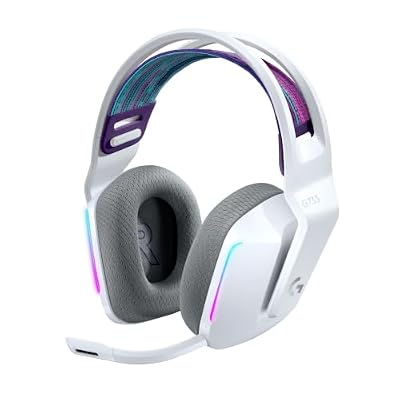
The G733 fills the headset slot for players who sit on camera or simply dislike heavy headsets. Its suspension headband spreads the weight across a soft strap instead of a rigid band, and at 278 g the whole headset stays comfortable through long sessions. LIGHTSPEED wireless connects through a USB receiver, the detachable microphone uses Blue VO!CE technology for clearer voice pickup, and PRO-G drivers handle game audio. The white finish and LIGHTSYNC RGB lighting make it the most visibly styled piece in this line-up, which streamers tend to count as a feature rather than a drawback.
Specs
- LIGHTSPEED wireless via USB receiver
- Suspension headband
- LIGHTSYNC RGB
- Blue VO!CE microphone technology
- PRO-G audio drivers
- Detachable mic
- PC / PS5 / PS4 / Switch compatible
- 278 g
Best for: streamers and long-session players who want a light white headset with a clear detachable mic.
Watch out for: no Bluetooth and no 3.5 mm wired fallback for Xbox controllers; the RGB lighting shortens battery runtime.
ASIN: B08141GQQG
SteelSeries QcK Heavy Gaming Mousepad — XXL — White

A desk mat is the background the rest of a white setup sits on, and this XXL QcK Heavy covers it in one piece at 900 x 400 mm, wide enough for both keyboard and mouse with room to spare. The Heavy variant is 4 mm thick, which cushions the wrists and levels out minor desk imperfections, while the micro-woven cloth surface is tuned for gaming sensors and the silicone rubber base keeps the whole mat planted. Because it is cloth and white, it is also the piece that will ask the most of your cleaning routine.
Specs
- 900 x 400 x 4 mm XXL size
- Thicker Heavy variant
- Non-slip silicone rubber base
- Micro-woven cloth surface tuned for gaming sensors
Best for: desks that need one continuous white surface under the keyboard and mouse.
Watch out for: white cloth shows dirt and drink marks fast — it is the highest-maintenance item in a white setup; the 4 mm thickness may catch a keyboard edge if overlapped.
ASIN: B0GSF3GBC6
Xbox Wireless Gaming Controller (2025) — Robot White

For gamepad play, the standard Xbox controller in Robot White is the safest white pick because it pairs with almost everything: Xbox Series X|S and Xbox One consoles, Windows PCs, and Android and iOS devices over Bluetooth, with Xbox Wireless on top. The hybrid D-pad handles fighting games and menu navigation more precisely than the older cross design, textured grip on the triggers, bumpers and back case keeps it secure, and the Share button captures clips and screenshots in one press. A USB-C port covers wired play and a 3.5 mm jack takes a chat headset.
Specs
- Hybrid D-pad
- Textured grip on triggers, bumpers and back case
- Share button
- USB-C port for wired play
- 3.5 mm headset jack
- Bluetooth + Xbox Wireless
- AA batteries included, up to 40 hours per set
- Works with Xbox Series X|S, Xbox One, Windows PC, Android, iOS
Best for: players who move between console, PC and mobile and want one white controller for all of them.
Watch out for: AA batteries (rechargeable pack sold separately); the white shell shows scuffs.
ASIN: B0F1HTGDTL
Which One Fits Your Situation
A First White Build Starting From an Empty Desk
Begin with the SteelSeries QcK Heavy mat to set the background tone, then add the Razer Huntsman Mini and the Logitech G PRO X SUPERLIGHT, since the keyboard and mouse are what you see and touch constantly. The headset and controller can wait a month without the desk looking unfinished, and buying the three core pieces together makes shade comparison far easier.
A Streamer Whose Setup Appears on Camera
Prioritise the Logitech G733 headset, because your face and headset fill the frame, and its white finish and RGB read clearly on stream. Pair it with the Huntsman Mini, whose Chroma lighting shows well in a dim room, and keep the mat fresh — a marked-up white mat is far more visible on camera than it is in person.
An Existing Mixed-Colour Setup Converting Piece by Piece
Swap the mat first: one white XXL surface changes the whole desk for the smallest outlay and sets the shade target for everything after it. Replace the mouse next, then the keyboard, checking each new piece against the mat in your own room light. The controller and headset can convert last, since both spend much of their time off the desk anyway.
A Shared Room Where the Setup Must Stay Quiet and Tidy
Choose the wireless pieces — the SUPERLIGHT mouse and G733 headset — so no cables cross the desk, and store the Xbox controller in a drawer between sessions. One caution: the Huntsman Mini’s clicky switches are genuinely loud, so if typing noise carries to a roommate or family member, type-heavy hours may need the controller or a quieter board instead.
Common Mistakes
- Assuming every product labelled white is the same shade, then discovering cool and neutral whites side by side on the desk.
- Buying the full set at once without checking product photos, instead of anchoring the shade with the mat and keyboard first.
- Choosing a white cloth mat and then skipping the cleaning routine, so it greys and marks within the first month.
- Forgetting that white cables are hard to find, and ending up with black cables crossing a white desk.
- Picking a clicky keyboard for a shared room without considering how far the sound carries.
Frequently Asked Questions
Will all these white products match each other exactly?
No, and it is better to expect that from the start. Razer’s Mercury White is a cool white, Logitech’s white and the Xbox Robot White are neutral whites, and the SteelSeries cloth reads brighter than any plastic shell. In practice the pieces sit close enough to look like one setup, especially under the same lighting, but they are not a factory-matched set.
How often does a white setup need cleaning?
Plan on a light weekly routine: wipe the hard shells, brush crumbs from the keyboard, and check the mat for marks. The white cloth mat needs the most attention and benefits from a proper wash every few weeks depending on use, since it shows dirt and drink marks faster than any other piece. Headset straps and fabric parts also grey gradually at contact points.
Is wireless or wired better for a white setup?
Wireless usually looks better because white cables are scarce and a black cable across a white mat breaks the effect, but wireless gear needs regular charging, which brings a cable onto the desk anyway. A common compromise is a wireless mouse and headset, where cable drag and tangling are worst, with a wired keyboard whose cable can be routed once and left alone.
Can I build a white setup gradually instead of all at once?
Yes, and it is often the smarter route. Start with the desk mat and the piece you use most, usually the mouse or keyboard, and match each later purchase against them in your own lighting. Shades are easier to judge against gear you already own than against photos, and spreading the cost also lets you confirm you can keep up with the cleaning before committing fully.