🛒 Best Price Today on Amazon
Prime members get fast, free shipping on everything above, plus member-only deals. New members get a 30-day free trial — cancel anytime.
Tracking is the most unforgiving skill in shooters. Flicking forgives a sloppy sensor because the crosshair only has to land once, but tracking asks the mouse to follow a moving target smoothly for a full second or more, and every stutter or drift shows up as a missed shot. The real decision is not which mouse advertises the biggest DPI number. It is which mouse holds a steady line at your sensitivity, keeps the cursor on a strafing target, and lets your hand make micro-corrections without fighting the shape.
This guide is for players who track targets in Apex, Overwatch and Valorant, for low-sensitivity arm aimers who drag the mouse across a large pad, for players whose aim feels fine in flicks but falls apart on moving targets, and for anyone who wants to know which sensor and shape traits matter for tracking. Every product below was chosen from its Amazon product title and listed specifications, so sensor, weight, battery life and polling figures come from the listing.
Quick Picks
As an Amazon Associate we earn from qualifying purchases.
| Product | Best for | Key spec from title |
|---|---|---|
| Razer Viper V3 Pro | Fast tracking with a featherweight shell | 55g lightweight, 35K DPI optical sensor, 8K polling |
| Logitech G PRO X Superlight 2 | Steady tracking in any grip | 60g, 44k DPI sensor, 8kHz report rate |
| Razer DeathAdder V3 Pro | Palm-grip tracking over long sessions | 63g ultra lightweight, Focus Pro 30K optical sensor |
| BenQ ZOWIE EC2-CW | Driverless tracking with a classic ergonomic shape | Wireless ergonomic, enhanced receiver, 24-step scroll wheel |
How to Choose
Look for a Sensor With No Acceleration or Smoothing
A tracking sensor must report exactly what your hand does, with no help and no filtering. Acceleration changes the cursor speed depending on how fast you move, smoothing averages your input and adds delay, and either one breaks the muscle memory that tracking depends on. Modern flagship optical sensors from Razer, Logitech and PixArt are designed to track one-to-one across a wide speed range, so check the listing for the sensor name and the maximum tracking speed. Then test slow diagonal movement on your own pad, because a sensor that feels fine in fast flicks can still wobble on slow drags.
Set Your Sensitivity Around Your Pad, Not the Box
Tracking improves when your sensitivity lets you follow a target without lifting the mouse every half second. Low sensitivity with a large pad gives your arm room to make smooth corrections, while high sensitivity forces the wrist to do work it cannot do steadily. Pick a DPI of 400 or 800, set your in-game sensitivity so a comfortable swipe covers the distance you need, and leave it alone for a week. Changing sensitivity every session resets the muscle memory that tracking is built on, so stability matters more than finding a perfect number.
Choose a Shape That Stays Planted
A mouse that rocks or shifts in your hand during a long drag will ruin a track no matter how good the sensor is. Palm grip players need a shell with a right-handed slope and a thumb rest that locks the hand in place, while claw players need a rear hump they can anchor against. The shell should feel the same at the start of a drag as at the end, with no edge digging into a finger. Weight matters too: a very light mouse moves easily but can feel twitchy, while a slightly heavier mouse damps small tremors during slow tracking.
Check Polling Rate and Wireless Stability
Polling rate decides how often the mouse reports its position, and a higher rate gives the game fresher data during fast tracking. A 1,000 Hz mouse reports every millisecond, which is enough for most players, while 4,000 and 8,000 Hz mice report more often and feel smoother on high refresh rate monitors. Wireless stability matters just as much: a dropped packet during a track looks like a sudden jump. Keep the receiver close to the mouse, and check whether the listing includes a high polling dongle or sells it separately.
The 4 Best Options
Razer Viper V3 Pro

The Viper V3 Pro is the tracking pick for players who want the sensor to disappear. Its Focus Pro 35K sensor follows fast strafes and slow drags without jitter, the 55 gram shell moves with almost no resistance, and the 8,000 Hz wireless polling keeps the cursor updating smoothly on high refresh rate monitors. The symmetrical shape suits claw and fingertip grips that steer with the fingers, and the low weight makes it easy to reset after a wide tracking swipe. Players who track in Apex and Overwatch will feel the difference within a few matches.
Specs
- Focus Pro 35K Optical Sensor Gen-2
- Up to 35,000 DPI
- Up to 8,000 Hz polling with included HyperPolling Wireless Dongle
- 54 g black, 55 g white
- Up to 95 hours of battery life at 1,000 Hz
- Gen-3 optical switches rated for 90 million clicks
- 8 programmable controls
- HyperSpeed wireless and wired connection
Best for: Claw and fingertip players who track fast-moving targets and want the lightest possible shell.
Watch out for: The low symmetrical shell gives little palm support, so full-palm players who rest their hand heavily may find it less stable on slow drags.
Logitech G PRO X Superlight 2

The Superlight 2 tracks steadily because nothing about it fights your hand. Its HERO 2 sensor reports movement cleanly at any speed, the 60 gram symmetrical shell stays balanced through long drags, and LIGHTSPEED wireless keeps the connection consistent. Palm, claw and fingertip grips all work, which matters for tracking because players change their grip slightly as a target changes direction. Battery life covers a week of play, and the shape has no sharp edges to catch a finger mid-drag. It is the most forgiving tracking mouse in this guide.
Specs
- HERO 2 sensor with up to 44,000 DPI
- Up to 8 kHz report rate
- LIGHTSPEED wireless connection
- LIGHTFORCE hybrid switches
- 60 g weight
- 5 programmable buttons
- Up to 95 hours of battery life
- USB-C charging
Best for: Players who want stable tracking in any grip without learning a new shape.
Watch out for: It has only five programmable buttons, so players who want extra binds for tracking-heavy games will find the layout sparse.
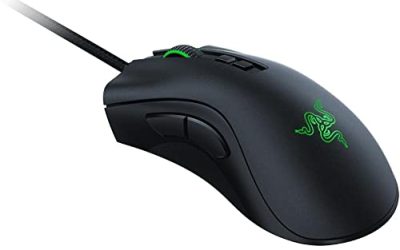
Razer DeathAdder V3 Pro

The DeathAdder V3 Pro suits palm-grip players whose tracking falls apart when their hand gets tired. Its right-handed ergonomic shell supports the palm and thumb through long sessions, the Focus Pro 30K sensor tracks smoothly on cloth and glass, and the 63 gram weight is light enough for repeated lifts without feeling twitchy. The switches stay crisp on semi-automatic fire, and the wireless link holds up at the standard polling rate for hours. Players who hold angles and track targets through doorways will appreciate how planted the shell feels.
Specs
- Focus Pro 30K optical sensor
- 63 g weight
- Gen-3 optical switches rated for 90 million clicks
- HyperSpeed wireless connection
- Up to 90 hours of battery life
- 5 programmable buttons
- 100% PTFE feet
- USB-C charging and wired operation
Best for: Palm-grip players who track at low sensitivity and want ergonomic support for long sessions.
Watch out for: The mouse runs at 1,000 Hz out of the box, and reaching 8,000 Hz needs the HyperPolling Wireless Dongle, which is sold separately.
BenQ ZOWIE EC2-CW

The EC2-CW is the tracking pick for players who want a classic shape and zero software. Its right-handed ergonomic shell has been refined over years of competitive play, the enhanced receiver keeps the wireless link stable, and the driverless design means it works the same on any computer with no setup. The 24-step scroll wheel gives precise weapon switching, and the matte coating keeps the grip consistent as hands warm up. Tracking with the EC2-CW feels deliberate and planted, which suits players who aim with the arm and value consistency over raw lightness.
Specs
- Wireless ergonomic gaming mouse for esports
- Enhanced receiver for stable wireless connection
- 24-step scroll wheel
- Driverless design with no software required
- Matte black coating
- Medium size, asymmetrical right-handed shape
Best for: Players who want a proven ergonomic shape and a driverless setup for tracking.
Watch out for: The listing does not state a sensor model or weight, so players who choose strictly by sensor numbers should compare the other picks here first.
Which One Fits Your Situation
You Track Fast Strafing Targets
Choose the Razer Viper V3 Pro. Its light shell and high polling rate keep the cursor glued to targets that change direction quickly, and the sensor stays accurate when you snap between a strafe and a flick. The symmetrical shape suits the claw and fingertip grips that steer best at speed.
Your Aim Is Good in Flicks but Weak in Tracking
Choose the Logitech G PRO X Superlight 2 and lower your sensitivity. The neutral shape and clean sensor let your arm take over from your wrist, which is the change that fixes most tracking problems. Give the new sensitivity a full week before judging it, because muscle memory needs time to settle.
You Play Long Sessions With a Palm Grip
Choose the Razer DeathAdder V3 Pro or the BenQ ZOWIE EC2-CW. Both offer a right-handed ergonomic shell that supports the hand through hours of play, and both track steadily at low sensitivity. Pick the DeathAdder for a lighter shell and longer battery life, or the EC2-CW for a driverless setup with a classic shape.
You Play on a High Refresh Rate Monitor
Choose a mouse with high polling, such as the Razer Viper V3 Pro or the Logitech G PRO X Superlight 2. Faster reporting pairs with a fast monitor to make tracking look and feel smoother, especially when a target crosses the screen quickly. Keep the receiver close to the mouse so the wireless link stays clean.
Common Mistakes
- Chasing the highest DPI number, when tracking happens at 400 or 800 DPI and sensor consistency matters far more than the ceiling.
- Changing sensitivity every session, which resets the muscle memory that smooth tracking depends on.
- Picking a mouse that is too light for your grip, so small hand tremors show up as wobble during slow tracking.
- Ignoring polling rate and receiver placement, then blaming the sensor for stutters caused by a weak wireless link.
- Buying a shape that feels good for ten minutes in a store but offers no support during a two-hour ranked session.
Frequently Asked Questions
What makes a gaming mouse good for tracking?
A good tracking mouse pairs a sensor with no acceleration or smoothing with a shape that stays stable. The sensor must report slow and fast movement faithfully, the shell must not rock during a long movement, and the polling rate must be high enough to keep the cursor updating smoothly. Weight, grip fit and wireless stability all matter, which is why two mice with the same sensor can feel different.
Is a higher polling rate better for tracking?
A higher polling rate reports the mouse position more often, which can make tracking smoother on fast monitors. The step from 1,000 Hz to 4,000 or 8,000 Hz is noticeable to some players and invisible to others, and it drains the battery faster. Most players should start at 1,000 Hz and only raise the rate if their monitor and CPU can use the extra updates.
Should I use low DPI for tracking?
Low DPI with a low in-game sensitivity usually helps tracking, because it gives your arm room to make smooth corrections instead of forcing the wrist to do fine work. Most competitive players use 400 or 800 DPI. The exact number matters less than keeping it stable, so pick a setting, set your sensitivity to match, and leave both alone for at least a week.
Does mouse weight affect tracking?
Weight affects tracking because a very light mouse moves with less resistance but can feel twitchy, while a heavier mouse damps small tremors and feels steadier on slow drags. Most tracking players settle between 55 and 75 grams, and the right weight depends on your grip and hand size. A shape that fits your hand matters more than a few grams either way.