🛒 Best Price Today on Amazon
Prime members get fast, free shipping on everything above, plus member-only deals. New members get a 30-day free trial — cancel anytime.
Buying a gaming microphone with noise cancellation is really a decision about where the cleanup happens. Some models process your voice inside the microphone before it reaches the computer, some hand the work to companion software, and some rely on a tight pickup pattern plus a noise feature in the maker’s app. Those three routes behave very differently in a loud room, and picking the wrong one leaves you paying for a headline feature you never actually switch on.
This guide is for gamers and streamers who play near keyboards, fans, televisions, or other people, and who want their voice to stay in front of that background. The five picks below were chosen from the names, feature lists, and specifications published on their Amazon product pages, with priority given to models where the maker states a noise cancellation or noise reduction feature outright rather than implying one.
Quick Picks
As an Amazon Associate we earn from qualifying purchases.
| Product | Best for | Key spec from title |
|---|---|---|
| SteelSeries Alias | Streamers who want AI noise cancelling handled in software | 1-inch condenser capsule with Sonar AI Noise Cancelling |
| Shure MV6 Gen 2 | Gamers who want noise processing built into the microphone | Dynamic cardioid capsule with Real-time Denoiser |
| HyperX QuadCast 2 | Creators who record solo and group sessions with one mic | Four polar patterns with 24-bit/96 kHz recording |
| Logitech G Yeti GX | Logitech G users who need automatic gain protection | Supercardioid dynamic capsule with Smart Audio Lock |
| MAONO DM40 | Budget buyers who want a wireless desk microphone | Wireless USB connection with 3-level one-tap noise cancellation |
How to Choose
Decide Where the Noise Reduction Happens
Noise features sit in three places, and the location decides how much setup your routine needs. On-board processing, like the adjustable denoiser inside the Shure MV6 Gen 2, works the moment the microphone is plugged in, with no app session before a match. Software features, such as SteelSeries Sonar, Logitech Blue VO!CE, and HyperX NGENUITY, offer deeper controls but only run on a computer with the maker’s program installed. A third group pairs a directional pickup pattern with a noise control in an app or on the mic body itself. Decide which of those workflows you will actually follow every session before ranking any model.
Match the Capsule Type to Your Room
Dynamic and condenser capsules hear a room differently. A dynamic capsule, like the ones in the Shure MV6 Gen 2 and Logitech G Yeti GX, is less sensitive to distant sound, so it naturally favors a close voice over noise across the room. A condenser capsule captures more detail and more of the space around you, which is why condenser models in this guide lean on stated noise features from their makers. Supercardioid and cardioid patterns narrow the pickup zone further. In an untreated room with hard walls, start with a dynamic model or a condenser with processing you are willing to configure.
Check Connections and Platform Support
Every pick here connects over USB, but the details matter. The MAONO DM40 adds a wireless USB receiver for a cable-free desk, while the others are wired USB-C models that draw power from the computer or console. Platform support is not identical either: the HyperX QuadCast 2 lists PC, Mac, PS5, and PS4 in its title, while several rivals are aimed at computers only. Software-based noise features generally need the maker’s app on Windows or macOS, so a console-only player should weight on-board features more heavily. Check the listing’s stated compatibility against every device you plan to use.
Look at Controls and Monitoring
Small controls decide how a microphone behaves mid-game. A tap-to-mute sensor or button keeps a cough or a doorbell out of your stream without opening a menu. A gain knob on the body lets you fix levels when you lean back, and a 3.5 mm headphone jack gives you direct monitoring of your own voice with no delay. The SteelSeries Alias adds an LED level meter on the front, so mute status and input level are visible at a glance. If you record often, these physical controls are worth as much as the headline noise feature.
The 5 Best Options
SteelSeries Alias

The Alias is the pick for players who are comfortable letting software do the heavy lifting. Its Amazon title leads with AI Noise Cancelling, delivered through the free Sonar for Streamers suite, which also handles audio mixing and routing for game, chat, and media channels. The hardware half of the package is a condenser capsule SteelSeries describes as up to three times bigger than rival gaming microphones, mounted in a shock mount with an LED strip on the front that shows your level and mute status while you play.
Specs
- Condenser microphone with a 1-inch (25 mm) ClearCast capsule
- Cardioid polar pattern
- USB-C connection, plug and play on PC
- Frequency response: 50 Hz to 20 kHz
- Maximum SPL: 120 dB
- Sonar for Streamers software with AI Noise Cancelling
- LED mute and level monitoring on the microphone
- Built-in shock mount and customizable RGB downlight
- Item weight: 1.65 lb
- Model 61601
Best for: streamers who want AI noise cancelling tuned inside one software suite.
Watch out for: the AI noise cancelling runs in the Sonar software on a computer, so players who only use a console cannot use that part of the package.
Shure MV6 Gen 2

The MV6 Gen 2 takes the opposite approach to the Alias: the noise work happens inside the microphone itself. Shure’s listing highlights an adjustable Real-time Denoiser that reduces distracting room noise, supported by Voice Isolation Technology and a Digital Popper Stopper, and the listing notes that this processing is already enabled before any app is opened. The dynamic cardioid capsule also helps by favoring a close voice. Auto Level Mode adjusts gain response as your volume changes, and the MOTIV apps add a 5-band EQ when you want finer control.
Specs
- Dynamic microphone with cardioid polar pattern
- USB-C connection for PC, Mac, and mobile devices
- Frequency response: 50 Hz to 15 kHz
- Recording resolution: 24-bit / 48 kHz
- Adjustable Real-time Denoiser and Auto Level Mode
- Voice Isolation Technology and Digital Popper Stopper
- 3.5 mm headphone output for real-time monitoring
- Tap-to-mute control on the microphone
- Includes desktop stand and USB-C to USB-C cable
- Model MV6G2-K
Best for: gamers in untreated rooms who want noise handling active the moment the mic is plugged in.
Watch out for: this is a USB-only microphone with no XLR output, so it cannot grow into an interface-based setup later.
HyperX QuadCast 2

The QuadCast 2 is the flexible option in this group. Its Amazon specification table lists Noise Reduction among the special features, and HyperX has since added an AI noise reduction function to the NGENUITY software the microphone is tuned through. Around that feature sits a condenser design with four selectable polar patterns, so the same microphone covers solo gaming in cardioid and a two-person recording in bidirectional. A multi-function knob handles gain, playback volume, monitoring volume, and pattern switching, and the tap-to-mute sensor shows a clear LED status on top.
Specs
- Condenser microphone with three 14 mm electret capsules
- Four polar patterns: stereo, omnidirectional, cardioid, and bidirectional
- USB-C connection for PC, Mac, PS5, and PS4
- Recording resolution: 24-bit / 96 kHz
- Special features listed: mute function, noise reduction, and volume control
- Multi-function knob for gain, monitoring, and pattern switching
- Tap-to-mute sensor with LED status indicator
- Removable shock mount and desktop stand included
- 3.5 mm headphone jack
- Model 872V1AA
Best for: creators who split time between solo gaming and recordings with more than one voice.
Watch out for: the noise tools are managed in NGENUITY on a computer, and the extra polar patterns add little if you only ever record yourself.
Logitech G Yeti GX

The Yeti GX is built for players whose volume swings from quiet callouts to loud celebrations. Its listing describes Smart Audio Lock, which pairs an analog limiter that guards against clipping with a downward expander that reduces ambient background noise, and the Blue VO!CE software in G HUB adds filters and effects on top. The capsule is a dynamic supercardioid design, a tighter pickup pattern than standard cardioid, and Logitech states the microphone is designed to reject noise and key clicks. Two LIGHTSYNC RGB zones and on-mic gain control round out a package aimed squarely at game streamers.
Specs
- Dynamic microphone with supercardioid polar pattern
- USB plug and play for PC and Mac
- Sample rate: 96 kHz
- Signal-to-noise ratio: 78 dB
- Blue VO!CE filters and effects through Logitech G HUB
- Smart Audio Lock with analog limiter and downward expander
- LIGHTSYNC RGB with two separate lighting zones
- On-mic gain control with mute
- Includes desktop stand and USB-C to USB-A cable
- Model 988-000567
Best for: Logitech G users who get loud during matches and want levels kept under control automatically.
Watch out for: Blue VO!CE and Smart Audio Lock are managed in G HUB, so the full feature set needs that software installed on a computer.
MAONO DM40
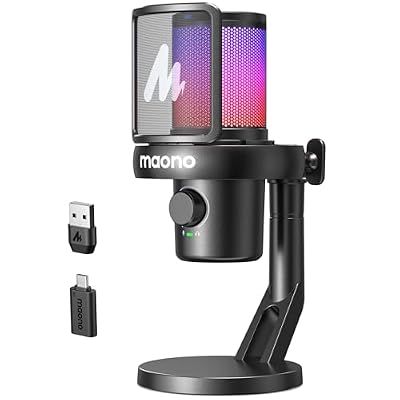
The DM40 is the budget and wireless entry in this guide. MAONO’s listing puts a one-touch noise cancellation button on the microphone itself, with three levels described as light, medium, and high, and the specification table names 3-level noise reduction as a special feature. It connects through a wireless USB receiver or a USB-C cable, runs on a built-in battery in wireless mode, and adds extras rarely seen at this level, including an AI voice changer with six modes and custom EQ through the MAONO Link software. A gain knob, one-tap mute, and a headphone jack cover the everyday controls.
Specs
- Condenser microphone with unidirectional polar pattern
- Wireless USB and USB-C connection, plus wired USB-C use
- Recording resolution: 24-bit / 48 kHz
- One-tap noise cancellation with three levels
- Up to 40 hours of battery life in wireless use
- AI voice changer with six voice modes via MAONO Link
- 3.5 mm headphone jack, gain knob, and one-tap mute
- Custom EQ and scene presets in MAONO Link software
- Includes stand, shock mount, and pop filter
- Model DM40, black
Best for: buyers who want a wireless desk microphone with noise cancellation controlled by a button on the mic.
Watch out for: wireless sessions depend on battery charge and the USB receiver, and the voice effects require MAONO Link on a computer.
Which One Fits Your Situation
A Shared Room With Other People Nearby
When voices and a television compete with you from across the room, start with the Shure MV6 Gen 2. Its dynamic capsule favors your close voice, and the adjustable denoiser is built into the microphone, so it is active in every app without extra setup. Keep the microphone close, set the denoiser strength in the MOTIV app once, and the processing the listing describes is working before your first match of the day.
A Loud Keyboard and PC Fans on the Same Desk
Desk-level noise is a placement problem first and a processing problem second. The MAONO DM40 puts three noise cancellation levels on a button you can reach mid-session, which suits a setup where fan noise changes as games load. The SteelSeries Alias is the alternative for players already living in streaming software, since Sonar can be adjusted while other audio channels keep running. Either way, bring the microphone within a short distance of your mouth before raising any setting.
One Microphone for Gaming and Podcast Recording
If the same microphone has to cover solo streams, duo podcasts, and the occasional group chat, the HyperX QuadCast 2 is the natural fit. Its four polar patterns cover those formats without extra hardware, the 24-bit/96 kHz recording gives editing headroom, and the shock mount and pop filtering are already in the box. You give up the deeper always-on processing of the Shure, but you gain a single microphone that adapts to the room’s layout each session.
A First Dedicated Microphone on a Tight Budget
The MAONO DM40 costs less than the rest of this list while still offering a stated noise cancellation control, wireless freedom, and the monitoring jack that headset microphones usually skip. It is the easiest way to test whether a desk microphone suits your setup before spending more. If the budget later grows, the Shure MV6 Gen 2 is the step up for stronger built-in processing, and the Alias is the step up for software control.
Common Mistakes
- Placing the microphone at the far edge of the desk and raising the gain to compensate, which brings room noise up with your voice.
- Expecting a noise cancellation feature to rescue a microphone left in a wide pattern, such as running the QuadCast 2 in stereo or omnidirectional for solo gaming.
- Never installing the companion software, then judging a microphone whose noise features live in Sonar, G HUB, NGENUITY, or MAONO Link.
- Buying a sensitive condenser for an untreated room with no plan to use the maker’s stated noise processing.
- Speaking into the side or back of a directional microphone instead of the side the listing tells you to face.
Frequently Asked Questions
Does a noise cancelling gaming microphone remove every background sound?
No. Makers describe these features as reducing or cancelling noise, and the result depends on the microphone, the setting level, and your placement. A denoiser or AI tool can lower steady background sound in the signal, but a microphone positioned close to your mouth with sensible gain will always give the feature less work to do. Treat noise cancellation as one layer, not a substitute for setup.
Is a dynamic or a condenser microphone better for a noisy room?
A dynamic microphone is the safer starting point, because its lower sensitivity favors a close voice over distant sound, which is why the Shure MV6 Gen 2 and Logitech G Yeti GX suit untreated rooms. A condenser can still work well when it carries a stated noise feature you will actually configure, as the SteelSeries Alias and HyperX QuadCast 2 do. Your room and routine matter more than the label.
Do software noise features still work on a console?
Features that live in a computer program, such as Sonar, Blue VO!CE in G HUB, or NGENUITY, need that program running, so they are computer features. Processing built into the microphone travels with it: the MV6 Gen 2 listing states its denoiser is enabled without the apps, and the DM40’s noise cancellation is a button on the mic itself. Check the listing’s stated compatibility before buying for a console.
Can these microphones move to a boom arm later?
Most of them can. They ship with desktop stands, and their listings or maker specifications reference standard threaded mounting, such as the 5/8-inch thread on the Shure MV6 Gen 2 and the dual thread sizes on the QuadCast 2 shock mount. The Yeti GX is sold with adapters for arms and stands. Confirm the thread size and included adapter on the product page before ordering an arm.