🛒 Best Price Today on Amazon
Prime members get fast, free shipping on everything above, plus member-only deals. New members get a 30-day free trial — cancel anytime.
A cooling stand with a built-in controller charger is three purchases in one: a vertical stand, a fan base, and a dual charging dock. The decision that matters is not the shape of the plastic but the fit. Console generations differ in size, docks differ in what they can charge, and fans differ in how they are controlled. Buy the wrong combination and you end up with a stand that wobbles, a dock that ignores your second device, or a fan you never turn on.
This guide groups the picks by household. PlayStation 5, Slim, and Pro owners get stations with three-speed fans, USB hubs, and headset storage. White-finished PlayStation owners get a slim station that keeps the console’s own look. Xbox Series X owners get two stands with rechargeable battery packs, one with an automatic temperature sensor. Launch-era PlayStation 5 owners get a compact ZRZLMVP station sized for the standard and Slim consoles. Every pick below combines a cooling fan stand with dual controller charging in one base.
Quick Picks
As an Amazon Associate we earn from qualifying purchases.
| Product | Best for | Key spec from title |
|---|---|---|
| CYKOARMOR PS5 / PS5 Slim / PS5 Pro Stand and Cooling Station (White) | White PS5 setups | White finish with 3 USB hubs and a media remote holder |
| CYKOARMOR PS5 Stand and Cooling Station | PS5 Slim and Pro setups | 3 USB hubs with headset and remote holders |
| MENEEA Auto Cooling Fan Charge Stand | Xbox owners who want automatic fan control | Temperature sensor starts the fan automatically |
| YUANHOT Vertical Cooling Stand | Xbox owners with disc collections | 10 game disc slots and two battery packs included |
| ZRZLMVP PS5 Cooling Station (Q311) | Standard and Slim PS5 owners | 3-speed turbo fan with 3 USB hubs |
How to Choose
Match the Stand to Your Console Generation
The PlayStation 5 family is not one shape. The original console, the Slim, and the Pro have different shells, and the disc and digital editions differ again at the base. Listings for multi-generation stands describe interchangeable panels, a safety screw, or a separate strip for the digital edition, so read the fit list before anything else. Xbox Series X stands are shaped for that console only. A stand built for the wrong generation will not lock in properly, and no fan or dock feature makes up for a base the console cannot sit in securely.
Decide How the Fan Should Be Controlled
Most stands in this category use a manual control: a button or touch switch that cycles through two or three fan speeds, with indicator lights showing the setting. One Xbox stand here works differently, using a temperature sensor that checks the console and starts the fan on its own when a set temperature is reached. Neither approach is automatically better. Manual speeds suit players who want the fan off during quiet games, while the automatic sensor suits a console kept in a cabinet where reaching the switch is awkward. Check which control the listing describes before buying.
Check What the Dock Charges Besides Controllers
A dual dock is the shared feature here, but the details around it vary. One PlayStation station uses a wireless dual dock that fills both controllers from empty within three hours. The Xbox stands take a different route, charging removable battery packs, and one of them charges only the original pack and the two packs in the box. Maker-stated full-charge times also differ, running from about three hours to four hours across these listings. Look for LED indicators that show charging and full status per controller, and confirm whether the dock draws power from the console or needs its own adapter.
Count the Storage and Check the Box Contents
These stands compete on storage: game disc slots, headset holders, media remote slots, and expansion card slots all appear in the listings above, in different combinations. Count the slots against your own shelf rather than the product photo, because disc capacity differs between models. Then check what the box actually contains. Fixing screws, connection cables, and battery packs are included with some stands and absent from others, and no stand here includes the console, controllers, or headset shown in its pictures. The included parts list is the reliable version of what arrives.
The 5 Best Options
CYKOARMOR PS5 / PS5 Slim / PS5 Pro Stand and Cooling Station (White)

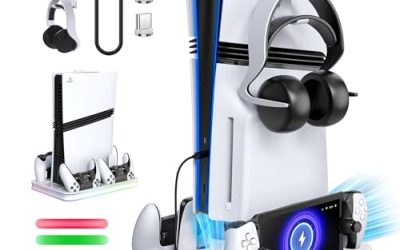
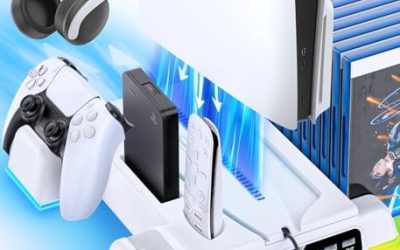
CYKOARMOR’s white station is the slim, color-matched option for the current PlayStation lineup, fitting the PS5, PS5 Slim, and PS5 Pro in disc and digital editions. Its cooling fan runs at three adjustable levels, Low, Mid, and High, with indicator lights showing the selected speed, and the listing states that it switches on automatically when the console powers up. The dual charging station fills both DualSense controllers from empty within three hours, and the base carries three USB hubs plus holders for a headset, both controllers, and a media remote, keeping the whole entertainment setup in one footprint.
Specs
- Fits PS5, PS5 Slim and PS5 Pro, Disc and Digital editions
- Cooling fan with 3 adjustable levels: Low, Mid and High, with indicator lights
- Fan switches on automatically when the console powers up
- Dual wireless controller charging, maker-stated full charge within 3 hours
- 3 USB hubs, taking one rear console USB port
- Holders for a headset, two controllers and a media remote
- Metal safety screw included; white finish
- One-year quality support stated in the listing
Best for: PS5, Slim or Pro owners who want a white all-in-one base that keeps the console’s own look.
Watch out for: The listing gives no game disc storage, and the console, controllers, headset and remote in the photos are not included.
CYKOARMOR PS5 Stand and Cooling Station

CYKOARMOR builds its station around the three current PlayStation 5 generations, with a safety screw for the disc editions and a separate strip for digital consoles. The cooling fan adjusts across Low, Mid, and High speeds, with indicator lights showing the selected setting. Dual controller charging is stated to fill both controllers from empty within three hours, with LED indicators for charging status and built-in overcharge protection. Three USB hub ports extend the console connections, and the base adds holders for a headset, both controllers, and a media remote, keeping the full entertainment setup in one footprint.
Specs
- Fits PS5, PS5 Slim and PS5 Pro, Disc and Digital editions
- Cooling fan with 3 adjustable speeds: Low, Mid and High
- Dual controller charging, maker-stated full charge within 3 hours
- LED indicators for charging status and fan speed
- 3 USB hub ports
- Holders for a headset, two controllers and a media remote
- Safety screw and digital-edition strip included
Best for: PS5 Slim or Pro owners who want one base that also parks a headset and a remote.
Watch out for: The console, controllers, headset and remote in the photos are not included, and the listing states a one-year quality support window.
MENEEA Auto Cooling Fan and Controller Charge Stand for Xbox Series X

The MENEEA stand for Xbox Series X puts its fan on top of the console rather than underneath it. In automatic mode, a temperature sensor checks the console after five seconds and starts the fan when the console reaches 36 degrees Celsius; manual Low, Medium, and High settings are also available. The dual charging dock is powered from the console and ships with two 1400 mAh rechargeable battery packs. Eleven RGB light modes with an independent switch, a headset stand, two expansion card slots, and six game disc slots complete a stand built around automatic, set-and-forget operation.
Specs
- Designed for Xbox Series X
- Top cooling fan with automatic temperature-sensor mode and manual Low, Medium and High speeds
- Fan starts automatically when the console reaches 36 degrees Celsius in auto mode
- Dual controller charging dock powered from the console
- Two 1400 mAh rechargeable battery packs included
- 11 RGB light modes with an independent light switch
- Headset stand, 2 expansion card slots and 6 game disc slots
- Rear USB ports for data transfer and charging
Best for: Xbox Series X owners who want the fan to switch itself on and off.
Watch out for: The dock charges only the original battery and the two supplied packs, not third-party battery packs, and the fan works only while connected to the stand.
YUANHOT Vertical Cooling Stand Charging Station for Xbox Series X

YUANHOT takes the vertical route for the Xbox Series X, standing the console upright on a base with a side cooling fan. The dual charging station works with the two 1400 mAh rechargeable battery packs included in the box, and the listing states a three-hour charging time for them. A headset holder keeps headphones off the desk, and the stand carries storage for ten game discs, the largest disc capacity among the picks here. For Xbox owners who still buy physical games and want spare battery packs included from the start, this is the straightforward combination of stand, fan, dock, and disc rack.
Specs
- Designed for Xbox Series X
- Vertical stand with a side cooling fan
- Dual controller charging station
- Two 1400 mAh rechargeable battery packs included
- Maker-stated charging time of 3 hours for the battery packs
- Headset holder
- Storage for 10 game discs
Best for: Xbox Series X owners who still buy physical discs and want spare battery packs in the box.
Watch out for: The included battery packs are made for this dock, so keep both packs with the stand rather than mixing them with other chargers.
ZRZLMVP PS5 Cooling Station (Q311)

ZRZLMVP’s Q311 station covers the launch and Slim PlayStation 5 consoles in disc and digital editions, using a panel adapter that comes off for the Slim models. The turbo cooling fan offers three speed settings, Normal, Medium, and Strong, and the dual charging dock is stated to fill two controllers in about three hours, with red and green LED indicators for charging and full status. Three USB 2.0 hubs extend the console’s connections, a headset holder is included in the box, and a safety screw locks the console to the base, making this a compact all-in-one for the first two console generations.
Specs
- Fits PS5 standard (2020) and PS5 Slim (2023), Disc and Digital editions
- Turbo cooling fan with 3 speed settings: Normal, Medium and Strong
- Dual controller charging, maker-stated full charge in about 3 hours
- LED charging indicators: red while charging, green when full or on standby
- 3 USB 2.0 hub ports
- Headset holder and panel adapter included; safety screw locks the console
- Plastic construction
Best for: Standard and Slim PS5 owners who want a compact vertical base with charging and USB hubs.
Watch out for: The dock does not fit the DualSense Edge controller, and the listing does not cover the PS5 Pro.
Which One Fits Your Situation
Your PlayStation Setup Is All White
If the console sits on show and you want the base to disappear into it, the white CYKOARMOR station is the match. It covers the PS5, Slim, and Pro in both editions, and its fan starts on its own when the console powers up. The dock fills two controllers in about three hours, and holders park the headset and media remote in the same footprint.
You Want the Fan to Look After Itself
The MENEEA Xbox stand is the pick for a console tucked into a TV cabinet or entertainment unit. Its temperature sensor starts the top fan automatically when the console reaches the set threshold, and the manual speeds remain available when you want control. The other PlayStation stands here use buttons instead, which suits an open desk where the switch is easy to reach during a session.
Your Shelf Still Holds Rows of Game Discs
Physical collectors should look at the two Xbox stands first. The YUANHOT holds ten game discs alongside its headset holder, while the MENEEA Xbox stand stores six discs and adds two expansion card slots. Both include a pair of rechargeable battery packs for their docks, so the disc storage does not come at the cost of the charging side of the combination.
You Are Keeping a Standard or Slim PS5
Owners of the launch console or the Slim do not need a Pro-sized base. The ZRZLMVP Q311 fits both generations in disc and digital editions, with a panel adapter for the Slim shells. Its three-speed turbo fan, dual dock with a maker-stated three-hour charge, three USB hubs, and headset holder cover the daily jobs in one compact unit.
Common Mistakes
- Buying a stand shaped for the wrong console generation, since the original PS5, Slim, and Pro shells all differ at the base.
- Assuming a dock charges everything you own, when a DualSense Edge controller or a third-party Xbox battery pack can stop it from working.
- Judging disc storage from product photos instead of the listing, because slot counts range from six to ten across these stands.
- Expecting the fan to start by itself on a model that only has manual speed buttons.
- Forgetting to check the box contents, then finding the fixing screw, cable, or battery packs you expected were never included.
Frequently Asked Questions
Do these stands fit both disc and digital consoles?
The PlayStation stands here list both editions. Multi-generation models handle the difference with interchangeable panels, a safety screw, or a separate strip for the digital console, all described in their listings. The two Xbox stands are built for the Xbox Series X only. Always match the stand listing against your exact console edition before ordering, because the base shape is what locks the console in place.
How long does the charging dock take to fill two controllers?
The maker-stated figures are close across these models. Both CYKOARMOR stations, the ZRZLMVP station, and the YUANHOT stand all state about three hours for a full charge of both controllers or battery packs. These are listing figures rather than measured results, and every dock here shows charging and full status with LED indicators so you can see when a controller is ready.
Can the Xbox docks charge any rechargeable battery pack?
No. The MENEEA Xbox dock charges only the original battery and the two 1400 mAh packs supplied with the stand, and its listing states that third-party battery packs are not supported. The YUANHOT stand likewise works with its own included packs. If you already own spare packs from another brand, check the dock listing for compatibility before assuming they will charge on either stand.
Does the fan run automatically, or do I switch it on myself?
Two stands start fans on their own. The MENEEA Xbox stand uses a temperature sensor that starts its fan at the set threshold, with manual speeds as an alternative. The white CYKOARMOR station switches its fan on when the console powers up. The remaining stands use a button or switch to select the speed, with indicator lights showing the setting.