🛒 Best Price Today on Amazon
Prime members get fast, free shipping on everything above, plus member-only deals. New members get a 30-day free trial — cancel anytime.
Buy the HS80 Max for longer wireless sessions and Bluetooth. Choose the HS80 RGB Wireless if you want audio over USB when you plug in on PC. In Corsair HS80 Max vs Corsair HS80 RGB Wireless, that wired fallback matters as much as battery life. Both have a flip-to-mute boom and support wireless play on PC and PlayStation.
Which Corsair HS80 headset should you buy?
Buy the HS80 Max for fewer charges and a phone connection
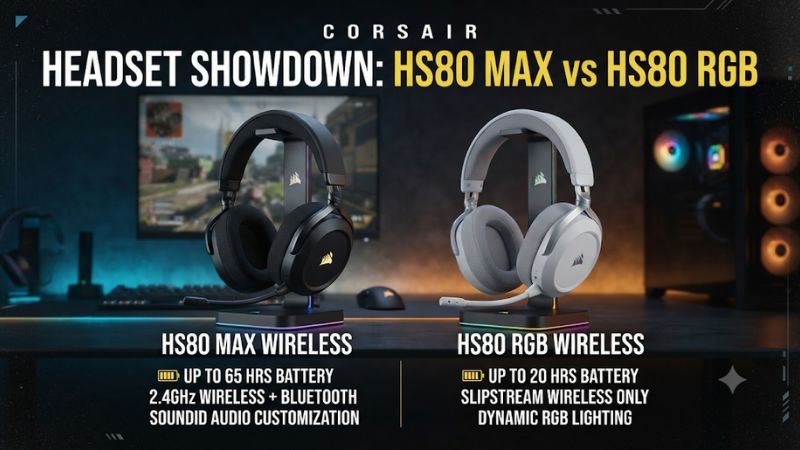
The HS80 Max is the better fit if your gaming headset spends most of its time on the wireless receiver, you dislike frequent charging, and you occasionally want to use it with a phone. Corsair lists up to 65 hours on 2.4 GHz with RGB lighting off. The Max also offers Bluetooth, which gives it a separate use away from the desk.
Check two limits before choosing it. Its USB-C port charges the battery and does not carry wired headset audio.
The Max also uses Bluetooth and the 2.4 GHz receiver as separate playback modes. A buyer who needs to hear phone media and game sound together should choose a headset with explicitly supported simultaneous audio.
A newer design is worth paying for when the changes fit your routine. If you use a single PC, play close to a USB port, and charge after each session, the longer rated runtime may solve little. If you share the headset between a PlayStation and a phone, the Max’s additional connection can have daily value.
Buy the HS80 RGB Wireless when USB playback matters
The original HS80 RGB Wireless works over its 2.4 GHz USB receiver and can also carry audio over a USB cable on PC. This is its most important difference from the Max. You can keep a wireless setup on most days and still choose a real wired audio connection when you prefer it.
Choose this model if you use one gaming setup and want a second way to connect when the receiver is in use elsewhere, buried behind a PC, or giving you trouble. Corsair also documents up to 24-bit, 96 kHz playback over wired USB on PC. The connection itself is often more valuable than the format specification.
The original has no Bluetooth and carries a much shorter published battery rating. If neither limitation affects your use and the original is available for less, it can be a better value. A used unit is only worth that discount if the receiver, cable, microphone, and battery still meet your needs.
| Buying criterion | Corsair HS80 Max | Corsair HS80 RGB Wireless |
|---|---|---|
| Primary gaming connection | 2.4 GHz via USB receiver | 2.4 GHz via USB receiver |
| Bluetooth | Yes, separate from receiver playback | No |
| USB cable audio on PC | No; port is for charging | Yes |
| Published receiver battery life | Up to 65 hours without RGB or 24 hours with RGB | Up to 20 hours |
| Published Bluetooth battery life | Up to 130 hours | No Bluetooth |
| iCUE EQ | Supported | Supported |
| SoundID | Available on a supported setup | Unavailable |
| Microphone | Fixed flip-to-mute boom | Fixed flip-to-mute boom |
| PlayStation route | Included wireless receiver on supported PS4 and PS5 | Included wireless receiver on supported PS4 and PS5 |
How do the two wireless and wired setups differ?
Use the included receiver as the baseline for gaming
Connect the appropriate receiver directly to a supported computer or console and check that the headset appears as an audio device. On PC, select it explicitly in your sound settings, then check the game’s output and voice app’s input. A working receiver can still appear silent if the game continues sending audio to a previous endpoint.
On PS5 or PS4, follow the model’s receiver setup and see where the console sends game audio and chat. If you hear party chat alone, check the console’s headphone output selection.
Confirm that the microphone is also selected. The volume that reaches you and the level others hear are separate controls.
Neither standard model in this comparison is the HS80 Max XB Xbox variant. If Xbox is the main platform, verify an Xbox-compatible SKU and its intended connection before buying.
Similar packaging also exists for the wired HS80 RGB USB and the newer HS80 v2 Max. All comparisons here apply to the first Max and the original RGB Wireless.
Bluetooth makes the Max useful away from the gaming receiver
Use Bluetooth when the target device is a phone, tablet, or another suitable source. The Max can be your gaming headset at a PC or console and then serve as a listening or call headset when you switch modes. That is useful if you prefer to keep one headset nearby during the day.
RTINGS confirms that the Max does not play the USB receiver and Bluetooth routes simultaneously. If you use a separate mobile chat app when gaming, check whether you can run that app on the PC or console instead. If the phone and game must remain separate and audible together, compare a different headset with explicit support.
The original RGB Wireless does not have this phone switch. Its best use is a supported setup with the receiver or the proper USB audio cable. A buyer who rarely listens on a phone can reasonably treat Bluetooth as an extra rather than a requirement.
Only the original supports wired USB audio
Corsair’s original HS80 RGB Wireless manual describes wired USB audio on PC up to 24-bit, 96 kHz. Use a cable that carries data, connect the headset, and verify the operating system’s selected output. If the audio still follows the receiver, disconnect the receiver briefly and confirm the USB cable appears as a working playback route.
The Max can charge with a cable connected while the receiver remains the audio path. If you remove the receiver and keep that charging cable connected, it will not replace the receiver as a wired audio device. This difference is easy to miss because both products ship with a USB cable and have similarly shaped charging ports.
The original’s higher supported wired sample rate is a capability specification. Game assets, the Windows mixer, and the chosen playback settings affect what you actually hear.
Consider the reliable second audio path the primary reason to buy it for USB use. The specification alone cannot establish better direction finding or sound quality in a game.
How large is the battery difference in realistic use?
Compare the Max ratings by mode and lighting
Corsair lists up to 65 hours over 2.4 GHz with RGB off, up to 24 hours with RGB on, and up to 130 hours on Bluetooth for the Max. Those are three conditions for the same product. A long Bluetooth rating should not be used to predict the result on the gaming receiver.
The lighting comparison matters if you wear the headset at a desk but can rarely see its exterior. Try one charge cycle with lighting off and see how that fits your routine.
If you prefer the lighting while streaming, use the appropriate shorter rating as a planning reference. Other factors such as listening level, traffic on each radio mode, and battery age can affect what you see.
If you leave the headset powered on between sessions, separate standby time from active hours when checking battery. A notebook record of the time you actually play is enough to see whether you are going days longer between charges. A battery icon or status light gives a useful prompt before you begin a long session.
Look at the original’s independent test as context
The original RGB Wireless is rated for up to 20 hours from Corsair. RTINGS reported roughly 13 hours in its review.
Those numbers describe different test conditions, and a particular headset may differ from both. They give someone buying the original a reason to be comfortable charging it regularly.
At a computer desk, the original’s USB audio fallback helps if the battery is inconveniently low. You can switch to a direct cable audio path when desired. The Max’s larger rating is the better reason to buy it when you play for many sessions between charges, especially in a living room where a long cable is inconvenient.
For a secondhand headset, ask the seller to identify the receiver and describe runtime with the relevant connection. A unit that pairs after a brief test can still have an aging battery. Compare the return process, accessory completeness, and charge behavior before valuing a used original solely on its lower asking price.
Are sound, mic, and comfort good reasons to upgrade?
Compare both headsets with ordinary stereo first
Both models target the same broad gaming use and have similar suspension headband designs. RTINGS describes them as broadly similar and highlights the differences in connection and battery. The Max’s more practical wireless features are a stronger reason to upgrade than assuming that a higher model name ensures audibly better sound.
In a familiar game, play the same encounter at a comfortable and broadly matched level. Listen for speech, movement, and how they hold up when loud effects enter. If you prefer a certain EQ setting, compare the two in a basic configuration before treating an amplified frequency band as extra detail from the headset.
Both have supported PC spatial options that are separate from the ordinary stereo baseline. If you use Dolby Atmos for Headphones, verify how it is enabled on the computer and what the game expects. Set up one spatial path at a time so the test reflects the feature you enabled.
Choose the Max if SoundID is a feature you will use
Both headsets support iCUE EQ on a supported setup. The Max adds Sonarworks SoundID, which builds a personalized listening profile through a preference test. Try it when you want guided tonal changes and you intend to keep the relevant software and receiver setup available.
A preference profile can make a certain mix more pleasant, and it can make cues easier or harder to distinguish depending on the game. Keep a standard preset available. Compare SoundID against it with a voice line, a quiet effect, and a louder scene where details usually get covered.
The first Max also offers optional companion features that can depend on the PC software and hardware. Choose settings based on what the app actually exposes for your unit. For PlayStation and Bluetooth use, evaluate the platform’s own controls and confirm whether the effect you tried at the PC is available in that connection mode.
Keep the original if you already like its microphone
Both headsets have a fixed boom that flips up to mute. RTINGS reported clear microphone performance from the original and also rated the Max’s overall microphone performance favorably. If you already own the original and friends hear you clearly, battery life and phone connectivity are more persuasive upgrade reasons than an assumed improvement in voice quality.
Check your voice with the microphone positioned near the corner of your mouth and record at a consistent input level. If your voice chat sounds thin or distant, inspect whether the app selected your camera or another mic. On a Bluetooth connection, voice quality can also depend on the device’s active profile and app behavior.
Comfort belongs in the same test session. Adjust the headband and wear the headset with any glasses you normally use.
Check whether the fabric pads feel stable and whether the boom stays out of the way when raised. The two are similar enough on paper that the specific unit’s fit or pad condition may decide which one you want to keep.
What should you check before buying or upgrading?
Decide which fallback your setup needs
- For a PC desk, decide whether plugging in should transmit sound or simply charge the battery. Choose the original if you regularly want direct USB audio.
- For wireless PlayStation sessions, use the correct receiver and check output and microphone support. Choose the Max if fewer charges are a meaningful convenience.
- For PC and phone switching, choose the Max if you can use one audio source at a time. Look for explicit audio mixing support elsewhere if both feeds need to be audible together.
- For a used purchase, verify the exact model, matching receiver, and actual battery behavior. Confirm the cable can transmit data if you want wired playback on the original.
A receiver failure can look like an app issue when multiple devices share one PC. Test the headset on a direct port and choose it as the output before concluding the headset is defective.
Try wired USB on the original as a separate check. On the Max, confirm the selected wireless mode and whether the receiver reconnects normally.
Verify the receiver before replacing or sharing it
Corsair says the Max uses a different wireless radio from earlier HS80 models and does not support the shared Slipstream receiver arrangement with other devices. Check this before moving an existing receiver from one HS80 to another. Buy the matching receiver when a used listing doesn’t include one, and confirm the model and pairing procedure before paying.
If you want to free a USB port on a PC, the original’s cable offers another audio path. The Max needs its supported receiver for the intended 2.4 GHz setup, even when the charging cable is connected.
Test the connection you plan to use every day
Use a game menu sound and a local recording to verify both playback and capture. On the Max, run the receiver test, switch to Bluetooth, and return to the receiver.
If the original should work over USB, unplug its receiver briefly while you test the data cable. This simple sequence verifies what you are actually buying.
If game audio only works while a particular app is open, inspect the selected playback endpoint and active profile before resetting everything. If wireless cuts out but the microphone and speakers otherwise work, check the receiver, its port placement, and your distance from it. Reproduce the issue from the seat where you will play.
When both options satisfy the baseline, compare prices in the exact configurations that include the needed receiver and cable. A discount on the original can be valuable if it meets every daily requirement. If replacing a working original, the additional price of the Max should buy a specific change you will regularly notice.
Check the microphone controls on both platforms
If you alternate between a PlayStation and PC, the basic microphone can follow the headset through their supported receiver connections. The console and computer can still use different input levels and noise controls.
Test them independently using the same phrase and speaking position. This makes it easier to identify whether a difference comes from the platform or the microphone.
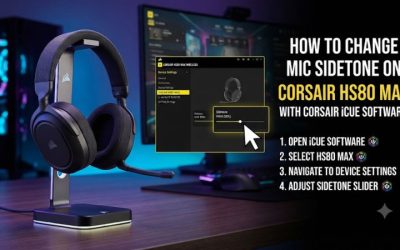
At a PC, check whether your chosen output and microphone are both the intended device after reconnecting. Sidetone lets you hear some of your own voice on a supported setup and can make closed-back cups feel easier to speak through. If you hear a delayed echo, check for a second monitoring path through the voice app or an operating system setting.
On PlayStation, confirm that the people in your party hear the headset mic by watching the selected input and testing a short line. Bringing the boom down and clearing the console’s own mute are separate steps. If you rarely use the optional PC features and chat already sounds clear, keep the comparison focused on runtime and the available connection paths.
Evaluate desk, couch, and phone use as separate cases
A desk player often has a cable close enough to use while playing. The original can make sense even at a similar price if a true wired fallback matters more than going longer between charges. Test the USB route by unplugging the receiver so a quiet wireless reconnection does not get mistaken for cable playback.
A couch player often has the opposite priorities. When the receiver is accessible and the headset is almost always unwired, the Max’s longer rated life with RGB off can remove a recurring interruption. Check the receiver path from where you sit and choose lighting settings before using the published rating to plan charging intervals.
Someone who spends much of the day using a phone is buying a different kind of convenience. The Max can switch to that device for a call or media.
Check whether its fixed boom and headset size still suit your phone use away from the gaming setup. If you never leave your desk with it, compare how much time the Bluetooth mode would actually save.
Upgrade the original only when a recurring inconvenience is clear
Count how often the original runs low during a session or how often you wish it could follow you to a Bluetooth source. If these happen regularly, the Max has a concrete purpose. If you are usually plugged in, the upgrade may take away the audio route you use most.
A player with an original that reconnects reliably, sounds the way they prefer, and charges conveniently can keep it. A first-time buyer who mostly plays wireless can put more weight on the Max’s extra runtime. Both choices become straightforward once the required connection and battery routine are clear.
Conclusion
Choose the Corsair HS80 Max for longer 2.4 GHz sessions with RGB off and for separate Bluetooth use with a phone. Choose the HS80 RGB Wireless if you need genuine USB cable audio on PC or find a better price and can live with more frequent charging. Treat microphone, fit, and EQ as checks for your unit, and let the connection you use every day decide the purchase.