🛒 Best Price Today on Amazon
Prime members get fast, free shipping on everything above, plus member-only deals. New members get a 30-day free trial — cancel anytime.
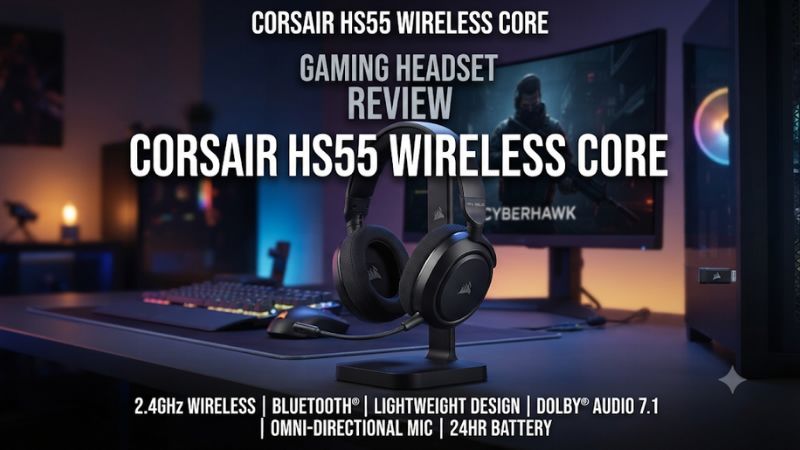
Buy the HS55 Wireless Core if you want a light wireless headset for PC or PlayStation and occasionally switch to a phone. This Corsair HS55 Wireless Core headset review explains why its simple controls work, where its fixed EQ presets fall short, and why Bluetooth does not let you mix phone music with game audio.
Is the Corsair HS55 Wireless Core worth buying?
Choose it for light wireless play and occasional phone use
The HS55 Wireless Core makes sense when the things you want are easy to list. It has a low-latency 2.4 GHz receiver for supported PCs and PlayStation consoles, Bluetooth for a compatible phone or tablet, and a headset weight that Corsair lists at 266 grams. You can adjust the level and mute the mic on the headset without taking a hand back to a keyboard or controller menu.
Think of Bluetooth as a second way to use the headset during the day. You can game through the receiver and switch to Bluetooth later for a podcast or mobile call. The implementation is less useful if your goal is to combine a live game feed and ordinary phone media in one mix.
The simple setup is a good fit for someone who wants a dedicated gaming headset without a deep software workflow. The headset has four built-in EQ presets. If you want narrow custom EQ bands, the Core’s controls offer less scope than a model with full software tuning.
Compare a different model for more tuning or a different input
Skip the Core if your main platform is Xbox or if you need an analog headset cable for an Xbox controller. Its documented PC and PlayStation wireless route uses the included USB receiver, and the charging connector does not provide a substitute 3.5 mm input. Check the complete model name before buying from a multi-variant listing.
It is also worth looking elsewhere if you need a detachable boom, a cleaner mic for regular voice recording, or simultaneous game and Bluetooth media. The flip-up microphone and quick mode switch are convenient for daily use, and those are separate benefits from professional capture or multiple playback streams.
The closely named HS55 Wireless without Core has a different feature set, including more iCUE functions. A discount that makes the two close in price deserves a closer look at those differences. If you would use custom EQ and the additional software controls, save the two exact listings and compare them rather than assuming all HS55 units share features.
| Feature | HS55 Wireless Core |
|---|---|
| USB wireless | 2.4 GHz via the included USB receiver |
| PlayStation path | Compatible PS5 and PS4 via included receiver |
| Bluetooth | For supported devices; ordinary Bluetooth media uses its own mode |
| Headphone drivers | 50 mm |
| Published headset weight | 266 g |
| Published battery life | Up to 24 hours |
| Microphone | Fixed omnidirectional boom with flip-to-mute |
| Everyday EQ | Four onboard presets |
| Wired audio | USB-C charging; playback requires a wireless connection |
| Built-in surround | Corsair lists no surround feature for the Core |
How do the wireless modes actually work?
Use the receiver first for PC and PlayStation gaming
Connect the receiver directly to a USB port on a supported machine for the initial setup. On Windows, choose the headset as the playback and recording device for the apps you want to use. Your game and chat application can store their own selections, so verify both with a menu sound and a short mic recording.
On PS5 or PS4, connect the receiver and select the USB headset in the console’s audio settings. If you only hear voice chat, check whether the console is set to send all audio to the headphones.
Then test the microphone input level separately from listening volume. The settings screen is a better way to identify which device is active than the fact that you can hear a game menu.
If the connection is intermittent, test from your normal seat with a clear path to the receiver. Try a different port if a hub or crowded desk interferes. If both the microphone and game audio drop together while the dongle lights change, diagnose the connection before changing game EQ or audio balance.
Understand what happens when a phone is paired
Pair the headset to your phone using the Bluetooth pairing control, then use the headset’s mode switch for ordinary Bluetooth media playback. Corsair’s quick start guide says it can accept phone calls while it is in receiver mode and paired to a phone. Tom’s Hardware reported an incoming call interrupted game audio during our research, after which game audio returned.
That behavior is useful when you are willing to take a call during a game break. It still gives you one audio source at a time for day-to-day listening. Someone who wants a continuous phone playlist, mobile voice chat, and PC game sound together needs a headset or routing setup specifically designed for that combination.
If phone audio is silent, confirm the selected Bluetooth mode and that your phone has chosen the headset for media. If game sound disappears after changing modes, switch back to receiver mode first. The headset can remember its last operating mode, so check it after powering on before assuming the receiver stopped working.
Keep voice quality and Bluetooth profiles in perspective
Bluetooth can be convenient for calls and music away from the gaming desk. On a computer, using a Bluetooth headset microphone can switch the operating system to a hands-free path with a different playback quality. If a call or voice app makes audio suddenly sound thinner, identify whether the headset is on Bluetooth and which input the app is using.
For a normal PC gaming session with Discord, the receiver is a cleaner first setup. Select its headset input and output explicitly.
If you prefer a desktop USB microphone, keep that as the app input and use the Corsair only for playback. That gives you independent control without needing to change the headset’s wireless mode.
The charging cable lets you replenish the battery while you are near the computer. The receiver still carries sound when you play in receiver mode while charging.
If you pull the dongle and only leave the charging cable plugged in, you should expect the receiver path to stop. This matters for buyers who expect a wired-audio fallback when traveling.
How does the headset sound in games and calls?
Start with Standard and judge the mix in familiar scenes
Independent evaluations do not describe every part of the sound in the same way, which is a reason to treat these as listening impressions. Tom’s Hardware reported a warm, bass-forward presentation and limited openness.
TechRadar found the headset usable for gaming and highlighted the convenience of cycling through its onboard sound profiles. Neither impression tells you how a particular game will sound with your fit and mix.
Start with Standard and play an encounter you know. Check whether dialogue remains clear when music, effects, or a friend is talking.
Then try a quiet scene with footsteps and a louder fight. A bass-heavy mix can make impacts enjoyable and at the same time make the softer cues harder to hear if the game mixes those sounds close together.
The Core does not include a Corsair surround renderer. It can still play the two-channel output a game sends, including a game-rendered headphone mix where the title supports it. Establish ordinary stereo before adding any separate platform spatial processing so you can tell whether directional changes come from the game or another layer.
Use the four presets as shortcuts
Corsair’s quick start guide lists Standard, Bass Boost, Movie Theater, and FPS Competition. Pressing the volume wheel changes the preset. It is an easy control during a match break, but it also means an unintended press can alter the mix when you thought you were only adjusting loudness.
Try FPS Competition if dialogue or footsteps are getting lost in a dense mix. Compare it against Standard with the volume level reasonably matched and in the same scene. If the preset makes some details stand out but changes your sense of distance, use the mode with the more reliable cues for that game.
Tom’s Hardware found that iCUE was useful mainly for maintenance tasks such as firmware and receiver pairing on the Core in its review. Do not expect the custom EQ workflow from the non-Core HS55 Wireless. If you want to tune individual frequencies for different games, verify the alternative model’s supported software options before ordering.
Expect a usable chat microphone with fixed hardware
The omnidirectional boom flips up to mute, and Corsair also supplies a physical mute button. Leave the boom down and position it near the corner of your mouth before checking levels.
Putting it directly in front of your mouth can emphasize breathing and strong consonants. If you still sound quiet, test a closer position before pushing input gain.
Tom’s Hardware found the mic adequate for Discord and less suitable for a stream where voice quality is a central part of the production. That trade-off fits the headset’s purpose. You can use an independent mic with the Core on PC if clearer recording matters and you want to keep the wireless playback.
- Check a short local recording. Read a sentence at your usual speaking level. Compare it with a second version when you move the boom slightly. Choose the position that keeps words clear without harsh breath sounds.
- Verify both mute controls. Watch the app’s input meter while you flip the mic or use the button. If the meter still reacts, confirm the app is listening to the Corsair input instead of a webcam or controller microphone.
- Test from the normal desk position. Type briefly while speaking. If your friends hear more keyboard than expected, improve boom placement and adjust supported app processing before raising gain.
How comfortable is it over a full session?
Check fit, seal, and control reach together
At 266 grams by Corsair’s published specification, the Core is easy to shortlist if a heavy headset bothers you. Its adjustable headband and padded cups spread that weight over a larger area. Comfort still depends on head shape, glasses, hair, and where the cups land around the ears.
Move the headband so the cups sit evenly, then move your head as you would during a match. If the sound changes when you hold one cup closer, inspect the seal before judging the sound preset. Glasses can create a small gap that changes bass and audible room noise.
Heat and pressure are longer-session questions. Play for an ordinary length of time and see whether the pads press on your glasses or whether an ear touches the inside of a cup. A headset that feels light in the first five minutes can still become distracting later if a small area carries too much pressure.
Compare the controls with the way you play
Try reaching the volume wheel, mute button, and mode control without looking. If you often join voice chat with the headset already on, the physical mic position makes a convenient mute cue. Confirm it with your app the first time so a separate mute setting does not create a surprise.
The boom is fixed to the headset. It stays out of the way when raised, but it still affects the look and portability if you use the headset away from gaming. Buyers who want the same headset for commuting may prefer a design that lets them remove the microphone.
Test the swivel and fit before leaving the headset hanging on a tight stand or packing it with the dongle loose. If the design feels good for gaming but bulky for travel, decide which part of your weekly use matters more. Bluetooth is a useful feature only in the places you will actually take the headset.
What should you verify about battery life and the exact model?
Treat 24 hours as a rating and check your own routine
Corsair rates the HS55 Wireless Core for up to 24 hours. Tom’s Hardware reported performance around that rating at a moderate setting in its use.
Volume, the way you switch wireless modes, and battery age can change the result. Check the first few charges under the conditions you play in.
Use the onboard status indication and make charging convenient at the end of a session. If the headset cuts out only after a long day, verify the battery state and compare after charging fully. If it drops a signal near the receiver soon after charging, investigate wireless reconnection or port placement first.
Corsair advertises a quick-charge benefit for the Core, which is useful if you forget to charge before playing. Treat the published runtime from a top-up as an estimate under the manufacturer’s conditions. A long session away from a USB cable is a better reason to compare a higher-capacity model than a rare need for a quick charge.
Confirm the full name and the contents of the box
- Look for Wireless Core. Listings can mix this product with HS55 Wireless, HS55 Surround, and HS55 Stereo. Use the full name to check the feature set.
- Verify the receiver. A used headset is much less useful for its intended gaming role if the included receiver is missing. Check whether the matching dongle is present before relying on the listing’s claim of wireless operation.
- Verify your platform. PC and PlayStation use the documented receiver path. Confirm the console or dock has the right port and select the headset in its audio settings.
- Compare feature cost. If the non-Core Wireless is close in price, decide whether its software and tuning are worth the difference. If you want to plug directly into a controller with a 3.5 mm cable, compare a model that actually provides that input.
After delivery, set it up in receiver mode, test the mic, and pair your phone. Switch back and forth twice before using it in a call or a match. This reveals whether the controls and routing match the routine you bought it for.
Make a quick first-night decision on PC or PlayStation
Play one familiar game through the receiver, then join a call using the built-in mic. Leave the default preset on until you have checked both routes. If either side sounds wrong, stop and verify the output and microphone choices independently before deciding that the headset’s tuning or mic is the problem.
Go to the phone after the receiver is confirmed. Play ordinary music in Bluetooth mode, take a short call, and return to receiver play afterward.
If you are buying the Core for convenient switching, pay attention to how easy it is to return to the game feed after using the phone. That routine affects how often you will use the second connection.
Try the whole sequence after the headset has been powered off. A headset that returns to the last Bluetooth mode can seem silent when you launch a game even though it still remembers its receiver. If changing the mode restores sound, the issue was setup state and you can account for it in your routine.
Compare wireless convenience with what you give up
If you already own the wired HS55 Stereo, the Core mainly adds freedom to move and phone playback. Consider how often your wire actually gets in the way. For a reader who only plays next to a PC and never takes calls on the headset, a wired replacement can meet the same daily needs at a lower price and stay ready without charging.
The decision changes if you sit away from a PlayStation and the analog cable to a controller bothers you. The Core’s receiver lets you get up without a cable tether and keeps the microphone with you. Test the distance you ordinarily use, including whether the headset reconnects after a short break.
A separate desktop mic is an option if your main concern with the Core is voice quality on PC. Count the cost, available space, and setup before choosing that route. Use the headset mic for simple calls, or compare a different headset if you need your voice input to travel wirelessly with the headphones and sound good enough for repeated recording.
Keep the headset only if it meets your main use case
The best value case is a player who mostly uses the USB receiver, wants simple controls, and occasionally switches to Bluetooth. Compare it with a wired option if you rarely move away from the desk and charging feels like extra work. Compare it with a better-equipped wireless option if Bluetooth media mixing or custom tuning is a requirement.
A returned or refurbished unit can be worthwhile if the battery, microphone, and receiver work together. Check those three items before spending time on game settings. If one part is missing or inconsistent, a lower price may leave you without the feature that made the model appealing.
Conclusion
Buy the Corsair HS55 Wireless Core for a light, straightforward PC or PlayStation headset with receiver-based game audio and occasional Bluetooth use. It offers convenient mute and EQ controls, and its 24-hour rating is a useful starting point for ordinary sessions. Choose a different model if you need wired audio, simultaneous phone media and game audio, or more control over EQ and microphone quality.