🛒 Best Price Today on Amazon
Prime members get fast, free shipping on everything above, plus member-only deals. New members get a 30-day free trial — cancel anytime.
The best low-latency wireless earbuds with a USB-C gaming dongle depend on what you play on. Start with SteelSeries Arctis GameBuds, pick Sony INZONE Buds for PS5 and PC, or consider soundcore VR P10 for a lower-cost setup. Check the exact console variant and whether the dongle blocks your charging port.
Compare the earbuds by platform, audio mode, and charging
Every pick here includes a dedicated USB-C gaming transmitter in the relevant retail package. Check the exact model and variant before buying. The physical USB-C connection tells you whether a plug fits. The host’s audio support and the transmitter’s platform mode determine what actually works.
| Earbuds | Best fit | What to confirm first |
|---|---|---|
| SteelSeries Arctis GameBuds | Several devices and a console-specific connection | Xbox or PlayStation variant and dongle mode |
| Sony INZONE Buds | PC or PS5 sessions and ANC | Bluetooth LE Audio compatibility for phone use |
| ASUS ROG Cetra True Wireless SpeedNova | Dongle gaming alongside a Bluetooth device | Exact SpeedNova model and behavior with chat or calls |
| Razer Hammerhead V3 HyperSpeed | PC, PS5, and compatible handheld use | V3 model, transmitter clearance, and separate console variants |
| soundcore VR P10 | Meta Quest or a lower-cost dongle setup | Real pass-through charger compatibility and runtime needs |
| JBL Quantum TWS Air | Straightforward game audio for compatible devices | Air model and the functions supported on your platform |
The ordering reflects the use case, host support, and documented features. It is not a single lab ranking by milliseconds. Independent measurements are most comparable when they use the same method. Manufacturer figures such as “under 30 ms” describe a specified wireless path or condition and may omit parts of the real controller-to-screen-to-ear experience.
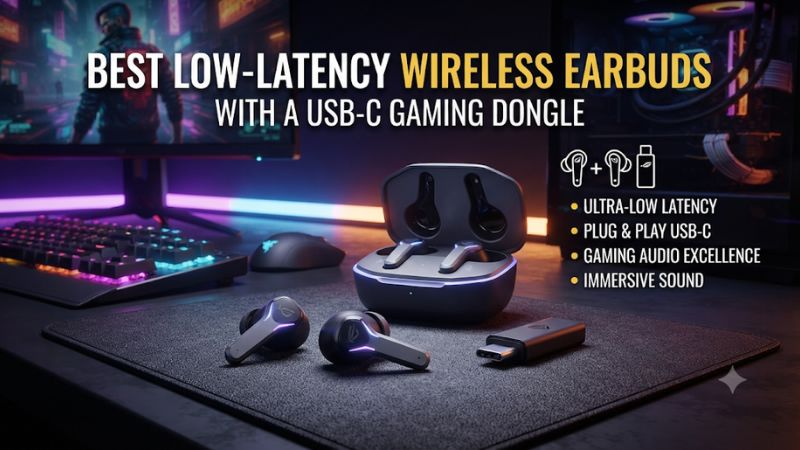
SteelSeries Arctis GameBuds for a multi-device setup
The GameBuds make the strongest all-round starting point when you want a dedicated game connection plus straightforward switching to Bluetooth. SteelSeries offers separate console versions. Its Xbox variant has a switchable dongle with Xbox and another mode for supported devices such as PC or PlayStation. The PlayStation version should be bought for its own supported platforms.
The switch matters in a shared household setup. A player with both Xbox and PC can price the Xbox version specifically and follow the instructions for each host. A player with a PS5 and phone should check the exact package rather than assume the variants are interchangeable. Verify which adapter is needed if the intended console port is USB-A.
SteelSeries offers quick switching between wireless modes. If you need simultaneous audio from two sources, verify the behavior before buying. Switching rapidly to take a call and mixing a phone conversation with audible gameplay are different features. That distinction matters far more in daily use than a vague statement that the earbuds support two connections.
Try game chat as soon as you set them up. Confirm the dongle is selected for both default audio output and microphone input where applicable. Hear how a teammate sounds during one normal match. Then test whether your voice remains intelligible when sitting next to a keyboard or fan.
Sony INZONE Buds for long PC or PS5 sessions
Sony’s INZONE Buds use a dedicated 2.4 GHz USB-C transmitter on compatible PCs and PS5. They also include active noise cancellation. Sony advertises under 30 ms over its dongle. Treat that as Sony’s claim for the specified transport rather than the delay of an entire PC or console setup.
The important buying limitation is Bluetooth. Sony supports Bluetooth LE Audio on compatible devices and does not offer the usual Bluetooth Classic audio fallback for this model. Confirm support on your exact phone if you want to use it without the dongle. A modern phone’s Bluetooth version alone does not establish that the required LE Audio connection will work.
The INZONE Buds suit someone who wants the gaming path to stay simple and will use the earbuds primarily on supported systems. For voice chat, test the built-in microphones in your actual room. If a keyboard or ventilation makes speech difficult to hear, consider a separate microphone on PC where the app supports separate inputs and outputs.
Test ANC and the fit together. A good seal can reduce the need for a loud game mix, but an uncomfortable tip can make long sessions impractical. Check the product during an ordinary game and with your usual controller or mouse. Do not infer game synchronization from a video app that can compensate for audio delay.
ASUS ROG Cetra True Wireless SpeedNova for game and phone connectivity
Choose the SpeedNova model when you want a dedicated USB-C transmitter and a flexible connection to a second device. ASUS documents Hybrid Multipoint on supported configurations. The original Cetra True Wireless name and the SpeedNova name can appear beside one another in listings, so verify the label and box contents.
A practical use is gaming through the transmitter while keeping a phone connected for notifications or calls. Test what happens when a call comes in. Some users want the game to continue in the background, while others prefer the device to prioritize spoken audio. Verify what the earbuds, phone, and chat app do together before depending on a particular behavior.
ASUS’s compatibility guidance matters if you plan to move from PC to console or iPhone. Check that the USB audio mode, microphone, and control features needed for your setup are supported. A device that plays stereo audio can still have platform-specific limitations for its microphone or software.
Compare battery figures by operating mode. A total that includes recharging from the case does not describe one uninterrupted gaming session. ANC, wireless mode, volume, and other settings can change practical runtime. If you regularly play for several hours, validate the continuous session you actually expect.
Razer Hammerhead V3 HyperSpeed for a PC and handheld mix
The Hammerhead V3 HyperSpeed ships with a USB-C wireless dongle for supported hosts. Razer lists PC, PS5, and Steam Deck among its intended uses. SoundGuys described the dedicated link as avoiding distracting delay in its gaming use. That is a qualitative independent observation. It does not establish a directly comparable measured number for every platform.
Check the full product name. Razer also sells Hammerhead V3 X HyperSpeed console-specific versions, including a model for Xbox. Verify Xbox support on the exact version and transmitter. A similar shell or name is not sufficient evidence that the standard V3 works on the console you own.
For a handheld, hold the machine in the positions you normally use. A transmitter can touch the case, block a nearby connector, or make it uncomfortable to play while charging. Verify any charging behavior the manufacturer documents and whether the included adapter or dongle fits the machine in its protective shell. Consider an extension only if it works reliably with your host.
When using a PC and phone, test how the device behaves across both connections. Reconnect after sleep and verify that the headset returns to the intended input and output. Short reconnection tests can reveal more about portability than the headline wireless specification.
soundcore VR P10 for a lower-cost USB-C dongle setup
The VR P10 was designed with Meta Quest use in mind and also lists several other supported hosts. soundcore advertises under 30 ms over its low-latency connection. Its charging pass-through is a reason to consider it, especially if a headset or handheld has one accessible USB-C port.
Verify the charging combination you plan to use. Passing power through a dongle can depend on the charger, cable, battery accessory, and host. Do not assume the presence of a power port preserves every accessory feature or charging rate. Test it while the game runs and confirm that the battery behaves as intended.
This model is particularly attractive when you need a compact transmitter and a simple gaming path at a lower total price. A long continuous session, higher ambient noise, or important team communication may change your priorities. Check runtime, mic quality, and fit against the other options rather than buying from the latency claim alone.
If buying used, check that the original dongle is included and that both earbuds maintain a stable connection. Ask about replacement availability before buying an incomplete set. A Bluetooth-only setup made from missing parts loses the dedicated connection that makes these earbuds interesting.
JBL Quantum TWS Air for a straightforward game audio connection
The Quantum TWS Air includes a USB-C 2.4 GHz dongle for compatible devices and Bluetooth for other situations. JBL’s support documentation covers host families including PCs and supported PlayStation and Nintendo systems. Confirm the exact device, connector, and mic behavior from the applicable documentation.
Check the Air label against the separate Quantum TWS model. Features and costs can differ, so price the model you intend to use. If you need full noise cancellation or a particular ambient mode, verify what the Air version offers before relying on a listing title that combines the models.
The Air is a practical option for someone who mainly wants low-delay game audio and an accessible secondary connection. Test transitions from the PC to your mobile device and back. If you depend on keeping both audible during a session, verify actual routing with your software. A claim about connecting to two devices may describe availability or switching instead of a mix you can hear simultaneously.
If the price is close to a better-supported console version from another brand, let the host and support terms decide. A good value purchase includes all the hardware needed to connect and control the game without an immediate accessory replacement.
Check what latency means before comparing numbers
Separate the wireless link from the complete game delay
A headphone latency figure measures some portion of the audio path. The game, operating system, USB device, transmitter, earbuds, and audio processing can each contribute delay. A manufacturer’s figure and an independent loop measurement can differ because they use different test points.
RTINGS documents a separate wireless dongle measurement for compatible headphones. Use like-for-like results from that method if you want to compare figures. An observation from another reviewer that a connection felt responsive is still useful for day-to-day context. Keep it separate from an instrument reading.
Also check how a comparison treats Bluetooth mode. A codec can change the delay, and an operating system can use a different audio profile once the microphone is active. A dedicated connection can be valuable because it offers a consistent gaming route even if the Bluetooth mode is convenient for other devices.
Use one repeatable game cue to test delay at home
Choose a local action with a visible change and recognizable audio. A practice range or rhythm timing test is more repeatable than online combat with variable network conditions. Select the dongle in your system, try the same cue several times, and compare against a wired reference if available.
Keep display settings and audio processing fixed. A change to TV game mode, buffering, or different audio effects can alter the result. If you film the action for a comparison, treat your test as a relative check. A camera and its microphone have their own timing and can add uncertainty. Repetition matters more than declaring a tiny difference from one recording.
Use the test that matches your needs. A rhythm player may notice delay that is easy to tolerate in a turn-based game. An FPS player may care more about consistent cues during a chaotic fight than a small difference in an isolated click. Verify both audio synchronization and connection stability before deciding.
Test chat and audio together on the real host
On a PC, open the game’s audio settings and select the intended output and microphone. Check your communication app separately. A Windows default device can switch after adding another headset, USB dock, or monitor with audio support. On supported consoles, check headset output and voice settings before using a teammate’s reaction as evidence of mic quality.
Record or ask for feedback on a short chat test. Test speech while typing and with game audio at a comfortable level. Earbud microphones sit farther from the mouth than a boom mic, and the effectiveness of noise handling can vary by model and room. ANC affects what you hear. It does not by itself tell you what reaches the other player.
Listen for operation changes when the mic starts. If the game sound becomes narrow or the voice input stops, check whether you are still using the dedicated device path. Keep the connection and app settings simple for your first test. Add software enhancements afterward so you can tell which change affects chat or timing.
Choose for fit, access, and long-session use
Check tips, stability, and comfort after an hour
A seal can affect bass and how much nearby noise you hear. Start with the provided tip sizes and test both ears. Some people need different sizes on each side. An earbud that loosens as you move can alter the sound and may make one side seem weaker.
Try the earbuds for a session long enough to reveal pressure or fatigue. A model that feels fine while standing at first can become distracting during repeated mouse movement or when a VR strap presses nearby. Consider controls you can use without shifting the fit. Verify that replacements or other supplied tip sizes fit the charging case.
Set a comfortable game volume and check the chat-to-game balance. Good fit and reasonable volume matter more to long-session use than pushing the sound level to compensate for loud room noise. If a room remains distracting, compare the earbuds’ isolation and ANC directly in that environment.
Plan the charging and dongle arrangement
Check whether a handheld or headset can charge while playing with the dongle attached. For a desktop, see whether the transmitter sits clear of adjacent ports. Use an included adapter, short compliant extension, or a different port when the manufacturer supports it. Test the final layout for connection stability.
For battery life, think in terms of the time you play without putting the earbuds in the case. Short breaks can make case charging useful, while a continuous tournament or long VR session needs adequate runtime on one charge. Compare the conditions under which the battery figure was measured.
Check the transmitter’s availability and storage arrangement. A detachable dongle is easy to leave behind when moving between devices. A case slot or consistently using the same adapter can help keep the set complete. If buying used, verify the pairing and charge each earbud before accepting the set.
Run a return-window checklist on every device you use
Test games for fifteen to thirty minutes on the primary host, then repeat a shorter check on the secondary host. Include mic, chat, wake from sleep, and controls. Test connectivity and picture-to-sound timing in a real match or VR app. Make sure you are using the included gaming transmitter during the relevant test.
If the connection drops, try the manufacturer-supported port and adapter arrangement first. Check the audio device selection after reconnecting. A crowded wireless setup, poor dongle placement, or settings on the host can create intermittent interruptions even when the earbuds work elsewhere. Record the failing device and mode before deciding whether to exchange the set.
The right pick is the one you can leave in its usual configuration. Buy for the specific console or PC, the session length you expect, and the charging and chat behavior you already know you need.
Conclusion
Start with the SteelSeries Arctis GameBuds if you need a flexible multi-device setup and can choose the right console variant. Pick Sony INZONE Buds for supported PC and PS5 use with ANC, ASUS or Razer for their respective multi-device features, or soundcore VR P10 for a lower-cost or VR-focused dongle setup. JBL Quantum TWS Air is another option for supported hosts. Confirm lag, fit, voice chat, and charging on your own hardware.