🛒 Best Price Today on Amazon
Prime members get fast, free shipping on everything above, plus member-only deals. New members get a 30-day free trial — cancel anytime.
- Best CPU Coolers for i7 and i5 at a Glance
- Best CPU Coolers for i7 by Tier
- Best i5 CPU Coolers
- Best CPU Coolers for Older K-Series: 6600K, 7700K, 8700K
- Best CPU Coolers for i7-2600K and Other LGA 1155 Chips
- Newer Generations: 12th to 14th Gen i5 and i7
- Air vs AIO for Core i7 and i5: Budget, Mid-Range and Premium
- How to Read a Cooler’s TDP Rating
- Installing a New Cooler on an Older Intel Platform
- Compatibility Notes for Older Sockets
- Pick X If You Are Buying Today
- Alternatives Worth Considering
- Frequently Asked Questions
Updated November 2026 – The best CPU coolers for Core i7 and i5 chips are the Thermalright Peerless Assassin 120 SE or Phantom Spirit 120 SE for value air, the Noctua NH-D15 G2 or be quiet! Dark Rock Pro 5 for quiet premium air, the DeepCool AK620 for a mid-range dual tower, the DeepCool AK400 for a locked i5, and the Arctic Liquid Freezer III for an AIO.
If you are looking for the best CPU coolers for i7 processors, or the best i5 CPU coolers, the answer depends on two things: which generation you own and whether the chip is a locked or unlocked K-series model. Older K-series chips such as the Core i5-6600K, i7-7700K, i7-8700K and i7-10700K run on LGA 1151 or LGA 1200, while newer 12th to 14th Gen chips use LGA 1700. Many modern coolers still include the older bracket, but some newer models have dropped it, so socket compatibility is the first check. This guide sorts coolers by tier and by generation.
Best CPU Coolers for i7 and i5 at a Glance
| Cooler | Type | Best for | Sockets as listed | Limit |
|---|---|---|---|---|
| Thermalright Peerless Assassin 120 SE | Dual-tower air | Value for i5 and i7 | LGA 1700, 1200 and 115x, AM4, AM5 | Tall; fans loud at full speed |
| Thermalright Phantom Spirit 120 SE | Dual-tower air | High-headroom air for i7 K chips | LGA 1700, 1200, 1151 and older, AM4, AM5 | 250W rating per reviews |
| DeepCool AK620 | Dual-tower air | Mid-range i7 builds | Confirm older sockets on the maker’s page | Older-socket support not confirmed in reviews |
| DeepCool AK400 | Single-tower air | Locked i5 chips | Modern Intel and AMD, confirm older sockets | Not for hot K-series chips |
| Noctua NH-D15 G2 | Dual-tower air | Quiet flagship air | LGA 1700, 1851, AM4, AM5 | Large; older-socket kits may be needed |
| be quiet! Dark Rock Pro 5 | Dual-tower air | Quiet high-end air | LGA 1700, 1200, 1151, 1150, 1155, AM4, AM5 | 168mm tall per reviews |
| be quiet! Pure Rock 2 | Single-tower air | Quiet i5 builds | Modern Intel and AMD sockets | Modest headroom |
| Cooler Master Hyper 212 | Single-tower air | Cheap upgrade for old i5 | Older revisions list LGA 115x | Basic ceiling |
| Arctic Liquid Freezer III | AIO liquid | i7 and i9 with radiator space | Intel LGA 1700 and AMD sockets | Confirm older Intel brackets |
Best CPU Coolers for i7 by Tier
Core i7 chips span a wide range, from eight-core Coffee Lake models to twenty-thread 13th and 14th Gen parts. Pick the cooler by the chip’s power rating, not just its name.
Thermalright Phantom Spirit 120 SE – Best for High-Headroom Value Air
Dual tower · seven heatpipes · 250W rating as reviews report · LGA 1700, 1200, 1151 and older Intel sockets plus AM4 and AM5 as the maker lists
A headroom ranking for LGA 1200 names the Phantom Spirit 120 SE the best overall for Core i5 and i7 builds, noting that it supports the Core i7-10700. It is shorter than the Dark Rock Pro 5, at about 154mm in reviewer listings. Reviewers say the fans can be loud when pushed to maximum.

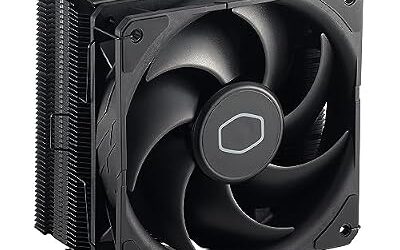
Thermalright Phantom Spirit 120SE CPU Air Cooler, 7 Heat Pipes CPU Cooler | Dual 120mm TL-C12B V2 PWM Fans, AGHP 4.0 Technology,S-FDB Bearing, for AM4/AM5/Intel lga1851/1700/1150/1151/1200, PC Cooling
Included for 'Best CPU Coolers for Intel Core i7 and Core i5 (Older and Newer Generations)' because the listing adds cooling or gel-infused layers, which is the attribute this article compares.
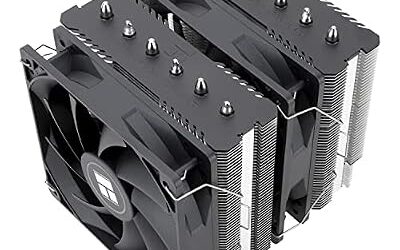
View on AmazonThermalright Peerless Assassin 120 SE – Best for Value Dual-Tower Air
Dual tower · two 120mm PWM fans · six heatpipes · broad Intel and AMD socket support as the maker lists
Tom’s Hardware and other outlets rank it among the best-performing air coolers. PC Masters reports the fans are loud at full PWM speed, so the common advice is to set a fan curve. It is a popular match for an i7-7700K, 8700K or 12700K where the owner wants a large upgrade over the stock cooler.

Thermalright Peerless Assassin 120 SE CPU Cooler, 6 Heat Pipes AGHP Technology, Dual 120mm PWM Fans, 1550RPM Speed, for AMD:AM4 AM5/Intel LGA 1700/1150/1151/1200/1851,PC Cooler
Included for 'Best CPU Coolers for Intel Core i7 and Core i5 (Older and Newer Generations)' as a representative home product in this roundup; selection reflects the product set returned for this topic.
View on AmazonDeepCool AK620 – Best for Mid-Range i7 Builds
Dual tower · two 120mm fans · six heatpipes · 260W rating as reviews report · up to 43mm RAM clearance per reviewers
One review finds the AK620 pulls ahead at higher sustained loads, such as an i7-14700K at stock. Reviews did not clearly list older-socket support, so owners of LGA 1151 or LGA 1200 systems should read DeepCool’s specification page before buying. Availability varies by region.
be quiet! Dark Rock Pro 5 – Best for Quiet High-End Air
Dual tower · seven heatpipes · 270W rating and 168mm height as reviews report · LGA 1700, 1200, 1150, 1151 and 1155 plus AM4 and AM5 as the maker lists
The Dark Rock Pro 5 is the pick for owners who want near-flagship air cooling and low noise. A headroom ranking for LGA 1200 lists it with more headroom than the Phantom Spirit on a Core i5-11600K. Reviewers say the front fan can be adjusted or recessed to avoid RAM conflicts.
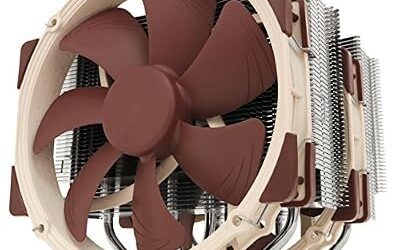
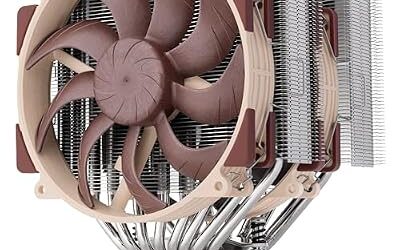
Noctua NH-D15 G2 – Best for Quiet Flagship Air
Dual tower · two 140mm fans · LGA 1700 and 1851, AM4 and AM5 as the maker lists · older Intel sockets may need a kit
Club386 names the NH-D15 G2 the best air cooler overall. It suits the hottest unlocked i7 chips such as the i7-13700K and 14700K. Because Noctua’s newer design focuses on current sockets, owners of LGA 1151 or LGA 1200 should consult Noctua’s compatibility list and consider the older NH-D15 or NH-U12S, which cover those sockets as Noctua states.
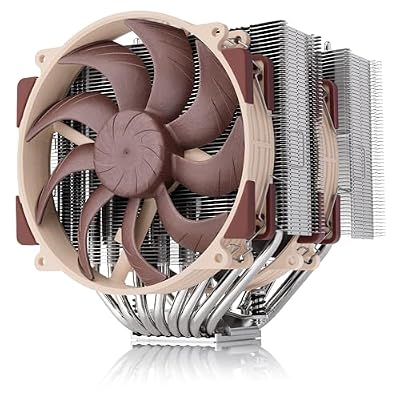
Noctua NH-D15 G2, Quiet High-Performance Dual Tower CPU Cooler | 168mm Height, Ultimate Low-Noise Cooling, 8 Heatpipes, For Intel & AMD, Dual Enthusiast-Grade 140mm Fans, Rich Accessory Kit
Included for 'Best CPU Coolers for Intel Core i7 and Core i5 (Older and Newer Generations)' because the listing adds cooling or gel-infused layers, which is the attribute this article compares.
View on AmazonArctic Liquid Freezer III – Best for an AIO on a Hot i7
AIO · 240, 280, 360 and 420mm radiators · contact frame on the Pro model for LGA 1700 as reviewers describe
The Liquid Freezer III suits i7 and i9 owners who prefer liquid cooling or have a cramped socket area. Older Intel sockets are not a guaranteed match, so confirm the bracket in the box.
Best i5 CPU Coolers
The best CPU coolers for i5 chips are single towers or mid-range dual towers, since most i5 models draw less power than an i7. Locked chips such as the i5-7500 and i5-12400 need only a modest cooler.
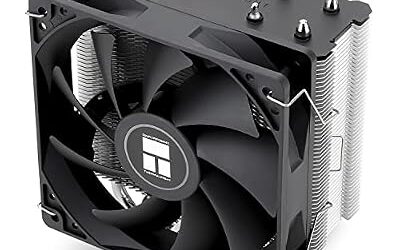
DeepCool AK400 – Best for Locked i5 Builds
Single tower · 120mm fan · modern Intel and AMD sockets as the maker lists
The AK400 is a compact budget cooler for the i5-12400, 13400 and similar parts. Check older-socket support if you are upgrading a Skylake or Kaby Lake PC.
be quiet! Pure Rock 2 – Best for Quiet i5 Builds
Single tower · 120mm fan · modern Intel and AMD sockets as the maker lists · low-noise focus
Pure Rock 2 is aimed at buyers who want a quieter system with a modest chip. It is not designed for hot K-series overclocking.
Cooler Master Hyper 212 – Best for Budget Older i5 Upgrades
Single tower · 120mm fan · older revisions list LGA 115x · long-running budget design
The Hyper 212 family has existed for over a decade, and older revisions list LGA 115x brackets. Reviewers describe it as a basic but dependable upgrade for an i5-6600K or i5-7500. Check the revision before buying.

Cooler Master Hyper 212 Black CPU Air Cooler - Aluminium Finish, 4 Compact Continuous Direct Contact Heat Pipes, SickleFlow 120 Edge Fan, LGA1700 & AM5 Brackets - Black
Included for 'Best CPU Coolers for Intel Core i7 and Core i5 (Older and Newer Generations)' as a representative home product in this roundup; selection reflects the product set returned for this topic.
View on AmazonBest CPU Coolers for Older K-Series: 6600K, 7700K, 8700K
These chips are previous-generation LGA 1151 parts. Owners asking for the best 7700K CPU coolers or the best CPU coolers for an 8700K should know that the 7700K and 6600K run hot at stock, and the 8700K adds six cores. A tower cooler such as the Phantom Spirit 120 SE, Peerless Assassin 120 SE or Dark Rock Pro 5 suits them, as these coolers list LGA 1151 support as the makers state. Intel’s LGA 1151 sockets share the same cooler hole spacing, and the makers state that LGA 1150, 1155, 1156 and 1200 do as well, so many coolers cover all of them.
For the best CPU coolers for the i5-6600K or the best i5-7500 CPU coolers, the locked i5-7500 does not need a large cooler. A single tower like the Hyper 212 or Pure Rock 2 is enough for it, while a 6600K that is overclocked deserves a dual tower. If you are running an old board, confirm that your case and RAM fit a tall cooler.
Best CPU Coolers for i7-2600K and Other LGA 1155 Chips
The best CPU coolers for an i7-2600K are those that still list LGA 1155. This is a very old platform, but the 2600K remains a popular overclocking chip. Coolers such as the Thermalright Phantom Spirit 120 SE and be quiet! Dark Rock Pro 5 list LGA 1155 support as the makers state, and a Noctua NH-U12S or NH-D15 from earlier generations does as well. Some newer coolers dropped older-socket brackets, so read the compatibility list before buying. A very old PC also has older fans, thermal paste and possibly a worn board, so overclocking carries stability and warranty risk.
Newer Generations: 12th to 14th Gen i5 and i7
For LGA 1700 chips, the same coolers above apply, with the Arctic Liquid Freezer III Pro and Noctua NH-D15 G2 as common premium choices. Reviewers suggest checking the motherboard’s power limit setting, because removing limits increases heat noticeably. For mounting, LGA 1700’s stock retention arm can press unevenly, and some makers sell contact frames. Follow the cooler’s manual and do not over-tighten.
Air vs AIO for Core i7 and i5: Budget, Mid-Range and Premium
Air cooling is the better fit for most i5 and i7 owners, and an AIO is a case-layout or appearance choice for the hottest chips. The tiers below describe the buyer, not a price.
- Budget tier: single towers such as the DeepCool AK400, be quiet! Pure Rock 2 and Cooler Master Hyper 212. Best for locked i5 chips such as the i5-7500, i5-12400 and similar, and for light gaming.
- Mid-range tier: dual towers such as the Thermalright Peerless Assassin 120 SE and DeepCool AK620. Best for unlocked i5 chips and most i7 models, including older 6700K, 7700K and 8700K systems.
- Premium tier: the Noctua NH-D15 G2, be quiet! Dark Rock Pro 5, Phantom Spirit 120 SE, or a 240 to 360mm AIO such as the Arctic Liquid Freezer III. Best for i7-10700K, 13700K and 14700K owners who want low noise and headroom.
A tower cooler has no pump and no coolant, which reviewers often cite as a reliability advantage. An AIO moves heat to a radiator, which can free space around the socket and suit cases with tall memory. Neither is automatically cooler: a flagship tower can match many 240mm AIOs, while a 360mm radiator gives the most headroom for the hottest chips.
How to Read a Cooler’s TDP Rating
A cooler’s TDP rating is a figure the maker lists to describe how much heat it is designed to handle, and it is not a guarantee of temperatures. Compare it with the processor’s rated power and remember that unlocked K-series chips can draw more than Intel’s base figure when the motherboard removes power limits. Reviewers cite ratings such as 250W for the Phantom Spirit 120 SE, 260W for the DeepCool AK620 and 270W for the Dark Rock Pro 5, though each maker uses its own test method, so treat the numbers as a rough guide rather than a ranking. If your chip runs close to the cooler’s rating, choose the next tier up, or lower the CPU’s power limit in the BIOS. Change BIOS settings with care: they can void warranties and cause instability, so keep values conservative and follow the motherboard manual.
Installing a New Cooler on an Older Intel Platform
- Switch off the PC, unplug it and wait for the parts to cool before opening the case.
- Remove the old cooler and clean the old thermal paste from the CPU with a lint-free cloth and isopropyl alcohol.
- Fit the correct bracket or backplate for your socket, as shown in the cooler’s manual. LGA 115x and LGA 1200 usually share one hole pattern, while LGA 1700 uses a different one as the makers state.
- Apply paste as the manual instructs, unless the cooler has pre-applied paste.
- Lower the cooler straight down and tighten the screws gradually in a cross pattern.
- Connect the fan header to the CPU_FAN connector and check the RAM clearance before closing the case.
If a screw will not turn smoothly, stop and recheck the bracket rather than forcing it, and ask a technician if you are unsure.
Compatibility Notes for Older Sockets
- Bracket: a cooler may list a socket but require a separate bracket or kit. Look inside the box list on the maker’s page.
- Newer coolers: some dropped older-socket hardware, so assume nothing.
- RAM clearance: dual towers can overhang the memory slots. Reviewers report that fan placement usually fixes this.
- Case height: compare the cooler’s stated height with the case limit.
- Thermal paste: follow the manual and clean old paste when reseating.
- Safety: power off and unplug before touching the socket, and do not force parts that do not fit.
Pick X If You Are Buying Today
| Pick this | If you |
|---|---|
| Hyper 212 or Pure Rock 2 | Have a locked i5 such as the i5-7500 on a tight budget |
| DeepCool AK400 | Have a modern locked i5 and want a compact cooler |
| Peerless Assassin 120 SE | Want value for an overclocked 6600K, 7700K or 8700K |
| Phantom Spirit 120 SE | Have an i7-10700 or 10700K and want maximum air headroom |
| be quiet! Dark Rock Pro 5 | Want quiet cooling for an older or newer i7 |
| Noctua NH-D15 G2 | Have an LGA 1700 i7 and want quiet flagship air |
| Arctic Liquid Freezer III | Have a hot i7 and a case with radiator space |
Alternatives Worth Considering
- Noctua NH-U12S: a compact quiet single tower; confirm which socket kit comes in the box.
- Corsair iCUE H150i and NZXT Kraken AIOs: premium AIOs with software control; check older-socket brackets.
- Stock Intel cooler: acceptable for locked chips under light loads, but reviewers often suggest upgrading for gaming.
Frequently Asked Questions
What is the best CPU cooler for an i7?
For value, reviewers often pick the Thermalright Peerless Assassin 120 SE or Phantom Spirit 120 SE. For quiet premium air, they pick the Noctua NH-D15 G2 or be quiet! Dark Rock Pro 5. The right choice depends on your socket and case.
Do I need a big cooler for a locked i5?
No. A single tower such as the DeepCool AK400 or be quiet! Pure Rock 2 is usually enough. Locked chips draw less power than K-series models.
Will a new cooler fit my i7-7700K or 8700K?
Many do, because those chips use LGA 1151. Coolers such as the Phantom Spirit 120 SE and Dark Rock Pro 5 list it as the makers state. Read the compatibility list for your exact model.
Can I use a modern cooler on an i7-2600K?
Only if it lists LGA 1155. Some newer coolers dropped that bracket. Check the maker’s page or use an older cooler that includes it.
Is an AIO needed for an i7-13700K?
Not required. A premium dual tower such as the Noctua NH-D15 G2 is a common choice. An AIO such as the Arctic Liquid Freezer III Pro suits cases where air does not fit.
Should I overclock my i5 or i7 with a new cooler?
A better cooler gives headroom, but overclocking can void warranties and cause instability. Keep settings conservative and follow the motherboard manual. Stop if the system overheats or crashes.