🛒 Best Price Today on Amazon
Prime members get fast, free shipping on everything above, plus member-only deals. New members get a 30-day free trial — cancel anytime.
- Best Webcams for Mac at a Glance
- How Webcams Work with macOS
- Best Webcams for MacBook and MacBook Air
- Best Webcams for iMac and Mac mini
- Best 4K Webcams for Mac
- Best Webcams for Zoom on Mac
- Continuity Camera: The Free Alternative
- Best Webcams for Apple TV
- Driver and Software Notes
- Pick This Webcam If…
- Choosing Between a Webcam, Continuity Camera and the Built-In Camera
- Extra Notes for Mac Buyers
- Frequently Asked Questions
Updated November 2026 – The best webcams for Mac are the Logitech MX Brio for sharp 4K, the Logitech Brio 500 for balanced everyday use, the Insta360 Link 2 for AI tracking, the Elgato Facecam MK.2 for streaming and the Logitech C920s for simple compatibility, with Apple’s Continuity Camera as the free alternative if you own a recent iPhone.
Choosing the best webcams for Mac comes down to three questions: which Mac you own, how sharp you need the picture to be and whether you want tracking or streaming features. This guide covers the best webcams for MacBook, MacBook Air, iMac and Mac mini, explains 4K and Zoom use on a Mac, looks at Apple TV, and lists the driver and software notes the makers publish. Specs are those the makers list, outlet opinions are attributed, and nothing here is a measured result.
Best Webcams for Mac at a Glance
| Model | Tier | Best for | Key stated specs | Limits |
|---|---|---|---|---|
| Logitech MX Brio | Premium | 4K work and content | 4K · 30 fps · 1080p · 60 fps · USB-C | Needs a fast port for top modes |
| Logitech Brio 500 | Mid-range | MacBook Air and everyday calls | 1080p · 30 fps · USB-C · shutter | No 4K |
| Logitech C920s | Budget to mid-range | Simple compatibility | 1080p · 30 fps · autofocus · shutter · USB-A | USB-A needs an adapter on newer Macs |
| Elgato Facecam MK.2 | Mid-range | Streaming and recording | 1080p · 60 fps · manual controls · no mic | Needs a separate microphone |
| Insta360 Link 2 | Premium | Tracking and presenting | 4K · AI gimbal tracking · USB-C | Costs more, gimbal adds bulk |
| Obsbot Tiny 2 | Premium | Motion and framing | 4K · gimbal tracking · voice and gesture control | Higher cost |
| Razer Kiyo Pro | Mid-range | Low light on a gaming setup | 1080p · up to 60 fps · adaptive light sensor | Maker software is Windows-focused |
| Continuity Camera | Free | Anyone with a recent iPhone | Uses the iPhone camera · wireless or USB | Needs a compatible iPhone and a mount |
How Webcams Work with macOS
Most USB webcams work with a Mac without installing anything. macOS supports the standard USB video class, so a camera that follows that standard appears in apps such as FaceTime, Zoom, Teams, Google Meet and QuickTime as soon as it is plugged in. Reviewers and makers agree that vendor software mostly adds extras like field-of-view settings, autofocus control and firmware updates rather than basic function. The main practical issues are connectors and software parity. Many recent Macs only have USB-C or Thunderbolt ports, so a camera with a USB-A cable needs an adapter or hub, and a few makers’ control apps are Windows-only. Always read the maker’s Mac support page for the exact model.
Best Webcams for MacBook and MacBook Air
For a MacBook or MacBook Air, the best external options are the Logitech Brio 500 and MX Brio, and a clip-on camera that uses USB-C. Apple’s laptops have built-in cameras whose quality depends on the model and generation, so an external webcam is mainly an upgrade for clarity, field of view and low-light behavior. On a thin laptop, a camera with a USB-C cable and a flexible clip saves you carrying adapters. If you mostly work at a desk with an external display, a monitor-mounted webcam gives a more natural eye line than the built-in camera.
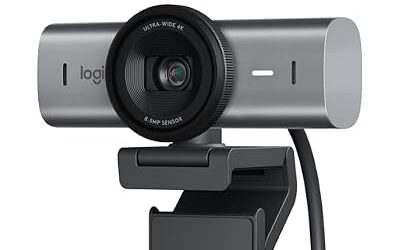
Logitech MX Brio – Best for 4K Mac Calls and Content
4K · 30 fps · 1080p · 60 fps · larger sensor · selectable field of view · USB-C · privacy shutter
The MX Brio is the most frequent overall pick in Mac webcam roundups. The maker lists an 8.5-megapixel sensor, 4K at 30 fps or 1080p at 60 fps, Show Mode and dual beamforming microphones, and it supports Logi Options+ on macOS for adjusting settings. One roundup praises its AI-assisted low-light handling. It is a premium choice for those who present often or record video, and its USB-C connection fits modern Macs directly.

Logitech MX Brio Ultra HD 4K Webcam for Streaming and Collaboration | Computer camera, 1080p 60 FPS, Show Mode, Works with Microsoft Teams, Zoom, Google Meet, Nintendo Switch 2, Graphite
Included for 'Best Webcams for Mac in 2026 (MacBook, iMac and Mac mini)' as a representative home product in this roundup; selection reflects the product set returned for this topic.
View on AmazonLogitech Brio 500 – Best for MacBook Air and Everyday Calls
1080p · 30 fps · selectable field of view · USB-C · privacy shutter · noise-reducing mics
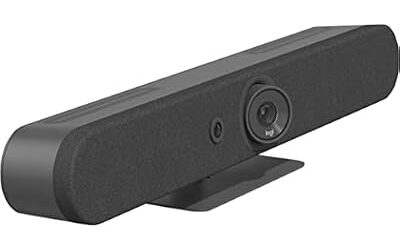
The Brio 500 is a mid-range 1080p camera that fits a MacBook Air well because of its USB-C cable. The maker lists RightLight exposure, Show Mode and a privacy shutter, and Logi Tune supports it. Tom’s Hardware ranks it near the top of its general webcam list. It is a solid default for Zoom, Teams and FaceTime on a laptop or a Mac mini.

Logitech Brio 500 Full HD Webcam with Auto Light Correction, show Mode, Dual Noise Reduction Mics, Webcam Privacy Cover, Works with Microsoft Teams, Google Meet, Zoom, USB-C Cable, Streaming -Graphite
Included for 'Best Webcams for Mac in 2026 (MacBook, iMac and Mac mini)' as a representative home product in this roundup; selection reflects the product set returned for this topic.
View on AmazonLogitech C920s – Best for Simple Compatibility
1080p · 30 fps · autofocus · privacy shutter · stereo mics · USB-A
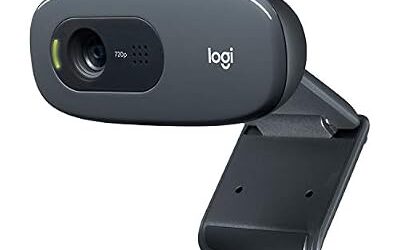
The C920 family is one of the longest-running webcam designs, and the C920s adds a shutter. It is widely reported to work on macOS as a standard USB device. It is a budget to mid-range pick if you have an older Intel Mac with USB-A or you are willing to use an adapter on a newer one. It is limited to 30 fps and its image processing is older than the Brio models.

Logitech C920S HD Pro Webcam for PC, Full HD 1080p/30fps Video Calling | Clear Stereo Audio, Light Correction, Privacy Shutter, Works with Skype, Zoom, FaceTime, Hangouts, PC/Mac/Laptop/Tablet/Xbox
Included for 'Best Webcams for Mac in 2026 (MacBook, iMac and Mac mini)' as a representative home product in this roundup; selection reflects the product set returned for this topic.
View on AmazonBest Webcams for iMac and Mac mini
The best webcams for iMac and Mac mini differ: the Mac mini has no built-in camera, so any USB webcam is an addition, while an iMac already has one and the webcam is an upgrade. For a Mac mini, the Brio 500 and MX Brio are tidy options with a monitor clip, and the Insta360 Link 2 suits a desk setup where you move around. For iMac, choose an external camera only if you want a better picture or a different angle. Apple’s Studio Display includes its own camera, which some reviewers rate as modest for the cost of the display, so external cameras are sometimes paired with it.
Insta360 Link 2 – Best for AI Tracking on a Mac Desk
4K · AI gimbal tracking · USB-C · supports macOS 10.13 or later as listed by sources · Link Controller software
The Link 2 is the usual pick for people who want the camera to follow them. A review roundup says it keeps you centered with its AI gimbal, and it works with the maker’s Link Controller app. A newer Link 2 Pro was released in January 2026 and is described by one outlet as the top-quality option in the line, with a larger sensor than the Link 2. Both are in the premium tier.

Insta360 Link 2 - PTZ 4K Webcam for PC/Mac, 1/2" Sensor, AI Tracking, HDR, AI Noise-Canceling Mic, Gesture Control for Streaming, Video Calls, Gaming, Works with Zoom, Teams, Twitch & More
Included for 'Best Webcams for Mac in 2026 (MacBook, iMac and Mac mini)' as a representative home product in this roundup; selection reflects the product set returned for this topic.
View on AmazonObsbot Tiny 2 – Best for Gimbal Framing and Motion
4K · gimbal tracking · voice and gesture control · Obsbot Center software
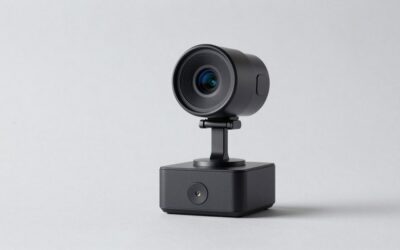
The Tiny 2 is a pan-and-tilt camera that follows a subject and can be controlled by gesture. A reviewer suggests comparing it against the lower-cost Tiny 3 Lite and the Insta360 Link 2 Pro before buying, since the line is changing quickly. It suits presenters, teachers and anyone who moves a lot.

OBSBOT Tiny 2 Webcam 4K Voice Control PTZ, AI Tracking Multi-Mode & Auto Focus, Web Camera with 1/1.5" Sensor, Gesture Control, 60 FPS, HDR Light Correction, Webcam for PC, Streaming, Meeting, etc.
Included for 'Best Webcams for Mac in 2026 (MacBook, iMac and Mac mini)' as a representative home product in this roundup; selection reflects the product set returned for this topic.
View on AmazonBest 4K Webcams for Mac
The best 4K webcams for Mac are the Logitech MX Brio, the Insta360 Link 2 and Link 2 Pro, and the Obsbot Tiny 2. 4K only helps if your apps and connection support it, because many meeting platforms compress video to lower resolutions. Recording with QuickTime, OBS Studio or similar tools can take advantage of 4K. Make sure the camera is connected to a port that supports the speeds the maker lists, and consider whether a 1080p camera at 60 fps would look smoother for your use.
Best Webcams for Zoom on Mac
For Zoom on Mac, a 1080p camera is enough in most cases, and the Brio 500 is a strong all-rounder. Zoom lists support for standard USB webcams, so selecting the camera under video settings is usually all that is needed. If you present or teach, the MX Brio or a tracking camera like the Link 2 helps keep you framed. Check Zoom’s own system requirements for the macOS version you run.
Elgato Facecam MK.2 – Best for Streaming and Recording on Mac
1080p · 60 fps · uncompressed video · manual controls · no microphone · USB-C
The Facecam MK.2 is a streamer’s camera. Sources describe it as delivering uncompressed 1080p at 60 fps with manual controls through Elgato’s Camera Hub, and it has no microphone, so you will need a separate one. Some digital tracking features reportedly depend on an NVIDIA GPU, which a Mac does not have, so read the maker’s feature list for macOS. It is in the mid-range tier.

Elgato Facecam MK.2, Premium Full HD Webcam, HDR | Sony sensor, PTZ control, Uncompressed 1080p60 video, DSLR-style controls, Easy-slide privacy shutter
Included for 'Best Webcams for Mac in 2026 (MacBook, iMac and Mac mini)' as a representative home product in this roundup; selection reflects the product set returned for this topic.
View on AmazonRazer Kiyo Pro – Best for Low-Light Gaming Setups
1080p · up to 60 fps · adaptive light sensor · USB
The Kiyo Pro is a gaming-oriented camera that Razer lists with an adaptive light sensor. As a standard USB camera it should show up in macOS apps, but Razer’s control software is aimed mainly at Windows, so on a Mac you may have fewer settings. Confirm Mac support on the maker’s page. A newer Kiyo Pro Ultra also exists with a larger sensor.

Razer Kiyo Pro Webcam for Streaming, Gaming, Video Calls: Full HD 1080p 60FPS - Adaptive Light Sensor - HDR Enabled - Wide Angle Lens with Adjustable FOV - Works with OBS, Xsplit, Twitch, Zoom, Teams
Included for 'Best Webcams for Mac in 2026 (MacBook, iMac and Mac mini)' as a representative home product in this roundup; selection reflects the product set returned for this topic.
View on AmazonContinuity Camera: The Free Alternative
If you own a recent iPhone, Continuity Camera lets your Mac use it as a webcam. Apple lists support for iPhone XR and later with a compatible macOS version, wireless or by cable. One roundup says it is often better than paid webcams under a certain tier, which is common reviewer opinion rather than a measurement. You will need a mount such as a clip or stand, and your iPhone is tied up during calls. For a permanent desk setup, a dedicated USB webcam is more convenient.
Best Webcams for Apple TV
For Apple TV, the supported route is an iPhone or iPad rather than a USB webcam. Apple’s tvOS documentation describes using a nearby iPhone or iPad as the camera for FaceTime and some video apps, and the makers of the webcams above do not list Apple TV support. If a source claims a specific USB webcam works with Apple TV, treat it as unconfirmed and look for Apple’s own documentation.
Driver and Software Notes
| Camera | Mac software | Notes |
|---|---|---|
| Logitech MX Brio | Logi Options+ | Advanced image settings on macOS |
| Logitech Brio 500 | Logi Tune | Basic controls and firmware |
| Logitech C920s | None required | Works as a standard USB camera |
| Elgato Facecam MK.2 | Camera Hub | Some features depend on the platform |
| Insta360 Link 2 | Link Controller | Tracking and gimbal controls |
| Obsbot Tiny 2 | Obsbot Center | Gesture and tracking settings |
| Razer Kiyo Pro | Limited | Maker software is Windows-focused |
If an app does not list your camera, open the app’s video settings and select it manually, and grant camera permission under System Settings in the Privacy and Security area. On Apple silicon Macs, install the maker’s current software rather than old versions.
Pick This Webcam If…
| Pick | If… |
|---|---|
| Logitech MX Brio | You want 4K for work or content |
| Logitech Brio 500 | You want one dependable camera for calls |
| Logitech C920s | You want a proven, simple camera |
| Elgato Facecam MK.2 | You stream and have a separate mic |
| Insta360 Link 2 | You want the camera to follow you |
| Obsbot Tiny 2 | You want gimbal framing with gesture control |
| Continuity Camera | You have a recent iPhone and want no extra cost |
Choosing Between a Webcam, Continuity Camera and the Built-In Camera
Many Mac owners do not need to buy anything. Recent MacBooks include a 1080p camera according to Apple’s specifications for newer models, and older ones are lower in resolution, so the first step is to find your model’s camera spec on Apple’s site. An external webcam is worth considering when you use a closed laptop on a stand with an external display, when you need a wider shot to show a whiteboard or a second person, or when you present to clients often. Continuity Camera is worth trying first if you own a supported iPhone, since it costs nothing beyond a mount. A dedicated USB webcam wins on convenience, because it stays in place, needs no phone, and works the same way every day.
Lighting matters more than the sensor. A modest 1080p camera with a lamp in front of you usually looks better than a 4K camera in a dark room. Place the light behind the monitor, angle it toward your face, and avoid a bright window behind you. Set the camera at eye level, since a camera tilted up from a laptop on a desk is unflattering whatever the model. If you use macOS video effects such as Center Stage or portrait blur, check which cameras support them, because those features depend on Apple’s own cameras and are not guaranteed for third-party webcams.
Extra Notes for Mac Buyers
Keep the camera cable short and plug it directly into the Mac or a powered hub rather than a long daisy chain, because 4K and 60 fps modes need a stable connection. If an app shows a black picture, quit other apps that may hold the camera, then reselect it in video settings. Always follow the maker’s guidance on firmware updates.
Frequently Asked Questions
What are the best webcams for MacBook?
The Logitech MX Brio and Brio 500 are the most common picks, with USB-C connections that suit thin laptops. The Insta360 Link 2 adds tracking. Your own iPhone can also work through Continuity Camera.
What is the best webcam for MacBook Air?
The Brio 500 is a balanced choice because of its USB-C cable and privacy shutter. If you want sharper video, the MX Brio is a premium step up. Check your MacBook Air’s ports before buying.
Do I need drivers for a webcam on Mac?
Usually not, because macOS supports standard USB video cameras. Maker apps add extras like firmware updates and field-of-view controls. Check the maker’s Mac page for your model.
Which webcam is best for a Mac mini?
A Mac mini has no built-in camera, so any compatible USB webcam works. The Brio 500 and MX Brio are common picks, and the Insta360 Link 2 suits desks where you move around. Make sure you have the right port or adapter.
Can I use my iPhone as a webcam on a Mac?
Yes, with Continuity Camera on supported iPhones and macOS versions, as Apple describes. It is free apart from a mount. It is less convenient for a fixed daily setup.
Does a 4K webcam make Zoom look better on Mac?
Only slightly in many cases, because meeting apps often send lower resolutions. A good 1080p camera with proper lighting often matters more. 4K helps for recording and presenting.