🛒 Best Price Today on Amazon
Prime members get fast, free shipping on everything above, plus member-only deals. New members get a 30-day free trial — cancel anytime.
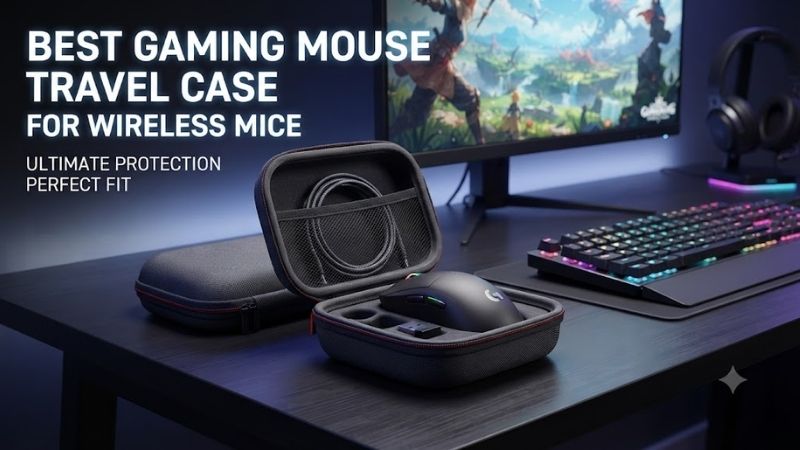
Wireless gaming mice are easy to carry, but their lightweight shells, delicate scroll wheels, and small USB receivers can be damaged or misplaced during travel. Finding the best gaming mouse travel case for wireless mice helps protect essential equipment while keeping charging cables and accessories organized. Proper fit and internal protection matter most.
Quick Verdict: Which Wireless Gaming Mouse Case Is Best?
A suitable gaming mouse travel case should prevent excessive pressure on the mouse shell while providing secure storage for the USB receiver and charging accessories. A hard EVA shell is useful for backpack travel, but internal padding and fit are just as important as the exterior material.
Best overall: Ausmodshop Gaming Mouse Carry Case
Best for accessory organization: CASEMATIX eSports Gaming Mouse Case
Best for Logitech Superlight: Logitech G Pro X Superlight EVA Hard Shell Case
Best for larger gaming mice: CASEMATIX Reptilia Mouse Case
Best alternative finish: CASEMATIX BlueCarbon Gaming Mouse Case
Best for compact Logitech mice: Logitech MX Anywhere 3 / G304 EVA Travel Case
Quick Comparison Table
| Travel case | Best for | Main advantage | Main limitation |
|---|---|---|---|
| Ausmodshop Gaming Mouse Carry Case | Multiple gaming mouse models | Broad fit-tested compatibility | Limited availability |
| CASEMATIX eSports Case | Mouse and accessories | Separate storage compartment | Larger exterior |
| Logitech Superlight EVA Case | G Pro X Superlight | Close model-specific fit | Limited to compatible shapes |
| CASEMATIX Reptilia | Larger gaming mice | Structured EVA protection | Exact dimensions required |
| CASEMATIX BlueCarbon | General gaming mice | Protective shell and accessory space | Same fit restrictions |
| Logitech MX Anywhere / G304 EVA Case | Compact wireless mice | Small travel footprint | Not for larger esports mice |
How We Selected These Gaming Mouse Travel Cases
Selection focused on internal dimensions, shell rigidity, padding, closure reliability, and the ability to transport wireless accessories safely. We also considered whether the case has documented compatibility with common gaming mouse models rather than relying only on a generic claim of universal fit.
A protective case should not press continuously against the mouse buttons or scroll wheel. It should also prevent the mouse from moving excessively when carried. These requirements become more important for lightweight gaming mice that use thin shells to minimize mass.
The 6 Best Gaming Mouse Travel Cases for Wireless Mice
Gaming mouse cases serve several different users. Competitive players may need protection during frequent travel to events, while ordinary laptop owners may simply want to keep a mouse safe inside a backpack. The options below provide different balances between compactness, storage capacity, and model-specific fit.
Ausmodshop Gaming Mouse Carry Case – Best Overall for Multiple Gaming Mice
The Ausmodshop Gaming Mouse Carry Case is a strong overall option because the seller documents fit testing with a broad selection of popular gaming mice. Its hard-shell construction is intended to protect the mouse during ordinary transportation, while the interior provides a dedicated space for the device.
Best for: Players who own popular lightweight gaming mice and frequently travel.
Documented compatible examples
-
Logitech G Pro X Superlight
-
Logitech G Pro Wireless
-
Logitech G502
-
Razer Viper and Viper V2 Pro
-
Razer Viper Mini
-
Pulsar X2 and X2 Mini
-
Selected Pulsar Xlite models
-
Lamzu Atlantis
-
Endgame XM1
-
Finalmouse Starlight-12
Why documented fit matters
A generic mouse case may be large enough to contain a device but still fail to support it correctly.
If the case is excessively loose, the mouse can move during transportation.
If it is too tight, the shell may apply pressure to the buttons or scroll wheel.
Ausmodshop’s stated testing with several popular models helps buyers identify likely compatibility.
However, newer generations and aftermarket modifications should still be checked individually.
Hard-shell protection
A structured case can protect against ordinary bumps and pressure inside a backpack.
This is particularly useful for lightweight gaming mice, which may use relatively thin plastic shells.
However, a hard-shell case should not be treated as crush-proof.
The amount of protection depends on the shell material, padding, and severity of the impact.
Practical travel use
For a competitive player carrying a keyboard, headset, and mouse, dedicated storage prevents the mouse from contacting harder accessories.
The case should be packed so that heavy objects are not pressing against the top.
The wireless receiver should also be stored securely.
A small receiver can become lost if placed loosely inside a large bag.
Pros
-
Broad documented fit testing
-
Hard-shell construction
-
Relevant to popular gaming mice
-
Suitable for travel
-
Dedicated mouse protection
Cons
-
Availability varies
-
Not every mouse revision is covered
-
Internal space may be limited for accessories
-
Not waterproof
Buy If: You own one of the supported gaming mice and want a dedicated hard-shell travel case.
Skip If: Your mouse has an unusual shape not covered by the compatibility information.
CASEMATIX eSports Gaming Mouse Case – Best for Mouse and Accessories
The CASEMATIX eSports Gaming Mouse Case offers a practical balance between mouse protection and accessory organization. Its molded EVA shell, padded internal divider, and separate storage area are useful for players who travel with charging cables, USB receivers, and other small accessories.
Best for: Wireless gaming mouse owners who want organized travel storage.
Key specifications
-
Molded EVA exterior
-
Approximate outer dimensions: 6 × 4.25 × 3 inches
-
Approximate maximum mouse dimensions: 5.4 × 3 × 2 inches
-
Padded interior divider
-
Accessory storage compartment
-
Removable carrying strap
-
Carabiner attachment
-
Scratch-resistant interior material
Interior organization
One of the product’s most useful features is the separation between the mouse and accessories.
A charging cable stored directly against the mouse can create pressure points.
Its connector may also scratch the exterior finish.
The CASEMATIX divider helps keep these items separate.
The accessory area can accommodate small items such as a receiver or cable, depending on their dimensions.
Protection characteristics
EVA construction provides a structured protective shell with some flexibility.
It can help protect against ordinary handling impacts and external pressure.
The interior fabric reduces direct abrasion.
However, the case is not a substitute for specialized shipping packaging or impact-rated protective equipment.
The mouse should still be secured without excessive movement.
Compatibility
CASEMATIX lists compatibility with numerous Logitech, Razer, and other gaming mouse designs.
However, the maximum supported dimensions remain the most useful reference.
A gaming mouse may be shorter than the case’s stated maximum but still have an unusual height or width that affects fit.
Check all three measurements.
Pros
-
Hard-shell protection
-
Accessory compartment
-
Padded divider
-
Portable carrying options
-
Broad gaming mouse relevance
Cons
-
Bulkier than compact single-mouse cases
-
Requires dimensional verification
-
Accessory capacity is limited
-
Not waterproof
Buy If: You want one case for the mouse, charging cable, and receiver.
Skip If: You prioritize the smallest possible carrying footprint.
Logitech G Pro X Superlight EVA Hard Shell Case – Best Model-Specific Fit
A Logitech G Pro X Superlight EVA carrying case is attractive to owners who want a compact protective accessory designed around the mouse’s recognizable shape. A properly fitted model-specific case can reduce unnecessary movement while avoiding the bulk of universal storage cases.
Best for: Original Logitech G Pro X Superlight owners.
Design characteristics
The case uses an EVA hard-shell construction with a protective interior.
It is intended to hold the mouse securely during transportation.
The relatively compact design can be convenient for players who use a lightweight backpack or gaming equipment bag.
Model compatibility
The seller identifies compatibility with the original Logitech G Pro X Superlight and G Pro Wireless.
However, buyers should check the exact case and mouse revisions.
The G Pro X Superlight 2 and other related models should not automatically be assumed compatible without confirmation.
Protection and storage
A close-fitting case reduces the chance of the mouse sliding around.
This can help protect buttons, the scroll wheel, and the outer shell from casual impacts.
However, accessory storage may be limited.
If the case provides only enough room for the mouse, the receiver and cable should be stored separately in a secure compartment.
Travel considerations
A model-specific case is convenient when the same mouse is transported frequently.
The downside is reduced flexibility.
If the user later changes to a different gaming mouse shape, the case may no longer be suitable.
Pros
-
Model-oriented fit
-
Compact construction
-
EVA shell
-
Useful for lightweight gaming mice
-
Less unnecessary internal space
Cons
-
Limited versatility
-
Accessory storage may be restricted
-
Compatibility with newer models requires checking
-
Not fully waterproof
Buy If: You use a supported G Pro X Superlight or G Pro Wireless.
Skip If: You frequently switch between unrelated gaming mouse designs.
CASEMATIX Reptilia Gaming Mouse Case – Best for Larger Mouse Shapes
The CASEMATIX Reptilia Gaming Mouse Case is a protective storage option designed for a broad range of gaming mice, including larger ergonomic and MMO-oriented models. Its structured exterior and internal divider make it relevant to players who need more space than a compact Superlight-focused case provides.
Best for: Larger Logitech and Razer gaming mice within the supported dimensions.
Design considerations
Some gaming mice have substantial thumb rests, raised button structures, or wider ergonomic shells.
These shapes can be difficult to fit into compact cases intended for symmetrical esports mice.
A larger protective case provides additional internal space.
However, extra space should not allow the device to move excessively.
The interior restraint should hold the mouse securely.
Documented fit
The CASEMATIX Reptilia family has been listed as compatible with several Logitech and Razer models.
Examples include selected G502, G703, G903, DeathAdder, and Naga configurations.
The exact supported revision and physical dimensions should be checked.
Accessory storage
The case includes an area for cables and smaller accessories.
This is useful for wireless mice that use USB receivers.
Keep the receiver inside a small dedicated compartment or pouch so it cannot escape when the case is opened.
Pros
-
Suitable for larger mouse shapes
-
Structured EVA protection
-
Accessory organization
-
Portable design
-
Broad documented compatibility categories
Cons
-
Bulkier than compact cases
-
Exact shape restrictions remain
-
Some listed models may be older generations
-
Not suitable for oversized mice beyond the stated limits
Buy If: You have a larger gaming mouse and want space for accessories.
Skip If: You need an ultra-compact case for a small symmetrical mouse.
CASEMATIX BlueCarbon Gaming Mouse Case – Best Alternative Finish
The CASEMATIX BlueCarbon Gaming Mouse Case provides a different exterior appearance within the manufacturer’s gaming mouse carrying case range. It is useful for buyers who want the same general protection concept as other CASEMATIX EVA cases while choosing a different visual style.
Best for: Users who prefer a distinctive travel accessory.
Construction
The BlueCarbon version uses a structured EVA shell with an interior intended to protect the mouse during transportation.
Its core purpose is the same as other hard-shell gaming mouse cases.
The exterior finish does not inherently improve impact resistance or internal protection.
Buyers should prioritize fit and construction over appearance.
Practical compatibility
The advertised internal size and supported mouse dimensions should be checked carefully.
The case should hold the mouse without continuously depressing buttons.
It should also prevent excessive movement.
Accessory organization
The internal arrangement provides space for the mouse and selected accessories.
This can help keep the charging cable and receiver together during travel.
However, accessories should not be packed so tightly that they press against the mouse.
Pros
-
Structured protective design
-
Alternative exterior finish
-
Accessory storage
-
Relevant to multiple mouse models
Cons
-
Similar functionality to other CASEMATIX variants
-
Exact fit remains essential
-
Limited differentiation beyond appearance
-
Bulkier than simple sleeves
Buy If: You want a protective mouse case with a different exterior design.
Skip If: You already own a compatible CASEMATIX case with the same internal structure.
Logitech MX Anywhere 3 / G304 EVA Travel Case – Best for Compact Wireless Mice
An EVA travel case designed for compact Logitech wireless mice, including supported MX Anywhere and G304 configurations, can be useful for players who carry a smaller gaming mouse alongside a laptop. Its appeal is a compact footprint rather than maximum accessory capacity.
Best for: Compact wireless mice and portable gaming setups.
Why a smaller case matters
A large universal case can occupy unnecessary backpack space.
Compact mice may move around inside oversized compartments unless additional padding is used.
A closer-fitting case helps reduce movement and makes storage more convenient.
However, the exact supported mouse models should be verified.
The Logitech G304 and G305 names are associated with closely related regional product variants, but the case should still be checked for physical fit.
Protection
A molded EVA shell helps separate the mouse from other equipment.
This can reduce scratches and ordinary handling impacts.
The case should not apply pressure against the scroll wheel or side buttons.
Receiver management
Compact wireless mice often use small USB receivers.
These accessories can be lost easily.
If the case has no dedicated receiver pocket, use the mouse’s built-in receiver compartment when available.
Pros
-
Compact storage
-
Relevant to portable gaming
-
EVA protection
-
Minimal backpack footprint
Cons
-
Limited compatibility
-
Small accessory capacity
-
Not suitable for large ergonomic gaming mice
-
Exact product dimensions must be verified
Buy If: You carry a compact compatible Logitech mouse.
Skip If: Your mouse has a larger or unusual shell shape.
Buying Guide: How to Choose a Wireless Gaming Mouse Travel Case
Choosing a mouse case requires more than comparing exterior dimensions. A protective case should support the mouse without stressing its buttons, scroll wheel, or shell. It should also accommodate essential wireless accessories and fit conveniently into the travel bag.
Measure the Mouse Before Buying
Measure the mouse’s maximum length, width, and height.
Include raised ergonomic features or unusual shell shapes.
Compare those measurements with the case’s internal dimensions.
Do not assume a case is suitable simply because it is advertised for gaming mice.
Choose Hard-Shell Protection for Backpack Travel
A hard EVA case offers greater structural protection than an ordinary fabric pouch.
This can be useful when the mouse shares a backpack with a laptop charger, keyboard, and other accessories.
However, rigid construction does not guarantee protection against severe drops or crushing loads.
Interior padding remains important.
Protect the Scroll Wheel and Mouse Buttons
A case should not press firmly against the scroll wheel.
Continuous pressure can stress delicate mechanical components.
Similarly, the mouse buttons should not remain depressed while stored.
Check how the mouse sits inside the case before regular travel.
Store the Wireless Receiver Securely
Small USB receivers are easy to lose.
Use a dedicated compartment, the mouse’s built-in storage slot, or a secure accessory pouch.
Avoid leaving the receiver loose inside a large case.
For mice with proprietary charging accessories, make sure the required components are packed separately.
Consider Charging Cable Storage
A charging cable is useful when traveling with a rechargeable mouse.
However, its connector can scratch the mouse or apply pressure to the shell.
Store it in a separate compartment when possible.
Never leave the cable connected to the mouse while packing unless the manufacturer specifically supports that arrangement.
Check Water Resistance Claims
EVA material can resist some moisture, but the complete case may not be waterproof.
Zippers, seams, and openings can allow water to enter.
Avoid exposing expensive gaming electronics to rain or spilled liquids.
A water-resistant case should be treated as an additional precaution rather than complete protection.
Frequently Asked Questions
Do wireless gaming mice need travel cases?
A case is useful when the mouse is transported frequently or stored with other equipment.
Are EVA cases protective enough for travel?
They can provide useful protection against ordinary impacts and scratches, but they are not necessarily crush-proof.
Can I store a mouse with its USB receiver?
Yes, provided the receiver is secured in a suitable compartment.
Can a tight case damage mouse buttons?
Potentially. Avoid cases that continuously press against buttons or the scroll wheel.
Should I turn off my wireless mouse before traveling?
Yes, when the device provides a power switch and the manufacturer recommends doing so.
Are gaming mouse cases waterproof?
Not automatically. Water resistance and waterproofing are different claims.
Can one case fit multiple gaming mice?
Yes, when the dimensions and internal shape are compatible.
Final Verdict
The Ausmodshop Gaming Mouse Carry Case is a strong overall choice for several popular esports mice, while CASEMATIX offers practical accessory organization and protection for larger shapes. Model-specific EVA cases suit compact Logitech mice. The best choice is one that secures your exact mouse without pressing against its buttons or scroll wheel.