🛒 Best Price Today on Amazon
Prime members get fast, free shipping on everything above, plus member-only deals. New members get a 30-day free trial — cancel anytime.
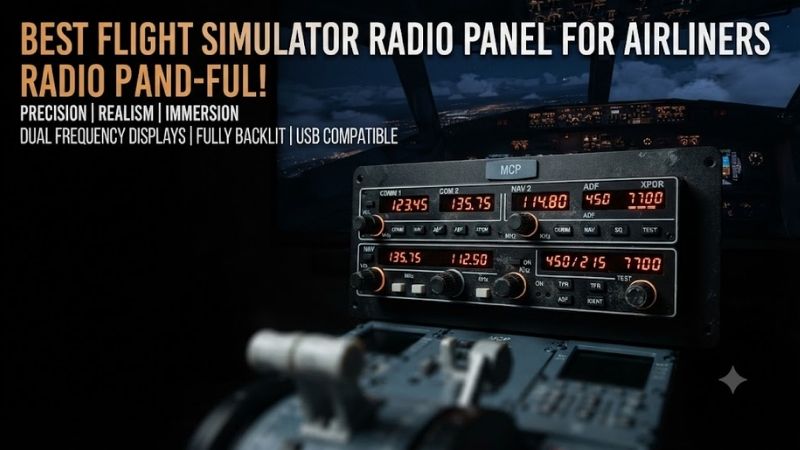
The best flight simulator radio panel for airliners should let pilots adjust communication frequencies, manage navigation receivers, and operate relevant radio systems without relying entirely on a mouse. For home cockpits, the choice ranges from general-purpose USB radio panels to full-size Boeing 737 replicas. This roundup compares six products and explains their important differences in wiring, avionics functions, and simulator compatibility.
Quick Verdict
Best Overall Standalone Choice: Logitech G Flight Radio Panel. It provides COM, NAV, ADF, DME, and transponder controls through one USB-connected module, making it useful for pilots who fly several aircraft types.
Best for Boeing 737 Communication: CPflight COM737. Its physical layout, frequency displays, and transfer controls are designed for a supported Boeing cockpit.
Best Advanced Boeing Radio: CPflight MULTI737. A broader communications panel supporting several VHF and HF radio functions.
Best for Navigation: CPflight MULTI MODE NAV Control Panel. A dedicated navigation-radio module for builders who already use a compatible CPflight MCP system.
Quick Comparison Table
| Product | Main Function | Standalone USB | Best For |
|---|---|---|---|
| Logitech G Flight Radio Panel | COM/NAV/ADF/DME/XPDR | Yes | Best overall |
| CPflight COM737 | Boeing VHF communication | No | 737 radio tuning |
| CPflight MULTI737 | VHF/HF communication | No | Advanced 737 cockpit |
| CPflight MULTI MODE NAV | Navigation radio functions | No | Boeing navigation |
| CPflight NAV737 | Dedicated NAV radio | No | NAV1/NAV2 workflows |
| CPflight ADF737 | ADF radio | No | Legacy navigation procedures |
All five CPflight modules require a compatible MCP737 controller. They are not independent USB peripherals. CPflight’s product documentation explicitly identifies this dependency and describes its five-pin module connection system.
How We Selected These Radio Panels
We prioritized real panels that provide physical radio controls and meaningful functions for airliner simulation.
The most important criteria were frequency displays, rotary control ergonomics, simulator compatibility, cockpit integration, and connection requirements.
We also separated communication radios from navigation receivers and transponder controls.
A panel that only sets ADF frequencies should not be described as a universal replacement for an airline communication radio.
The comparison includes one broadly useful standalone device and five specialist expansion modules intended for dedicated Boeing cockpit systems.
Detailed Product Recommendations
1. Logitech G Flight Radio Panel — Best Overall
Best For: Pilots who alternate between airliners and general aviation aircraft.
Why We Picked It: The Logitech panel provides several radio and navigation functions in one widely recognized USB accessory.
Key Specifications
-
Model: 945-000029
-
Four LED displays
-
COM1 and COM2
-
NAV1 and NAV2
-
ADF and DME
-
Transponder functions
-
USB connection
-
Windows-based simulator support
Features and Practical Performance
The Logitech panel provides physical rotary adjustments and frequency selection.
Instead of clicking a radio display in a virtual cockpit, pilots can use dedicated controls while keeping the main screen focused on flying.
The product is also modular within Logitech’s flight-panel ecosystem.
It can be positioned beside a compatible yoke or stacked with other supported panels.
For airliner pilots, the major benefit is flexibility rather than exact aircraft replication.
Pros: Standalone USB operation, several radio systems, compact installation.
Cons: Generic layout, aircraft-specific functions may require plugins or custom mappings.
Buy If: You fly several aircraft types and want one physical radio panel.
Skip If: You require a full-size Boeing 737 replica.
2. CPflight COM737 — Best Boeing Communication Radio
Best For: Dedicated Boeing 737 cockpit builders using compatible CPflight MCP hardware.
Why We Picked It: The COM737 provides a physical replica of the Boeing 737 communication-radio controls.
Key Specifications
-
Product: COM737
-
Aircraft focus: Boeing 737
-
Dedicated communication-radio controls
-
Active and standby frequency displays
-
Dual concentric encoders
-
Transfer button
-
Five-pin CPflight bus connection
-
Compatible MCP737 controller required
Features and Practical Performance
The COM737 is designed for pilots who want a realistic radio stack rather than a multipurpose desktop accessory.
Its physical frequency displays and transfer button support a more aircraft-specific workflow.
For example, the pilot can tune a standby frequency, check the displayed value, and transfer it using the dedicated control.
The panel also supports configuration for different communication radio positions within the larger cockpit system.
Pros: Full-size replica, physical frequency controls, dedicated Boeing integration.
Cons: Requires MCP737 hardware, not a standalone USB device.
Buy If: You already own a compatible CPflight Boeing cockpit system.
Skip If: You want to plug a single radio panel directly into your laptop.
3. CPflight MULTI737 — Best Advanced Boeing Radio
Best For: Boeing 737 home cockpits requiring several communication-radio functions.
Why We Picked It: The MULTI737 combines VHF and HF communication controls in a dedicated physical module.
Key Specifications
-
Product: MULTI737
-
VHF1, VHF2, and VHF3 functions
-
HF1 and HF2 functions
-
Dedicated sensitivity control
-
Illuminated numerical display
-
Concentric encoder system
-
CPflight five-pin bus
-
MCP737 controller required
Features and Practical Performance
The MULTI737 is relevant to users building a more complete airline pedestal.
Instead of limiting the panel to one conventional communication receiver, it provides additional radio selections used in complex aircraft operations.
Its physical controls can make procedural flying more immersive, particularly when working with supported aircraft add-ons.
However, the simulated aircraft must expose the required radio functions.
A hardware switch cannot create an avionics feature that the aircraft model does not implement.
Pros: Broad communication-radio coverage, aircraft-specific layout, dedicated encoders.
Cons: Requires CPflight controller, specialist cockpit integration.
Buy If: You want extensive Boeing communication-system hardware.
Skip If: You only need one COM radio for casual flying.
4. CPflight MULTI MODE NAV Control Panel — Best Navigation Integration
Best For: Boeing 737 cockpit owners who want a dedicated navigation-radio module.
Why We Picked It: Its full-size physical layout is designed for integration with CPflight’s other Boeing modules.
Key Specifications
-
Product: MULTI MODE NAV Control Panel
-
Aircraft focus: Boeing 737
-
Navigation-radio controls
-
Orange LCD display
-
Illuminated front panel
-
Five-pin module connection
-
Compatible MCP737 controller required
-
Included mounting hardware
Features and Practical Performance
Navigation-radio controls remain relevant even when modern aircraft also use flight-management systems.
A dedicated NAV panel can support procedures involving radio navigation, depending on the simulated aircraft.
The MULTI MODE NAV also creates a consistent physical layout within a cockpit pedestal.
Its main limitation is dependency on the CPflight control ecosystem.
It cannot simply be connected to an ordinary PC USB port as an independent panel.
Pros: Dedicated navigation controls, full-size design, coherent Boeing cockpit integration.
Cons: Requires supported MCP hardware, specialized installation.
Buy If: You already use CPflight equipment and need a navigation-radio module.
Skip If: You want a standalone multipurpose radio accessory.
5. CPflight NAV737 — Best Dedicated NAV Radio
Best For: Boeing 737 builders seeking a separate navigation radio control.
Why We Picked It: The NAV737 provides a more focused navigation receiver interface than a general-purpose radio panel.
Key Specifications
-
Product: NAV737
-
Aircraft focus: Boeing 737
-
Dedicated navigation-radio function
-
Frequency adjustment controls
-
CPflight expansion-module design
-
Compatible MCP737 controller required
Features and Practical Performance
The NAV737 is appropriate for a builder assembling a realistic radio pedestal.
Its focused controls allow the pilot to adjust navigation frequencies without using the main simulator interface.
However, it is a specialist component.
A user who primarily flies general aviation aircraft may obtain more flexibility from the Logitech panel.
The NAV737 should also be selected according to the intended Boeing cockpit layout and simulator add-on.
Pros: Focused navigation functionality, dedicated Boeing appearance, consistent module ecosystem.
Cons: No standalone USB operation, limited use outside compatible cockpit arrangements.
Buy If: You are developing a Boeing 737 radio stack.
Skip If: You fly many unrelated aircraft types.
6. CPflight ADF737 — Best for ADF Procedures
Best For: Boeing cockpit builders practicing compatible ADF navigation workflows.
Why We Picked It: The ADF737 provides physical controls and frequency displays for the aircraft’s ADF system.
Key Specifications
-
Product: ADF737
-
Dedicated ADF controls
-
Active and standby displays
-
Dual concentric encoder
-
Frequency transfer function
-
Jumper selection for ADF1 or ADF2
-
Five-pin CPflight bus connection
-
Compatible MCP737 required
Features and Practical Performance
ADF navigation is less prominent in many modern routes, but it remains part of certain aircraft systems and legacy procedures.
The ADF737 is valuable for pilots seeking a detailed physical Boeing cockpit.
Its frequency displays and transfer controls reproduce relevant interaction patterns.
However, the simulated aircraft and software must support the appropriate functionality.
For users who rarely fly ADF procedures, the panel may add cost and installation complexity without much practical benefit.
Pros: Dedicated ADF operation, physical displays, aircraft-specific integration.
Cons: Narrow use case, requires MCP737 hardware.
Buy If: You want comprehensive Boeing pedestal controls.
Skip If: You only use GPS-based navigation.
Buying Guide: Choosing an Airliner Radio Panel
Distinguish Standalone Devices From Expansion Modules
A standalone radio panel generally connects directly through USB.
An expansion module may require another device to manage its communication and power.
CPflight’s radio modules use the MCP737 as the central connection system.
Buying only the module without the required controller can leave the hardware unusable.
Identify the Aircraft You Fly
Boeing, Airbus, and general aviation aircraft use different radio arrangements.
A generic radio panel provides flexibility.
A replica offers greater physical fidelity but may support a narrower range of aircraft.
Understand COM and NAV Functions
COM radios are used for voice communication.
NAV radios support appropriate radio-navigation functions.
ADF equipment serves different navigation procedures.
A transponder is another distinct system.
Choose the controls you actually need rather than buying the largest number of displays.
Check Simulator Integration
Microsoft Flight Simulator and X-Plane support many external controls, but aircraft add-ons can expose data differently.
An airliner radio panel needs both input mapping and, where applicable, synchronization of physical displays.
Check compatibility with the exact aircraft package.
Plan Cockpit Mounting
A full-size Boeing module generally belongs in a pedestal or purpose-built panel structure.
A compact Logitech radio panel is easier to place on a desk.
Measure width, mounting depth, power connections, and access to other controls.
Consider Future Expansion
A complete airline radio stack may include several communication radios, navigation receivers, transponder controls, and audio selection panels.
Choose a compatible ecosystem if you intend to add more modules over time.
Frequently Asked Questions
What is the best radio panel for Microsoft Flight Simulator airliners?
The Logitech G Flight Radio Panel is a practical multipurpose choice. Boeing cockpit specialists may prefer compatible replica modules.
Does a CPflight COM737 work directly through USB?
No. It requires a compatible CPflight MCP737 system.
Can I use a Boeing radio panel with Airbus aircraft?
Not as a guaranteed aircraft-specific experience. Any broader use depends on simulator mappings and integration.
Do radio panels work with virtual ATC?
They can control compatible simulator radio frequencies, but the actual interaction depends on the ATC software and simulator integration.
Is a separate NAV panel necessary?
Not for every setup. Its value depends on the aircraft and the procedures you want to simulate.
Conclusion
The Logitech G Flight Radio Panel is our best overall choice among the best flight simulator radio panel for airliners options for users who want a versatile USB accessory. For dedicated Boeing 737 cockpits, CPflight COM737 and MULTI737 offer more realistic communication controls, while NAV737 and ADF737 support specialized navigation functions. The most important buying decision is whether the panel operates independently or requires a compatible MCP737 controller.