🛒 Best Price Today on Amazon
Prime members get fast, free shipping on everything above, plus member-only deals. New members get a 30-day free trial — cancel anytime.
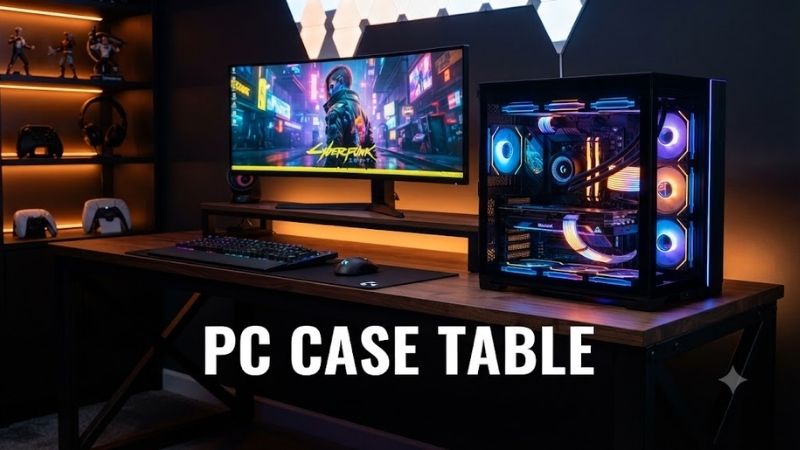
A PC case table combines the computer chassis and desk into one showcase workstation, placing core hardware beneath the work surface instead of beside it. The best designs provide strong cooling support, practical cable management, enough GPU clearance, and ergonomic height adjustment without sacrificing upgrade access.
Best PC Case Table Options Compared
| Product | Best For | Key Advantage | Limitation |
|---|---|---|---|
| Lian Li DK-07 Wood | Best Overall | Premium wood top and dual-system support | Extremely large |
| Lian Li DK-07 | Best Gaming Desk Case | Up to dual E-ATX systems | Premium enthusiast design |
| Lian Li DK-05F | Best Dual-System Alternative | Two independent PC builds | Older generation |
| Lian Li DK-04F | Best Single-System Desk Case | More compact one-PC design | Still much larger than a normal case |
Best PC Case Table Picks
Lian Li DK-07 Wood
Best For: High-end gaming and workstation users who want a PC case integrated into a premium standing desk.
The Lian Li DK-07 Wood combines a dark walnut desktop with a tempered-glass hardware display section underneath. It supports one or two complete systems, including E-ATX motherboards, while motorized height adjustment lets the workstation move between seated and standing positions without separating the PC from the desk.
Key Features
- Single- or dual-system support
- Up to two E-ATX motherboards
- Dual ATX power-supply support
- Dark walnut desktop
- Tempered-glass viewing area
- Motorized height adjustment
- Three programmable height presets
- GPU support up to 383mm
- Multiple radiator positions
- Wireless charging pad
- Two integrated drawers
- Dual front I/O sections
What makes the DK-07 Wood different is its attempt to look like premium furniture rather than a giant computer enclosure. The walnut surface softens the industrial appearance of the internal chassis, while the glass viewing area still lets a custom cooling loop, GPU, motherboard, and lighting remain visible during normal desk use.
Cooling capacity is substantial enough for enthusiast hardware. Depending on whether one or two systems are installed, the internal layout can accommodate numerous 120mm fans and multiple large radiators. Builders therefore have enough room for powerful CPUs, flagship graphics cards, or elaborate custom loops without placing a separate tower beside the desk.
Pros
- Premium furniture-inspired appearance
- Supports one or two complete PCs
- Extensive liquid-cooling capacity
Cons
- Requires considerable floor space
- More complex to build than a tower case
Who Should Buy It: Choose the DK-07 Wood if the workstation itself is part of the room design and you want the hardware permanently integrated into it. It suits flagship gaming setups, professional editing stations, streaming rooms, and dual-PC workflows where a normal case plus separate standing desk would feel less cohesive.
Lian Li DK-07
Best For: Enthusiasts who want maximum hardware flexibility in a motorized desk-style chassis.
The standard Lian Li DK-07 uses a large steel, aluminum, and tempered-glass structure measuring roughly 1,480mm wide and 805mm deep. Its motorized frame adjusts from approximately 676mm to 1,162mm high, allowing the same system to function as both a seated gaming desk and a standing workstation.
Key Features
- Motorized desk chassis
- Height range around 676–1,162mm
- Support for up to two E-ATX systems
- Up to two ATX power supplies
- Maximum 383mm GPU clearance
- 180mm CPU cooler clearance
- Multiple radiator positions
- Up to 17 fans in single-system layouts
- Extensive HDD and SSD support
- Wireless charging
- Two storage drawers
- Dual-system front I/O
The DK-07 is particularly interesting for dual-system builders. A streamer could install a gaming system on one side and a dedicated encoding or production PC on the other, while both machines remain inside the same desk. Separate motherboard trays and front controls make the two systems easier to manage than a heavily modified conventional case.
Storage support is also unusually generous. Single-system configurations can accommodate numerous 3.5-inch and 2.5-inch drives, making the desk suitable for workstation users with large local libraries. That is useful for video editing, photography, development, or media production where several terabytes of project storage may be required.
Pros
- Exceptional component capacity
- Motorized sit-stand adjustment
- Strong dual-system flexibility
Cons
- Difficult to move after assembly
- Excessive for conventional gaming builds
Who Should Buy It: The DK-07 makes sense if you already planned to purchase a premium standing desk and an extreme PC case. Combining both functions can create a cleaner high-end setup, but mainstream users should remember that upgrading, relocating, or servicing such a large system requires more effort than working with a traditional tower.
Lian Li DK-05F
Best For: Dual-PC builders who want a proven desk case with switchable glass.
The Lian Li DK-05F is an earlier dual-system desk chassis designed around two E-ATX motherboards and two ATX power supplies. It measures about 1,400mm wide and 780mm deep, while electric height adjustment covers approximately 689mm to 1,175mm for seated and standing use.
Key Features
- Dual E-ATX motherboard support
- Two removable motherboard trays
- Two ATX power supplies
- Up to 400mm GPU length
- 185mm CPU cooler clearance
- Large radiator support
- Numerous 120mm and 140mm fan mounts
- Motorized height adjustment
- Four stored height presets
- Switchable tempered-glass top
- Integrated fan controls
- Integrated RGB controls
Its most unusual feature is the switchable glass surface. The top can change between a transparent state that exposes the internal hardware and an opaque appearance that hides the components. This allows a heavily customized PC to become the visual focus during gaming while creating a cleaner look during work or meetings.
The dual-system design also offers enormous cooling capacity. Builders can dedicate separate cooling hardware to each machine or create complex custom water-cooling layouts across the desk. Removable motherboard and radiator brackets reduce some installation difficulty, although maintenance remains more involved than opening the side panel of a tower.
Pros
- Two complete systems in one desk
- Switchable transparent or opaque glass
- Extensive water-cooling support
Cons
- Older than the DK-07 platform
- Large and complicated to assemble
Who Should Buy It: The DK-05F remains relevant when found through specialist retailers or the used market at a sensible price. It is best suited to collectors, custom-loop enthusiasts, streamers, and workstation users who specifically need two PCs and value the switchable-glass design more than the refinements of the newer DK-07.
Lian Li DK-04F
Best For: Users who want a single high-end PC integrated into an adjustable desk.
The DK-04F shares much of the DK-05F design but reduces the chassis to a single-system layout. It measures about 1,000mm wide and 740mm deep, supports E-ATX through Mini-ITX motherboards, and provides electric height adjustment from approximately 689mm to 1,175mm.
Key Features
- Single-system configuration
- Mini-ITX through E-ATX support
- One removable motherboard tray
- Up to 390mm GPU clearance
- 185mm CPU cooler clearance
- ATX power-supply support
- 480mm or 420mm front radiator support
- Additional rear radiator support
- Large drive capacity
- Switchable tempered glass
- Motorized standing adjustment
- Integrated fan and RGB controls
The smaller width makes the DK-04F easier to place than the dual-system DK-05F while retaining the desk-PC concept. A single gaming system still receives ample room for a long graphics card, tall air cooler, multiple storage drives, and serious liquid cooling without requiring an oversized 1,400mm-wide dual-PC enclosure.
Its storage support is another notable advantage. Depending on configuration, the case can accommodate numerous 3.5-inch hard drives and several 2.5-inch SSDs. That makes it suitable not only for gaming but also for editing and workstation environments where local project archives would overwhelm the limited storage mounts of compact cases.
Pros
- More manageable than a dual-system desk
- Strong component clearance
- Switchable glass display
Cons
- Older desk-case generation
- Still occupies more room than a tower
Who Should Buy It: The DK-04F is the better choice for enthusiasts who know they will run only one PC. It preserves the sit-stand mechanism, showcase glass, cooling capacity, and integrated chassis design of the larger model without dedicating half the desk to hardware that may never be installed.
PC Case Table Buying Guide
Desk Case vs Traditional PC Tower
A traditional PC tower separates the computer from the furniture, making both parts easier to replace independently. A desk case combines them, creating a cleaner visual installation and freeing floor space around the workstation. The trade-off is that every upgrade or relocation becomes connected to the desk itself.
Desk cases work best when the system will remain in one room for several years. Renters, students, or users who move frequently may find a conventional case easier to manage. Enthusiasts building permanent gaming rooms or studios gain more from the dramatic presentation and integrated cable-management advantages.
Single-System vs Dual-System Support
A single-system PC case table is appropriate for almost every normal gaming or workstation build. Dual-system support becomes valuable when one user genuinely needs two independent motherboards, processors, storage configurations, and operating environments working from the same physical desk.
Streamers are an obvious example because one system can run the game while another handles encoding, capture, recording, and production software. Developers and professionals may also separate work and personal machines. The disadvantage is cost because two complete PCs require far more hardware, cooling, power, and maintenance.
GPU and CPU Cooler Clearance
Desk-style cases may appear enormous from the outside, but component clearance still needs to be checked before purchasing expensive hardware. Current flagship graphics cards can be exceptionally long and thick, while vertical mounting can add riser-cable requirements that do not exist in a conventional horizontal installation.
The newer DK-07 supports GPUs up to around 383mm, while DK-05F reaches approximately 400mm and DK-04F around 390mm. These limits accommodate many large cards, but buyers should confirm the exact dimensions of a chosen GPU, including connectors and tubing, rather than assuming every flagship model will fit.
Liquid Cooling and Radiator Support
One of the strongest reasons to choose a desk PC case is water cooling. The large internal volume can provide space for multiple radiators, pumps, reservoirs, tubing runs, and fans that would overwhelm a standard mid-tower. This allows builders to create visually impressive loops while maintaining substantial heat-dissipation capacity.
However, more radiator capacity also increases complexity. Filling, bleeding, draining, leak testing, and cleaning a custom loop inside a large desk can take considerably more time than servicing an AIO cooler. Buyers who do not enjoy PC maintenance may be better served by high-quality air cooling or simpler closed-loop liquid systems.
Sitting and Standing Height
A PC desk still needs to function as comfortable furniture. Motorized height adjustment is therefore more than a novelty, especially because desk cases are too heavy to place on many third-party standing-desk frames. Programmable presets let users switch between known sitting and standing positions without manually finding the correct height each time.
Ergonomics depend on more than the desk motor. Monitor height, keyboard placement, chair adjustment, mouse position, and viewing distance still matter. Buyers should confirm that the desk’s adjustment range matches their body height and working posture instead of assuming every motorized PC desk will automatically provide a comfortable setup.
Cable Management
Integrating the computer inside the desk removes a tower from the floor, but it does not eliminate cables. Monitor power, DisplayPort or HDMI, Ethernet, speakers, USB devices, mains power, and lighting still need routes that remain tidy when the desk moves between sitting and standing positions.
Modern desk cases address this with rear trays, cable clips, internal straps, and pass-through openings. Leave enough slack for the full height range and secure power strips to the desk structure when possible. Cables hanging directly from a moving desk can snag on furniture or place stress on connectors during height changes.
Who Should Buy a PC Case Table?
Gaming and Showcase Builders
A desk case is ideal when the PC itself is intended to be part of the visual design of the room. Tempered-glass surfaces expose the motherboard, graphics card, cooling loop, sleeved cables, and lighting from above, producing a presentation that conventional side-window cases cannot easily replicate.
The format is especially compelling for custom water-cooling enthusiasts because tubing can be routed over a much larger area. Builders should still prioritize airflow and serviceability rather than treating the desk purely as decoration. A visually impressive loop becomes frustrating if routine draining or component replacement requires excessive disassembly.
Workstation and Creator Users
Professional creators can benefit from the enormous component and storage capacity. Multiple drives, high-end GPUs, powerful CPUs, capture hardware, and extensive cooling can all be integrated while leaving the desktop surface relatively clean. Dual-system versions also allow production and rendering environments to remain physically separated.
The downside is business continuity. If the desk mechanism or internal chassis needs service, the workstation itself may become inconvenient to use. Professionals should therefore consider how quickly they could access critical components or temporarily move work to another machine before adopting such an integrated system.
Frequently Asked Questions
What Is a PC Case Table?
A PC case table is a desk that also functions as the computer chassis. The motherboard, graphics card, power supply, storage, fans, and cooling hardware install inside the desk structure rather than a separate tower. Many enthusiast models use tempered glass so internal components remain visible beneath the work surface.
Is a Desk PC Case Good for Gaming?
Yes, especially for high-end gaming builds requiring substantial cooling and large graphics cards. A desk chassis can offer more radiator and fan capacity than ordinary cases while creating a clean setup without a tower on the floor. The trade-offs are price, size, complicated assembly, and more difficult relocation.
Can a PC Case Table Hold Two Computers?
Some models can. Lian Li DK-07 and DK-05F support two motherboard and power-supply configurations, allowing two independent computers to operate inside one desk. This is useful for streaming or separate work systems, while DK-04F focuses on a single PC and is more practical for conventional users.
Are Desk PC Cases Difficult to Build In?
They provide abundant room but require more planning than normal towers. Builders need to route long cables, organize cooling zones, position radiators, plan monitor connections, and ensure moving desk components remain unobstructed. Removable motherboard and radiator trays can simplify installation, but the finished system remains physically large.
Do PC Case Tables Support Water Cooling?
High-end desk cases are particularly well suited to custom liquid cooling. Lian Li’s desk designs provide multiple radiator and fan locations along with enough internal space for pumps and reservoirs. Exact support differs between models, so radiator thickness, fan clearance, GPU orientation, and tubing routes should be planned together.
Is a PC Case Table Worth Buying?
It is worth considering if you want a permanent enthusiast workstation and value presentation, cooling space, and hardware integration. It is poor value for users who only need a functional desk and ordinary gaming case. The format makes the most sense when the desk itself is a major part of the custom PC project.
Conclusion
The best PC case table is determined by how many systems you need, how much cooling hardware you plan to install, and whether the workstation will remain in one location. Lian Li DK-07 Wood offers the most refined presentation, DK-07 delivers modern dual-system flexibility, while DK-05F and DK-04F remain capable enthusiast alternatives.