🛒 Best Price Today on Amazon
Prime members get fast, free shipping on everything above, plus member-only deals. New members get a 30-day free trial — cancel anytime.
The Cooler Master Tempest GP27Q is a 27-inch 1440p gaming monitor built around a 165Hz IPS panel, Quantum Dot color, and a 576-zone Mini-LED backlight. It targets buyers who want stronger HDR than a typical IPS display without moving to 4K, while also offering USB-C, a KVM switch, and useful ergonomic adjustments.
Cooler Master Tempest GP27Q Overview
Core Specifications
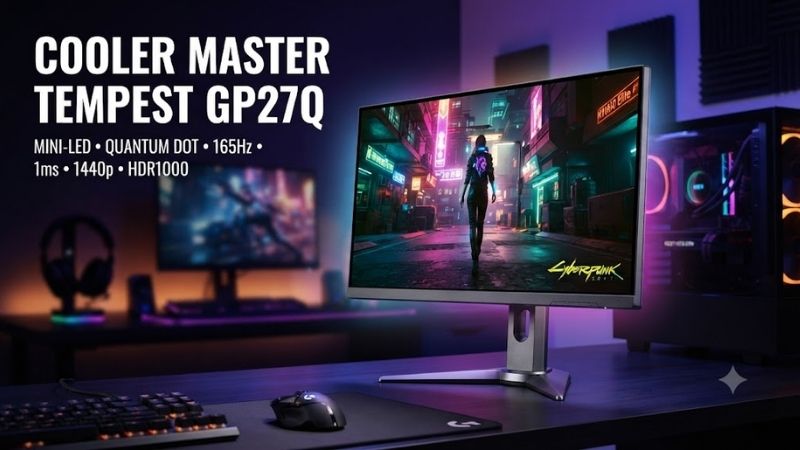
The Tempest GP27Q combines a 27-inch 2560 x 1440 Ultra-Speed IPS panel with a 165Hz maximum refresh rate and a 1 ms specified response time. Cooler Master lists 576 Mini-LED local-dimming zones, Adaptive Sync, 600-nit SDR brightness, and HDR peak brightness up to 1,200 nits.
Key Specifications:
- 27-inch flat IPS display
- 2560 x 1440 WQHD resolution
- 165Hz refresh rate
- 576-zone Mini-LED backlight
- Quantum Dot enhancement
- DisplayHDR 1000 compatible
- 600-nit listed SDR brightness
- Up to 1,200-nit listed HDR peak
- Adaptive Sync support
- 100 x 100 mm VESA mount
The 27-inch 1440p format remains a useful balance for desktop gaming because it provides visibly more detail than 1080p without demanding the GPU power required by 4K. At normal desk distance, text and game environments look sharp while midrange and high-end graphics cards can still target high frame rates.
Mini-LED Backlight and Local Dimming
The defining feature is the 576-zone Mini-LED backlight. Traditional IPS monitors usually illuminate large areas continuously, limiting black depth in dark scenes. Local dimming divides the backlight into many independently controlled zones, allowing dark portions of an image to dim while bright highlights remain intense.
With local dimming enabled, Cooler Master claims contrast can reach 50,000:1 under suitable conditions. That is dramatically above the panel’s native 1,000:1 specification, although local dimming effectiveness depends on scene composition and the relationship between bright objects and individual dimming zones.
The practical benefit appears most clearly in HDR games. Sunlight, explosions, reflections, neon signs, and highlights can become much brighter while dark backgrounds remain substantially darker than on a conventional edge-lit IPS monitor. The limitation is blooming, where bright objects can create visible halos against very dark backgrounds.
Quantum Dot Color
Cooler Master uses a Quantum Dot enhancement layer to expand the monitor’s color gamut. The company specifies 98% DCI-P3 coverage and 99% Adobe RGB, giving the GP27Q substantially broader color reproduction than a basic sRGB-only gaming display.
Wide-gamut capability benefits HDR games, digital artwork, photography, and video work. It can make saturated colors appear richer and provide more coverage for professional color spaces. Users working specifically in sRGB should still select an appropriate color mode because wide-gamut monitors can otherwise make ordinary content appear overly saturated.
Gaming Performance and Image Quality
1440p at 165Hz
A 165Hz refresh rate gives the GP27Q enough speed for competitive shooters while maintaining the image clarity of 1440p. Compared with 60Hz, motion appears significantly smoother and input updates occur much more frequently, benefiting fast games where tracking enemies and responding quickly are important.
The 165Hz ceiling is not aimed at players specifically chasing 240Hz, 360Hz, or 500Hz esports performance. Instead, the GP27Q targets users who want one monitor to handle both visually demanding games and faster multiplayer titles without dropping to 1080p or sacrificing HDR capability.
For modern single-player games, 1440p can also be easier to drive than 4K. A graphics card capable of 70 to 120 fps at 1440p may require much more aggressive upscaling or reduced settings at 4K, so the GP27Q provides a sensible resolution for users prioritizing frame rate.
Response Time and Motion Handling
Cooler Master specifies a 1 ms response time and provides multiple overdrive controls, including unusually granular customization from 0 to 100. This lets users tune pixel transitions instead of relying only on a handful of predefined Normal, Fast, and Faster settings.
The advantage of adjustable overdrive is flexibility. Faster transitions can reduce visible trailing behind moving objects, but excessive overdrive introduces inverse ghosting or bright artifacts. An adjustable scale gives enthusiasts more opportunity to find a compromise that matches refresh rate and personal sensitivity.
For competitive gaming, users should prioritize a setting that reduces blur without producing obvious overshoot. The fastest advertised mode is not automatically the best mode, particularly when frame rate fluctuates and Adaptive Sync changes the operating refresh rate.
Adaptive Sync
The GP27Q supports Adaptive Sync and lists both FreeSync and G-SYNC operating compatibility in Cooler Master’s specifications. Variable refresh rate synchronizes monitor refresh timing with frames produced by the graphics card, reducing tearing when game performance does not remain locked to 165 fps.
This is particularly useful at 1440p because demanding games rarely maintain one perfectly constant frame rate. A title may move between 80 and 130 fps as scenes change, and VRR helps those fluctuations appear smoother than running the monitor at a fixed refresh rate with traditional V-Sync behavior.
Variable refresh rate does not create extra GPU performance, however. If a game drops to very low frame rates because the graphics card is overloaded, the correct solution remains adjusting settings, using supported upscaling technology, or upgrading the GPU rather than expecting the monitor to hide the limitation.
HDR Performance
HDR is where the Tempest GP27Q separates itself most clearly from ordinary 1440p gaming monitors. Cooler Master lists DisplayHDR 1000 compatibility, 600-nit SDR brightness, and up to 1,200 nits of HDR peak brightness alongside its 576-zone Mini-LED system.
That combination allows highlights to become genuinely bright instead of merely changing the color curve. Dark areas can also benefit from local dimming, creating a stronger sense of depth in space games, dark RPG environments, nighttime driving scenes, and HDR movies.
Mini-LED still cannot control light at the individual-pixel level like OLED. Small white text, stars, interface elements, or bright objects on black backgrounds can reveal halos because each backlight zone illuminates an area larger than one pixel. Buyers expecting OLED-like black precision should understand this trade-off.
SDR Image Quality
In SDR mode, the GP27Q still behaves like a high-quality 1440p IPS gaming monitor even when local dimming is not the priority. The resolution is well suited to a 27-inch panel, the wide color gamut provides strong saturation, and the IPS technology offers broad viewing angles for normal desktop use.
Users mainly working with web content, documents, or conventional games may prefer disabling local dimming during some SDR tasks. Local dimming can alter brightness around windows and desktop elements, while native IPS operation provides more predictable uniformity for general productivity.
Cooler Master notes that flicker-free operation applies when local dimming is disabled. Users sensitive to flicker or working for long periods on static desktop content should consider this detail when selecting display modes.
Design, Connectivity, and Daily Use
Stand and Ergonomics
The included stand offers 110 mm of height adjustment, tilt from -5 to +20 degrees, swivel of approximately 15 degrees in either direction, and pivot capability. A standard 100 x 100 mm VESA mount also makes the monitor compatible with many third-party arms and mounting solutions.
That range is useful for long gaming or work sessions because users can position the display according to desk height and seating position rather than adapting their posture to a fixed stand. Pivot support is less important for gaming but can benefit coding, chat windows, and vertical document workflows.
The styling is comparatively restrained for a gaming monitor. Cooler Master adds rear lighting and a distinctive stand base, but the front does not rely on aggressive RGB elements. This helps the GP27Q fit into both gaming rooms and professional workstations.
USB-C and Laptop Connectivity
USB-C is one of the monitor’s strongest productivity features. Cooler Master specifies DisplayPort Alt Mode, USB data connectivity, and up to 90W USB-C Power Delivery. A compatible laptop can therefore transmit video, connect to USB peripherals, and receive charging power through one cable.
This can transform the GP27Q into a practical hybrid-work display. A desktop gaming PC can remain connected through DisplayPort, while a work laptop connects through USB-C. The user can then switch between systems without rebuilding the desk each morning and evening.
Ninety watts is sufficient for many productivity and creator notebooks, although powerful gaming laptops may require their dedicated AC adapters under full load. Buyers should check their laptop’s charging requirements rather than assuming USB-C can replace every proprietary power supply.
KVM Switch
The integrated KVM switch allows one keyboard and mouse to control two connected devices. Cooler Master specifically positions this feature for switching between a desktop, laptop, tablet, or another compatible device through the monitor’s input and USB connections.
A KVM is valuable when one desk serves both work and gaming. Instead of keeping separate keyboards and mice or manually moving USB cables, users can switch control between machines through the monitor’s menu.
The limitation is convenience. Hardware KVM functions built into monitors are rarely as instant or customizable as dedicated enterprise KVM devices, but the feature remains far cleaner than maintaining duplicate peripherals on a small desk.
Ports and Device Support
Connectivity includes one DisplayPort input, two HDMI 2.0 ports, USB-C, one USB Type-B upstream port, two USB Type-A ports, and a 3.5 mm headphone connection. The monitor also includes two 3W speakers for basic integrated audio.
HDMI 2.0 is the main limitation. It is perfectly useful for many 1440p devices, but the GP27Q does not provide the HDMI 2.1 bandwidth found on newer premium gaming displays. Users connecting current consoles should verify the exact refresh-rate and resolution behavior they expect over HDMI.
For a desktop PC, DisplayPort is the natural primary connection when targeting the monitor’s full gaming capabilities. USB-C is better reserved for compatible laptops or compact PCs that benefit from video, power delivery, and USB data through one connection.
Practical Strengths and Limitations
What the GP27Q Does Best
The Tempest GP27Q’s strongest feature is that it combines gaming speed with meaningful HDR hardware. Many 1440p 165Hz monitors offer similar refresh rates but rely on conventional edge lighting with limited brightness, making HDR support mostly a format-compatibility feature rather than a major visual upgrade.
Its 576-zone Mini-LED system gives HDR highlights and dark scenes substantially more range. Quantum Dot color, 90W USB-C, a KVM switch, a USB hub, and strong stand adjustment also make the GP27Q far more versatile than a gaming-only display.
The 1440p resolution deserves credit as well. It lowers GPU demands compared with 4K and provides a comfortable pixel density on a 27-inch panel, making the monitor suitable for both high-refresh gaming and everyday productivity.
Main Weaknesses
The first limitation is Mini-LED blooming. Five hundred seventy-six zones are far better than basic edge-lit local dimming, but each zone still controls thousands of pixels. Bright interface elements or subtitles against black backgrounds can therefore create halos that an OLED display would avoid.
HDMI 2.0 is another weakness for a premium monitor. PC users relying on DisplayPort may never care, but buyers building a multi-device setup with consoles and PCs receive less flexibility than they would from a modern HDMI 2.1 monitor.
The monitor also has more settings and interactions to manage than a simple IPS display. Local dimming, HDR, Adaptive Sync, overdrive, color profiles, and different connections can require experimentation before the monitor behaves exactly as the user prefers.
Who Should Buy the Cooler Master Tempest GP27Q?
The GP27Q makes the most sense for PC gamers who want 1440p rather than 4K and care enough about HDR to demand real local dimming. It is particularly strong for mixed game libraries containing cinematic RPGs, racing titles, shooters, strategy games, and HDR video rather than exclusively competitive esports.
It also suits users with a gaming desktop and work laptop on the same desk. USB-C power delivery and the integrated KVM reduce cable clutter and make switching devices much easier than on basic gaming monitors.
Users who play only competitive shooters may obtain better value from a faster 240Hz or higher-refresh display. Buyers who prioritize perfect blacks and minimal blooming may instead prefer OLED, assuming they accept OLED-specific considerations such as static-content management.
Relevant Alternatives
Cooler Master Tempest GP27U
Tempest GP27U is the closest alternative within Cooler Master’s own lineup. It retains a 27-inch Mini-LED format with 576 local-dimming zones but increases resolution to 3840 x 2160 and operates up to 160Hz. It also adds HDMI 2.1, making it more attractive for users combining PC and current-generation console gaming.
The trade-off is GPU demand. Driving modern games at 4K requires considerably more graphics power than 1440p. GP27Q is therefore the more balanced choice for gamers who prioritize frame rate and do not want to rely heavily on upscaling.
Conventional 1440p 165Hz IPS Monitors
A standard IPS monitor without Mini-LED can cost considerably less while providing similar resolution and refresh rate. For competitive gaming and ordinary SDR use, that may be enough, especially when HDR movies and cinematic single-player games are not priorities.
What those models usually cannot replicate is the GP27Q’s combination of high peak brightness and hundreds of local-dimming zones. Buyers deciding between them should ask whether HDR quality is worth paying a premium for rather than focusing only on refresh rate.
OLED Gaming Monitors
OLED is the strongest alternative for users who prioritize black level, pixel-level contrast, and extremely fast transitions. Because each OLED pixel produces its own light, there is no Mini-LED blooming around small bright objects.
Mini-LED retains advantages for buyers who want very high brightness and spend significant time on static productivity content. The GP27Q also combines USB-C power and KVM functionality in a package that can work as both a gaming and professional desktop monitor.
Cooler Master Tempest GP27Q Pros and Cons
Pros
- 576-zone Mini-LED local dimming
- Strong HDR peak brightness
- 2560 x 1440 resolution
- 165Hz refresh rate
- Quantum Dot wide-gamut color
- Highly adjustable overdrive
- Adaptive Sync
- 90W USB-C Power Delivery
- Integrated KVM switch
- Flexible ergonomic stand
- Standard VESA mounting
- Useful PC and laptop connectivity
Cons
- Blooming remains possible around bright objects
- HDMI is limited to 2.0
- 165Hz is below modern esports-focused displays
- Local dimming adds configuration complexity
- Integrated speakers are basic
- Premium features may be unnecessary for SDR-only users
FAQ
Is the Cooler Master Tempest GP27Q Good for Gaming?
Yes. Its 2560 x 1440 resolution and 165Hz refresh rate provide a useful balance between image clarity and high frame rates. The 576-zone Mini-LED backlight adds meaningful HDR capability, while Adaptive Sync helps reduce tearing when GPU output changes. Competitive-only players may prefer a faster 240Hz or 360Hz monitor.
Is the Tempest GP27Q True HDR?
The GP27Q has considerably stronger HDR hardware than basic HDR-compatible monitors because it combines high peak brightness with 576 local-dimming zones and wide-gamut Quantum Dot color. It is DisplayHDR 1000 compatible. Mini-LED can still show blooming, so its dark-scene behavior is not identical to pixel-level OLED dimming.
Is 1440p Enough for a 27-Inch Monitor?
Yes. At 27 inches, 2560 x 1440 provides a strong balance between sharpness and graphics-card demand. Text and games look noticeably sharper than 1080p, while maintaining high frame rates is substantially easier than at 4K. This makes the resolution particularly suitable for midrange and high-end gaming PCs.
Does the GP27Q Support USB-C Charging?
Yes. The USB-C connection supports DisplayPort Alt Mode, USB data, and up to 90W Power Delivery. This allows many compatible laptops to use one cable for display output, peripherals, and charging. High-power gaming laptops may still require their dedicated charger when operating under demanding CPU and GPU workloads.
Does the Tempest GP27Q Have a KVM Switch?
Yes. The integrated KVM lets one keyboard and mouse serve multiple connected systems. It is particularly useful when a gaming desktop and work laptop share the same monitor. Combined with the USB-C port and USB hub, the feature makes the GP27Q more suitable for mixed productivity and gaming than many basic gaming monitors.
Is the GP27Q Better Than an OLED Monitor?
It depends on priorities. OLED provides superior pixel-level black control, faster transitions, and no Mini-LED blooming. The GP27Q can deliver strong brightness and is attractive for mixed productivity use where static content is common. Buyers should choose based on HDR priorities, work habits, refresh-rate needs, and budget.
Conclusion
The Cooler Master Tempest GP27Q remains a compelling 27-inch 1440p monitor because its 576-zone Mini-LED backlight delivers HDR capability far beyond a conventional IPS display. Its 165Hz panel, Quantum Dot color, USB-C charging, KVM switch, and adjustable stand make it equally useful for gaming and work, although blooming and HDMI 2.0 remain notable trade-offs.