🛒 Best Price Today on Amazon
Prime members get fast, free shipping on everything above, plus member-only deals. New members get a 30-day free trial — cancel anytime.
- Quick Verdict: Is the Cooler Master Q300L Worth Buying?
- Cooler Master Q300L Specifications
- Design and Build Quality
- Cooling Performance and Airflow
- Hardware Compatibility
- Cable Management and Building Experience
- Front I/O and Connectivity
- Noise Performance
- Cooler Master Q300L vs Newer Q300L Versions
- Cooler Master Q300L Pros and Cons
- Who Should Buy the Cooler Master Q300L?
- Who Should Skip the Cooler Master Q300L?
- Common Problems and Practical Solutions
- Frequently Asked Questions
- Conclusion: Is the Cooler Master Q300L Still Worth It?
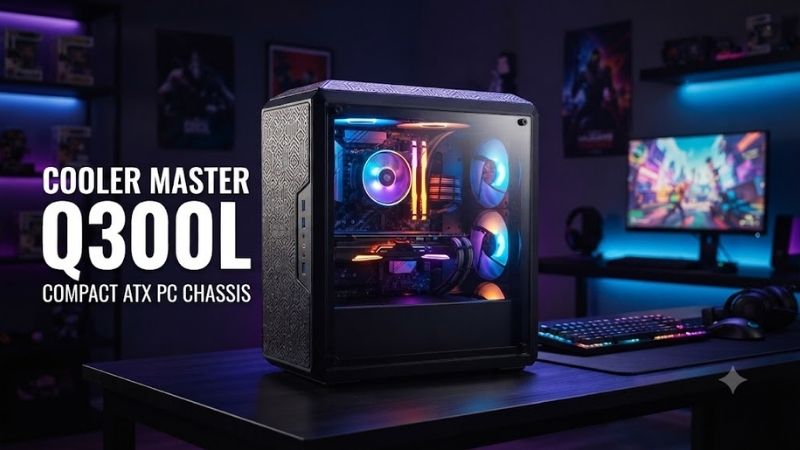
The Cooler Master Q300L is a compact Micro-ATX PC case designed for budget gaming desktops and everyday computer builds. Its flexible layout, magnetic dust filters, acrylic side panel, and support for full-size ATX power supplies make it appealing for inexpensive setups. However, limited stock cooling and restrictive airflow mean buyers should examine its trade-offs carefully before choosing it over newer alternatives.
Quick answer: Our top pick in 2026 is the Specification — our #1 rated choice. See the full ranked comparison, alternatives and buying advice below.
Quick Verdict: Is the Cooler Master Q300L Worth Buying?
The original Cooler Master MasterBox Q300L is a reasonable budget PC case for builders who value compact dimensions, straightforward component installation, and flexible positioning. It supports Micro-ATX and Mini-ITX motherboards, graphics cards up to 360mm long, and conventional ATX power supplies up to 160mm long.
Its most distinctive features include removable patterned dust filters, a repositionable front I/O panel, and the ability to operate in vertical or horizontal orientations.
However, its cooling performance is less impressive than the manufacturer’s ventilation-focused design might suggest. The restrictive perforated panels and single included exhaust fan create limitations for demanding gaming hardware. Independent community feedback has repeatedly identified airflow as a weakness.
Overall Recommendation: Consider the Q300L for a low-cost Micro-ATX build with moderate thermal requirements. For a modern gaming PC with power-hungry hardware, a newer airflow-focused case is generally a better choice.
Cooler Master Q300L Specifications
The following specifications apply to the original MasterBox Q300L, model MCB-Q300L-KANN-S00, rather than the newer Q300L V2 or V3.
| Specification | Cooler Master MasterBox Q300L |
|---|---|
| Case type | Mini Tower |
| Motherboard support | Micro-ATX, Mini-ITX |
| Dimensions | 387 × 230 × 381mm |
| Materials | Steel, plastic |
| Side panel | Transparent acrylic |
| Expansion slots | 4 |
| Maximum GPU length | 360mm |
| Maximum CPU cooler height | 159mm |
| Maximum PSU length | 160mm |
| Power supply support | Standard ATX PS2 |
| Preinstalled fans | 1 × 120mm rear |
| Front fan support | 2 × 120mm or 2 × 140mm |
| Top fan support | 2 × 120mm |
| Rear fan support | 1 × 120mm |
| Bottom fan support | 1 × 120mm |
| Front radiator support | Up to 240mm |
| Rear radiator support | 120mm |
| Storage support | 1 × 3.5-inch, 2 × 2.5-inch |
| Front USB | 2 × USB 3.0 Type-A |
| Audio ports | Separate headphone and microphone |
| Cable management clearance | 28mm |
| Operating orientation | Vertical or horizontal |
Cooler Master’s published specifications confirm these component limits and mounting options.
Design and Build Quality
Compact Micro-ATX Design
The Q300L measures approximately 15.2 inches deep, 9.1 inches wide, and 15 inches tall. Its size makes it suitable for compact workstations, gaming desks, and smaller rooms.
Although categorized as a Mini Tower, the case offers space for many conventional desktop components. It does not require a proprietary power supply or unusually specialized cooling hardware.
The case supports both Micro-ATX and Mini-ITX motherboards. However, full-size ATX motherboards are not compatible.
Its relatively wide chassis helps provide room for cable routing behind the motherboard tray.
The biggest advantage of the design is flexibility rather than extreme compactness. Smaller Mini-ITX cases can occupy less space, but often introduce additional restrictions on component selection and assembly.
Acrylic Side Panel
The original Q300L includes a transparent acrylic side panel extending across much of the case.
This allows users to display their motherboard, graphics card, CPU cooler, and internal lighting.
Compared with tempered glass, acrylic is generally lighter and less prone to shattering. However, it scratches more easily, particularly when cleaned with abrasive materials.
Fingerprint marks and fine surface scratches can also become visible over time.
Builders who frequently remove the panel should handle it carefully and use a soft microfiber cloth for cleaning.
An acrylic panel is an understandable compromise in a budget-focused case, but buyers expecting premium materials may be disappointed.
Patterned Magnetic Dust Filters
The Q300L uses distinctive patterned magnetic filters that contribute to its recognizable appearance.
These filters are removable, making routine cleaning more convenient.
However, the decorative pattern and underlying perforated panels introduce resistance to airflow.
A case can have numerous ventilation holes without necessarily delivering strong cooling performance. The effective open area, filter resistance, and fan arrangement all influence airflow.
This distinction is particularly important for the Q300L because its external appearance suggests substantial ventilation, while its actual cooling potential is more limited.
Vertical and Horizontal Positioning
One unusual feature is the ability to position the case vertically or horizontally.
This allows users to adapt the computer to different desk arrangements.
Horizontal placement can be convenient for certain workstation setups, while conventional vertical positioning minimizes the case’s footprint on the desk.
However, orientation changes require attention to ventilation clearance.
Users should avoid blocking the front, top, or bottom openings regardless of how the chassis is positioned.
Cooling Performance and Airflow
How Good Is the Cooler Master Q300L Airflow?
Airflow is the original Q300L’s most important limitation.
The manufacturer describes its perforated front, top, and bottom panels as supporting effective ventilation. However, the combination of restrictive perforations, decorative filters, and limited stock fan installation can reduce practical cooling performance.
A perforated metal panel is not necessarily equivalent to a high-open-area mesh front.
The difference becomes more noticeable with demanding CPUs and graphics cards that generate substantial heat.
Although the Q300L supports multiple fan positions, only one 120mm rear fan is included in the original configuration.
That means buyers seeking effective front-to-back airflow will likely need additional fans.
The thermal behavior of any completed build depends on component power consumption, fan speeds, room temperature, and cable arrangement. Without a controlled comparison of a specific configuration, exact temperature improvements should not be assumed.
Stock Cooling Configuration
The original Q300L ships with one rear 120mm fan.
This fan acts as an exhaust, moving warm air from inside the case toward the rear.
With no included front intake fans, airflow depends on the pressure created by the exhaust fan and the openings around the chassis.
For a low-power office desktop, this arrangement may be sufficient.
For a gaming PC equipped with a dedicated graphics card, adding intake fans is generally advisable.
Two compatible front fans can help establish a more deliberate airflow path through the chassis.
However, additional fans cannot eliminate the airflow restrictions imposed by the case panels.
Recommended Fan Configuration
For a balanced gaming system, the following arrangement is a sensible starting point:
| Fan Position | Recommended Configuration | Purpose |
|---|---|---|
| Front | 2 × 120mm or 140mm | Intake cool air |
| Rear | 1 × 120mm | Exhaust warm air |
| Top | Optional 1–2 × 120mm | Additional exhaust |
| Bottom | Optional 1 × 120mm | Supplemental intake |
Start with two front intake fans and the included rear exhaust.
Adding more fans is not always necessary. Extra fans may increase noise, and their benefit depends on component temperatures and existing airflow.
Fan direction should be checked during installation.
Most conventional PC fans move air from the open blade side toward the side containing the motor support struts, although the fan’s airflow arrows provide the most reliable indication.
Does Adding More Fans Fix the Airflow Problem?
Additional fans can improve airflow compared with the stock single-fan arrangement.
However, the magnitude of the improvement depends on the fans’ pressure characteristics, rotational speeds, and the resistance created by the case.
Static-pressure-capable fans may be useful when drawing air through restrictive openings and filters.
Still, a newer case with a more open front panel may achieve similar cooling with lower fan speeds.
This matters for users who want both low temperatures and quiet operation.
For high-power builds, spending significantly on aftermarket fans to compensate for restrictive case ventilation may reduce the Q300L’s value advantage.
CPU and GPU Temperature Considerations
The case itself does not determine processor or graphics card temperature.
The CPU cooler, GPU heatsink, component power consumption, ambient temperature, and airflow configuration all contribute.
For a moderate-power six-core processor paired with a mainstream GPU, an upgraded Q300L fan arrangement may be adequate.
For a high-end processor and graphics card that generate substantial heat, the case can become less attractive.
The safest approach is to check the thermal requirements of the selected components and avoid assuming the Q300L’s perforated appearance guarantees sufficient cooling.
Hardware Compatibility
Motherboard Support
The Q300L supports Micro-ATX and Mini-ITX motherboards.
This is a useful combination for budget PC builders because Micro-ATX motherboards often provide multiple RAM slots, several expansion options, and enough connectivity for mainstream gaming systems.
However, buyers must not confuse Micro-ATX with full-size ATX.
A standard ATX motherboard is physically larger and cannot fit inside the original Q300L.
The case provides four rear expansion slots, corresponding to the usual expansion arrangement for Micro-ATX boards.
Graphics Card Clearance
Cooler Master specifies a maximum GPU length of 360mm.
This allows the case to accommodate many mainstream and some large graphics cards, depending on the exact model.
However, graphics card length is only one compatibility factor.
Buyers also need to check GPU thickness, height, power connector location, and cable bending clearance.
Large cards can occupy multiple expansion slots and may sit close to the bottom of a compact case.
Front radiator installation may also affect usable GPU clearance.
Do not assume every card shorter than 360mm will fit comfortably in every possible cooling configuration.
CPU Cooler Clearance
The original Q300L supports air coolers up to 159mm tall according to the current manufacturer specification.
This provides room for numerous compact and midrange tower coolers.
However, some large dual-tower air coolers exceed this height and will not fit.
Before purchasing a cooler, compare its total height—including any raised fan position—with the case clearance.
A cooler advertised as exactly 159mm tall leaves little margin for tolerances or installation differences.
Choosing a slightly shorter cooler is generally safer.
Power Supply Compatibility
The Q300L supports standard ATX power supplies up to 160mm long.
This is valuable for budget builds because ATX power supplies are widely available.
Buyers do not necessarily need to purchase a compact SFX unit.
However, longer power supplies may not fit, and modular connector clearance should also be considered.
A fully modular PSU can reduce unused cables, making assembly easier in a compact case.
Power supply wattage should be selected according to the complete system’s electrical requirements rather than case size.
Cable Management and Building Experience
How Much Cable Management Space Is Available?
Cooler Master specifies approximately 28mm of cable routing space behind the motherboard tray.
This is a reasonable amount for a budget Micro-ATX case.
It allows motherboard power cables, SATA connections, and other wiring to be routed away from the main component area.
However, a neat build still requires planning.
Thick PSU cables can be difficult to arrange, particularly when several connectors converge behind the motherboard.
Using cable ties and routing wires before installing the graphics card can simplify the process.
Is the Q300L Easy to Build In?
The Q300L’s relatively straightforward layout makes it approachable for new PC builders.
Its compatibility with standard ATX power supplies and Micro-ATX motherboards reduces the need for specialized components.
The removable side panels also provide access during installation.
However, builders should plan the sequence of component installation carefully.
Installing the motherboard, connecting essential power cables, and arranging storage wiring before adding a large graphics card can make assembly easier.
Users planning liquid cooling should also consider radiator, fan, motherboard, and memory clearance before purchasing components.
Storage Installation
The Q300L provides mounting support for one 3.5-inch drive and two 2.5-inch drives.
This is adequate for many modern gaming and office systems.
A build using an M.2 NVMe SSD directly on the motherboard may require no additional physical drive installation.
However, users maintaining several hard drives or large storage arrays may find the case restrictive.
The Q300L is better suited to a contemporary SSD-focused desktop than a storage-heavy workstation.
Front I/O and Connectivity
USB Connectivity
The original Q300L includes two USB 3.0 Type-A ports.
These support common peripherals such as external storage devices, USB flash drives, and other accessories.
However, the original model does not include a front USB Type-C port.
For users with modern USB-C storage devices, phones, or high-speed peripherals, this omission may be inconvenient.
The motherboard’s rear I/O can provide additional connectivity, but that depends on the specific board.
Audio Connections
Separate 3.5mm headphone and microphone connections are provided.
This arrangement works with compatible analog headsets and microphones.
However, users with a single combined headset plug may need a suitable splitter, depending on their equipment.
Repositionable I/O Panel
One of the Q300L’s most useful design features is its modular I/O panel.
Cooler Master allows the panel to be moved among six different positions.
This flexibility helps users place the ports where they are most convenient for a vertical or horizontal case orientation.
For a computer located beneath a desk, accessible USB and audio ports can make everyday use easier.
Noise Performance
Is the Cooler Master Q300L Quiet?
The Q300L does not use extensive acoustic insulation or sound-dampening materials.
Its perforated panels allow airflow but also provide paths for fan noise to escape.
With moderate-power components and appropriately configured fan curves, it can be used in a reasonably quiet desktop system.
However, demanding hardware may require higher fan speeds to compensate for restrictive intake airflow.
That can increase noise.
The acoustic result depends more on the installed fans, graphics card, CPU cooler, and thermal load than on the case’s advertised features alone.
How to Reduce Noise
The most useful approach is to select efficient cooling components and configure appropriate fan curves.
For a mainstream gaming build, two quality front intake fans and one rear exhaust provide a sensible foundation.
Avoid running all fans at maximum speed unless temperatures justify it.
Also check for loose panels, cables touching fan blades, and unnecessary vibration.
A well-organized build with adequate cooling generally offers a better balance between temperatures and acoustics.
Cooler Master Q300L vs Newer Q300L Versions
The original Q300L should not be confused with newer revisions.
The Q300L V3, for example, incorporates redesigned ventilation, a tempered-glass side panel, USB Type-C connectivity, and other changes.
An August 2026 review by Tom’s Hardware found that the Q300L V3 offered improved cooling capability and strong value in its budget category. That result applies specifically to the V3, not the original Q300L.
| Feature | Original Q300L | Q300L V3 |
|---|---|---|
| Motherboard support | Micro-ATX, Mini-ITX | Micro-ATX, Mini-ITX |
| Side panel | Acrylic | Tempered glass |
| Front USB-C | No | Yes, 20Gbps port |
| Ventilation | Restrictive perforations | Enlarged ventilation openings |
| Included rear fan | 120mm | 140mm |
| Position flexibility | Vertical or horizontal | Vertical or horizontal |
| Main appeal | Basic budget flexibility | Updated budget design |
These differences matter because a review of one model should not be used to make unsupported claims about another.
If both models are available at similar prices, the V3 deserves serious consideration because of its updated features and cooling design.
Cooler Master Q300L Pros and Cons
| Advantages | Disadvantages |
|---|---|
| Compact Micro-ATX design | Restrictive airflow |
| Supports standard ATX power supplies | Only one stock fan |
| Up to 360mm GPU length | Acrylic panel scratches easily |
| Flexible I/O panel placement | No front USB-C |
| Vertical and horizontal positioning | Limited drive capacity |
| Magnetic dust filters | Not ideal for very hot components |
| 28mm cable routing space | Large CPU coolers may not fit |
Who Should Buy the Cooler Master Q300L?
Budget Gaming PC Builders
The Q300L can be suitable for a budget gaming system using a Micro-ATX motherboard, a moderate-power processor, and a mainstream graphics card.
It offers standard component compatibility and enough space for a straightforward gaming build.
However, factoring in the cost of additional intake fans is important.
A competing case that already includes sufficient cooling may provide better overall value.
Students and Home Office Users
For productivity-focused desktops, the Q300L’s compact dimensions and flexible positioning are useful.
Office applications, web browsing, and school workloads often place less sustained thermal demand on the system than high-end gaming.
A basic configuration may therefore work well without extensive cooling upgrades.
First-Time PC Builders
The Q300L offers a relatively simple internal layout and support for common hardware standards.
Those characteristics make it approachable for new builders.
However, cooling and component clearance still require attention.
A case with stronger stock ventilation might provide a more forgiving experience.
Who Should Skip the Cooler Master Q300L?
High-End Gaming Enthusiasts
Users building systems around especially power-hungry graphics cards and processors should consider cases with less restrictive airflow.
Modern high-end hardware can produce substantial heat.
The Q300L may require additional cooling investment while still offering less thermal flexibility than a well-ventilated alternative.
Buyers Seeking Premium Materials
The original acrylic side panel and relatively basic construction reflect its budget positioning.
Users who want tempered glass, refined cable-management features, and more advanced connectivity should look elsewhere.
Builders Using Full-Size ATX Motherboards
The Q300L does not support standard ATX motherboards.
Buyers using that motherboard size need a compatible ATX Mid Tower or larger case.
Users Requiring Front USB-C
The original Q300L lacks a front USB Type-C connection.
Buyers who frequently use USB-C accessories may prefer a newer case with dedicated front connectivity.
Common Problems and Practical Solutions
High CPU or GPU Temperatures
If the system runs hotter than expected, inspect the airflow arrangement first.
Verify that intake and exhaust fans are installed in the intended directions.
Clean dust filters and ensure that vents are not blocked by furniture or nearby objects.
Consider adding front intake fans if the case uses only its stock rear exhaust.
However, if temperatures remain unsatisfactory with appropriate fans, the restrictive case design may be the underlying limitation.
Excessive Fan Noise
High fan speeds can indicate that the system is compensating for elevated temperatures.
Check temperatures under realistic workloads and adjust fan curves where appropriate.
Better intake airflow may help reduce the need for aggressive fan speeds.
Side Panel Scratches
Acrylic panels can accumulate scratches during regular cleaning.
Use a soft microfiber cloth and cleaning products appropriate for acrylic surfaces.
Avoid abrasive towels and harsh chemicals that may damage the finish.
Difficult Cable Routing
Use the 28mm rear cable space strategically.
Route thick power cables first, then smaller connections.
Cable ties can help prevent wires from interfering with fans or making the side panel difficult to close.
Frequently Asked Questions
Is the Cooler Master Q300L Good for Gaming?
Yes, the original Q300L can support a mainstream gaming computer, provided the components fit and cooling is configured appropriately.
However, its stock single-fan arrangement and restrictive ventilation make it less attractive for high-power gaming systems.
Does the Cooler Master Q300L Support ATX Motherboards?
No. The original Q300L supports Micro-ATX and Mini-ITX motherboards only.
It does support standard ATX power supplies, but motherboard and PSU form factors are different compatibility requirements.
How Many Fans Can the Q300L Support?
The case provides mounting positions for two front fans, two top fans, one rear fan, and one bottom fan.
This gives up to six fan positions, depending on the configuration.
Actual compatibility can change when radiators or other hardware occupy the same mounting locations.
Does the Cooler Master Q300L Come With Fans?
Yes. The original Q300L includes one 120mm rear fan.
Additional fans must be purchased separately if you want a more complete intake and exhaust configuration.
Can the Cooler Master Q300L Fit a 360mm GPU?
Cooler Master specifies a maximum GPU length of 360mm.
However, a card measuring exactly 360mm may leave little installation margin.
Front cooling hardware, card thickness, connector placement, and cable clearance must also be considered.
Can the Q300L Fit a 240mm Liquid Cooler?
Yes. The original Q300L officially supports a front-mounted 240mm radiator.
However, radiator thickness, fan thickness, graphics card length, and tubing clearance can affect the practical installation.
Confirm compatibility with the specific liquid cooler before purchasing.
Conclusion: Is the Cooler Master Q300L Still Worth It?
The original Cooler Master Q300L remains a practical entry-level Micro-ATX case for users who need compact dimensions, flexible positioning, standard ATX PSU support, and straightforward component installation. Its adjustable I/O panel, magnetic dust filters, and generous GPU length allowance are useful features at the budget end of the market. However, restrictive airflow, a single included fan, an acrylic side panel, and the absence of front USB-C limit its appeal for demanding modern gaming systems. It is most worthwhile when priced significantly below better-ventilated alternatives and paired with moderately powered components. If the newer Q300L V3 or another airflow-focused Micro-ATX case is available at a similar total cost, that alternative is likely the more sensible long-term purchase.
Ready to decide? Our #1 pick for 2026 is the Specification.
Live price & availability on Amazon.