🛒 Best Price Today on Amazon
Prime members get fast, free shipping on everything above, plus member-only deals. New members get a 30-day free trial — cancel anytime.
- Quick Verdict: Best Under Desk CPU Mounts
- Quick Comparison Table
- How We Selected These Under Desk CPU Mounts
- 7 Best Under Desk CPU Mounts Reviewed
- Under Desk CPU Mount Buying Guide
- How to Install an Under Desk CPU Mount
- Common Mistakes When Buying an Under Desk CPU Mount
- Frequently Asked Questions
- Conclusion
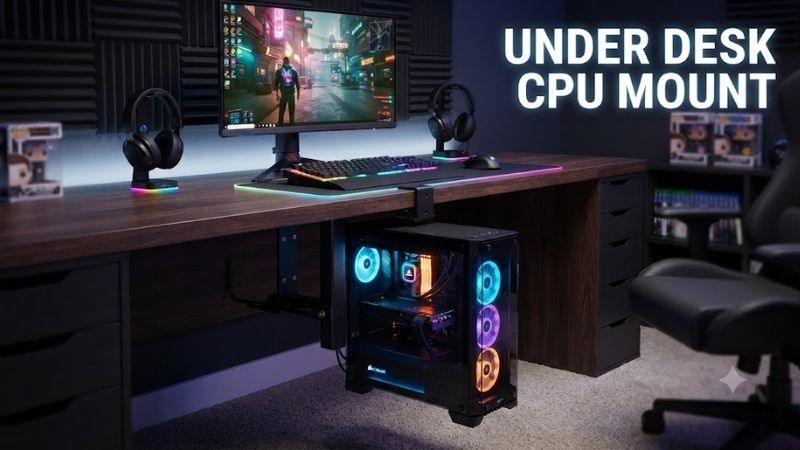
An under desk CPU mount keeps your computer tower off the floor, frees valuable workspace, and creates a cleaner desk setup. Whether you have a compact office PC, a heavy gaming desktop, or a height-adjustable standing desk, choosing the right holder requires careful attention to tower dimensions, weight capacity, ventilation, and mounting compatibility.
Quick answer: For most people in 2026, the best under desk cpu mount is the CPU Mount — our #1 rated choice. See the full ranked comparison, alternatives and buying advice below.
Quick Verdict: Best Under Desk CPU Mounts
A good computer tower mount should support the entire weight of your PC without restricting ventilation or placing excessive stress on your desk.
These seven options cover compact computers, conventional desktop towers, heavier gaming systems, and desks with obstructing support frames.
-
Best Overall: VIVO MOUNT-PC01 — Adjustable steel holder with 135-degree swivel and a 22-pound capacity, suitable for relatively light desktop towers.
-
Best Rotating Alternative: Mount-It! MI-7150 — Offers 360-degree rotation and adjustable width and height for easier access to rear computer ports.
-
Best for Heavy Gaming PCs: VIVO MOUNT-PC04A — Reinforced steel construction with a 66-pound weight capacity.
-
Best for Large PC Cases: VIVO MOUNT-PC04L — Supports towers up to 14 inches wide with a 66-pound load rating.
-
Best for Standing Desks with Frame Obstructions: VIVO MOUNT-PC01-SB — Incorporates a spacer bracket to clear certain under-desk support structures.
-
Best Fixed Heavy-Duty Alternative: VIVO MOUNT-PC04B — A 66-pound-capacity steel holder with multiple height settings.
-
Best for Compact Office Towers: HumanCentric Adjustable Computer Case/CPU Mount — A practical adjustable holder for smaller desktops when its exact size and mounting requirements are satisfied.
Quick Verdict: Best Under Desk CPU Mounts
Quick Comparison Table
| CPU Mount | Weight Capacity | Width Compatibility | Main Feature | Best For |
|---|---|---|---|---|
| VIVO MOUNT-PC01 | 22 lb | 3.5–7.8 in | 135° swivel | Overall compact setups |
| Mount-It! MI-7150 | 22 lb | 3.5–8 in | 360° swivel | Rear-port accessibility |
| VIVO MOUNT-PC04A | 66 lb | 5–10 in | Heavy-duty steel frame | Gaming towers |
| VIVO MOUNT-PC04L | 66 lb | 9–14 in | Extra-wide support | Large PC cases |
| VIVO MOUNT-PC01-SB | 22 lb | 3.5–8 in | Integrated spacer bracket | Obstructed desk frames |
| VIVO MOUNT-PC04B | 66 lb | 5–10 in | Five height settings | Heavy desktop towers |
| HumanCentric Adjustable CPU Mount | 22 lb* | Check selected configuration | Adjustable frame | Office PCs |
*For the HumanCentric model, confirm the manufacturer’s specifications for the exact version before purchasing.
Important: Weight capacity refers to the mount’s rated load under appropriate installation conditions. Your desktop’s material, thickness, hardware, and structural integrity must also be suitable for supporting a suspended computer.
How We Selected These Under Desk CPU Mounts
The recommendations prioritize identifiable computer tower holders with relevant mounting designs and practical compatibility features.
Selection factors include supported tower weight, adjustable dimensions, construction materials, mounting options, ventilation clearance, and accessibility.
Greater emphasis is placed on mechanical compatibility than on appearance because an incorrectly fitted mount can damage both the computer and the desk.
Swiveling designs are useful for accessing rear ports, while heavy-duty fixed holders are often more appropriate for large gaming towers.
The comparisons use manufacturer-published specifications and product documentation rather than claimed detailed research.
7 Best Under Desk CPU Mounts Reviewed
1. VIVO MOUNT-PC01 — Best Overall for Compact Desktop Towers
Best For: Home offices, gaming setups with relatively light PC cases, and users who want an adjustable under-desk holder with convenient swivel access.
Why We Picked It: The VIVO MOUNT-PC01 combines steel construction, adjustable dimensions, protective padding, and a 135-degree swivel mechanism. Its design provides useful flexibility for many smaller desktop towers without requiring a large mounting assembly.
Key Specifications
-
Product model: MOUNT-PC01
-
Mounting type: Under desk or wall
-
Material: Steel
-
Weight capacity: 22 pounds
-
Adjustable width: 3.5–7.8 inches
-
Adjustable height: 11.5–20.5 inches
-
Swivel: 135 degrees
-
Interior padding: Included
-
Mounting hardware: Included
Features & Benefits
The MOUNT-PC01 is designed to hold a computer tower beneath a desk while allowing the user to rotate the mounted assembly.
Its adjustable width and height provide flexibility for different tower dimensions.
Protective padding helps reduce direct contact between the metal frame and computer case.
The 135-degree swivel mechanism is particularly convenient when connecting USB devices, display cables, Ethernet, or other rear-panel accessories.
Performance & Practical Use
This mount is suitable for lightweight desktop computers within its supported dimensions.
Raising the computer off the floor can improve cleaning access and reduce direct contact with floor-level dust and accidental moisture.
However, the mount does not automatically improve CPU or GPU temperatures.
Actual cooling depends on the computer’s intake and exhaust layout and the available ventilation clearance.
The 22-pound capacity is an important restriction. Some modern gaming PCs with tempered-glass panels, large graphics cards, and liquid cooling can exceed it.
What Makes It Different
Its main advantage is the balance between adjustability and a swiveling design.
Compared with fixed heavy-duty mounts, it offers easier rear-port access but supports a much lighter computer.
Pros
-
Adjustable for different tower dimensions.
-
135-degree swivel for cable access.
-
Protective padding and steel construction.
Cons
-
Limited to 22 pounds.
-
Not wide enough for many large gaming cases.
Buy If: Your PC fits the adjustment range, weighs comfortably below the limit, and you want convenient rear-port access.
Skip If: Your computer has a large chassis or weighs more than the supported load.
2. Mount-It! MI-7150 — Best 360-Degree Swivel CPU Holder
Best For: Office desktops and smaller computer towers requiring frequent access to rear ports or cables.
Why We Picked It: The Mount-It! MI-7150 offers full 360-degree rotation when installed beneath a desk, making it especially useful for workstations where rear connectors are accessed regularly.
Key Specifications
-
Product model: MI-7150
-
Weight capacity: 22 pounds
-
Adjustable width: 3.5–8 inches
-
Adjustable height: 11.75–21 inches
-
Rotation: 360 degrees in under-desk configuration
-
Mounting locations: Under desk or wall
-
Construction: Metal frame
-
Installation hardware: Included
Features & Benefits
The MI-7150 uses an adjustable clamping-style frame to accommodate different PC towers.
Its 360-degree swivel capability allows the user to rotate the computer for easier access to rear ports.
This can be helpful for users who frequently change USB connections, reconnect displays, or work with external hardware.
The computer remains elevated rather than resting directly on carpet or flooring.
Performance & Practical Use
The holder is most suitable for compact to moderately sized desktop towers.
Its eight-inch maximum width excludes many modern wide gaming cases, particularly dual-chamber models.
The 22-pound weight capacity also makes it inappropriate for heavy custom gaming desktops.
When installed properly, the rotating mechanism improves accessibility without requiring users to crawl behind a computer case.
However, cables need enough slack to accommodate rotation.
What Makes It Different
Its full 360-degree swivel offers more rotational freedom than VIVO’s MOUNT-PC01.
This makes the Mount-It! particularly appealing for people who regularly access or rearrange PC connections.
Pros
-
Full 360-degree swivel under a desk.
-
Adjustable height and width.
-
Wall-mounting option.
Cons
-
22-pound maximum load.
-
Eight-inch maximum width limits compatibility.
Buy If: Rear-port accessibility is a priority and your PC is within the supported dimensions.
Skip If: You have a heavy gaming computer or limited cable slack.
3. VIVO MOUNT-PC04A — Best for Heavy Gaming PCs
Best For: Gaming desktops, workstations, and heavier PC towers that exceed the capacity of lightweight swivel mounts.
Why We Picked It: The VIVO MOUNT-PC04A supports up to 66 pounds and uses a sturdy steel frame with protective padding.
Its adjustable dimensions make it appropriate for a wider range of PC cases than many standard under-desk holders.
Key Specifications
-
Product model: MOUNT-PC04A
-
Material: Steel
-
Weight capacity: 66 pounds
-
Adjustable width: 5–10 inches
-
Height settings: 14, 16, 18, 20, and 22 inches
-
Minimum desktop thickness: 0.75 inch
-
Interior padding: Included
-
Mounting: Under-desk installation
Features & Benefits
The MOUNT-PC04A is designed for users who need more substantial load support.
Its steel frame provides a strong mounting structure when attached to a suitable desktop.
The adjustable width accommodates various mid-tower cases, while the multiple height settings allow users to configure the bracket around different chassis dimensions.
Protective padding helps reduce scratches during installation and adjustment.
Performance & Practical Use
A 66-pound rating provides considerably more load capacity than typical lightweight CPU mounts.
This is useful for gaming desktops with large graphics cards, substantial cooling hardware, and heavier cases.
However, weight capacity is only one aspect of compatibility.
The PC must also fit within the mount’s five-to-ten-inch width range and its available height settings.
Some wide dual-chamber gaming cases exceed the supported width despite weighing less than 66 pounds.
What Makes It Different
The MOUNT-PC04A emphasizes heavy-duty support rather than convenient rotation.
It is a strong option when secure mounting is more important than frequently turning the computer.
Pros
-
66-pound rated load capacity.
-
Adjustable width and multiple height settings.
-
Protective padding and steel construction.
Cons
-
Less convenient rear-port access than swivel models.
-
Maximum width excludes some wide gaming cases.
Buy If: You have a heavy gaming PC that fits the mount’s dimensions and your desk can support the installation.
Skip If: Your case exceeds ten inches in width or you need a swiveling design.
4. VIVO MOUNT-PC04L — Best for Large Gaming PC Cases
Best For: Owners of oversized desktop towers, wider gaming cases, and workstations requiring a substantial support platform.
Why We Picked It: The VIVO MOUNT-PC04L accommodates computers between 9 and 14 inches wide and supports up to 66 pounds, making it especially relevant for larger cases that cannot fit conventional narrow CPU holders.
Key Specifications
-
Product model: MOUNT-PC04L
-
Weight capacity: 66 pounds
-
Adjustable width: 9–14 inches
-
Height settings: 17, 19, 21, 23, and 25 inches
-
Materials: Steel, aluminum, and plastic
-
Minimum desktop thickness: 0.75 inch
-
Top mounting bracket: 8.8 × 6.5 inches
-
Bottom support: 13.5 × 9 inches
-
Protective padding: Included
Features & Benefits
The MOUNT-PC04L addresses a common problem with under-desk holders: many gaming cases are too wide for standard mounts.
Its adjustable frame provides sufficient width for numerous large desktop chassis, including some dual-chamber designs.
The bottom support platform helps distribute the computer’s weight across a wider surface.
Protective padding reduces direct contact between the bracket and the case.
Performance & Practical Use
This holder is appropriate for larger gaming systems when the computer’s dimensions and weight remain inside the supported limits.
Its large width range is particularly useful for builds containing wide graphics cards, substantial cooling systems, or cases designed around tempered-glass presentation.
However, this mount requires considerable space beneath the desk.
The installer must account for the PC’s height, the thickness of the mounting structure, and adequate leg clearance.
What Makes It Different
Unlike conventional CPU mounts designed around relatively narrow office towers, the PC04L specifically accommodates wider chassis.
Its large bottom support structure is another advantage for heavy computer cases.
Pros
-
Supports widths up to 14 inches.
-
Heavy-duty 66-pound capacity.
-
Large bottom support with protective padding.
Cons
-
Requires substantial clearance under the desktop.
-
Too large for many small office computers.
Buy If: Your PC case is wide and heavy, and you have a suitable desk with enough mounting space.
Skip If: Your computer is narrow or your desk has limited clearance.
5. VIVO MOUNT-PC01-SB — Best for Standing Desks with Frame Obstructions
Best For: Height-adjustable standing desks where support rails, crossbars, or other hardware obstruct normal under-desk mounting.
Why We Picked It: The MOUNT-PC01-SB combines an adjustable tower holder with a spacer bracket, allowing installation around certain desk-frame obstacles.
Key Specifications
-
Product model: MOUNT-PC01-SB
-
Weight capacity: 22 pounds
-
Adjustable width: 3.5–8 inches
-
Adjustable height: 11.75–21.5 inches
-
Swivel: 135 degrees
-
Spacer drop: Approximately 2.1 inches
-
Minimum desk thickness: 1 inch
-
Construction: Steel
-
Installation options: Under-desk or supported wall configurations
Features & Benefits
Standing desks frequently include metal support structures directly underneath the desktop.
These structures can prevent standard CPU holders from being installed in the intended location.
The MOUNT-PC01-SB includes a spacer designed to lower the mounting position below certain obstacles.
This provides additional installation flexibility without requiring modifications to the desk frame itself.
The integrated CPU holder also retains width and height adjustment, along with 135-degree swivel functionality.
Performance & Practical Use
This model is particularly useful when a desk support bracket extends below the desktop surface.
The spacer is intended to clear obstructions approximately 2.1 inches deep or less.
However, lowering the mount also lowers the computer, which reduces legroom and floor clearance.
Users should measure the desk at both its lowest and highest positions before installation.
It is also important to ensure that monitor, USB, Ethernet, and power cables remain long enough throughout the desk’s full movement range.
What Makes It Different
The integrated spacer arrangement makes the PC01-SB more suitable than conventional mounts for certain standing desk configurations.
Pros
-
Helps clear under-desk support rails.
-
Adjustable holder with swivel access.
-
Useful for height-adjustable workstations.
Cons
-
Limited to 22 pounds.
-
Spacer lowers the computer and consumes additional clearance.
Buy If: Your standing desk has a frame obstruction preventing a conventional CPU mount from fitting.
Skip If: Your PC is heavy or the obstruction exceeds the supported clearance.
6. VIVO MOUNT-PC04B — Best Fixed Heavy-Duty CPU Holder
Best For: Owners of conventional mid-tower gaming PCs who want secure under-desk mounting without a swivel mechanism.
Why We Picked It: The VIVO MOUNT-PC04B supports up to 66 pounds, features adjustable width and height settings, and uses steel construction with protective padding.
Key Specifications
-
Product model: MOUNT-PC04B
-
Weight capacity: 66 pounds
-
Adjustable width: 5–10 inches
-
Height settings: 16, 18, 20, 22, and 24 inches
-
Material: Steel
-
Minimum desktop thickness: 0.75 inch
-
Mounting base: 7 × 6.5 inches
-
Support base: 6.3 × 9 inches
-
Protective padding: Included
Features & Benefits
The PC04B uses a rigid support arrangement designed to suspend a computer beneath a suitable desk.
Its height-adjustable structure accommodates several desktop tower sizes.
The protective padding helps prevent the computer case from rubbing directly against the bracket during installation.
Its 66-pound capacity provides a substantial margin compared with lightweight models.
Performance & Practical Use
For gaming systems that fit inside its width and height settings, the PC04B provides a straightforward mounting solution.
Its fixed design is particularly suitable when the computer rarely needs to be rotated or repositioned.
However, rear-port access may be less convenient than with a swiveling holder.
Plan cable connections carefully before finalizing the mount location.
What Makes It Different
The PC04B emphasizes a fixed, rigid mounting arrangement with a relatively wide range of height settings.
It is especially appropriate for users who want their computer to remain in one position.
Pros
-
Supports up to 66 pounds.
-
Multiple height settings.
-
Steel construction with protective padding.
Cons
-
No swivel mechanism.
-
Limited to towers no wider than ten inches.
Buy If: You want a heavy-duty fixed holder for a conventional mid-tower PC.
Skip If: Your computer is wider than ten inches or you need frequent rear-panel access.
7. HumanCentric Adjustable Computer Case/CPU Mount — Best Compact Office Alternative
Best For: Office desktop computers, smaller PC towers, and users wanting an adjustable rotating mount.
Why We Picked It: The HumanCentric Adjustable Computer Case/CPU Mount provides 360-degree rotation, adjustable dimensions, and under-desk or wall-mounting options.
Key Specifications
-
Product: HumanCentric Adjustable Computer Case/CPU Mount
-
Weight capacity: 22 pounds
-
Adjustable width: 3.5–8 inches
-
Adjustable height: 12–21 inches
-
Rotation: 360 degrees
-
Installation: Under desk or wall
-
Protective pads: Included
-
Mounting hardware: Included
Features & Benefits
The HumanCentric design allows users to secure a compatible desktop tower beneath a desk while retaining access to rear-panel connections.
Its 360-degree rotating mechanism is useful for users who frequently adjust cables or connect external accessories.
The adjustable frame accommodates a variety of smaller desktop cases.
Protective felt pads help reduce scratching at contact points.
Performance & Practical Use
This mount is a practical choice for home-office computers and relatively lightweight PC towers.
Its dimensions are comparable to those of the Mount-It! MI-7150, giving buyers another option when choosing a 360-degree rotating design.
However, the maximum 22-pound capacity restricts its suitability for heavy gaming computers.
Buyers should measure both chassis width and height rather than assuming a standard desktop tower will fit.
What Makes It Different
HumanCentric combines full rotation with a compact mounting frame and included protective pads.
It is particularly suitable for users prioritizing organization and rear-port access.
Pros
-
Full 360-degree rotation.
-
Adjustable height and width.
-
Under-desk and wall-mounting options.
Cons
-
Limited to 22 pounds.
-
Not suitable for wide or especially heavy gaming systems.
Buy If: You have a compact computer and want a rotating mount with straightforward adjustability.
Skip If: Your tower exceeds the supported width, height, or weight.
Under Desk CPU Mount Buying Guide
1. Check Your PC Case Dimensions
Physical compatibility should be your first consideration.
A mount must accommodate the computer’s width and height while supporting its base securely.
Before ordering, measure:
-
Width: Side-to-side chassis measurement, including protruding panels.
-
Height: Bottom feet to the highest point of the case.
-
Depth: Front-to-back distance, including protruding handles or structural features.
-
Weight: Fully assembled computer, including internal components.
Do not rely exclusively on the case manufacturer’s empty chassis weight.
A graphics card, power supply, liquid cooling radiator, and additional drives can significantly increase the total weight.
2. Choose the Right Weight Capacity
Under-desk holders are often categorized by their rated load.
| Mount Capacity | Typical Application | Key Consideration |
|---|---|---|
| 22 pounds | Small office towers and lighter desktops | Limited gaming PC compatibility |
| 44 pounds | Medium desktop computers | Check weight and width |
| 66 pounds | Heavy gaming PCs and workstations | Requires suitable desktop support |
A mount rated for 66 pounds is not automatically appropriate for every gaming computer.
The case must still fit securely, and the desk must be capable of supporting the suspended load.
For heavier systems, choosing a mount with meaningful capacity headroom is preferable to operating directly at its rated limit.
3. Verify Desk Material and Thickness
The desktop is part of the mounting system.
Solid wood, plywood, engineered wood, and laminate surfaces have different structural characteristics.
A thick-looking desktop may contain a hollow or honeycomb core that is unsuitable for ordinary mounting screws.
Manufacturers often specify minimum desktop thickness, but thickness alone does not guarantee adequate screw-holding strength.
Before drilling, verify the desk manufacturer’s mounting guidance.
Do not assume a hollow-core or glass desktop can safely support a suspended computer.
4. Swivel vs. Fixed CPU Mounts
Swiveling holders provide easier access to the computer’s rear ports.
They are particularly convenient for users who frequently connect displays, USB devices, and network cables.
Fixed mounts prioritize a simpler support arrangement and can be appropriate for heavier desktops.
| Feature | Swivel Mount | Fixed Mount |
|---|---|---|
| Rear-port access | Usually easier | May require reaching behind |
| Cable movement | More frequent | Usually minimal |
| Installation clearance | Rotation space required | Primarily fixed clearance |
| Typical suitability | Small and medium towers | Medium and heavy towers |
A rotating mount is not necessarily weaker, but each product must be evaluated according to its actual load rating.
5. Consider PC Airflow
Computer cases depend on unobstructed airflow to cool internal components.
When mounting a PC beneath a desk, avoid blocking:
-
Front intake fans.
-
Rear exhaust fans.
-
Top radiator exhaust.
-
Bottom-mounted ventilation.
-
Power supply air intake.
Mounting a computer off the floor can reduce direct contact with carpet and floor debris.
However, it does not automatically reduce temperatures.
A computer positioned too close to the underside of a desk may struggle to exhaust warm air through its top panel.
Leave adequate clearance around major ventilation openings.
6. Standing Desk Compatibility
Height-adjustable desks introduce additional mounting considerations.
The CPU holder must avoid collisions with the desk frame, support rails, cable trays, and other accessories.
The computer must also remain clear of the floor when the desk reaches its lowest position.
Check cable lengths across the entire lifting range.
A computer attached to a rising desk moves with the desktop, so external power and data cables must accommodate that movement.
Spacer brackets can solve some mounting interference problems, but they also reduce clearance beneath the desk.
7. Consider Case Accessibility
Some computer cases have important connections on their top or front panels.
Others require frequent access to rear connections.
Choose a mounting location that keeps the power button, USB ports, and ventilation accessible.
A mount that fits the computer perfectly may still be inconvenient if it places essential connections against a desk frame.
How to Install an Under Desk CPU Mount
Step 1: Measure and Plan the Location
Measure the desktop’s available underside space and the PC’s complete dimensions.
Choose a position with sufficient clearance for the mount, computer, cables, and ventilation.
Avoid locations where the user regularly moves their legs.
Step 2: Confirm the Desk Can Support the Load
Verify the desktop’s material and thickness.
Check the CPU mount manufacturer’s installation requirements.
For standing desks, confirm that the desk’s lifting mechanism and structure can accommodate the additional suspended weight.
Step 3: Mark the Mounting Holes
Position the mounting plate where the holder will be installed.
Use the manufacturer’s template or mounting bracket to mark the holes.
Check that the bracket does not overlap metal support rails or other desk hardware.
Step 4: Install the Bracket
Follow the mounting instructions supplied with the product.
Use the specified hardware and pilot holes where appropriate.
Avoid drilling through the desktop.
Tighten the fasteners according to the manufacturer’s instructions without damaging the desk material.
Step 5: Adjust the Holder
Set the bracket width and height to match the computer.
Ensure the support surfaces align correctly with the chassis.
Check that protective pads are positioned at the intended contact points.
Step 6: Secure the Computer
Carefully place the computer into the holder.
Ensure the base is supported and the chassis cannot slide or tip.
Secure the adjustment mechanisms before releasing the computer completely.
For heavy computers, a second person may be useful during installation.
Step 7: Check Cables and Clearance
Reconnect the power, display, network, and USB cables.
Confirm that cables are not pinched or pulled tight.
For standing desks, slowly test the full height-adjustment range while watching for collisions or cable tension.
Common Mistakes When Buying an Under Desk CPU Mount
Buying Without Weighing the Complete Computer
A manufacturer’s empty case weight excludes installed components.
A fully assembled gaming PC may be much heavier.
Always consider the weight of the complete system rather than the case alone.
Ignoring Case Width
Many traditional CPU mounts support widths of eight inches or less.
Modern gaming cases can be considerably wider.
Measure the chassis before choosing a holder.
Installing into an Unsupported Desktop
A mount’s published load rating assumes appropriate installation conditions.
A thin or hollow desktop may not provide sufficient structural support.
The desk’s suitability matters as much as the metal holder’s capacity.
Blocking Cooling Fans
An under-desk mount can position the computer close to surrounding surfaces.
Insufficient ventilation clearance may increase internal temperatures.
Ensure the mount does not cover major airflow openings.
Failing to Account for Standing Desk Movement
Cables can become stretched or disconnected when a height-adjustable desk moves.
Check the lowest and highest desk positions before completing the installation.
Frequently Asked Questions
Is an Under Desk CPU Mount Safe for a Gaming PC?
Yes, provided the mount is designed for the computer’s dimensions and weight and is installed into a structurally suitable desk.
Heavy gaming PCs often require a mount with a higher load rating than standard 22-pound office holders.
Can an Under Desk CPU Mount Improve Airflow?
It can help prevent carpet or flooring from obstructing bottom-mounted ventilation, but it does not inherently improve cooling.
The actual result depends on the computer case’s airflow design and available clearance around the mounted system.
What Is the Best Under Desk CPU Mount for a Heavy PC?
The VIVO MOUNT-PC04A and MOUNT-PC04B both offer 66-pound weight capacities and accommodate PC widths from five to ten inches.
For wider cases, the VIVO MOUNT-PC04L supports widths from nine to fourteen inches.
Choose according to the exact case dimensions rather than weight capacity alone.
Can I Install a CPU Holder on a Standing Desk?
Yes, but you must verify compatibility with the desk frame, mounting surface, lifting capacity, and full height-adjustment range.
A spacer-equipped model such as the VIVO MOUNT-PC01-SB may help clear certain under-desk supports.
Should My PC Tower Be on the Floor or Under the Desk?
An under-desk mount can help free floor space and reduce accidental kicks or contact with floor-level debris.
Floor placement can still be appropriate when the PC rests on a stable, ventilated surface.
The best option depends on safety, airflow, accessibility, and workspace constraints.
Do Under Desk CPU Mounts Fit All Computer Cases?
No. Mounts vary significantly in supported width, height, weight, and mounting design.
Large gaming cases, compact mini PCs, and unusual chassis shapes may require specialized mounting solutions.
Conclusion
The best under desk CPU mount depends on your computer’s weight, dimensions, and desk structure. The VIVO MOUNT-PC01 is a practical overall option for lighter desktop towers, while the Mount-It! MI-7150 and HumanCentric Adjustable CPU Mount offer convenient 360-degree rotation. Heavy gaming systems are better suited to the VIVO MOUNT-PC04A or MOUNT-PC04B, and the wider MOUNT-PC04L accommodates larger cases. For standing desks with obstructing support frames, the VIVO MOUNT-PC01-SB offers additional installation flexibility. Before purchasing, measure your complete PC, verify desk strength, and ensure adequate cooling clearance.
Ready to decide? Our #1 pick for 2026 is the CPU Mount.
Live price & availability on Amazon.