🛒 Best Price Today on Amazon
Prime members get fast, free shipping on everything above, plus member-only deals. New members get a 30-day free trial — cancel anytime.
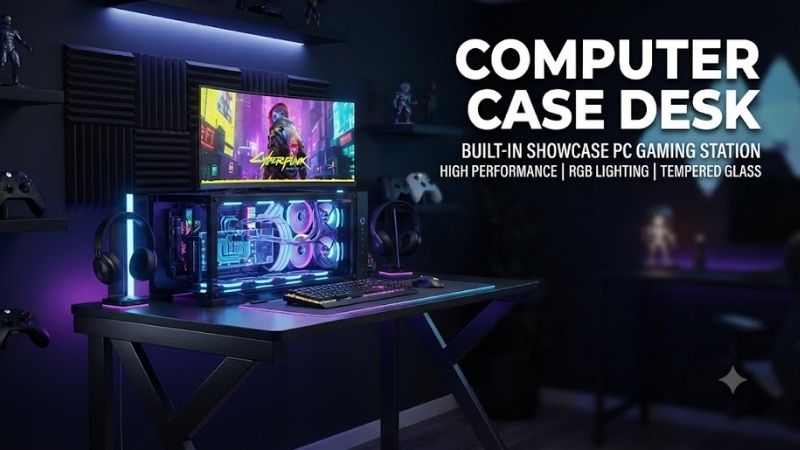
A desk PC case combines computer hardware and furniture into one showcase build, placing the motherboard, GPU, cooling system, and storage beneath or inside the desktop surface. The best options provide enough airflow, radiator support, cable space, strong glass or metal construction, and easy access for maintenance without making the workstation impractical.
Quick Comparison Table
| Product | Best For | Key Advantage | Limitation |
|---|---|---|---|
| Lian Li DK-05F | Best overall | Dual-system support and motorized desk | Extremely expensive |
| Lian Li DK-04F | Single-system premium builds | Clean integrated chassis design | Large and heavy |
| Lian Li DK-03 | Dual-PC workstation | Supports two complete systems | Older platform design |
| Lian Li DK-02 | Enthusiast dual-system setups | Massive internal space | Requires significant room |
| Lian Li DK-01X | Single-system custom builds | Classic desk-case layout | Limited modern availability |
| Hydra Desk | Extreme custom water cooling | Open custom-loop potential | Requires advanced building skills |
Best Desk PC Case Picks
Lian Li DK-05F
Best For: High-end gaming, streaming, and dual-system workstation builds.
Lian Li DK-05F is one of the most recognizable desk PC case designs because it combines a motorized desk with space for two independent computer systems beneath the glass surface. It is intended for enthusiasts who want gaming hardware to become part of the furniture rather than sit in a conventional tower beside the desk.
Key Features:
- Dual-system support
- Motorized height adjustment
- Tempered glass desktop
- Large internal hardware area
- Extensive fan and radiator support
- Multiple storage mounting positions
- Integrated cable-routing space
The dual-system layout is particularly useful for streamers who want one computer for gaming and another for encoding, capture, or production. It can also support professional users who keep separate gaming and workstation hardware but want both systems inside a single desk.
What Makes It Different: The DK-05F is not simply a large case mounted under a desktop. The entire product is designed around integrated hardware, cooling, cable routing, and height adjustment, making it one of the most complete desk-chassis concepts available.
Performance & Use Case: Its large interior can accommodate high-end GPUs, powerful processors, multiple radiators, pumps, reservoirs, and extensive custom water cooling. The trade-off is complexity. Building two full systems inside a desk requires careful thermal planning and significantly more cable management than a normal tower.
Pros:
- Supports two complete PCs
- Excellent showcase potential
- Adjustable working height
Cons:
- Very expensive
- Large and difficult to move
Who Should Buy It: Choose the DK-05F if you want a flagship desk PC case and genuinely need dual systems or an extreme custom build.
Lian Li DK-04F
Best For: Premium single-system gaming and workstation setups.
Lian Li DK-04F follows the same desk-integrated concept as the larger DK-05F but focuses on one main computer system. That makes it easier to manage while still providing a wide internal compartment for graphics cards, radiators, storage, pumps, and custom cooling hardware.
Key Features:
- Single-system desk chassis
- Motorized height adjustment
- Tempered glass work surface
- Large component chamber
- Strong radiator support
- Internal cable-management area
- Multiple fan mounting positions
A single-system layout is more practical for most users because all cooling capacity and internal space can be dedicated to one high-performance gaming or workstation configuration. It also reduces the number of power cables, motherboard connections, and peripheral routes inside the desk.
What Makes It Different: The DK-04F delivers most of the visual and ergonomic benefits of Lian Li’s flagship desk platform without requiring a second computer. This makes it more appropriate for builders who want an integrated PC but do not need a streaming or workstation system running beside it.
Performance & Use Case: Large GPUs and custom loops are natural fits because the hardware lies horizontally below the desktop rather than being stacked inside a narrow tower. This can simplify visual presentation, but maintenance often requires opening or lifting the top section rather than removing a conventional side panel.
Pros:
- Cleaner than a dual-system layout
- Excellent component visibility
- Strong cooling potential
Cons:
- Still extremely large
- More expensive than premium tower cases
Who Should Buy It: Choose the DK-04F if you want one powerful system built directly into a premium adjustable desk without the complexity of dual-PC hardware.
Lian Li DK-03
Best For: Dual-system enthusiasts who want a classic desk-chassis design.
Lian Li DK-03 is an older dual-system desk case designed around the same idea that later evolved into the company’s more advanced motorized models. It provides two motherboard zones under a large desktop surface, allowing gaming and workstation hardware to coexist inside one piece of furniture.
Key Features:
- Dual-system layout
- Large horizontal hardware chamber
- Tempered glass viewing surface
- Multiple cooling zones
- Extensive storage support
- Dedicated cable space
- Large desk footprint
The dual layout is especially useful for users who run separate gaming and production systems. One computer can handle gameplay while the second manages streaming, rendering, server duties, or other workloads without forcing both systems into separate towers.
What Makes It Different: DK-03 represents a more traditional fixed desk-case approach. It lacks some of the newer convenience features found on later motorized models, but the large internal layout still provides substantial room for custom hardware.
Performance & Use Case: The horizontal layout helps builders create symmetrical dual-PC configurations, and the wide surface gives custom cooling hardware room to breathe. However, because it is an older design, availability and modern component fit should be checked carefully before planning a new build around one.
Pros:
- Dual-system capability
- Large internal workspace
- Excellent showcase format
Cons:
- Older design
- Harder to source new
Who Should Buy It: Choose the DK-03 mainly if you find one in good condition and specifically want a dual-system desk chassis for a custom project.
Lian Li DK-02
Best For: Large enthusiast builds with extensive cooling hardware.
Lian Li DK-02 is another large desk-style PC chassis built for serious enthusiast systems. It provides enough internal space for multiple motherboards, large graphics cards, storage devices, and elaborate cooling hardware while preserving a broad work surface above the components.
Key Features:
- Multi-system capability
- Horizontal component layout
- Large cooling capacity
- Tempered glass top sections
- Extensive cable routing
- Multiple drive positions
- Heavy-duty desk construction
The biggest attraction is internal volume. A builder using several radiators, custom pumps, reservoirs, or multiple GPUs can spread the hardware across a wide area instead of stacking everything inside a conventional full-tower chassis.
What Makes It Different: The DK-02 feels more like a custom workstation platform than an ordinary case. Its scale gives enthusiasts unusual freedom over component placement, cooling layout, and visual presentation.
Performance & Use Case: This type of chassis works especially well for custom water cooling because tubing can run across broad horizontal areas without sharp bends. It also gives radiators more space, although the final thermal performance still depends on fan orientation and clear intake and exhaust paths.
Pros:
- Huge internal capacity
- Excellent for custom loops
- Supports complex builds
Cons:
- Very large footprint
- Older hardware layout
Who Should Buy It: Choose DK-02 if your main goal is an extreme custom desk build and you have enough room to accommodate furniture-sized computer hardware.
Lian Li DK-01X
Best For: Single-system builders who prefer a simpler integrated desk.
Lian Li DK-01X is a single-system desk chassis built around a large horizontal component tray beneath the work surface. Compared with dual-system models, the internal layout is easier to plan because motherboard, graphics, cooling, and storage all belong to one computer.
Key Features:
- Single-system layout
- Large internal component chamber
- Glass viewing surface
- Multiple drive positions
- Fan and radiator mounting areas
- Integrated cable-routing space
- Full desk form factor
The single-system approach is particularly useful for builders moving from a large tower case. Hardware still gains the dramatic horizontal presentation of a desk chassis, but system assembly remains much closer to a normal PC build.
What Makes It Different: DK-01X offers a more straightforward desk-PC experience than oversized dual-system models. It targets users who want the visual impact of hardware under glass without managing two motherboards and two sets of cables.
Performance & Use Case: It can accommodate powerful GPUs and custom cooling, making it suitable for gaming and workstation hardware. Because this model belongs to an older generation, builders should confirm modern GPU length, radiator dimensions, and replacement-part availability before purchasing one secondhand.
Pros:
- Easier than dual-system desk cases
- Large component viewing area
- Good custom-cooling potential
Cons:
- Older product generation
- Limited new-market availability
Who Should Buy It: Choose DK-01X if you want a traditional single-system desk case and can find one at a sensible price.
Hydra Desk
Best For: Advanced custom water-cooling and showcase builds.
Hydra Desk designs target enthusiasts who want the computer integrated directly into a large desk-style frame with strong visual access to hardware. Compared with conventional enclosed cases, the emphasis is usually on open presentation, modular mounting, and freedom to design custom cooling layouts.
Key Features:
- Desk-integrated PC layout
- Large component mounting area
- Strong custom-loop potential
- Open or semi-open architecture
- Flexible component positioning
- Showcase-oriented construction
Open desk systems can be particularly attractive for hardline water cooling because pumps, reservoirs, tubing, and coolant become visible design elements. This allows the PC to function almost like display furniture rather than simply being hidden beneath the desk.
What Makes It Different: Hydra-style desks emphasize customization instead of standardized internal chambers. Enthusiasts can design the hardware layout around appearance and cooling rather than being constrained by a conventional motherboard tray and PSU shroud.
Performance & Use Case: The freedom is also the main challenge. Cable management, dust control, tubing layout, fan orientation, and component protection require more planning. These systems are therefore better suited to experienced builders than someone assembling a first gaming PC.
Pros:
- Exceptional customization freedom
- Excellent for custom water cooling
- Strong showcase potential
Cons:
- More difficult to build and maintain
- Open layouts collect dust more easily
Who Should Buy It: Choose Hydra Desk if you are comfortable designing a custom loop and want the workstation itself to become the centerpiece of the gaming setup.
Desk PC Case Buying Guide
Decide Between Single and Dual Systems
A single-system desk case is easier to cool, wire, and maintain because all internal space serves one motherboard and GPU. Dual-system models are useful for streaming, production, servers, or separate work and gaming computers, but they increase cost, heat output, power consumption, and cable complexity significantly.
Measure the Entire Room
Desk cases are furniture as well as computer chassis. Their width, depth, and weight can exceed conventional desks, especially after installing hardware, radiators, coolant, monitors, and accessories. Measure doorways and the final room location before buying because relocating a completed desk PC can be extremely difficult.
Check GPU Clearance
Modern high-end graphics cards are long, thick, and heavy. A desk chassis should provide enough horizontal clearance for the card itself plus power connectors and cable bends. Models designed around older GPUs may not automatically fit current flagship cards, so exact clearance matters more than the case’s overall size.
Plan Radiator and Fan Placement
Large desk cases often support several radiators, but more radiator area does not guarantee better cooling. Fans still need access to fresh air and a clear exhaust path. Avoid creating zones where warm air from one radiator immediately feeds another, especially when cooling both a high-power CPU and GPU.
Consider Maintenance Access
A tower case usually opens from the side, but desk cases often require lifting or sliding a large glass top. Think about how often you replace storage, clean filters, refill coolant, or access motherboard headers. A beautiful design can become frustrating if every small upgrade requires clearing the entire desktop first.
Plan Cable Routing Early
A desk PC may need cables for the motherboard, GPU, pumps, fans, monitors, USB devices, networking, lighting, speakers, and height-adjustment motors. Because the workstation is physically larger than a tower, cable paths are longer. Planning power strips, grommets, and hidden channels before assembly prevents visible clutter.
Think About Dust Control
A large horizontal chassis exposes more surface area to dust. Filtered intake fans and positive internal air pressure help reduce buildup. Open-frame desk systems need more frequent cleaning because there are fewer barriers between room dust and components.
Desk PC Case Design Trade-Offs
Desk Case vs Full-Tower Case
A full tower is easier to move, upgrade, and replace independently from the furniture. A desk case provides far greater visual impact and can offer more cooling space, but upgrading the desk means changing the chassis as well. The desk format makes the most sense when aesthetics and integration matter more than convenience.
Tempered Glass vs Open Frame
Tempered glass protects components from accidental contact and gives the build a polished appearance, while open frames improve direct access and make custom tubing easier to display. Glass designs need deliberate airflow paths, whereas open frames trade protection and dust resistance for flexibility.
Air Cooling vs Custom Water Cooling
Air cooling can work in a desk chassis, but the format naturally favors liquid cooling because radiators can spread across large horizontal areas. Custom loops provide the strongest visual effect but require more maintenance. A simpler AIO or air-cooled build is easier to service and usually sufficient for most gaming hardware.
FAQ
Is a Desk PC Case Good for Gaming?
Yes. A desk PC case can support powerful gaming hardware as long as airflow, GPU clearance, power delivery, and cooling are planned correctly. The format does not automatically improve frame rates, but the larger internal area can make it easier to install radiators, multiple fans, and custom cooling for high-end components.
Are Desk PC Cases Difficult to Build?
They are generally more difficult than normal towers because the builder must manage longer cable routes, large glass sections, unusual component orientation, and sometimes custom water cooling. Single-system desk cases are easier, while dual-system designs require separate motherboard, cooling, and power layouts inside one piece of furniture.
Can a Desk PC Case Hold Two Computers?
Some models can. Lian Li’s larger desk chassis were specifically designed to support dual-system configurations, allowing two motherboards, CPUs, and sets of hardware inside one desk. This is useful for gaming and streaming setups but adds considerable cost, heat output, and maintenance compared with one powerful system.
Do Desk PC Cases Have Good Airflow?
They can, provided the fan layout creates clear intake and exhaust paths. Their large internal volume provides room for many fans and radiators, but poor placement can still trap warm air. Builders should design airflow deliberately rather than assuming a large chassis will automatically cool better than a tower.
Are Desk PC Cases Worth the Price?
They are worth considering when the visual design and integrated workstation are important parts of the project. For pure performance per dollar, a normal tower case is usually more practical. Desk cases make the most sense for showcase builds, high-end custom loops, streaming rooms, and enthusiasts who enjoy complex PC projects.
Can I Use Air Cooling in a Desk PC Case?
Yes. Large air coolers can work if the chassis provides enough vertical clearance and airflow around the CPU socket. However, many desk-case builders prefer AIO or custom liquid cooling because the horizontal interior provides extensive radiator space and keeps large tower coolers from obstructing the view through the glass.
Conclusion
The best desk PC case depends on whether you want a practical single-system build or an extreme showcase workstation. Lian Li DK-04F suits premium single PCs, DK-05F leads dual-system setups, older DK models remain interesting for custom projects, and Hydra Desk offers maximum freedom for advanced water-cooling enthusiasts.