🛒 Best Price Today on Amazon
Prime members get fast, free shipping on everything above, plus member-only deals. New members get a 30-day free trial — cancel anytime.
- Best Desk Chairs With Leg Rest at a Glance
- Dowinx Gaming Chair With Footrest
- GTRACING Gaming Chair With Footrest
- GTPLAYER Gaming Chair With Footrest
- Homall Gaming Recliner Chair
- Hbada Ergonomic Chair With Footrest
- COLAMY Reclining Office Chair With Footrest
- How to Choose a Desk Chair With Leg Rest
- Desk Chair With Leg Rest vs Separate Footrest
- Gaming Chair vs Office Chair With Leg Rest
- FAQ
- Conclusion
A desk chair with leg rest can make a home office or gaming setup more comfortable when you frequently switch between focused work and relaxed sitting. The best models combine a supportive backrest, adjustable recline, useful lumbar support, stable armrests, and a retractable footrest without compromising the chair’s normal working position.
Quick answer: For most people in 2026, the best desk chair with leg rest is the Chair — our #1 rated choice. See the full ranked comparison, alternatives and buying advice below.
Best Desk Chairs With Leg Rest at a Glance
| Chair | Best For | Chair Style | Main Strength |
|---|---|---|---|
| Dowinx Gaming Chair With Footrest | Overall | Gaming chair | Balanced work and relaxation |
| GTRACING Gaming Chair With Footrest | Gaming | Racing-style chair | Recline and gaming features |
| GTPLAYER Gaming Chair With Footrest | Value | Gaming chair | Affordable comfort |
| Homall Gaming Recliner Chair | Relaxed desk use | Reclining gaming chair | Strong lounge-style comfort |
| Hbada Ergonomic Chair With Footrest | Home office | Ergonomic office chair | Office-focused support |
| COLAMY Reclining Office Chair | Executive work | Executive chair | Padded professional design |
Dowinx Gaming Chair With Footrest
Best For: Overall work-and-gaming use
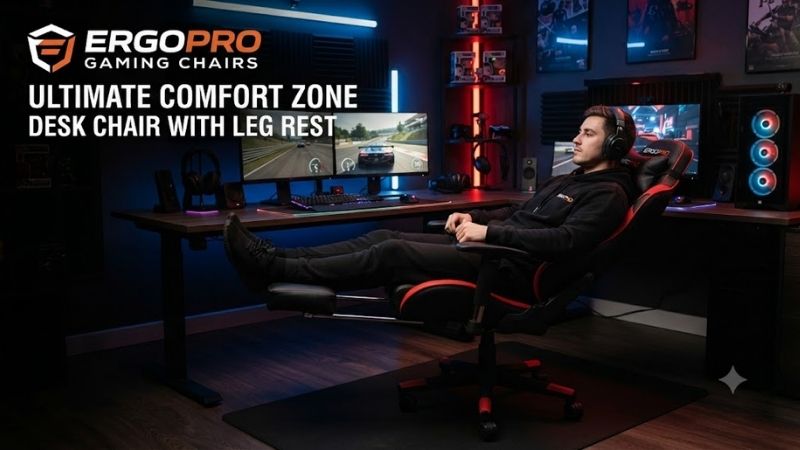
Dowinx gaming chairs with integrated footrests are designed for users who want a chair capable of handling normal desk work while also providing a more relaxed position between tasks. The retractable leg rest stores beneath the seat, so it does not permanently occupy additional floor space when the user is typing or gaming.
The tall backrest and pronounced side support create a more enclosed seating position than a traditional office chair. This can feel comfortable for users who prefer greater body contact, particularly when reclining. People who prefer a completely open seat and unrestricted shoulder movement may favor a conventional ergonomic office design instead.
A reclining backrest is one of the most useful features in this chair category. During focused work, the chair can remain relatively upright, while breaks, videos, or controller gaming allow a more relaxed angle. Extending the footrest at the same time supports the lower legs and creates a more lounge-like position.
The footrest should be viewed primarily as a relaxation accessory rather than permanent ergonomic support. During keyboard and mouse work, feet are usually better supported by the floor or a dedicated footrest beneath the desk. The integrated leg rest becomes valuable when the user reclines and moves away from the normal typing position.
Key Features
- Retractable leg rest
- Tall backrest
- Reclining function
- Adjustable seat height
- Padded armrests
- Lumbar-support system
- Head and neck support
- Five-wheel base
- Gaming-oriented design
What Makes It Different
Dowinx combines the appearance of a gaming chair with enough cushioning and reclining flexibility to function as a mixed work-and-relaxation seat. The integrated leg rest is hidden during normal desk use and can be extended only when the user wants to lean back.
Pros
- Built-in retractable footrest
- Comfortable reclining position
- Suitable for work and gaming
- Substantial cushioning
- Tall back support
- Useful for breaks between tasks
Cons
- Racing-style design may not suit professional offices
- Side bolsters can feel restrictive
- Footrest is not a replacement for proper seated ergonomics
- Padded surfaces may become warm
Use Case: Gaming, work from home, watching videos, controller gaming, studying, and mixed desk use.
Who It’s For: Users who want one chair that can remain upright for desk work and recline comfortably during breaks.
GTRACING Gaming Chair With Footrest
Best For: Gaming-focused desk setups
GTRACING gaming chairs with footrests follow the familiar racing-style design used throughout the gaming-chair category. A tall backrest, adjustable recline, removable support cushions, and retractable footrest make the chair particularly suitable for users who spend long periods moving between keyboard gaming and relaxed entertainment.
For gaming, the chair’s full-height backrest provides support while the user remains upright in front of the monitor. Side bolsters help define the seating position, although users with broader shoulders or hips should pay attention to internal seat dimensions because racing-style chairs can feel narrower than flat office seats.
The footrest becomes most useful during controller gaming, movies, or breaks. Extending the support while reclining allows the legs to rise instead of hanging downward. When switching back to a keyboard and mouse, the footrest can retract beneath the seat so it does not interfere with normal chair movement.
Users should still adjust seat height carefully. Armrests and keyboard height should allow relaxed shoulders, while feet should normally remain stable during active desk work. A chair with many comfort features cannot compensate for a desk that forces the hands or monitor into poor positions.
Key Features
- Retractable footrest
- Reclining backrest
- Tall gaming-chair design
- Adjustable seat height
- Lumbar cushion
- Headrest cushion
- Padded seat
- Rolling base
- Swivel function
What Makes It Different
GTRACING focuses heavily on the gaming experience. The combination of a reclining racing-style shell and integrated footrest works especially well for people who alternate between competitive desk gaming and more relaxed controller-based sessions.
Pros
- Gaming-oriented design
- Built-in footrest
- Reclining support
- Tall backrest
- Suitable for controller gaming
- Adjustable seating position
Cons
- Racing bolsters do not fit every body type
- Less office-like appearance
- Cushion support is less adjustable than premium ergonomic systems
- Large backrest requires room
Use Case: PC gaming, console gaming at a desk, streaming, entertainment, and casual work.
Who It’s For: Gamers who want a chair that transitions easily from active play to a reclined position.
GTPLAYER Gaming Chair With Footrest
Best For: Budget-conscious buyers
GTPLAYER footrest gaming chairs are aimed at users who want many of the popular gaming-chair features without moving into premium pricing. Typical designs combine an adjustable backrest, retractable leg support, removable cushions, adjustable height, and padded seating in a package suitable for bedrooms, gaming rooms, and home offices.
The value of this style comes from versatility rather than advanced ergonomics. Users can sit upright for work, recline during breaks, and pull out the footrest when watching content. That flexibility makes it more useful than a simple fixed-back chair for someone who uses the same desk for several activities.
Cushioning can provide immediate comfort, particularly for users who dislike firm mesh office chairs. The trade-off is that thick foam and synthetic upholstery can retain more heat. In warmer rooms, users may prefer breathable fabric or mesh-backed alternatives even if they provide less lounge-style padding.
Budget chairs should also be evaluated for fit rather than appearance. Seat width, backrest shape, armrest position, and recommended load matter more than RGB-style branding or aggressive aesthetics. A cheaper chair that correctly fits the user’s body can be more comfortable than an expensive model with the wrong dimensions.
Key Features
- Integrated retractable footrest
- Reclining backrest
- Adjustable height
- Removable lumbar cushion
- Headrest support
- Padded seat
- Swivel base
- Rolling casters
- Gaming-focused styling
What Makes It Different
The GTPLAYER option focuses on delivering a broad feature set at an accessible level. It is less sophisticated than premium ergonomic chairs but gives budget buyers the combination of reclining, leg support, cushioning, and gaming style they are often looking for.
Pros
- Affordable relative to premium chairs
- Footrest included
- Reclining functionality
- Good for mixed-use rooms
- Comfortable padded design
- Useful for first gaming setups
Cons
- Limited advanced ergonomic adjustment
- Padding can become warm
- Long-term comfort depends heavily on individual fit
- Gaming styling may not suit office environments
Use Case: Budget gaming rooms, student desks, casual remote work, movies, and controller gaming.
Who It’s For: Buyers who want a reclining desk chair with a footrest without paying for a premium ergonomic model.
Homall Gaming Recliner Chair
Best For: Relaxed desk and entertainment use
Homall reclining gaming chairs are designed more like compact lounge seating than traditional task chairs. Models with leg support emphasize reclining comfort, making them useful for gaming rooms where the chair may serve both a computer desk and entertainment area.
The broader padded design can feel more relaxed than tightly bolstered racing chairs. Users who frequently play games with a controller, watch movies, or lean back between tasks may prefer this style because it places less emphasis on an aggressive upright gaming position.
This lounge-oriented approach does create a compromise for productivity. A chair optimized for reclining is not necessarily the best choice for eight hours of typing. Users should confirm that the seat height, armrests, and upright backrest position work correctly with the desk before prioritizing its relaxed mode.
Space is another consideration. Reclining requires clearance behind the chair, and an extended leg rest occupies more room in front. Small home offices should measure the area carefully because a chair that feels compact when upright can require considerably more floor space when fully reclined.
Key Features
- Reclining gaming-chair design
- Extended leg support
- Padded seat and back
- Head and neck support
- Wider lounge-style seating
- Adjustable reclining position
- Gaming-room appearance
What Makes It Different
Homall’s recliner-style approach prioritizes relaxation more heavily than conventional desk-chair designs. It is particularly appealing when the workstation doubles as a place for movies, console gaming, and general entertainment.
Pros
- Comfortable for reclining
- Generous cushioning
- Good for controller games
- Useful entertainment chair
- Less restrictive than some racing seats
Cons
- Requires more room when reclined
- Less suited to strict office ergonomics
- Bulky compared with compact task chairs
- Foot support is primarily for relaxation
Use Case: Gaming rooms, entertainment setups, controller gaming, streaming, and casual desktop use.
Who It’s For: Users who prioritize reclined comfort as much as traditional desk work.
Hbada Ergonomic Chair With Footrest
Best For: Work-from-home users
An Hbada ergonomic chair with an integrated footrest is a better fit for users who want leg support but prefer an office-chair appearance instead of racing-style gaming aesthetics. Mesh-backed configurations are particularly useful in warm rooms because they allow more airflow around the user’s back during long work sessions.
Ergonomic office designs generally provide a more open seating position. The shoulders and hips are less restricted by side bolsters, making it easier to shift posture throughout the day. Adjustable lumbar support and head support can also help users fine-tune the chair around their body more effectively than removable gaming cushions.
The retractable footrest remains available for breaks or reclined reading. When working, the user can keep it stored underneath and use the chair like a normal office model. This makes the feature less intrusive than separate ottomans or permanently extended leg supports in smaller rooms.
The most important consideration is adjustment range. A chair should allow the feet to sit comfortably on the floor, the arms to approach desk height, and the lumbar support to align with the lower back. No footrest feature is valuable if the basic seated position does not fit properly.
Key Features
- Retractable leg rest
- Office-oriented ergonomic design
- Mesh back on many configurations
- Adjustable lumbar support
- Adjustable headrest
- Reclining function
- Height adjustment
- Swivel base
- Rolling casters
What Makes It Different
Hbada-style ergonomic models combine a professional office appearance with the relaxation benefits of a retractable leg rest. They are more appropriate than racing chairs for users whose desk is primarily a work environment rather than a gaming station.
Pros
- Office-friendly appearance
- Breathable back support
- Integrated footrest
- Better ergonomic adjustment
- Useful for long work sessions
- Less restrictive seating shape
Cons
- Usually more expensive than basic gaming chairs
- Footrest may feel narrow for larger users
- Mesh firmness does not suit everyone
- Assembly can require careful adjustment
Use Case: Work from home, programming, writing, office tasks, video calls, reading, and occasional gaming.
Who It’s For: Remote workers who want a leg rest without turning their office into a gaming-style setup.
COLAMY Reclining Office Chair With Footrest
Best For: Executive-style home offices
COLAMY reclining office chairs with footrests are designed for users who prefer thick cushioning and an executive appearance. Rather than mesh or racing-style bolsters, these chairs typically use a broad padded seat, tall backrest, padded arm support, and integrated retractable leg rest.
This type of chair can feel comfortable immediately because the upholstery distributes pressure over a large padded surface. It works well for users who enjoy softer seating and spend part of the day on calls, reading documents, or working in a slightly reclined posture.
The disadvantage is heat and reduced ventilation. Thick padded upholstery traps more warmth than mesh, especially during long summer work sessions. Users in warmer climates should consider whether air conditioning is available or whether breathable materials would provide better long-term comfort.
Executive chairs can also be physically large. Check seat width, desk clearance, armrest height, and total reclined footprint. The chair should slide close enough to the desk while working and still have enough room to extend the leg rest when moving into a relaxed position.
Key Features
- Retractable footrest
- Executive-style upholstery
- Thick seat cushioning
- Tall padded backrest
- Reclining function
- Padded armrests
- Adjustable seat height
- Swivel and rolling base
What Makes It Different
The COLAMY style combines a more professional visual design with lounge-chair comfort. It is a useful alternative for users who dislike gaming-chair aesthetics but still want an integrated leg support system.
Pros
- Executive appearance
- Thick cushioning
- Comfortable reclining
- Built-in leg rest
- Broad seat design
- Good for home offices
Cons
- Less breathable than mesh
- Bulky
- Thick padding may soften over time
- Limited advanced ergonomic adjustments
Use Case: Executive home offices, video meetings, reading, administrative work, and relaxed desk use.
Who It’s For: Users who prefer traditional padded office-chair comfort over mesh or gaming-chair styling.
How to Choose a Desk Chair With Leg Rest
Prioritize the Working Position First
A built-in leg rest is attractive, but the chair must first work correctly when you are typing. Seat height, back support, desk clearance, and arm position matter more than reclining features. If the upright position is uncomfortable, the chair is not a good work chair regardless of how comfortable it feels when fully reclined.
Check the Seat Dimensions
Seat width and depth determine whether the chair fits your body. A seat that is too narrow can create pressure at the hips, while a seat that is too deep may press behind the knees. Compare actual dimensions rather than choosing based only on the chair’s appearance.
Look for Useful Lumbar Support
Lumbar support should follow the natural curve of the lower spine. Adjustable support is preferable because body proportions vary. Removable gaming cushions can work for some users, but they are less precise than built-in systems that move vertically or change depth.
Evaluate the Footrest Design
A retractable footrest should slide smoothly, feel stable when extended, and store completely under the seat. Most integrated leg rests are intended for relaxed reclining rather than supporting the full body weight. Avoid pushing downward heavily or standing on the footrest.
Consider Breathability
Mesh chairs allow airflow and are often better for long workdays in warm environments. Upholstered chairs provide softer cushioning but may retain heat. Users should choose based on room temperature, clothing, and personal preference rather than assuming more padding automatically means greater comfort.
Check Recline Range
A moderate recline is useful during short breaks, while deeper angles are better for watching videos or resting. The mechanism should hold the selected position securely. Also check how much space the chair needs behind the desk before purchasing.
Match the Chair to the Desk
Armrests should fit beneath or beside the desk without blocking the chair from moving close enough to the keyboard. If the desk is unusually high, a separate footrest may actually provide better ergonomics than relying on the chair’s retractable leg support.
Consider Weight Capacity
Choose a chair whose recommended capacity comfortably exceeds the user’s body weight. Additional margin helps because sitting down, reclining, and changing position create dynamic loads. Frame construction and base quality are more important than simply selecting the chair with the highest advertised number.
Desk Chair With Leg Rest vs Separate Footrest
An integrated leg rest is better for reclining because it moves with the chair and can disappear beneath the seat when not required. It is convenient for gaming, watching content, and resting between tasks without adding another object to the room.
A separate ergonomic footrest is better during active work. It stays on the floor and supports the feet while the user remains upright, which is useful when the chair must be raised to match a tall desk. Many users can benefit from both systems because they serve different purposes.
Gaming Chair vs Office Chair With Leg Rest
Gaming chairs usually provide deeper recline, thick cushioning, and more visually aggressive styling. They are appealing for mixed entertainment and work but may offer fewer precise adjustments around the lumbar region, armrests, or seat depth.
Office chairs generally focus more on long-session posture, breathability, and adjustable support. Models with retractable footrests add relaxation without abandoning a professional appearance. For full-time remote work, the office-style option is usually the better starting point.
FAQ
Is a Desk Chair With Leg Rest Good for Work From Home?
Yes, provided the chair is comfortable in its normal upright position. The leg rest is useful during breaks, reading, or reclining, but it should not be the primary reason to choose an otherwise poorly fitting chair. Work-from-home users should prioritize seat fit and lumbar support first.
Can I Use the Footrest While Typing?
You can, but it may place the body farther from the desk and change arm positioning. For active keyboard work, keeping the feet on the floor or using a dedicated floor footrest is usually more practical. Integrated leg rests work best when the backrest is reclined.
Are Gaming Chairs With Footrests Comfortable?
They can be, especially for users who enjoy thick cushioning and a tall backrest. Comfort varies significantly with body size and chair dimensions. Racing-style side bolsters may feel supportive to one person and restrictive to another.
Is Mesh Better Than a Padded Chair?
Mesh provides better airflow and can feel cooler during long work sessions. Padding feels softer and can be more comfortable for users who prefer a cushioned seat. Neither is universally superior, so room temperature and personal comfort should determine the better option.
Do Leg Rests Help With Back Pain?
A leg rest can make a reclined position more comfortable, but it is not a medical treatment and cannot compensate for poor chair fit. Users experiencing persistent back pain should focus on workstation ergonomics, movement, and appropriate professional medical guidance where needed.
Which Chair Style Is Best for Eight-Hour Workdays?
An ergonomic office chair with adjustable lumbar support, seat height, armrests, and a breathable back is generally the strongest choice for full workdays. A retractable footrest can be a useful addition, but it should remain secondary to the chair’s core ergonomic adjustments.
Conclusion
The best desk chair with leg rest depends on whether work, gaming, or relaxation is the priority. Dowinx provides a strong overall balance, GTRACING and GTPLAYER suit gaming setups, Homall favors reclined entertainment, Hbada works better for ergonomic home offices, while COLAMY combines a professional executive appearance with padded comfort and integrated leg support.
Ready to decide? Our #1 pick for 2026 is the Chair.
Live price & availability on Amazon.