🛒 Best Price Today on Amazon
Prime members get fast, free shipping on everything above, plus member-only deals. New members get a 30-day free trial — cancel anytime.
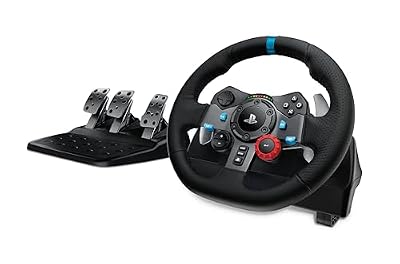
Logitech G29 Racing Wheel and Pedals for PS5/PS4/PC | Stainless steel paddle shifters, leather steering wheel cover, real force feedback, for PS5, PS4, PC, Mac
Included for 'Best Racing Wheel for Beginners: 5 Easy Starter Picks 2026' because the listing specifies Stainless steel paddle shifters and leather steering wheel cover, details this guide uses to compare options.
View on Amazon
Logitech G920 Racing Wheel and Pedals for Xbox X|S/Xbox One/PC | Real force feedback, stainless steel paddle shifters, leather steering wheel cover, for Xbox Series X|S, PC, Mac
Included for 'Best Racing Wheel for Beginners: 5 Easy Starter Picks 2026' because the listing specifies S/Xbox One/PC and Real force feedback, details this guide uses to compare options.
View on Amazon
Thrustmaster T98 Ferrari 296 GTB - Racing Wheel and Pedal Set - PS5 & PC | Beginner racing wheel, officially licensed by Ferrari, linear resistance, automatic return to centre, paddle shifters
Included for 'Best Racing Wheel for Beginners: 5 Easy Starter Picks 2026' because the listing specifies Racing Wheel and Pedal Set and PS5 & PC, details this guide uses to compare options.
View on Amazon
HORI Racing Wheel Apex for Playstation 5, PlayStation 4 and PC - Officially Licensed by Sony - Compatible with Gran Turismo 7
Included for 'Best Racing Wheel for Beginners: 5 Easy Starter Picks 2026' because the listing specifies PlayStation 4 and PC and Officially Licensed by Sony, details this guide uses to compare options.
View on AmazonThe best racing wheel for beginners should make driving more immersive without turning setup into another hobby. Useful force feedback, responsive pedals, secure desk mounting, broad game support, and simple software matter most. These five bundles cover casual first wheels through affordable direct-drive systems.
Quick Comparison
| Racing Wheel | Best For | Drive System | Rotation | Pedals | Platforms |
|---|---|---|---|---|---|
| Logitech G923 | Overall beginners | Dual-motor, 2.3Nm | 900° | 3 pedals | PC + PlayStation or Xbox |
| Thrustmaster T128 | First force-feedback wheel | Hybrid Drive | 270°–900° | 2 pedals | PC + PS5/PS4 or Xbox |
| MOZA R3 Bundle | Beginner direct drive | 3.9Nm Direct Drive | Limitless | 2 pedals | PC or Xbox/PC version |
| Thrustmaster T248 | Growing sim racers | Hybrid belt/gear | Up to 900° | 3 pedals | PC + PS5/PS4 or Xbox |
| Logitech G29/G920 | Simple proven starter | Dual-motor, 2.3Nm | 900° | 3 pedals | PC + PlayStation or Xbox |
Logitech G923
Best For: Overall beginner racing setup
Key Features:
- 2.3Nm force-feedback system
- TRUEFORCE support
- Three-pedal set
- Pressure-sensitive brake
- Aluminum paddle shifters
- Hand-stitched leather rim
- PlayStation/PC and Xbox/PC versions
- Optional Driving Force Shifter
The Logitech G923 is a practical starting point because the wheel, base, and three-pedal set arrive as one established package. Logitech rates the force-feedback system at 2.3Nm and offers separate PlayStation/PC and Xbox/PC versions, so beginners can start racing without selecting individual bases, rims, and pedals.
TRUEFORCE is the G923’s main feature beyond conventional force feedback. In supported games, Logitech connects the wheel more directly to game physics and audio data to reproduce additional vibration and road information. Support is game-dependent, so ordinary force feedback remains more important when choosing the wheel for a broad game library.
The included pedal set provides accelerator, brake, and clutch pedals, which gives beginners room to add an H-pattern shifter later without replacing the pedals immediately. The pressure-sensitive brake requires more force near the end of its travel, helping drivers learn progressive braking rather than treating the brake like a simple controller trigger.
The G923 is also easy to understand mechanically. It uses a familiar fixed wheel rim, paddle shifters, desk mounting, and Logitech G HUB configuration rather than a modular direct-drive ecosystem. That simplicity is valuable when the goal is learning braking points, steering inputs, and racing lines instead of researching hardware upgrades.
What Makes It Different: The G923 combines beginner-friendly installation with TRUEFORCE and a complete three-pedal set. It does not provide the smoothness or upgrade flexibility of direct drive, but its broad game support and straightforward hardware make it easier to recommend to someone buying a first force-feedback wheel.
Pros:
- Complete wheel and three-pedal bundle
- TRUEFORCE in supported games
- PlayStation and Xbox versions
- Optional H-pattern shifter
- Familiar software ecosystem
- Leather-covered wheel rim
- Simple desk installation
Cons:
- Gear-driven feedback can feel mechanical
- 2.3Nm torque is modest
- TRUEFORCE benefits depend on game support
Use Case: Gran Turismo, Forza, F1, Assetto Corsa, racing games, and casual sim racing from a desk before investing in a dedicated cockpit.
Who It’s For: Beginners who want a recognizable, complete racing package with minimal hardware decisions and room to add a shifter later.
The G923 makes the most sense when convenience matters more than maximizing force-feedback fidelity. It gives new drivers enough physical feedback to learn understeer, curb impacts, and changing grip while retaining conventional controls. If sim racing becomes a serious hobby, the next upgrade can be a direct-drive base or improved pedals.
Thrustmaster T128
Best For: Affordable first force-feedback experience
Key Features:
- HYBRID DRIVE force feedback
- 270° to 900° rotation
- T2PM magnetic two-pedal set
- Magnetic paddle shifters
- Engine-speed LEDs
- 13 action buttons
- Tool-free desk clamp
- PlayStation/PC and Xbox variants
The Thrustmaster T128 is aimed directly at players moving from a gamepad to their first force-feedback wheel. Its HYBRID DRIVE system communicates vehicle weight, road surfaces, impacts, and loss of tire grip, giving beginners information that a vibration-only wheel cannot provide while remaining simpler than a modular sim-racing setup.
Rotation can vary from 270 to 900 degrees and automatically adapts in supported games. That range lets beginners use a quicker steering ratio for certain race cars while retaining wider rotation for road cars, trucks, and simulation titles. The lightweight rim also helps the modest force-feedback system react without excessive rotational mass.
The included T2PM pedal set uses magnetic sensors for accelerator and brake inputs. Thrustmaster states that the contactless design avoids the precision loss associated with traditional potentiometers as they wear. It is only a two-pedal set, however, so drivers who eventually want a clutch and manual shifter should budget for upgrades.
Desk installation is beginner friendly because the included clamp requires no tools and fits surfaces up to 5.5 cm thick. This matters for players who cannot dedicate permanent space to a cockpit. The wheel can be attached for an evening session and removed afterward without drilling mounting holes into the desk or furniture.
What Makes It Different: The T128 prioritizes the essential experience of force feedback at an approachable level. Magnetic pedals and paddle shifters add useful durability, while the compact mounting system suits bedrooms and shared desks. The biggest compromise is the basic two-pedal configuration rather than feedback itself.
Pros:
- Real force feedback
- 270° to 900° rotation
- Magnetic pedal sensors
- Magnetic paddle shifters
- Easy tool-free mounting
- Engine-speed LEDs
- Compact beginner bundle
Cons:
- Only two pedals included
- Lightweight construction
- Less feedback strength than higher-tier wheels
Use Case: A first racing setup for F1, Gran Turismo, Forza, Assetto Corsa, rally games, or driving simulators at an ordinary computer desk.
Who It’s For: Controller players who want to experience genuine force feedback without immediately investing in a direct-drive ecosystem.
For a beginner, the T128 can teach more about car behavior than a non-force-feedback wheel because steering resistance changes with the game. Feeling tire grip begin to disappear encourages smoother inputs and earlier corrections. That makes force feedback a functional learning tool instead of simply an immersion feature.
MOZA R3 Racing Bundle
Best For: Beginners who want direct drive immediately
Key Features:
- 3.9Nm direct-drive motor
- 15-bit encoder
- 1000Hz USB refresh rate
- Limitless maximum rotation
- 280mm steering wheel
- Quick-release wheel system
- SR-P Lite steel pedals
- Table clamp included
MOZA’s R3 introduces direct drive at a level that remains manageable for a first setup. The base delivers 3.9Nm of peak torque and connects the steering wheel directly to the servo motor rather than using gears or belts between them. That architecture provides smoother and more immediate feedback than traditional entry-level mechanisms.
The base uses a 15-bit encoder and a 1000Hz USB refresh rate, while maximum wheel rotation is effectively unrestricted and can be configured through software. Beginners do not need to understand those numbers to start driving, but the added precision gives the R3 more room to remain useful as driving skills and expectations improve.
The PC bundle includes an ES Lite 280mm wheel, SR-P Lite pedals, and a table clamp, so a full cockpit is not required. The pedals use Hall sensors and allow pedal spacing, plate height, input curves, and direction to be adjusted. MOZA Pit House also handles force feedback, button mappings, firmware, and pedal configuration.
MOZA also sells an officially licensed Xbox and PC R3 package. That version retains the 3.9Nm direct-drive base while using an Xbox-compatible ES wheel. Console buyers should therefore choose the correct bundle rather than assuming the standard PC package can simply be connected to an Xbox Series X|S or Xbox One.
What Makes It Different: Direct drive is the R3’s defining advantage. Instead of buying a traditional starter wheel and replacing the entire system later, beginners can start inside MOZA’s ecosystem with a removable wheel rim and configurable base. The trade-off is more software tuning and upgrade temptation than simpler packages.
Pros:
- 3.9Nm direct drive
- Smooth detailed feedback
- Quick-release wheel
- Metal pedal construction
- Adjustable pedal settings
- Desk clamp included
- Expandable MOZA ecosystem
Cons:
- More configuration than plug-and-play wheels
- Two pedals in the standard bundle
- Platform version must be chosen carefully
Use Case: Assetto Corsa, iRacing, F1, rally titles, Forza, and other games where the beginner expects sim racing to become a longer-term hobby.
Who It’s For: New PC or Xbox racers who would rather start with entry-level direct drive than replace a gear-driven wheel after a year.
The R3 is especially appealing when a beginner already knows they enjoy racing games. Its torque remains moderate enough for desk mounting, yet the direct-drive motor communicates smaller steering changes more cleanly than typical starter systems. Pedals and wheel rims can then be upgraded without immediately replacing the entire base.
Thrustmaster T248
Best For: Beginners ready for a more complete three-pedal setup
Key Features:
- Hybrid gear and belt drive
- Three force-feedback presets
- T3PM three-pedal set
- Four brake-pressure modes
- Magnetic paddle shifters
- Built-in telemetry display
- 25 action buttons
- PlayStation/PC and Xbox/PC versions
Thrustmaster positions the T248 for players moving beyond basic entry-level hardware while keeping setup approachable. Its hybrid drive combines gear and belt mechanisms, and Thrustmaster states that the system provides up to 70% more power than its previous T150 design. Three force-feedback presets can be changed directly from the wheel.
The included T3PM pedal set is an important upgrade over two-pedal beginner bundles. It includes accelerator, brake, and clutch pedals using magnetic sensor technology, while the brake provides four resistance configurations. That allows beginners to experiment with firmer braking without immediately buying a standalone pedal system.
A built-in display can show more than 20 types of information in supported games, including gear, RPM, lap data, force-feedback settings, and steering rotation. Twenty-five action inputs also reduce reliance on a keyboard or controller. These controls are particularly helpful in F1 and simulation titles with many car settings.
Thrustmaster offers separate PlayStation/PC and Xbox/PC versions, so console compatibility should be chosen before purchase. The system remains simpler than direct drive because the wheel rim is integrated with the base. That limits modular upgrades, but it also means beginners do not need to choose a wheel, hub, base, and pedals separately.
What Makes It Different: T248 combines stronger hybrid feedback with a useful display and a proper three-pedal set. It sits between simple starter hardware and modular direct-drive systems. That position suits beginners who want more adjustability immediately but still prefer buying one complete box instead of assembling an ecosystem.
Pros:
- Stronger hybrid force feedback
- Three feedback presets
- Three magnetic pedals
- Adjustable brake resistance
- Built-in telemetry screen
- 25 action inputs
- Magnetic paddle shifters
Cons:
- Less smooth than direct drive
- Integrated wheel limits rim upgrades
- Paddle sound can be noticeable in quiet rooms
Use Case: F1, Gran Turismo, Forza, Assetto Corsa Competizione, rally games, and simulation racing where a clutch pedal and additional controls are useful.
Who It’s For: New racers who already want three pedals, stronger feedback, and more onboard controls than basic beginner wheels provide.
The T248 can delay the need for upgrades because its pedals, feedback presets, and controls cover more advanced use from the start. A first-time driver can initially leave most settings alone, then experiment with brake resistance and force-feedback modes as technique improves. That progression keeps the hardware relevant beyond the first few weeks.
Logitech G29 / G920 Driving Force
Best For: Straightforward first wheel with proven game support
Key Features:
- 2.3Nm racing system
- Dual-motor force feedback
- 900° rotation
- Three-pedal set
- Stainless steel paddle shifters
- Leather-covered wheel
- G29 for PlayStation/PC
- G920 for Xbox/PC
The Logitech G29 and G920 remain straightforward starter wheels because the design combines dual-motor force feedback, three pedals, and platform-specific console support in one package. Logitech currently lists the system at 2.3Nm, with the G29 serving PlayStation and PC while the G920 targets Xbox and PC.
Both versions use stainless steel paddle shifters, a leather-covered steering wheel, and adjustable floor pedals. The clutch pedal means beginners can add Logitech’s Driving Force Shifter later and learn manual shifting without replacing the original pedal set. This modular step is simple compared with building a full direct-drive ecosystem.
Force feedback communicates tire slip and changes in terrain through the dual-motor mechanism. The gearing is more noticeable than on belt-driven or direct-drive systems, but the response is still far more informative than a spring-centered wheel. For first-time users, learning to react to steering forces is the largest improvement over a controller.
The G29 and G920 also benefit from longevity in the market. Many racing titles, community guides, desk setups, and configuration tutorials have been built around them. That does not improve hardware performance directly, but beginners can often find game-specific settings and troubleshooting information without experimenting entirely on their own.
What Makes It Different: The Driving Force pair emphasizes familiarity and simplicity. There is no display, interchangeable rim, or advanced direct-drive configuration to learn. You mount the wheel, position the pedals, connect power and USB, select the correct game settings, and spend most of the time learning to drive.
Pros:
- Three pedals included
- 900° wheel rotation
- Dual-motor force feedback
- Optional shifter available
- Leather wheel covering
- Broad platform options
- Established game support
Cons:
- Older gear-driven design
- Feedback is less refined than direct drive
- Limited ecosystem compared with modular bases
Use Case: Casual and intermediate racing on PC, PlayStation, or Xbox from a desk, wheel stand, or basic cockpit.
Who It’s For: Beginners who want a proven three-pedal force-feedback package and do not need newer features such as TRUEFORCE or a direct-drive motor.
Choosing G29 or G920 instead of G923 can make sense when the older bundle is meaningfully easier to obtain or when TRUEFORCE is not important to your games. The underlying 2.3Nm racing system still provides the core force-feedback experience. The more important choice is buying the version that supports your console platform.
How to Choose the Best Racing Wheel for Beginners
Choose Force Feedback, Not Just Vibration
Force feedback actively turns the steering wheel according to forces calculated by the game. That lets you feel tire grip, understeer, road surfaces, impacts, and steering weight. Simple vibration wheels may shake during events but cannot reproduce meaningful steering resistance, so genuine force feedback should be the priority for learning.
Gear, Hybrid, or Direct Drive
Gear-driven wheels are affordable and proven but can feel notchy. Hybrid belt-and-gear systems smooth some of that mechanical sensation while retaining reasonable prices. Direct-drive bases attach the steering wheel more directly to the motor, producing cleaner detail and faster responses, but usually require more configuration and investment.
Do Not Obsess Over Maximum Torque
A beginner does not need 10Nm or more to learn racing technique. Moderate torque can clearly communicate grip while remaining easier to control on a desk. Strong direct-drive wheels become more useful when a stable cockpit is available. For a first setup, mounting quality and useful feedback matter more than chasing the largest torque number.
Check Platform Compatibility First
PC offers the broadest wheel compatibility, but consoles require licensed hardware. PlayStation and Xbox versions of otherwise similar wheels are not automatically interchangeable. Determine where you will play before comparing feedback or pedals, especially with Logitech, Thrustmaster, and MOZA bundles that are sold in platform-specific configurations.
Two Pedals vs Three Pedals
Two pedals are enough for paddle-shifted GT, F1, and many modern race cars. A third clutch pedal becomes useful when learning manual H-pattern shifting or driving older cars realistically. Beginners unsure about manual shifting can start with two pedals, while anyone already planning to buy a shifter should consider a three-pedal bundle.
Pedal Quality Matters
Consistent braking is essential for improving lap times because braking points repeat every lap. Magnetic sensors can provide durable contactless input, while more advanced load-cell pedals measure pressure instead of only pedal travel. Beginners do not require load cells immediately, but a stable pedal base and predictable brake are worth prioritizing.
Desk Mounting Can Decide the Experience
Force feedback is less useful if the wheel base slides or shakes the desk. Check clamp thickness limits, desk strength, and available edge clearance before buying. Lightweight starter wheels work well on many desks, while stronger direct-drive hardware benefits from a sturdy table, dedicated wheel stand, or racing cockpit.
Consider the Upgrade Path
Some beginners only want an occasional racing accessory, while others eventually add shifters, handbrakes, stronger pedals, and different wheel rims. Logitech starter systems offer a simple shifter upgrade, while MOZA’s direct-drive ecosystem provides broader expansion. Choose based on realistic plans rather than buying accessories before learning the basics.
FAQ
Is a Racing Wheel Worth It for Beginners?
Yes, if you regularly play racing games and want more control than a gamepad provides. A force-feedback wheel teaches smoother steering, throttle control, and correction when grip changes. The experience also becomes more physical and immersive. Casual arcade players who race only occasionally may still prefer the convenience of a controller.
How Much Force Feedback Does a Beginner Need?
There is no required torque level for learning. Entry systems around the G923’s 2.3Nm can communicate meaningful steering forces, while a 3.9Nm direct-drive system such as MOZA R3 offers additional detail. Higher torque is not automatically better for a first setup, especially when the wheel is attached to a lightweight desk.
Is Direct Drive Good for a First Racing Wheel?
Yes. Entry-level direct drive has become practical enough that beginners no longer need to start with gears or belts. A system such as MOZA R3 includes a table clamp, wheel, and pedals, making it usable without a cockpit. The main downside is that direct-drive ecosystems introduce more settings and upgrade choices.
Is Logitech G923 Good for Beginners?
The G923 is beginner friendly because it combines force feedback, three pedals, paddle shifters, desk mounting, and console-specific versions in one package. Its 2.3Nm feedback is moderate enough for desktop use. TRUEFORCE also adds additional detail in supported games without being necessary for ordinary force-feedback operation.
Do Beginners Need a Clutch Pedal and Shifter?
No. Most modern racing games work well with paddle shifters and two pedals, and many real race cars also use paddle-based gear changes. A clutch and H-pattern shifter become worthwhile when you enjoy road cars, classic racing vehicles, drifting, trucking, or simulations where manual shifting is part of the experience.
What Games Are Good for Learning With a Racing Wheel?
Gran Turismo and Forza provide accessible progression, while F1 games teach braking and precise circuit driving. Assetto Corsa and Assetto Corsa Competizione move further toward simulation, while rally titles demand fast corrections. Start with assists enabled, then reduce them gradually instead of learning every advanced setting at once.
Conclusion
The best racing wheel for beginners depends on platform, budget, and whether sim racing will remain casual or become a serious hobby. Logitech G923 offers an easy complete package, T128 makes force feedback accessible, MOZA R3 brings direct drive to beginners, while T248 and G29/G920 provide strong three-pedal alternatives.