🛒 Best Price Today on Amazon
Prime members get fast, free shipping on everything above, plus member-only deals. New members get a 30-day free trial — cancel anytime.
- Best HAILAN All-in-One PCs Compared
- HAILAN FB40 Core i5-13400 – Best Overall
- HAILAN FB40 Core i3-12100 – Best Office Value
- HAILAN X6 Core i5-10400 – Best Budget Desktop-Class AIO
- HAILAN X6 Core i3-10105 – Best Basic Home PC
- HAILAN X6 Used Core i5 and i7 Models – Best Low-Cost Used Option
- How to Choose a HAILAN All-in-One PC
- Is a HAILAN All-in-One Good for Gaming?
- HAILAN vs Mainstream All-in-One Brands
- FAQ
- Conclusion
The best HAILAN All-in-One PC depends heavily on the exact configuration because HAILAN sells similar-looking chassis with very different processors, RAM, storage, and motherboards. Newer FB40 systems offer 12th- and 13th-gen desktop Intel CPUs with DDR5, while X6 models range from older Core i5 systems to stronger desktop configurations.
Quick answer: For most people in 2026, the best hailan all is the HAILAN Model — our #1 rated choice. See the full ranked comparison, alternatives and buying advice below.
Best HAILAN All-in-One PCs Compared
| HAILAN Model | Best For | Processor | RAM | Storage | Display |
|---|---|---|---|---|---|
| HAILAN FB40 Core i5-13400 | Best Overall | Core i5-13400 | 8GB DDR5 | 512GB SSD | 23.8″ FHD |
| HAILAN FB40 Core i3-12100 | Best Office Value | Core i3-12100 | Up to 16GB+ | 512GB NVMe | 23.8″ FHD IPS |
| HAILAN X6 Core i5-10400 | Best Budget Desktop-Class AIO | Core i5-10400 | 8GB DDR4 | 256GB SSD | 23.8″ FHD |
| HAILAN X6 Core i3-10105 | Best Basic Home PC | Core i3-10105 | 8GB DDR4 | 256GB SSD | 23.8″ FHD |
| HAILAN X6 Used Core i5/i7 | Best Low-Cost Used Option | Varies | 8–32GB | 256GB+ SSD | 23.8″ FHD |
HAILAN differs from many mainstream all-in-one brands because several configurations use socketed desktop processors instead of low-power laptop chips. Verified X6 and FB40 specifications show desktop-class Intel Core processors combined with SO-DIMM memory and M.2 or SATA storage inside a monitor-style chassis.
That flexibility can make HAILAN attractive when CPU performance and upgradeability matter more than brand ecosystem or premium industrial design. The trade-off is that model naming is inconsistent across sellers, so two listings marked “HAILAN X6” may contain completely different generations of processor, motherboard, RAM type, or storage.
HAILAN FB40 Core i5-13400 – Best Overall
Best For: Office users, multitaskers, businesses, and buyers wanting a newer desktop-class CPU
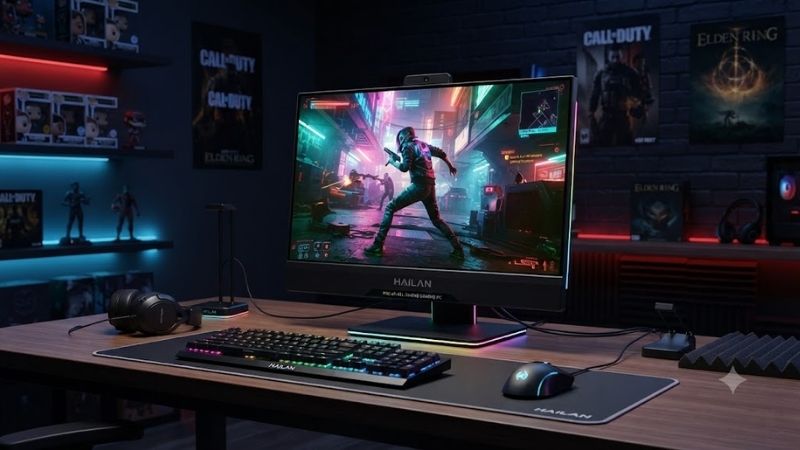
The HAILAN FB40 is the strongest verified modern configuration in this roundup. A manufacturer data sheet lists a 23.8-inch Full HD screen, Intel Core i5-13400 processor, 8GB DDR5-4800 memory, 512GB SSD, Intel UHD Graphics 730, and Windows 11 Pro.
The Core i5-13400 is much more capable than the older quad-core processors found in many used X6 systems. That gives the FB40 more headroom for heavy browser use, office suites, accounting software, CRM systems, video meetings, light editing, and multitasking across several applications.
Key Features
- 23.8-inch Full HD display
- 1920 × 1080 resolution
- Intel Core i5-13400
- 8GB DDR5-4800 memory
- 512GB SSD
- Intel UHD Graphics 730
- Gigabit Ethernet
- Wi-Fi 802.11ac
- Bluetooth 5.1
- 5MP camera
- Built-in microphone
- Dual 3W speakers
- HDMI output
- USB 3.2 Gen 1
- VESA 100 × 100 mounting
- Windows 11 Pro
- 36-month documented warranty
What Makes It Different
The FB40 uses a Thin Mini-ITX motherboard platform rather than a tightly integrated laptop-style motherboard. The documented configuration includes an LGA1700 desktop processor and DDR5 memory, giving it a more modular internal design than many mainstream all-in-one computers.
The screen is specified at 250 nits, 1000:1 contrast, 178-degree viewing angles, and 1920 × 1080 resolution. Those specifications are appropriate for office and home use, although buyers should not expect the brightness, color accuracy, or refresh rate of a premium standalone monitor.
Pros
- Modern 13th-gen desktop CPU
- DDR5 memory
- 512GB SSD
- Built-in camera and speakers
- Gigabit Ethernet
- HDMI output
- VESA mounting
- Compact desk footprint
- Strong office performance
Cons
- Integrated graphics only
- 8GB base RAM is modest
- 250-nit display is basic
- Brand support varies by market
- Internal cooling is more constrained than a tower
Use Case
The Core i5 FB40 is ideal for office desks where a compact system is more important than graphics performance. It can handle large spreadsheets, dozens of browser tabs, video conferences, business software, and light creative work more comfortably than older X6 configurations.
Who It’s For
Choose this version if you want a HAILAN AIO as a primary office computer rather than simply the cheapest available model. It is the better long-term choice for users who expect heavier multitasking and want newer platform components.
HAILAN FB40 Core i3-12100 – Best Office Value
Best For: Reception desks, study systems, POS use, and standard office applications
A current FB40 configuration has also been listed with an Intel Core i3-12100, 23.8-inch IPS Full HD panel, 512GB NVMe SSD, and upgradeable DDR5 SO-DIMM memory. The platform supports LGA1700 processors and is positioned for office, home, education, POS, and CRM workloads.
The Core i3-12100 provides four cores and eight threads, which is enough for normal Windows multitasking without the sluggish feel associated with older low-end mobile CPUs. For Word, Excel, browser applications, email, Zoom, accounting tools, and media playback, it represents a sensible balance between performance and cost.
Key Features
- 23.8-inch IPS panel
- Full HD 1920 × 1080
- Core i3-12100
- LGA1700 platform
- DDR5 SO-DIMM support
- 512GB NVMe SSD
- Integrated Intel graphics
- Wi-Fi
- Built-in speakers
- Webcam and microphone
- Gigabit networking
What Makes It Different
This configuration offers much of the practical FB40 platform without paying for the stronger Core i5 processor. In office workloads, storage speed and enough memory often matter more than maximum CPU performance, so a Core i3-12100 with 16GB RAM can feel responsive for typical productivity tasks.
The platform also provides more upgrade potential than many sealed all-in-one systems. A verified FB40 listing states support for Core i3, i5, and i7 LGA1700 processors plus DDR5 SO-DIMM memory up to 32GB, although actual BIOS and thermal support should always be confirmed before a CPU upgrade.
Pros
- Modern desktop Core i3
- NVMe storage
- DDR5 support
- IPS Full HD display
- Upgradeable memory
- Suitable for business deployment
- Smaller footprint than a desktop tower
Cons
- Integrated graphics
- CPU upgrade compatibility must be verified
- Base configurations may ship with limited RAM
- Not designed for demanding games
Use Case
This model works well for businesses buying several identical systems for front desks, classrooms, customer-service stations, or administrative staff. The all-in-one format minimizes cables while retaining enough performance for standard office software.
Who It’s For
Choose the Core i3 FB40 if your workload is primarily productivity and web applications. It offers better value than the i5 configuration when heavier rendering, compiling, or multitasking is not part of the daily workload.
HAILAN X6 Core i5-10400 – Best Budget Desktop-Class AIO
Best For: Buyers wanting six-core desktop performance at a lower price than newer FB40 models
HAILAN X6 listings include a configuration with the Intel Core i5-10400, 8GB DDR4, 256GB SSD, and a 24-inch-class Full HD display. Vietnamese retailers have listed this alongside a Core i3-10105 version, showing how the same X6 chassis can be paired with different desktop CPUs.
The Core i5-10400 is an older six-core, 12-thread desktop processor, but it remains capable for office work, general multitasking, basic editing, and home applications. When available at a meaningful discount, it can provide stronger multi-core performance than low-end newer mobile processors used in budget all-in-one machines.
Key Features
- 23.8-inch class Full HD screen
- Intel Core i5-10400
- 8GB DDR4 memory
- 256GB SSD
- Integrated Intel graphics
- Wi-Fi
- Bluetooth
- Built-in speakers
- HDMI
- USB
- Gigabit LAN
What Makes It Different
The X6 platform has existed across several motherboard generations, including H310-based systems. A documented HAILAN X6-H310 used a socketed Core i3-8100, two SO-DIMM slots, M.2 storage, an additional 2.5-inch SATA bay, multiple USB ports, HDMI output, Wi-Fi, and Gigabit LAN.
That modularity is valuable because it can make storage or memory upgrades easier than on highly proprietary all-in-one PCs. However, buyers must inspect the exact motherboard because older X6 systems can use different RAM standards and chipset revisions despite sharing nearly identical external cases.
Pros
- Six-core desktop processor
- Compact all-in-one chassis
- Upgradeable storage on many X6 variants
- Replaceable memory
- Full HD display
- Good value when discounted
Cons
- Older CPU generation
- 256GB SSD fills quickly
- Only integrated graphics
- X6 internal specifications vary heavily
- Seller documentation can be inconsistent
Use Case
The Core i5-10400 version is useful as a low-cost office workstation, home computer, accounting system, or education PC. Increasing memory to 16GB and storage to 512GB or 1TB can make it considerably more practical for long-term daily use.
Who It’s For
Choose this configuration when the price is clearly below newer brand-name all-in-one PCs but you still want a reasonably capable desktop processor. Verify the actual CPU, motherboard, RAM configuration, and SSD health before buying used stock.
HAILAN X6 Core i3-10105 – Best Basic Home PC
Best For: Browsing, school work, office applications, and everyday home computing
A currently documented HAILAN X6 configuration uses the Intel Core i3-10105 with four cores and eight threads, 8GB DDR4 RAM, 256GB SSD, Intel UHD Graphics 630, and a 23.8-inch Full HD frameless display. Wi-Fi, Bluetooth, stereo speakers, Gigabit Ethernet, HDMI, USB 3.0, and audio connectivity are also listed.
For everyday computing, the Core i3-10105 remains capable enough to run Windows 10 or 11, browsers, Office applications, video streaming, and basic image editing. The SSD is more important than the CPU for perceived responsiveness during startup and application loading, although 256GB capacity is relatively limited.
Key Features
- Intel Core i3-10105
- Four cores and eight threads
- 8GB DDR4
- 256GB SSD
- 23.8-inch Full HD display
- Intel UHD Graphics 630
- Wi-Fi and Bluetooth
- Built-in speakers
- Gigabit LAN
- HDMI output
What Makes It Different
The i3 model delivers the same compact desktop experience as more expensive X6 variants without paying for CPU performance that light users may never need. For study, browsing, remote work, and basic business software, four cores and eight threads remain adequate.
The main weakness is storage. A 256GB SSD can fill quickly after Windows updates, applications, downloads, and personal files. Buyers should check whether the specific X6 motherboard provides a free SATA bay or M.2 slot before planning an upgrade.
Pros
- Affordable desktop-class CPU
- Full HD screen
- SSD boot drive
- Built-in Wi-Fi and Bluetooth
- Suitable for basic productivity
- Clean desk setup
Cons
- 256GB storage is restrictive
- Limited gaming performance
- Older integrated graphics
- 8GB RAM is becoming a minimum
Use Case
This configuration makes sense for homework, online classes, web browsing, video calls, accounting programs, POS software, and general home use. It can also work as a reception or shared family PC where gaming and content creation are not priorities.
Who It’s For
Choose the Core i3 X6 if your main goal is low-cost everyday computing. If the price difference to a Core i5 model is small, the i5 configuration offers more useful long-term processing headroom.
HAILAN X6 Used Core i5 and i7 Models – Best Low-Cost Used Option
Best For: Buyers comfortable inspecting second-hand hardware
The used market contains many X6 configurations because the chassis has been paired with several processor generations. Listings include Core i5-7500, Core i5-11400, and Core i7-11700 versions, with memory configurations ranging from 8GB to 32GB and SSD capacities commonly around 256GB.
More recent second-hand listings also show X6 machines fitted with processors such as the Core i5-12400 and 32GB DDR4. Because these systems may have been upgraded after purchase, the hardware inside a used unit should be verified with BIOS information or diagnostic software rather than trusted solely from the case model.
Key Features
- Wide CPU selection
- Often low used prices
- Upgradeable memory on many versions
- M.2 or SATA storage support
- 23.8-inch class Full HD screen
- Integrated speakers
- Wi-Fi and Ethernet
What Makes It Different
Used HAILAN systems can provide surprisingly strong CPU performance for their price because some use ordinary desktop processors. However, community reports show different X6 boards using different memory types and processor generations, reinforcing that “X6” alone does not define the internal hardware.
Pros
- Low cost
- Desktop CPU options
- Often upgradeable RAM and storage
- 24-inch-class display included
- Useful for office deployment
Cons
- Configuration uncertainty
- Battery-free but aging display and PSU components
- Limited manufacturer support in some regions
- Used SSD health must be checked
- Older Wi-Fi hardware may be slow
Who It’s For
Used X6 systems are best for technically confident buyers willing to inspect CPU model, memory type, storage health, temperatures, display condition, ports, speakers, webcam, networking, and warranty coverage before purchase.
How to Choose a HAILAN All-in-One PC
Verify the Exact Processor
Do not buy based on “Core i5” or “Core i7” alone. HAILAN X6 listings span several Intel generations, and the performance gap between an older i5-7500 and a newer i5-12400 is substantial. Ask for the full CPU model before comparing prices.
Check RAM Type and Capacity
FB40 configurations can use DDR5 SO-DIMM memory, while older X6 systems may use DDR4 or even DDR3L depending on the motherboard. A 16GB configuration is preferable for modern multitasking, especially if several browser tabs and office programs remain open simultaneously.
Prefer at Least 512GB SSD Storage
A 256GB drive works for Windows and basic applications but leaves limited space for files. A 512GB NVMe SSD is a more practical starting point, while 1TB is better for large media collections, project files, or users who do not want to manage storage frequently.
Inspect the Display
Most verified HAILAN office-oriented configurations use 23.8-inch Full HD panels. The FB40 data sheet lists 250-nit brightness and 178-degree viewing angles, which are suitable for normal indoor work but not professional HDR or color-critical production.
Consider Upgradeability
One advantage of several HAILAN designs is the use of desktop-style or Thin Mini-ITX internals. Verified models provide SO-DIMM slots, M.2 storage, and in some cases additional SATA storage. CPU upgrades are theoretically possible on socketed systems, but BIOS, power delivery, and cooling compatibility must be checked first.
Is a HAILAN All-in-One Good for Gaming?
HAILAN office configurations rely mainly on Intel integrated graphics, so they are not ideal for demanding modern games. Older esports titles, browser games, lightweight indie games, and some older 3D titles can run at reduced settings, but current AAA games require much stronger graphics hardware.
The desktop processors inside several HAILAN models can provide enough CPU power for gaming, but the absence of a discrete GPU remains the main limitation. Because the compact chassis usually lacks space and power delivery for a conventional graphics card, buyers should choose a normal desktop tower if gaming performance is a priority.
HAILAN vs Mainstream All-in-One Brands
A current HP 23.8-inch all-in-one with a Core i5-1334U offers 8GB DDR4, 512GB NVMe storage, Wi-Fi 6, Bluetooth 5.4, Full HD IPS display, and stronger mainstream support infrastructure. HAILAN can counter with desktop-class CPUs and potentially more modular internal hardware, depending on configuration.
The buying decision therefore comes down to price and support. HAILAN may offer more CPU performance per dollar in some markets, while HP, Dell, Lenovo, and ASUS generally provide clearer model documentation, firmware support, service networks, and more predictable warranties.
FAQ
Is HAILAN a Real Computer Brand?
Yes. HAILAN all-in-one PCs are produced by Shenzhen Hailan Electronic Co., Ltd. Manufacturer documentation identifies the company and lists several HAILAN models, including FB40, G-series systems, Q-series models, and F24 variants.
Is the HAILAN X6 Upgradeable?
Many X6 configurations are upgradeable. A verified X6-H310 specification includes two SO-DIMM memory slots, M.2 storage, a 2.5-inch SATA bay, and a socketed desktop processor. However, other X6 motherboard revisions may differ, so inspect the exact model first.
Is HAILAN Good for Office Work?
Yes, when configured with a suitable processor, SSD, and enough RAM. Core i3 and Core i5 models are well suited to web applications, Office software, accounting, video conferencing, POS systems, and general business tasks.
Is HAILAN Good for Gaming?
Not for demanding modern gaming unless a specific model includes dedicated graphics. Most common X6 and FB40 systems use Intel integrated graphics, making them better suited to office work and light games.
Which HAILAN All-in-One Is Best?
Among currently verified configurations, the FB40 with Core i5-13400, DDR5, and 512GB SSD is the strongest all-round option. Buyers on a smaller budget can consider the FB40 Core i3-12100 or an X6 Core i5 configuration.
Conclusion
The best HAILAN All-in-One PC is the configuration with the right CPU, RAM, storage, and motherboard rather than simply the newest-looking chassis. The FB40 Core i5-13400 is the strongest modern choice, the Core i3 FB40 offers excellent office value, while X6 systems remain attractive budget options if their exact internal hardware is verified before purchase.
Ready to decide? Our #1 pick for 2026 is the HAILAN Model.
Live price & availability on Amazon.