🛒 Best Price Today on Amazon
Prime members get fast, free shipping on everything above, plus member-only deals. New members get a 30-day free trial — cancel anytime.
- Logitech G502 HERO Overview
- What Makes the Logitech G502 HERO Different?
- HERO 25K Sensor Performance
- 11 Programmable Buttons
- DPI Shift Button
- Dual-Mode Scroll Wheel
- Weight and Balance
- Ergonomics and Grip
- Build Quality
- Logitech G HUB
- Gaming Performance
- Productivity Performance
- Pros
- Cons
- Use Case
- Who It’s For
- FAQ
- Conclusion
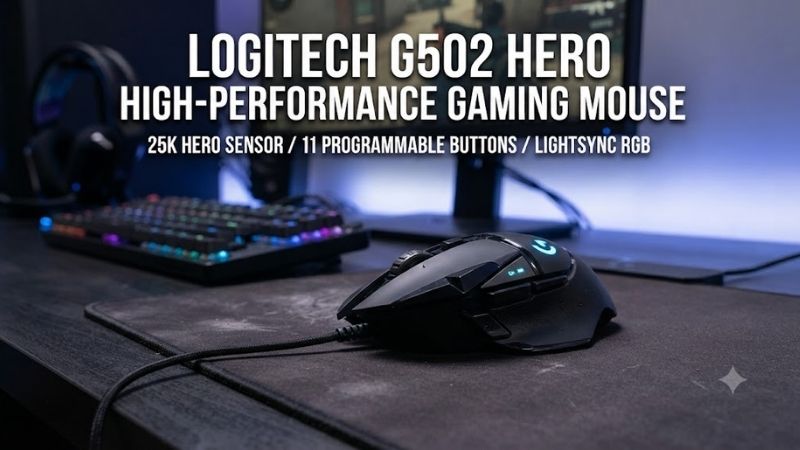
The Logitech G502 HERO is a wired gaming mouse built around precise tracking, extensive button customization, and a substantial right-handed shape. Its HERO 25K sensor, 11 programmable controls, dual-mode scroll wheel, onboard memory, RGB lighting, and adjustable weight system make it unusually flexible for games and productivity.
Logitech G502 HERO Overview
The G502 HERO keeps the classic G502 design while using Logitech’s HERO 25K optical sensor. It supports sensitivity from 100 to 25,600 DPI, tracks at more than 400 IPS, and is designed without smoothing, filtering, or acceleration across its stated range. That gives the mouse a strong technical foundation for precise cursor movement.
Logitech also equips the mouse with 11 programmable buttons, five optional 3.6-gram weights, onboard profiles, a dual-mode scroll wheel, and LIGHTSYNC RGB lighting. The result is a feature-heavy wired mouse aimed at players who prefer extensive physical controls and a heavier chassis rather than an ultra-light competitive design.
Best For
- MMO and RPG gaming
- Productivity-heavy gaming setups
- Players who prefer heavier mice
- Games requiring many commands
- Users who want adjustable weight
- Right-handed palm and claw grips
Key Features
- HERO 25K optical sensor
- 100–25,600 DPI range
- More than 400 IPS tracking
- 11 programmable buttons
- Five optional 3.6 g weights
- Dual-mode scroll wheel
- Onboard memory
- LIGHTSYNC RGB
- Wired USB connection
What Makes the Logitech G502 HERO Different?
The G502 HERO stands out because it combines a large number of buttons with a shape that still behaves like a conventional gaming mouse. Many MMO mice rely on dense thumb grids, while lightweight FPS models remove extra controls. The G502 sits between those categories by offering additional commands without turning the entire side panel into a keypad.
Weight customization is another unusual feature. Logitech provides five removable 3.6-gram weights that can be positioned inside the underside of the mouse. Players can increase total mass or change the balance toward the front or rear, although the base chassis is already substantially heavier than current lightweight esports mice.
HERO 25K Sensor Performance
The HERO 25K sensor remains one of the G502 HERO’s strongest components. Logitech specifies tracking above 400 IPS with sensitivity from 100 to 25,600 DPI and no smoothing, filtering, or acceleration across the supported range. That means the sensor itself is not the limiting factor for normal competitive or casual gaming.
Extremely high DPI settings are rarely necessary in actual gameplay. Most players achieve better control at moderate sensitivity while adjusting in-game settings around their preferred movement style. The value of the HERO sensor is not the maximum 25,600 DPI number but consistent tracking at the sensitivity you actually use.
For shooters, accurate low-to-medium DPI tracking is more important than the upper limit. The G502 HERO responds predictably during fast sweeps and small corrections, so players can tune sensitivity around muscle memory. The heavier chassis, however, makes rapid repeated flicks more demanding than on a lightweight esports mouse.
11 Programmable Buttons
The mouse provides 11 programmable controls that can be assigned through Logitech G HUB. These include the primary buttons, thumb controls, DPI buttons, wheel functions, and profile-related inputs. Commands and macros can be stored in onboard memory, allowing selected configurations to work on another PC without keeping software active.
This button count is particularly useful in games where several actions must remain immediately accessible. Players can assign melee, push-to-talk, inventory, healing, grenades, abilities, media controls, or other commands without reaching across the keyboard. The layout is less intimidating than a twelve-button MMO grid but more flexible than a basic five-button mouse.
The main limitation is accidental input during adaptation. The DPI up, DPI down, and DPI Shift controls sit close to frequently used areas, so some users may trigger them unintentionally at first. G HUB allows unwanted functions to be disabled or reassigned, which makes the layout easier to customize around individual habits.
DPI Shift Button
A dedicated DPI Shift control sits on the left side near the thumb. Holding it can temporarily change sensitivity, allowing users to move from normal cursor speed to a slower aiming setting. Logitech specifically positions this as useful for precision targeting, although the same button can be reassigned to another command.
In practice, many competitive players prefer one consistent sensitivity rather than changing DPI during a match. The button remains valuable because it does not have to control DPI. Reassigning it to melee, push-to-talk, ping, crouch, or another frequently used function often provides more practical value than using it as a sensitivity modifier.
Dual-Mode Scroll Wheel
The G502 HERO uses a dual-mode scroll wheel that can switch between a tactile stepped mode and a free-spinning mode. The stepped setting works well for weapon selection or controlled scrolling, while the free-spin mode can move quickly through long documents, browser pages, inventories, or other lists.
This is one of the mouse’s strongest productivity features. Many gaming mice use a basic wheel designed only for games, while the G502 can move comfortably between gaming, web browsing, editing, spreadsheets, and general desktop work. The wheel also supports horizontal tilt inputs, adding additional programmable functions.
The metal wheel can feel heavier and louder than the wheels on minimalist esports mice. Players who only need precise weapon switching may not care about free-spin functionality, but anyone using the same mouse for work and gaming can gain real value from switching between the two scrolling modes.
Weight and Balance
The G502 HERO weighs roughly 121 grams before adding optional weights, and the tuning system can increase that figure further. Logitech’s own comparison places the HERO between approximately 121 and 139 grams depending on configuration. That is dramatically heavier than modern lightweight competitive mice.
The benefit is a planted, substantial feel. Users who dislike hollow or extremely light mice may find the G502 easier to control during slower movements, strategy games, RPGs, or productivity work. The downside appears during fast FPS play, where repeatedly accelerating and stopping a heavier mouse can produce more hand and forearm fatigue.
Removing every optional weight is the best starting point for new users. Add weight only if the mouse feels too light or unstable. Because the chassis already carries significant mass, many players will find that the lightest configuration provides the most comfortable balance for longer gaming sessions.
Ergonomics and Grip
The G502 HERO uses a strongly sculpted right-handed body with a dedicated thumb rest. Its shape naturally supports palm grip and relaxed claw grip, particularly for medium or larger hands. The contours make the mouse feel secure, but they also make it less universally adaptable than a symmetrical gaming mouse.
Small hands may struggle to reach some front buttons without shifting grip, while left-handed users should look elsewhere. The fixed DPI Shift button position also assumes a particular thumb placement. Logitech later made this button reversible and removable on the G502 X series, but the HERO retains the original fixed arrangement.
For longer sessions, the wide body can feel supportive because more of the hand rests on the mouse. Whether that is comfortable depends heavily on grip preference. Players who use fingertip grip or prefer minimal palm contact may find the G502 bulky compared with compact lightweight alternatives.
Build Quality
The G502 HERO feels dense and mechanically substantial, with multiple buttons, rubberized grip areas, a metal scroll wheel, and removable underside panels for the weight system. Its design originated long before the current lightweight trend, so the chassis prioritizes features and structural solidity rather than reducing every unnecessary gram.
Traditional mechanical switches are used in the G502 HERO, whereas newer G502 X models use Logitech’s LIGHTFORCE hybrid optical-mechanical switches. That distinction matters mainly to buyers comparing generations, because the HERO’s older switch design is part of the reason the newer G502 X exists as a modernization of the platform.
Logitech G HUB
Logitech G HUB controls DPI stages, button assignments, macros, lighting, and onboard profiles. Players can configure up to five DPI levels for quick cycling and change the behavior of individual controls. Once preferred settings are stored onboard, the mouse can retain them without requiring G HUB on every computer.
The software is most valuable during initial setup. Disabling unused DPI stages, remapping the thumb buttons, and saving one or two profiles can make the G502 much easier to use. Players who leave every default function active may find the mouse more complicated than necessary because several controls remain dedicated to sensitivity changes.
Gaming Performance
For RPGs, strategy games, action titles, and general-purpose PC gaming, the G502 HERO remains highly capable. The sensor is accurate, extra buttons reduce keyboard reach, and the scroll wheel provides flexibility. The heavier body is less problematic in games that rely on deliberate cursor movements rather than constant high-speed flicking.
MMO players who need a moderate number of extra commands may also prefer the G502 over a dedicated twelve-button mouse. Eleven programmable controls provide substantial flexibility without creating a dense side grid. It works particularly well when several actions need quick access but full MMO-style button density would be excessive.
Competitive FPS is where the design shows its age most clearly. The HERO 25K sensor itself is excellent, but the 121-gram base weight is far above today’s ultra-light alternatives. Players who use low sensitivity and broad arm movements may notice greater fatigue and slower direction changes during long Counter-Strike, Valorant, or Apex sessions.
Productivity Performance
The G502 HERO is unusually strong as a work-and-gaming mouse. Side buttons can control browser navigation, editing commands, media functions, application shortcuts, or macros, while the free-spinning wheel handles long documents quickly. This makes it easier to justify than a mouse optimized exclusively for gaming.
Users working with spreadsheets, timelines, documents, or browser-heavy tasks can also use horizontal wheel tilt and programmable buttons to reduce keyboard movement. A lightweight esports mouse may feel faster for shooters, but it rarely provides the same number of useful controls for daily desktop work.
Pros
- Accurate HERO 25K sensor
- 11 programmable controls
- Excellent button customization
- Dual-mode scroll wheel
- Adjustable weight system
- Onboard memory
- Comfortable right-handed shape
- Useful for gaming and productivity
Cons
- Heavy by modern gaming standards
- Wired only
- Fixed right-handed shape
- Too bulky for some small hands
- Extra buttons require setup
- Traditional mechanical switches
Use Case
The G502 HERO makes the most sense for gamers who want one mouse for multiple genres and everyday desktop use. It handles shooters, RPGs, strategy games, editing, browsing, and productivity without requiring separate devices. Its wide feature set remains useful even though the chassis is much heavier than newer competitive designs.
It is less appropriate for players whose only priority is minimum weight. A dedicated lightweight FPS mouse can feel significantly quicker during low-sensitivity aiming and repeated flick shots. The G502 instead rewards users who value additional controls, a substantial grip, adjustable mass, and one of the most versatile scroll wheels in gaming.
Who It’s For
Buy the G502 HERO if you prefer a heavier right-handed mouse, use several programmable commands, and want wired reliability without managing batteries. It is especially suitable for players who mix gaming with office work and want button customization and fast scrolling to remain useful outside games.
Skip it if you use fingertip grip, have very small hands, are left-handed, or compete primarily in fast FPS titles where low mouse weight is a major priority. Logitech’s newer G502 X reduces chassis weight substantially while keeping much of the recognizable G502 layout, making it worth considering for those users.
FAQ
Is the Logitech G502 HERO good for FPS gaming?
Yes, the sensor is accurate enough for competitive FPS gaming, but the mouse is considerably heavier than modern esports-focused models. Players who prefer a stable, substantial mouse may enjoy it, while low-sensitivity players making large and rapid movements will generally benefit more from a lighter design.
Does the G502 HERO have 25,600 DPI?
Yes. Logitech specifies the HERO 25K sensor at 100 to 25,600 DPI with tracking above 400 IPS and no smoothing, filtering, or acceleration across the supported range. The practical advantage is accurate tracking rather than actually playing games at the maximum sensitivity setting.
How many buttons does the G502 HERO have?
The G502 HERO provides 11 programmable controls that can be configured through Logitech G HUB. These can handle game commands, macros, navigation, DPI changes, media functions, or productivity shortcuts. Profiles can also be stored in onboard memory for use on another PC.
Is the G502 HERO too heavy?
That depends on preference. Logitech lists the chassis around 121 grams before the optional weights, which is heavy compared with modern lightweight gaming mice. For strategy, RPG, productivity, and general gaming this may feel stable, but competitive FPS players may prefer something significantly lighter.
Is the Logitech G502 HERO still worth buying?
Yes, if its strengths match your priorities. The HERO sensor remains highly capable, while 11 buttons, onboard memory, adjustable weights, and the dual-mode wheel provide features many newer lightweight mice omit. It is less compelling if wireless connectivity, minimum weight, or newer switch technology matters most.
Conclusion
The Logitech G502 HERO remains a strong high-performance gaming mouse for users who value customization over minimum weight. Its HERO 25K sensor, 11 programmable buttons, dual-mode wheel, onboard memory, and adjustable weights make it extremely versatile, but competitive FPS players may prefer a lighter modern alternative.