🛒 Best Price Today on Amazon
Prime members get fast, free shipping on everything above, plus member-only deals. New members get a 30-day free trial — cancel anytime.
- What Is the Ideal Computer Desk Height?
- Ideal Desk Height for Sitting
- Ideal Desk Height for Tall People
- Ideal Desk Height for Short People
- Ideal Standing Desk Height
- Desk Height and Monitor Position
- Ideal Desk Height for Gaming
- Ideal Desk Height for Laptop Users
- How Deep Should a Computer Desk Be?
- Under-Desk Leg Clearance
- Fixed vs Adjustable Desk Height
- How to Measure Your Ideal Desk Height
- FAQ
- Conclusion
The ideal height for a computer desk is not one fixed number for everyone. Your desk should place the keyboard and mouse near elbow height while you sit with relaxed shoulders, straight wrists, and supported feet. For many adults, a standard 28–30-inch desk works, but adjustability gives a better fit.
What Is the Ideal Computer Desk Height?
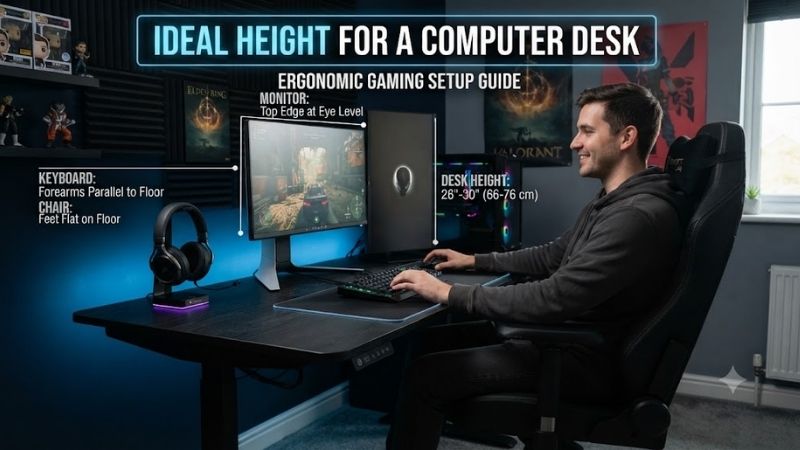
A desk that sits too high can force your shoulders upward and bend your wrists, while a desk that is too low can make you lean forward or angle your hands upward. OSHA recommends keeping the keyboard around elbow height, with the forearms roughly parallel to the floor and the elbows close to the body.
Most fixed computer desks are around 28 to 30 inches high, which works reasonably well for many average-height adults. However, body proportions vary, so total height alone cannot determine the correct setup. Leg length, torso length, chair adjustment, keyboard thickness, and armrest height all affect the final position.
For seated computer use, OSHA notes that adjustable keyboard height commonly falls within roughly 22 to 30 inches. That range is much wider than a normal fixed desk because shorter and taller users need different working heights. The target is not a specific number but a neutral arm and wrist position.
Ideal Desk Height for Sitting
Start by adjusting your chair before changing the desk. Set the seat so your feet rest flat on the floor and your thighs are roughly parallel to it. Your hips can sit slightly higher than your knees. Once the chair feels stable, check whether your elbows line up naturally with the keyboard and mouse surface.
If the desk is too high after the chair is adjusted, raise the chair until your elbows and keyboard are aligned, then use a footrest if your feet no longer reach the floor comfortably. Mayo Clinic recommends this approach when the desk cannot be lowered, because unsupported feet can create another posture problem.
If the desk is too low, stable risers can raise the work surface, provided they are secure and do not compromise the desk. OSHA also suggests removing center drawers when they reduce thigh clearance. A keyboard tray is another option when the desktop cannot be positioned at the right typing height safely.
The best seated desk height lets your shoulders stay relaxed while your elbows remain close to your sides. Your forearms should be approximately horizontal, and your wrists should stay straight rather than bending upward, downward, or sideways. If you must shrug or reach, the desk or chair height probably needs adjustment.
Ideal Desk Height for Tall People
Tall users often find a standard 29-inch desk too low once the chair is raised enough to support long legs. In that case, a height-adjustable desk is usually easier than adding thick risers. The correct setting should preserve leg clearance while keeping the keyboard close to elbow height and the monitor at a comfortable level.
Ideal Desk Height for Short People
Shorter users often have the opposite problem. A standard desk may sit too high, forcing the chair upward until the feet lose contact with the floor. A footrest can solve that mismatch, but a desk with a lower minimum height or an adjustable keyboard tray usually produces a cleaner and more comfortable long-term setup.
Ideal Standing Desk Height
For standing computer work, OSHA lists an adjustable keyboard-height range of roughly 36 to 46.5 inches. Again, the correct setting depends on the user. Stand upright with relaxed shoulders, then raise or lower the desk until the keyboard and mouse sit near elbow height without forcing your wrists to bend.
A standing desk should not make you reach downward or lift your shoulders. Keep the elbows close to the body and the forearms roughly parallel to the floor. If you alternate between sitting and standing, save both positions on an electric desk when memory presets are available so you can switch without recalibrating each time.
Desk Height and Monitor Position
Desk height also affects monitor placement. Mayo Clinic recommends positioning the monitor directly in front of you, around an arm’s length away, with the top of the screen at or slightly below eye level. If the desk height is correct for typing but the screen sits too low, use a monitor arm or stand instead of raising the entire desk.
Ideal Desk Height for Gaming
Gaming setups follow the same ergonomic principles as office work. A mouse pad, mechanical keyboard, and large desk do not change the basic target: relaxed shoulders, straight wrists, and elbows near the body. Competitive players using low mouse sensitivity also need enough surface depth and width to move freely without reaching.
Ideal Desk Height for Laptop Users
For a laptop, the ideal desk height becomes harder to achieve because the keyboard and screen are attached. Raising the laptop improves screen height but makes typing too high. Mayo Clinic recommends using an external keyboard and mouse with a laptop stand when the laptop is used for extended desk work.
How Deep Should a Computer Desk Be?
Desk depth matters almost as much as height. OSHA recommends enough space to place the monitor at least 20 inches from the eyes and enough room for the keyboard and mouse directly in front of the user. A desk that is technically the right height can still cause poor posture if the screen or mouse is pushed too far away.
Under-Desk Leg Clearance
Under-desk clearance is another important measurement. OSHA recommends enough space for the legs and feet so you can sit in more than one comfortable posture. Avoid storing a computer tower, drawers, boxes, or other equipment where they force your knees sideways or prevent you from moving the chair close enough to the desk.
Fixed vs Adjustable Desk Height
If you are buying a new desk, height adjustability is usually more useful than choosing a single fixed number. An adjustable desk can fit different users, chair heights, and sitting or standing positions. It also makes future changes easier if you replace your chair, add a thicker keyboard, or change how you position your monitor.
How to Measure Your Ideal Desk Height
To measure your personal ideal desk height, sit or stand in your normal working posture and bend your elbows to a comfortable angle near 90 degrees. Measure from the floor to the underside of your forearms or keyboard position. That measurement gives a better starting point than choosing a desk based only on your overall height.
FAQ
Is 30 Inches Too High for a Computer Desk?
Thirty inches is usable for many adults, but it can be too high for shorter users or anyone whose chair cannot rise enough to align the elbows with the keyboard. If raising the chair leaves your feet unsupported, use a footrest or consider a lower desk instead of accepting raised shoulders or bent wrists.
Is 28 Inches a Good Desk Height?
A 28-inch desk can work well for many users, particularly when combined with an adjustable chair. However, the correct height depends on elbow position rather than the desk number alone. Your shoulders should stay relaxed, your forearms should remain near horizontal, and your wrists should stay straight while typing.
What Height Should a Gaming Desk Be?
A gaming desk should place the keyboard and mouse near elbow height just like an office desk. For many users, this falls somewhere around the common 28–30-inch desktop range, but chair height and body proportions determine the real target. Large mouse movements should also be possible without reaching forward.
Should My Desk Be Level With My Elbows?
The keyboard and mouse surface should generally sit around elbow height or slightly lower when you are in a neutral posture. OSHA recommends elbows close to the body, relaxed shoulders, and straight wrists. A desk significantly above the elbows often causes shoulder elevation, while one far below can encourage leaning.
Is a Height-Adjustable Desk Better?
A height-adjustable desk is usually easier to fit accurately because it can adapt to your chair, body proportions, keyboard, and standing position. It is especially useful for shared desks or users who alternate between sitting and standing. A fixed desk can still work well when its height already matches your posture.
Conclusion
The ideal height for a computer desk is the height that keeps your keyboard and mouse near elbow level while your shoulders stay relaxed, wrists remain straight, and feet are fully supported. For many people that is around 28–30 inches seated, but an adjustable desk or keyboard tray provides a much more precise ergonomic fit.