🛒 Best Price Today on Amazon
Prime members get fast, free shipping on everything above, plus member-only deals. New members get a 30-day free trial — cancel anytime.
- Best Keyboards With Knobs Compared
- Keychron Q1 Max — Best Premium Keyboard With Knob
- Keychron V1 Max — Best Balanced Keyboard With Knob
- EPOMAKER TH80 V2 Pro — Best Keyboard With Knob and Screen
- Akko 5075B Plus — Best Compact Wireless Knob Keyboard
- How to Choose the Best Keyboard With Knob
- Which Keyboard With Knob Fits Your Setup?
- FAQ
- Conclusion
The best keyboard with knob should make volume, lighting, or media adjustments faster without pulling you out of a game or workflow. The strongest options pair a useful rotary control with responsive switches, practical layouts, stable software, and connectivity that matches either a fixed gaming desk or a multi-device setup.
Quick answer: For most people in 2026, the best keyboard with knob is the Keyboard — our #1 rated choice. See the full ranked comparison, alternatives and buying advice below.
Best Keyboards With Knobs Compared
| Keyboard | Best For | Layout | Connectivity | Hot-Swap | Knob Focus |
|---|---|---|---|---|---|
| Keychron Q1 Max | Premium build and customization | 75% | 2.4 GHz, Bluetooth, USB-C | Yes | Quick media control |
| Keychron V1 Max | Balanced features in a lighter chassis | 75% | 2.4 GHz, Bluetooth, USB-C | Yes | Convenient desktop control |
| EPOMAKER TH80 V2 Pro | Knob plus integrated display | 75% | 2.4 GHz, Bluetooth, USB-C | Yes | Volume, RGB, display control |
| Akko 5075B Plus | Compact wireless customization | 75% | 2.4 GHz, Bluetooth, USB-C | Yes | Volume and lighting control |
Keychron Q1 Max — Best Premium Keyboard With Knob
Keychron Q1 Max targets users who want a premium 75% mechanical keyboard with a dedicated knob and extensive customization. Its aluminum case, gasket mount, hot-swappable PCB, screw-in stabilizers, and south-facing RGB make it better suited to a permanent desk where build quality and switch tuning matter as much as gaming response.
The knob adds quick volume control, while QMK and VIA support let you remap keys and layers for games, productivity, or creative work. The board also supports 2.4 GHz wireless, Bluetooth 5.1, and USB-C wired operation. Its main drawback is weight, because the aluminum chassis is designed more for stability than portability.
Best For: Premium desktop setups, enthusiasts, gamers, programmers, and users who want deep key customization.
Key Features:
- 75% mechanical layout
- Aluminum body
- Rotary knob
- Gasket mount
- Hot-swappable PCB
- Gateron Jupiter switches on assembled versions
- 2.4 GHz wireless
- Bluetooth 5.1
- USB-C wired connectivity
- 1000 Hz polling in wired and 2.4 GHz modes
- QMK and VIA support
- South-facing RGB
- Double-shot PBT keycaps
What Makes It Different: The Q1 Max combines an aluminum custom-keyboard-style chassis with wireless gaming connectivity, hot-swap support, programmable firmware, and an easily accessible rotary knob.
Pros:
- Solid aluminum construction
- Flexible tri-mode connectivity
- Hot-swappable switches
- QMK and VIA customization
- Useful compact layout
- 1000 Hz 2.4 GHz polling
- Dedicated knob
Cons:
- Heavy for frequent travel
- Takes more setup to exploit advanced customization
- Bluetooth polling is lower than wired or 2.4 GHz
Use Case: Keep it connected to a gaming desktop through 2.4 GHz or USB-C, then use Bluetooth when switching to another computer or tablet.
Who It’s For: Buyers who want their keyboard with knob to feel closer to a customizable enthusiast board than a conventional mass-market gaming keyboard.
Keychron V1 Max — Best Balanced Keyboard With Knob
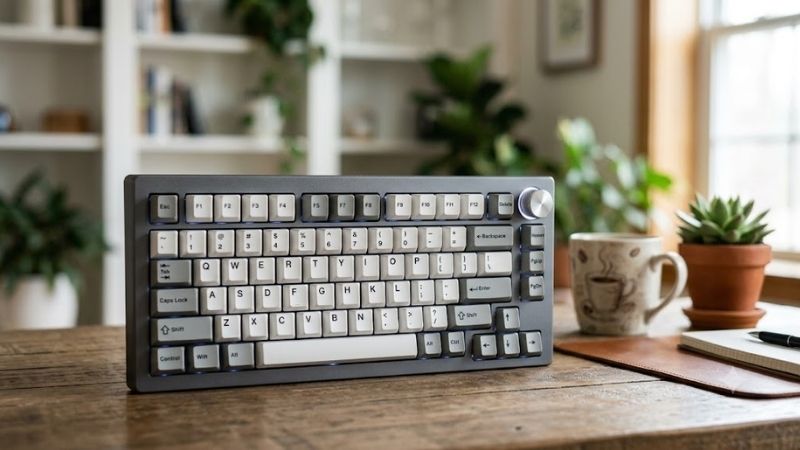
Keychron V1 Max keeps many of the Q1 Max features but uses an ABS plastic case, making it a more approachable option for buyers who want a 75% keyboard with knob control and modern wireless modes. It combines a gasket mount, hot-swappable switches, double-shot PBT keycaps, and south-facing RGB in a lighter chassis.
Its 2.4 GHz and wired modes support a 1000 Hz polling rate, while Bluetooth 5.1 can connect to multiple devices. QMK and VIA customization are useful for remapping shortcuts, macros, and layers. Compared with the Q1 Max, the V1 Max gives up the heavier aluminum construction, but it is easier to move between desks.
Best For: Buyers who want strong customization and wireless flexibility without prioritizing an aluminum chassis.
Key Features:
- 75% layout
- ABS plastic housing
- Rotary knob
- Gasket mount
- Hot-swappable switches
- Gateron Jupiter switches on assembled versions
- 2.4 GHz wireless
- Bluetooth 5.1
- USB-C wired mode
- 1000 Hz polling through 2.4 GHz and wired modes
- QMK and VIA support
- Double-shot PBT keycaps
- South-facing RGB
What Makes It Different: The V1 Max delivers many features associated with premium customizable keyboards while using a lighter plastic enclosure instead of the Q1 Max aluminum construction.
Pros:
- Practical 75% layout
- Dedicated knob
- Tri-mode connectivity
- Hot-swappable PCB
- QMK and VIA support
- Lighter than the Q1 Max
- 1000 Hz gaming-oriented wireless mode
Cons:
- Plastic construction feels different from aluminum boards
- Bluetooth is not the preferred gaming mode
- Advanced firmware features may be unnecessary for basic users
Use Case: Use 2.4 GHz for gaming, Bluetooth for a secondary work device, and QMK or VIA layers for macros, navigation commands, and application shortcuts.
Who It’s For: Gamers, programmers, and general desktop users who want a customizable wireless mechanical keyboard with knob controls without moving into a heavier aluminum design.
EPOMAKER TH80 V2 Pro — Best Keyboard With Knob and Screen
EPOMAKER TH80 V2 Pro stands out because its rotary knob is paired with a 1.06-inch glass screen, giving users direct access to volume, RGB, and display controls from the keyboard. The 75% layout keeps the function row and arrow keys, while the gasket-mounted structure and layered dampening target a softer typing feel.
The board supports Bluetooth 5.0, 2.4 GHz wireless, and USB-C, plus hot-swap support for 3-pin and 5-pin switches. Its 10,000mAh battery is unusually large for this category. The extra screen adds visual utility, but buyers who want a simpler keyboard may prefer a conventional knob-only design with fewer display features.
Best For: Users who want both a multifunction rotary knob and an integrated display in a compact mechanical keyboard.
Key Features:
- 75% 78-key layout
- Metal multifunction knob
- 1.06-inch glass screen
- Gasket-mounted structure
- Hot-swappable 3-pin and 5-pin PCB
- Bluetooth 5.0
- 2.4 GHz wireless
- USB-C connectivity
- 10,000mAh battery
- Multiple internal dampening layers
- RGB lighting
What Makes It Different: The TH80 V2 Pro combines its rotary encoder with a small configurable screen, giving the top-right control area more functionality than a standalone volume knob.
Pros:
- Multifunction metal knob
- Integrated display
- Large battery capacity
- Tri-mode connectivity
- Hot-swappable switches
- Compact 75% layout
- Gasket-mounted design
Cons:
- Screen is unnecessary for buyers who want minimal controls
- More features mean more settings to configure
- Compact layout omits a dedicated numpad
Use Case: Control volume with the knob during gaming, use the screen for available display functions, and switch between wired, 2.4 GHz, and Bluetooth depending on the device.
Who It’s For: Gamers and desktop enthusiasts who want their keyboard knob to do more than basic volume adjustment and appreciate an integrated visual display.
Akko 5075B Plus — Best Compact Wireless Knob Keyboard
Akko 5075B Plus is a compact wireless mechanical keyboard with a custom knob that can toggle between volume and lighting control. It uses a gasket mount, 5-pin hot-swappable sockets, PBT keycaps on several versions, RGB lighting, and tri-mode connectivity. The layout keeps key functions accessible without taking full-size desk space.
Akko Cloud Driver allows key remapping and lighting customization, while Bluetooth, 2.4 GHz, and USB-C give the board flexibility across gaming PCs, laptops, and mobile devices. The 3000mAh battery is smaller than some newer competitors, but the combination of knob control, hot-swap support, and compact packaging remains practical.
Best For: Compact wireless setups where switch customization, RGB control, and an accessible rotary knob matter.
Key Features:
- 75% layout
- Custom rotary knob
- Gasket mount
- 5-pin hot-swappable sockets
- 2.4 GHz wireless
- Bluetooth
- USB-C wired connectivity
- 3000mAh battery
- RGB lighting
- Akko Cloud Driver support
- PBT keycaps on multiple versions
What Makes It Different: The custom knob can switch between volume and lighting functions, making it useful for users who frequently adjust both audio and RGB without opening software.
Pros:
- Compact 75% footprint
- Tri-mode connectivity
- Hot-swappable sockets
- Gasket-mounted construction
- Multifunction knob
- Software remapping
- Wireless device flexibility
Cons:
- Smaller battery than the TH80 V2 Pro
- Proprietary software rather than QMK and VIA
- No dedicated numpad
Use Case: Connect the receiver to a gaming PC, keep Bluetooth available for another device, and use the knob for quick volume or lighting changes throughout the day.
Who It’s For: Users looking for a compact mechanical keyboard with knob controls, wireless connectivity, and switch customization without needing an integrated display.
How to Choose the Best Keyboard With Knob
Check What the Knob Actually Controls
A keyboard knob is useful when it controls something you adjust often, usually system volume, media playback, RGB brightness, or a software-defined function. Gamers benefit from fast sound changes between matches, while creators may prefer timeline controls. A clickable knob can add another command without using extra key space.
Choose the Right Keyboard Layout
Layout affects whether the knob feels like a bonus or a compromise. A 75% board keeps arrow keys and the function row while leaving more mouse space than a full-size keyboard, which suits gaming and daily work. If you rely heavily on a numpad, a compact knob keyboard may save desk space but force you to add a separate numeric pad.
Consider Hot-Swappable Switch Support
Hot-swappable sockets matter if you expect to change switch feel later. They let you replace compatible mechanical switches without soldering, which helps when testing lighter linear switches for gaming or tactile switches for typing. The trade-off is that hot-swap support does not guarantee every switch will fit, so compatibility still matters.
Compare Wired, Bluetooth, and 2.4 GHz Modes
For wireless use, 2.4 GHz is generally the gaming-focused mode because supported keyboards can deliver higher polling than Bluetooth, while Bluetooth is convenient for tablets and secondary computers. Wired USB-C removes battery concerns entirely. Tri-mode boards are especially useful when one keyboard must move between gaming and work devices.
Look at Software and Key Remapping
Software and firmware determine how much control you have beyond the physical knob. QMK and VIA are valuable for advanced remapping, layers, and macros, while proprietary apps may offer easier RGB and media settings. The best choice depends on whether you prioritize deep customization or a simpler interface that requires less setup.
Which Keyboard With Knob Fits Your Setup?
| Priority | Keyboard to Consider |
|---|---|
| Premium aluminum construction | Keychron Q1 Max |
| Lighter customizable design | Keychron V1 Max |
| Knob plus integrated screen | EPOMAKER TH80 V2 Pro |
| Compact wireless versatility | Akko 5075B Plus |
| QMK/VIA customization | Keychron Q1 Max or V1 Max |
| Large battery capacity | EPOMAKER TH80 V2 Pro |
| Volume and RGB knob control | Akko 5075B Plus |
| Hot-swappable mechanical switches | All four models |
FAQ
Is a Keyboard With a Volume Knob Good for Gaming?
A keyboard with a volume knob is useful for gaming because sound levels often need quick adjustment between voice chat, game audio, music, and videos. A rotary control is faster than opening a software mixer or holding a function shortcut. It does not improve gaming performance directly, but it can make routine audio changes less disruptive.
Is a 75% Keyboard With a Knob a Good Size?
A 75% keyboard is often a strong size for users who want a knob without giving up essential navigation keys. It usually preserves arrows and the function row while reducing the width of the board. That gives the mouse more room for low-sensitivity gaming, although users who need a dedicated numpad may still prefer a larger layout.
Is a Knob Better Than Dedicated Media Keys?
A knob is not automatically better than dedicated media keys; it depends on how you work. A rotary encoder gives precise, fast adjustment with one hand and uses little space, while separate buttons can make play, pause, mute, and track changes more obvious. Some keyboards combine both approaches, but that increases the board’s footprint.
Are Wireless Keyboards With Knobs Good for Gaming?
Wireless keyboards with knobs can work well for gaming when they include a dedicated 2.4 GHz connection designed for responsive input. Bluetooth remains useful for general typing and device switching, but it is usually the secondary mode for gaming. Wired operation is still the simplest choice if charging and wireless management are unnecessary.
Do I Need a Hot-Swappable Keyboard With a Knob?
You do not need hot-swappable switches to benefit from a keyboard knob, but hot-swap support makes the board easier to customize. It lets you change compatible switches without soldering if your preferences shift. Buyers who plan to keep the factory switches can instead prioritize layout, connectivity, software, or build quality.
Conclusion
The best keyboard with knob depends on what you want the rotary control to complement. Keychron Q1 Max emphasizes premium construction, V1 Max balances customization and portability, EPOMAKER TH80 V2 Pro adds a screen and large battery, while Akko 5075B Plus combines compact wireless flexibility with hot-swappable mechanical switches.
Ready to decide? Our #1 pick for 2026 is the Keyboard.
Live price & availability on Amazon.