🛒 Best Price Today on Amazon
Prime members get fast, free shipping on everything above, plus member-only deals. New members get a 30-day free trial — cancel anytime.
- Best Keyboards for Students Compared
- 1. Logitech Pebble Keys 2 K380s — Best Overall
- 2. Keychron B1 Pro — Best for Flexible Connectivity
- 3. Logitech MX Keys Mini — Best Premium Keyboard
- 4. Microsoft Designer Compact Keyboard — Best for Windows
- 5. Apple Magic Keyboard USB-C — Best for Mac and iPad
- How to Choose the Best Keyboard for Students
- FAQ
- Conclusion
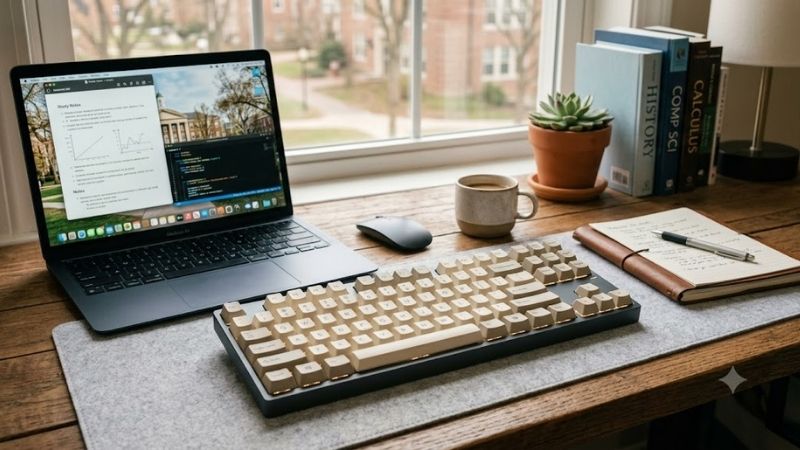
The best keyboard for students should be comfortable for long essays, quiet enough for shared rooms, easy to carry, and simple to pair with a laptop or tablet. This guide compares five practical options for school, college, and university work, from affordable compact boards to premium backlit models. Students usually need a different balance than gamers or office power users. Portability, quiet keys, device switching, battery life, and operating-system support often matter more than RGB lighting or ultra-fast switches. The picks below focus on note-taking, research, assignments, spreadsheets, and everyday campus use.
Quick answer: For most people in 2026, the best keyboard for students is the Keyboard — our #1 rated choice. See the full ranked comparison, alternatives and buying advice below.
Best Keyboards for Students Compared
| Keyboard | Best For | Connectivity | Multi-Device | Backlight | Main Advantage |
|---|---|---|---|---|---|
| Logitech Pebble Keys 2 K380s | Best overall | Bluetooth | Up to 3 devices | No | Portable, quiet typing |
| Keychron B1 Pro | Flexible connectivity | Bluetooth, 2.4 GHz, USB-C | Multiple devices | No | Wired and wireless modes |
| Logitech MX Keys Mini | Premium study setup | Bluetooth, Logi Bolt | Up to 3 devices | Yes | Backlighting and refined keys |
| Microsoft Designer Compact Keyboard | Windows students | Bluetooth | Up to 3 devices | No | Simple Windows integration |
| Apple Magic Keyboard USB-C | Mac and iPad students | Bluetooth, USB-C charging | Apple ecosystem | No | Slim Apple-focused layout |
1. Logitech Pebble Keys 2 K380s — Best Overall
Logitech Pebble Keys 2 K380s is the strongest all-round choice for most students because it combines a compact layout, quiet low-profile keys, and fast switching between three devices. That makes it useful for moving between a laptop, tablet, and phone without carrying a second keyboard or changing cables.
Its rounded keys have a familiar laptop-style feel, so students who already type on notebooks should face little adjustment. The board is also small enough for crowded desks and shared study spaces. The main trade-off is the lack of a number pad and backlighting, which may matter for accounting work or late-night typing.
Key Features
- Compact Bluetooth keyboard
- Quiet low-profile keys
- Easy-Switch controls for up to three devices
- Windows, macOS, iPadOS, iOS, and Android support
- Customizable function shortcuts
- Portable design for bags and small desks
What Makes It Different
The K380s focuses on portability without forcing students to use a stripped-down mobile keyboard. Device switching is especially useful in modern study setups where notes may be on a tablet, assignments on a laptop, and messages or research references on a phone.
Pros
- Quiet enough for libraries and shared rooms
- Easy to carry between home and campus
- Works across several major operating systems
- Three-device switching is practical for mixed setups
- Laptop-like typing style requires little adaptation
Cons
- No dedicated number pad
- No key backlighting
- Compact layout may not suit heavy numeric work
Use Case
This model fits students who want one keyboard for lectures, dorm rooms, libraries, and travel. It is especially practical for users who alternate between Windows, macOS, iPadOS, iOS, or Android devices. Students who need illuminated keys or a more premium typing surface should consider the MX Keys Mini instead.
Who It’s For
Best for high school, college, and university students who prioritize portability, quiet typing, and compatibility over advanced customization or a full-size layout.
2. Keychron B1 Pro — Best for Flexible Connectivity
Keychron B1 Pro stands out for students who want flexible connectivity without moving to a bulky mechanical keyboard. It supports Bluetooth, 2.4 GHz wireless, and USB-C wired use, while its 75% layout keeps dedicated function and navigation access in a relatively compact footprint for desks, backpacks, and study rooms.
The B1 Pro also supports multiple Bluetooth devices and can be remapped through Keychron Launcher, which is useful for students who want custom shortcuts for writing, coding, or research. Its non-backlit design helps keep the board simple, but anyone who studies in dark rooms may prefer a keyboard with illuminated keys.
Key Features
- 75% layout with 77 keys
- Bluetooth 5.2
- 2.4 GHz wireless connectivity
- USB-C wired mode
- 800 mAh rechargeable battery
- Up to eight months of stated wireless working time
- Keychron Launcher remapping support
- Windows, macOS, iOS, Android, and Linux compatibility
- Non-backlit design
- 425 g weight
What Makes It Different
Few slim student-focused keyboards provide Bluetooth, receiver-based wireless, and wired operation together. That flexibility lets the B1 Pro serve a desktop PC, laptop, tablet, or campus computer without limiting the user to a single connection method.
Pros
- Three different connection methods
- Compact 75% layout
- Programmable shortcuts and remapping
- Broad operating-system support
- Long stated battery endurance
Cons
- No backlighting
- Heavier than some ultra-portable options
- More settings than a basic plug-and-type keyboard
Use Case
Choose the B1 Pro if you switch between computers often, want both wireless and wired modes, or prefer more customization than basic portable keyboards provide. It is a particularly sensible fit for computer science, engineering, and productivity-focused students who value shortcuts but do not need mechanical switches.
Who It’s For
Best for students studying coding, engineering, design, or other subjects where custom shortcuts and flexible connections can improve daily workflow.
3. Logitech MX Keys Mini — Best Premium Keyboard
Logitech MX Keys Mini is the premium choice for students who type for several hours a day and want backlighting, stable scissor keys, and multi-device support. Its compact design saves desk space while retaining useful function keys, making it better suited to serious writing, research, and remote classes than many travel keyboards.
Automatic backlighting and USB-C charging make the MX Keys Mini convenient for evening study, while Easy-Switch lets it move between three paired devices. The trade-off is that it is less budget-focused than simpler student keyboards, and the compact layout omits a dedicated number pad for spreadsheet-heavy coursework.
Key Features
- Compact 79-key layout
- Scissor-style typing mechanism
- Automatic backlighting
- Bluetooth Low Energy connectivity
- Logi Bolt support on compatible versions
- Easy-Switch for up to three devices
- USB-C rechargeable battery
- Up to 10 days with backlighting or up to five months with backlighting off under Logitech’s stated conditions
What Makes It Different
The MX Keys Mini adds features usually missing from lightweight campus keyboards, particularly illuminated keys and more advanced function controls. It favors a permanent study desk that occasionally travels rather than absolute minimum weight or the lowest possible cost.
Pros
- Backlit keys for low-light study
- Refined low-profile typing feel
- Three-device switching
- Rechargeable through USB-C
- Compact footprint for small desks
Cons
- More expensive than basic portable keyboards
- No dedicated numeric keypad
- Backlighting reduces battery endurance
Use Case
This keyboard suits graduate students, writers, researchers, and anyone who regularly works on long papers or projects. It also makes sense for students using both a laptop and tablet at the same desk. If portability and price matter more than backlighting or premium key feel, the Pebble Keys 2 K380s is the leaner option.
Who It’s For
Best for students who spend many hours writing papers, preparing presentations, researching, or studying after dark and are willing to prioritize typing comfort over minimum cost.
4. Microsoft Designer Compact Keyboard — Best for Windows
Microsoft Designer Compact Keyboard is a good Windows-focused option for students who want a low-profile board that can pair with up to three devices. Its streamlined layout works well on small desks, and Windows users benefit from straightforward Bluetooth pairing without needing a receiver or a large full-size keyboard.
The keyboard uses replaceable coin-cell batteries rather than a built-in rechargeable pack, which some students may like because charging cables are unnecessary. The compromise is that its strongest integration is with Windows, and students working across several operating systems may find Logitech or Keychron options more flexible.
Key Features
- Low-profile compact design
- Bluetooth connectivity
- Pairing with up to three devices
- Swift Pair support on compatible Windows PCs
- Windows 10 and Windows 11 support
- Four CR2032 coin-cell batteries
- Dedicated expressive functionality on supported Windows versions
What Makes It Different
Microsoft keeps the experience focused on Windows rather than trying to support every platform equally. Students who already use a Windows notebook for nearly all coursework get a straightforward layout with fewer unnecessary extras competing for desk or backpack space.
Pros
- Compact footprint
- Pairs with three devices
- Straightforward Windows pairing
- No regular charging routine
- Low-profile typing angle
Cons
- Less attractive for mixed operating-system setups
- Replaceable batteries instead of USB-C charging
- No dedicated numeric keypad
Use Case
It is best for students who primarily use Windows laptops and want a clean, portable keyboard for essays, email, research, and online classes. Those who depend on macOS, iPadOS, or Android as much as Windows should prioritize a cross-platform model, while heavy spreadsheet users may still prefer a full-size layout.
Who It’s For
Best for Windows-first students who want simple wireless typing and do not need advanced remapping, gaming features, or extensive cross-platform controls.
5. Apple Magic Keyboard USB-C — Best for Mac and iPad
Apple Magic Keyboard with USB-C is the cleanest fit for students already committed to Mac or iPad. It is slim, light, wireless, rechargeable, and designed around Apple shortcuts, so there is little setup friction for users who want a desktop-style typing experience that matches the rest of their Apple hardware.
Its compact size makes it easy to use beside a MacBook or iPad, and USB-C charging avoids the older Lightning cable requirement. The main limitation is ecosystem focus: students using Windows, Android, or shared campus computers will get more versatile device support from Logitech, Keychron, or Microsoft alternatives.
Key Features
- Bluetooth wireless connection
- USB-C charging
- Built-in rechargeable battery
- Approximately one month or more of stated battery life between charges
- 239 g weight
- 27.89 cm width
- Multimedia keys
- Compatibility with supported Mac, iPad, and iPhone software versions
What Makes It Different
The Magic Keyboard is designed around Apple’s hardware and keyboard conventions instead of universal platform support. That creates a straightforward experience for Mac and iPad users, but it provides less reason to choose it when a student’s devices regularly span several ecosystems.
Pros
- Slim and lightweight
- Familiar Apple key layout
- USB-C charging
- Strong fit with Mac and iPad
- Compact enough for limited desk space
Cons
- Less versatile for mixed-platform users
- No dedicated numeric keypad on this model
- Limited customization compared with Keychron
Use Case
Choose the Magic Keyboard if your daily setup revolves around a Mac, iPad, or both and you value a consistent Apple layout. It is less compelling for students who frequently change platforms or want extensive remapping. For mixed-device study setups, the Pebble Keys 2 K380s or B1 Pro offers broader flexibility.
Who It’s For
Best for students already using Apple hardware for most coursework, especially MacBook or iPad users building a simple desk setup for writing, browsing, research, and online classes.
How to Choose the Best Keyboard for Students
Keyboard Size and Layout
For most students, layout size should be the first buying decision. Compact keyboards save backpack space and leave more room beside notebooks or tablets, but they usually remove the number pad. Students in finance, accounting, statistics, or data-heavy courses may work faster with a full-size model despite the added bulk.
Quiet Typing
Quiet typing matters more than it seems in libraries, dorm rooms, classrooms, and shared apartments. Low-profile scissor-style boards generally produce less disruptive noise than many mechanical keyboards. Students who write late at night or attend live online classes should prioritize restrained acoustics over switch novelty.
Bluetooth, 2.4 GHz, or Wired
Connectivity determines how easily one keyboard fits into a student workflow. Bluetooth is convenient for tablets and laptops, while 2.4 GHz wireless can offer a simple receiver-based connection. A wired USB mode is useful when batteries are low or wireless access is restricted, so mixed connectivity adds practical resilience.
Backlighting
Backlighting is worth paying for only if you often work in dim rooms, overnight libraries, or dark lecture halls. It improves key visibility but can reduce battery life and increase cost. Students who usually work in bright classrooms or daytime study spaces can often save money with a non-backlit keyboard and lose little usability.
Operating-System Compatibility
Compatibility should be checked before features such as color or styling. Confirm the keyboard supports the operating systems you actually use, especially if your workflow mixes Windows, macOS, iPadOS, Android, or Linux. Multi-device switching is most valuable when the keyboard can map keys correctly across those platforms.
FAQ
Are Compact Keyboards Better for Students?
Yes. A compact keyboard can be better for students because it is easier to carry, fits smaller desks, and leaves more room for notebooks or a mouse. The main downside is losing a dedicated number pad and sometimes extra navigation keys, so students doing frequent numeric entry should consider a larger layout.
Is Bluetooth Good Enough for a Student Keyboard?
Bluetooth is usually enough for essays, browsing, research, coding, and general coursework. A 2.4 GHz connection can be useful when you want a dedicated wireless receiver, while wired USB provides a reliable fallback. Students using tablets should prioritize Bluetooth because many tablets do not support standard USB receivers directly.
Should Students Buy a Mechanical Keyboard?
Mechanical keyboards are not automatically better for studying. They can offer distinctive key feel and customization, but they are often heavier, louder, and less portable than low-profile models. Students who share rooms or carry a keyboard daily may benefit more from quiet scissor keys than from mechanical switches.
Do Students Need a Number Pad?
A number pad is useful for accounting, finance, statistics, engineering calculations, and large spreadsheets, but it is unnecessary for many writing-heavy courses. If you only enter numbers occasionally, a compact keyboard is easier to transport. Frequent numeric work is where a full-size or separate numpad becomes worthwhile.
Is Keyboard Backlighting Worth It for Students?
Backlighting helps students who type in dim rooms or late at night because the legends remain visible without extra room lighting. It is not essential for touch typists or bright study areas, and it can shorten battery life. Choose it for genuine low-light study sessions rather than as a cosmetic feature.
Conclusion
The best keyboard for students depends on how and where you study. Logitech Pebble Keys 2 K380s is the most balanced portable pick, Keychron B1 Pro adds flexible connectivity, and MX Keys Mini suits heavy typists who want backlighting. Match layout, platform support, noise, and portability to your coursework.
Ready to decide? Our #1 pick for 2026 is the Keyboard.
Live price & availability on Amazon.