Best gaming desk buyers frequently struggle with wobbly frames, messy cable clutter, and cramped surfaces when arranging monitors. This buying guide eliminates those frustrating headaches by comparing top ergonomic battle stations on Amazon so you can choose an exceptional, reliable gaming workstation with complete confidence.
How to Choose the Right Battle Station
Selecting an optimal gaming desk demands careful analysis of your room dimensions, gear weight, and daily ergonomic requirements. Understanding these crucial factors prevents buyer remorse and ensures your expensive electronics stay stable during high-intensity competitive gaming sessions. Here are key criteria to assess.
Surface Area and Desktop Dimensions
Desktop surface area dictates how efficiently you can arrange peripheral equipment without feeling constrained during gameplay. A standard surface depth of thirty inches provides sufficient clearance between your eyes and ultra-wide displays while offering ample room for oversized mouse pads and mechanical keyboards.
Always measure your dedicated room dimensions prior to selecting the best gaming desk for your available room. Compact rooms benefit significantly from corner designs, whereas spacious bedrooms accommodate expansive rectangular tops that host multiple peripheral audio accessories and streaming gear cleanly.
Weight Capacity and Frame Stability
Frame construction directly impacts workstation durability and prevents monitor shaking during aggressive mouse flicks. Steel legs engineered with reinforced crossbars deliver the structural integrity needed to support massive desktop computer towers, articulated monitor arms, and heavy studio speaker enclosures.
Check the certified weight limit specifications before committing your hard-earned dollars to a purchase. Quality models provide stable lifting or load ratings exceeding two hundred pounds, ensuring your valuable electronic hardware remains completely safe and level through years of constant daily operation.
Cable Management and Power Integration
Concealed power pathways eliminate unsightly cord tangles that ruin the clean visual presentation of modern battlestations. Integrated metal under-desk trays, rear grommet drop holes, and magnetic raceways guide bulky power supplies and connection cables away from your legs and moving chair casters.
Desks featuring embedded power strips or high-speed USB hubs streamline device recharging throughout long marathon campaigns. Keeping desktop wiring organized also prevents accidental connection disconnects, minimizes dust accumulation behind components, and drastically accelerates regular hardware maintenance routines.
Height Adjustability and Ergonomics
Ergonomic adaptability protects your spinal health by encouraging dynamic posture transitions between seated and standing positions. Advanced dual-motor frames smoothly raise heavy hardware configurations to appropriate eye levels without generating annoying motor whine or disturbing housemates during late-night gaming sessions.
Before investing in the best gaming desk with electric motors, confirm the programmable keypad includes multiple memory presets. Digital presets enable instant transitions between customized seated heights and standing heights, ensuring your wrists, neck, and shoulders maintain natural alignment during competitive play.
Top Picks for Modern Battle Stations
Comparing verified features across the best gaming desk market allows competitive players to pinpoint the right balance of price, surface resilience, and accessories. The following curated models deliver outstanding real-world performance, dependable build quality, and positive owner satisfaction ratings on Amazon.
| Model | Dimensions | Mechanism | Weight Capacity | Target Gamer |
|---|---|---|---|---|
| Secretlab Magnus Pro | 59 x 27.5 in | Dual Motor Electric | 265 lbs | Enthusiast Streamers |
| Eureka Captain GIP-P47 | 47 x 23.6 in | Fixed Steel Legs | 150 lbs | Budget Small Spaces |
| FEZIBO Triple Motor L | 63 x 48.0 in | Triple Motor Electric | 330 lbs | Multi-Screen Power Users |
Secretlab Magnus Pro
The Secretlab Magnus Pro is purpose-built for hardcore enthusiasts and professional streamers who demand museum-grade cable concealment and unyielding structural steel rigidity. Its full-metal chassis and integrated magnetic ecosystem create a pristine, modern aesthetic that effortlessly anchors any high-end streaming space.
This desk delivers whisper-quiet motorized lifting, integrated electrical pillar routing, and flawless stability under maximum hardware loads. However, the premium pricing and substantial overall shipping weight represent notable trade-offs that might deter casual players who seek a budget-friendly workstation.
Eureka Ergonomic Captain GIP-P47
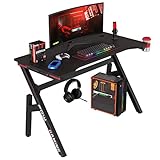
The Eureka Ergonomic Captain GIP-P47 is widely regarded as a best gaming desk contender for compact spaces, making it a fantastic pick for student dorms or cozy bedroom corners. Its carbon-fiber textured surface provides a sporty look while supplying adequate space for a single large monitor setup and basic peripherals.
Budget-conscious buyers will appreciate the included headphone hanger, cup holder, and tailored full-desk mouse pad that enhance value immediately. The primary disadvantage is the fixed frame height, which lacks ergonomic adjustability for taller gamers who need personalized elevation levels for daily comfort.
FEZIBO Triple Motor L-Shaped Desk
The FEZIBO Triple Motor L-Shaped Desk caters directly to dedicated multi-taskers, work-from-home gamers, and flight simulation enthusiasts requiring maximum wraparound tabletop area. Its expansive corner configuration provides distinct zones for dedicated competitive gaming towers alongside productivity laptops.
Equipped with three synchronized lifting motors, this desk adjusts smoothly across varying elevations despite holding multiple heavy monitors securely. Assembly requires patience due to multiple tabletop panels, yet the generous usable space and accessible price point make it an exceptional value investment.
Frequently Asked Questions
Prospective buyers researching the best gaming desk frequently encounter technical queries regarding sizing, weight thresholds, and motorized mechanisms. Addressing these common concerns empowers you to spend your setup budget strategically and pick hardware tailored specifically to your entertainment style and room layout.
What is the ideal surface depth for a gaming desk?
An ideal surface depth ranges between twenty-seven and thirty inches for serious computer gaming configurations. This specific depth range establishes a safe viewing distance from large monitors, which reduces eye strain during prolonged campaigns while leaving sufficient desktop space for comfortable forearm placement.
Shallower surfaces measuring under twenty-four inches force displays dangerously close to your face and restrict keyboard angles. When configuring the best gaming desk to protect your posture, aim for adequate clearance that lets your forearms rest naturally without striking display bases or monitor mounting clamps.
Are L-shaped desks better for multi-monitor setups?
Corner L-shaped desks offer substantial surface advantages for players who run three or more monitors alongside secondary streaming peripherals. The angled layout allows you to swivel between different screens effortlessly without sliding your chair or straining your neck to view supplementary chat feeds and broadcast metrics.
Standard rectangular desks demand excessive horizontal wall space to match the usable footprint of an efficient corner unit. If your gaming space features an unutilized corner, an L-shaped format optimizes floor geometry while keeping critical input controls within comfortable arms reach at all times.
Is a motorized standing desk worth the extra investment?
Motorized standing desks deliver immense long-term wellness benefits by allowing you to change postures throughout extended gameplay periods. Alternating between sitting and standing boosts blood circulation, combats lower back stiffness, and sustains energy levels during grueling ranked matchmaking sessions.
While manual or fixed desks cost substantially less upfront, the physical comfort provided by electric height adjustments proves invaluable over time. If your gaming budget permits the additional financial expense, a reliable motorized desk represents an intelligent investment in your ongoing spinal comfort.
How much weight capacity does a gaming setup need?
A standard single-monitor gaming rig requires approximately seventy to one hundred pounds of secure load capacity. This weight calculation factors in your display screen, heavy articulated mounting arm, desktop audio speakers, external DAC converters, mechanical keyboard, and occasional forearm pressure applied during matches.
If you plan to place your glass-paneled gaming tower directly onto the desk surface, aim for a certified weight limit exceeding two hundred pounds. Generous load headroom protects lifting motors from burnout and prevents structural warping across wooden desktop surfaces over prolonged continuous use.
View more products:
Final Thoughts
Investing in the best gaming desk elevates both your gaming comfort and daily operational productivity by organizing messy wires and providing an unshakeable platform for all your hardware. Measure your floor boundaries, evaluate personal weight demands, and select a desk that complements your battlestation goals today.