🛒 Best Price Today on Amazon
Prime members get fast, free shipping on everything above, plus member-only deals. New members get a 30-day free trial — cancel anytime.
A dell 4k monitor can mean a lot of different things in 2026. On one end you have sub-$300 IPS panels running 120Hz with FreeSync that handle competitive gaming and color-accurate creative work simultaneously. On the other end you have Thunderbolt-equipped UltraSharp panels pushing past $1,000 with HDR certification and connectivity that turns your desk into a docking station. The gap between those two extremes is where most buyers get stuck, because the differences that actually matter — response time consistency at native resolution, panel type trade-offs, refresh rate scaling at 4K — do not always appear on the spec sheet in ways that predict real-world experience.
We compared every model on this list using published specifications, verified retail pricing, and aggregated owner feedback across multiple community sources. What separates a worthwhile dell 4k monitor from a regrettable purchase usually comes down to three things: whether the panel’s native refresh rate is sustained at 4K without resolution scaling tricks, whether input lag stays imperceptible during fast motion, and whether the stand or connectivity situation matches your desk reality. The products below vary wildly on all three dimensions.
As an Amazon Associate we earn from qualifying purchases at no extra cost to you.



Quick Picks
| Product | Best for | Price |
|---|---|---|
| Dell S2725QS | Best value 4K gaming | Check on Amazon |
| Dell S2725QC | Color-accurate 4K gaming | Check on Amazon |
| Dell S3225QS | Large-screen 4K comfort | Check on Amazon |
| Dell S3425DW | Ultrawide productivity | Check on Amazon |
| Dell U3225QE | HDR media and pro work | Check on Amazon |
| Dell S2725DSM | High-refresh budget gaming | Check on Amazon |
| Dell U3226QER | Thunderbolt docking setup | Check on Amazon |
| Alienware AW3425DWM | Immersive ultrawide racing | Check on Amazon |
How We Compared
Resolution and panel technology form the first filter: a dell 4k monitor that uses VA instead of IPS brings deeper blacks but risks color-shift at off-center angles. Sustained refresh rate at native resolution matters more than peak marketing numbers, and response-time claims (4ms vs. 5ms vs. 1ms) need context about gray-to-gray versus MPRT measurement methods. Ergonomic flexibility and connectivity round out the criteria — a monitor that lacks Thunderbolt or has a tilt-only stand may force a VESA arm purchase that erases its price advantage.
The 8 Best Dell 4K Monitor in 2026
1. Dell S2725QS
For anyone wanting a dell 4k monitor at the lowest sane price with 120Hz gaming support, the S2725QS is the entry point. The 27-inch IPS panel renders text crisply at 4K and handles mixed creative-work-then-gaming sessions without complaint. Owner reports consistently praise the value proposition at this price bracket, calling it one of the few options where you get both resolution and high refresh without premium-panel surcharges. The 5ms response time is adequate but not exceptional for competitive play. Skip it if you need color-critical accuracy above standard sRGB or want a larger screen.
- 4K UHD at 120Hz under $250 is rare
- IPS panel keeps colors consistent across viewing angles
- 5ms response lags behind sub-5ms rivals in fast motion
2. Dell S2725QC
The S2725QC earns its place as the best balanced dell 4k monitor on this list. Ninety-nine percent sRGB coverage means creative work — photo editing, UI design, color-coded spreadsheets — lands within acceptable tolerances without calibration. The 4ms response time is one full millisecond faster than the S2725QS, a difference some owners note in fast-paced shooters, though the practical impact at 120Hz remains modest. At around $300 it undercuts most IPS-based 4K alternatives. Skip it if you need Adobe RGB or DCI-P3 wider gamut for professional print or cinema work.
- 99% sRGB covers most creative workflows out of the box
- 4ms response is competitive for a 120Hz 4K IPS panel
- No HDR certification for media-heavy users
3. Dell S3225QS
Thirty-two inches of 4K UHD on a VA panel gives the S3225QS the deepest contrast ratio of any gaming-oriented dell 4k monitor here. Dark scenes in games hold more visible detail, and Eye Comfort filtering reduces flicker during long sessions. Owner feedback highlights the immersive feel of the larger canvas at a price still under $335. The VA trade-off is color accuracy at sharp angles — those sitting off-center or sharing the screen will notice slight hue shifts. Skip it if you do side-by-side collaborative work or need a color-critical IPS panel.
- VA contrast depth benefits dark-ambient gaming rooms
- 32 inches at 4K provides generous real estate for games and apps
- Color-shift at extreme angles is a known VA characteristic
4. Dell S3425DW
This is not a 4K product — at 34 inches it runs WQHD, which means roughly 3.4 megapixels instead of 8.3. It earns inclusion because many shoppers comparing a dell 4k monitor are actually solving a multitasking problem that ultrawide handles better than higher pixel density. The 120Hz refresh, Eye Comfort suite, and VA contrast make it a strong productivity and light-gaming option. Owner feedback praises the aspect ratio for spreadsheet and timeline work. Skip it if raw 4K resolution for sharp text or native 4K gaming is a firm requirement.
- 34-inch ultrawide replaces dual-monitor setups cleanly
- Eye Comfort certification for extended work sessions
- WQHD falls short of 4K density at this size
5. Dell U3225QE
The U3225QE targets users who want a dell 4k monitor with genuine HDR performance and UltraSharp build quality. The 31.5-inch 16:9 panel in black LED backlighting delivers HDR content with contrast that gaming-oriented S-series panels cannot match at half the price. Owner reports from creative professionals emphasize consistent factory calibration. The around $820 tag positions it above the gaming segment. Skip it if you primarily game at 120Hz-plus and do not touch HDR content or color-managed workflows — you are overpaying for features you will not use.
- HDR performance exceeds anything else on this list
- UltraSharp line consistency for professional reliability
- Premium price without gaming-focused refresh advantages
6. Dell S2725DSM
At around $190 the S2725DSM is the fastest-refresh option here at 144Hz with a 1ms panel, but it runs QHD (2560×1440), not 4K. For buyers whose actual bottleneck is frame-rate responsiveness rather than pixel density — competitive multiplayer, motion-sensitive users — this may serve better than pricier 4K alternatives. The included 3W speakers and full ergonomic adjustment (height, tilt, pivot, swivel) add utility that many 4K gaming monitors lack. Skip it if your GPU already pushes 144fps at 4K or you need maximum text sharpness.
- 144Hz and 1ms response at a very accessible price
- Built-in speakers and full stand adjustability included
- QHD resolution is not 4K — text and detail are softer
7. Dell U3226QER
The U3226QER represents the upper tier of what a dell 4k monitor can be: Thunderbolt hub connectivity, 120Hz at 4K UHD, and UltraSharp reliability in a single 32-inch package. For laptop users who want one cable handling video, data, and power delivery while maintaining a high-refresh display, nothing else on this list matches. Owner feedback from mobile-workforce users highlights the desk-cable reduction as transformative. The around $1,050 price reflects that specialization. Skip it if you have a desktop tower with dedicated GPU outputs and do not benefit from Thunderbolt daisy-chaining.
- Thunderbolt hub simplifies laptop-centric desk setups
- 4K at 120Hz maintains gaming capability alongside productivity
- Highest price point — value drops without Thunderbolt need
8. Alienware AW3425DWM
The AW3425DWM is a curved WQHD ultrawide, not a 4K panel, but it is included because Alienware ownership sits under Dell’s umbrella and this monitor solves an immersion problem that flat 4K panels cannot address. The 1500R curve combined with 34 inches creates a wraparound effect for racing and flight simulators. At 180Hz with 1ms response and both FreeSync Premium and VESA AdaptiveSync, it is the most gaming-focused option here. Skip it if you need 4K pixel density for text-heavy work or prefer flat-panel geometry.
- 180Hz and 1ms with dual sync support for competitive play
- 1500R curvature enhances immersion in racing and sims
- WQHD at 34 inches means lower pixel density than 4K
Buying Guide
IPS vs. VA at 4K Gaming
A dell 4k monitor with an IPS panel preserves color accuracy across wide angles, which matters for multi-user setups and off-center seating. VA panels deliver higher contrast ratios (often 3000:1 versus 1000:1), making them superior in dark rooms for cinematic games and media. The practical difference at 27 inches is subtle; at 32 inches VA contrast becomes noticeably beneficial. If you sit centered and game in dim lighting, VA is a legitimate advantage rather than a compromise.
Refresh Rate at Native Resolution
Marketing “120Hz” on a 4K panel means the monitor supports that refresh rate only when your GPU outputs 3840×2160 at 120 frames per second. Many mid-range GPUs sustain 120fps at 4K only in less demanding titles. A dell 4k monitor’s value proposition depends on whether your hardware can actually feed it at native resolution and target framerate. If not, the higher refresh claim is theoretical. Check GPU benchmarks for your specific games before assuming the monitor is the bottleneck.
Connectivity and Ergonomics Beyond the Panel
Thunderbolt or USB-C hub functionality on premium models like the U3226QER adds genuine value for laptop users but means little for desktop setups with dedicated GPU outputs. Stand adjustability (height, tilt, pivot, swivel) varies significantly across price tiers. A fixed-stand monitor at $250 plus a $60 VESA arm may cost the same as an $310 monitor with full ergonomic movement. Factor the total desk solution into comparisons, not just the monitor price alone.
Our Verdict
The Dell S2725QC is the top pick for most buyers seeking a dell 4k monitor: it balances 4K UHD resolution, 120Hz refresh, 4ms response, and 99% sRGB coverage at around $300 with no meaningful spec gaps. For pure value with no color-accuracy requirement, the S2725QS at around $250 delivers the same core experience for fifty dollars less. If you work primarily from a laptop and want to eliminate cable clutter, the U3226QER’s Thunderbolt hub justifies its premium over any other option here.
FAQ
Is 4K overkill for gaming monitors?
Not for most 2026 GPUs. Modern mid-range cards handle 4K at 60-120fps in demanding titles, and less demanding games scale easily. If your GPU cannot sustain acceptable framerates at 3840×2160, a QHD panel with higher refresh (like the S2725DSM) provides a better balance of sharpness and fluidity.
Do I need FreeSync if I have an NVIDIA GPU?
NVIDIA’s G-Sync Compatible mode works with FreeSync Premium monitors in most cases, though not every pairing is officially validated. The dell 4k monitor options listed here use AMD FreeSync Premium, which provides variable refresh rate support without a proprietary hardware module, making them broadly compatible with both AMD and NVIDIA cards.
Is VA or IPS better for a 4K gaming monitor?
VA wins on contrast, which improves perceived image quality in dark games and HDR-like content. IPS wins on color accuracy and viewing-angle consistency. At 27 inches the difference is minor for most users; at 32 inches VA’s contrast advantage becomes more visible in typical room lighting conditions.
Can I use a 34-inch ultrawide for 4K content?
A 34-inch ultrawide at WQHD (3440×1440) does not reach 4K vertical resolution. You can view 4K content on it, but the panel will downscale. True 4K requires 3840×2160. If native 4K playback or editing is your goal, choose a dell 4k monitor with 3840×2160 rather than an ultrawide alternative.
Top picks from this guide
 DellDell 27 Monitor S2725QC, 4K UHD IPS, 120Hz, 99% sRGB,…$330 \xc2\xb7 99/100
 DellDell 27 Monitor S2725QS, 4K UHD IPS, 120Hz, 5ms, FreeSync…$280 \xc2\xb7 98/100
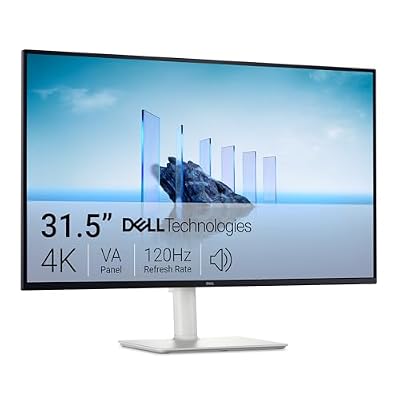 DellDell 32 Monitor S3225QS, 4K UHD VA, 120Hz, FreeSync Premium,…$329 \xc2\xb7 97/100
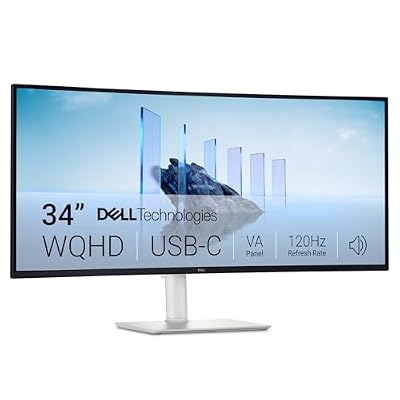 DellDell 34 Monitor S3425DW, WQHD VA, 120Hz, FreeSync Premium, Eye…$400 \xc2\xb7 96/100