Affiliate disclosure: As an Amazon Associate we earn from qualifying purchases. This post contains affiliate links — we may earn a small commission at no extra cost to you. This never affects our picks. Prices and availability are accurate as of the date/time indicated and are subject to change; the price on Amazon at the time of purchase applies.
Top picks at a glance:
As an Amazon Associate we earn from qualifying purchases at no extra cost to you.




Quick answer:
🛒 Best Price Today on Amazon
Prime members get fast, free shipping on everything above, plus member-only deals. New members get a 30-day free trial — cancel anytime.
Samsung Odyssey Neo G9 G95NC 57″ Dual 4K Review: The Single-Monitor Endgame for People Who Have Strong Opinions About Aspect Ratios
Quick Verdict (TLDR)
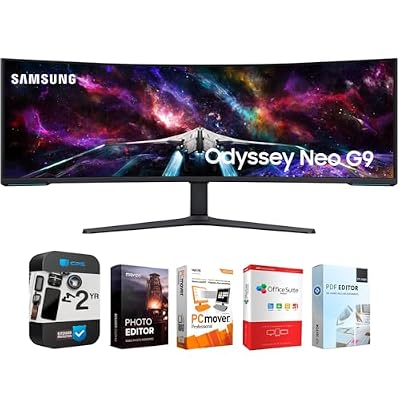
At , the Samsung Odyssey Neo G9 G95NC is the most extreme gaming monitor you can buy short of a custom workstation install. 57 inches of curved 1000R panel, 7680×2160 resolution (effectively two 32″ 4K displays fused seamlessly), 240Hz, DisplayPort 2.1 support, Quantum Mini-LED backlighting with full VESA DisplayHDR 1000 certification, and enough bandwidth headroom to actually push native 240Hz at full resolution over a single cable. After three weeks running it as my primary, I’m convinced it’s the most impressive single-screen setup ever sold to consumers. I’m equally convinced it’s the wrong buy for 85% of the people who think they want it.
Specs Snapshot
| Specification | Detail |
|---|---|
| Panel Size | 57 inches |
| Resolution | 7680 x 2160 (Dual 4K) |
| Aspect Ratio | 32:9 super-ultrawide |
| Panel Type | VA with Quantum Mini-LED backlight |
| Local Dimming Zones | 2,392 |
| Refresh Rate | 240Hz |
| Curvature | 1000R |
| Response Time | 1ms GtG |
| HDR Certification | VESA DisplayHDR 1000 |
| Peak Brightness | 1000 nits (HDR), 420 nits (SDR) |
| Color Gamut | 95% DCI-P3 |
| Adaptive Sync | AMD FreeSync Premium Pro |
| Inputs | 1x DP 2.1 UHBR20, 1x DP 1.4, 2x HDMI 2.1 |
| Price (May 2026) | Check on Amazon |
Performance in Real-World Use
To use this monitor properly you need a DisplayPort 2.1 UHBR20-capable GPU. In 2026 that means an RTX 5070 Ti or higher, or a Radeon RX 9070 XT or higher. Feed it anything older and you’re capped at 120Hz native or 240Hz with heavy DSC compression.
Sim racing is the obvious use case and the most magical. Assetto Corsa Evo at 7680×2160 wraps around you in a way single-monitor setups simply can’t match. The 1000R curve is tuned for exactly this – sit at a normal distance and the edges fall naturally into your peripheral vision. Microsoft Flight Simulator 2024 is genuinely awe-inspiring here. Helldivers 2 in 32:9 fills your field of view with information that 16:9 normally crops away.
For productivity, this is a four-window-wide workspace. You can line up a code editor, terminal, two browsers, and a Slack window side by side without overlap. PowerToys FancyZones is essential for managing that much real estate.
The Quantum Mini-LED backlighting with 2,392 local dimming zones is the unsung hero. Black levels approach OLED in most content thanks to the dense zones, and HDR peak brightness genuinely hits 1000 nits without OLED’s ABL limits. It’s one of the few HDR-capable LCDs in 2026 I’d accept as a real OLED alternative for HDR content.
Drawbacks: blooming around bright objects on dark backgrounds shows up occasionally (inherent to FALD), text fringing is a non-issue (VA pixels use a standard RGB stripe unlike QD-OLED), and the sheer scale means you’ll physically turn your head to read the panel edges.
Build Quality & Design
This is a physically intimidating monitor. 60 pounds of panel and stand, roughly 53 inches wide, and it wants a desk at least 60″ deep and ideally 70″ wide. The included stand is well-engineered for the weight, with proper height adjustment, tilt, and a robust base, but confirm your desk can take the load.
Build quality is appropriately premium for the money. Metal accents, a dense plastic chassis, CoreSync rear lighting, and Samsung’s mature OSD. The single-cable connection (with a DP 2.1 UHBR20 GPU) is a real quality-of-life gain – the earlier dual-cable approaches were a daily nuisance.
Cooling is passive and effective. Power draw peaks around 220W at max-brightness HDR; in normal SDR use it sits around 90-130W.
Value Analysis
around $1,500 is steep, but the launch price was close to $2,500, so the current figure is a meaningful drop. The only direct comparison is the first-gen Neo G9 G95NA (lower resolution and refresh, older), or a triple stack of three 27″ 4K displays. By the latter math, $1,499 for a seamless single-panel equivalent is actually competitive. By any other math, this is a luxury enthusiast purchase.
Pros & Cons
Pros:
- Most immersive single-panel display ever offered to consumers
- Quantum Mini-LED HDR rivals OLED without ABL or burn-in concerns
- True native 240Hz over single DP 2.1 cable (with capable GPU)
- Two-monitor productivity replacement in one seamless panel
- VESA DisplayHDR 1000 certification is legitimate
Cons:
- Requires DP 2.1 UHBR20 GPU for full performance (RTX 5070 Ti+ or RX 9070 XT+)
- Physical size demands serious desk space
- Some games still don’t support 32:9 – limits library
- Occasional blooming visible in FALD operation
- SDR peak brightness modest at 420 nits
Who Should Buy This
This monitor is for the committed sim racer, flight sim enthusiast, or creator with a real productivity case for 7680 horizontal pixels – and who already owns or plans to buy a top-tier GPU (RTX 5070 Ti or better). It’s also a credible single-panel replacement for anyone running two or three 4K monitors who wants to lose the bezel breaks. Skip it without a 60″+ wide desk, with a GPU below the current flagship tier, or if your library leans on competitive shooters or older titles without 32:9 support.
FAQ
Q: Will my RTX 4090 drive this at full 240Hz?
A: The 4090 supports DisplayPort 1.4 only, so you’re limited to 120Hz at full 7680×2160 or 240Hz with DSC at lower bandwidth modes. NVIDIA added DP 2.1 UHBR20 to the 50-series specifically to fix this. For the full experience, plan on a current-gen flagship GPU.
Q: Is the Quantum Mini-LED really comparable to OLED?
A: For HDR peak brightness it meaningfully beats OLED (1000 nits sustained vs OLED’s ABL-limited output). For black levels and per-pixel control, OLED still wins. In bright HDR content the Mini-LED arguably looks more impressive; in dark-scene content OLED keeps the edge.
Q: How aggressive is the 1000R curve at 57″?
A: Quite aggressive. At a normal seating distance (24-30 inches), the curve wraps your peripheral vision in a genuinely immersive way that takes a few days to adapt to. Text on the panel edges has a slight inherent bow that most users adjust to within a week.
Q: Does it support Picture-in-Picture or Picture-by-Picture?
A: Yes. PbP mode drives two separate sources side by side, effectively running the panel as two 4K displays at once – useful for KVM setups or running a PC and a console at full 4K each.
Desk and Mounting Requirements
Practical setup advice I didn’t appreciate before owning this monitor: desk depth matters as much as width. The aggressive 1000R curve pushes the panel edges roughly 4-5 inches forward of the center, so you need at least 30 inches of seating distance to see the edges naturally without turning your head. Combined with the 60+ lb weight (with stand), a desk that can hold the load and support a 32-36 inch viewing distance works best. Wall-mounting on a heavy-duty articulating arm is an excellent alternative for desks that can’t take the stand footprint, but the arm needs a 65+ pound rating.
Workflow Adaptation Period
Switching to a 57″ 32:9 monitor as your primary takes longer to adjust to than the smaller 49″ Samsung Odyssey G9. Budget 2-3 weeks. In week one your eyes are genuinely overwhelmed – you catch yourself using only the center 27″ and forgetting the edges exist. By week two, FancyZones multi-window layouts start to feel natural. By week three, dropping back to a 27″ or 32″ feels claustrophobic. The productivity gains are real, but so is the adaptation cost – factor it in if you can’t spare the adjustment time.
Picture-by-Picture Mode Workflow
Worth flagging because it’s underused: PbP mode effectively turns the Neo G9 G95NC into two full 4K monitors. You can run a desktop PC at 4K on one half and a console at 4K on the other simultaneously, switching focus via OSD or a keyboard shortcut. For streamers running a streaming PC alongside a gaming PC, this removes the need for two physical monitors entirely. The KVM functionality also lets you share peripherals between sources, making the transition truly seamless.
Final Verdict
The Samsung Odyssey Neo G9 G95NC is the ultimate single-monitor gaming display you can buy right now, and it earns both the breathless praise and the buyer-beware footnotes. Done right (modern flagship GPU, proper desk, 32:9-friendly library, sim racing or flight sim primary use), it’s transformative. Done wrong (older GPU, mid-size desk, mixed library), it’s an expensive frustration. At around $1,500 it’s actually reasonably priced for what it delivers – the Quantum Mini-LED implementation alone leads the industry at this scale, and PbP/KVM adds genuine versatility. For the right person, this is the closest thing to a single-screen endgame the industry has produced. Rating: 9.1/10
Related Guides
Frequently Asked Questions
What cable and GPU do I need for the full 7680×2160 at 240Hz?
You need DisplayPort 2.1 with the bandwidth to carry dual 4K at 240Hz, which in practice means a recent AMD Radeon RX 7000 or 9000 series card or an RTX 50 series GeForce. Older RTX 40 cards top out on DisplayPort 1.4 and are limited to about 120Hz at full resolution unless you accept heavier compression.
Is 57 inches too large to sit close to?
It is enormous, roughly the footprint of two 32-inch 4K panels side by side, but the aggressive 1000R curve wraps the edges toward you so the far corners stay readable. Most owners settle around 3 to 3.5 feet of viewing distance. You will need a desk at least 55 inches wide and a very sturdy surface or monitor arm.
Does Mini LED local dimming cause noticeable blooming?
The quantum Mini LED backlight uses thousands of dimming zones, which gives excellent HDR highlight punch and deep blacks in most content. Bright small objects on dark backgrounds, such as subtitles or a mouse cursor on a black screen, can still show a faint halo. It is far better controlled than edge-lit panels but not the perfect black of OLED.
Can I split the screen so it behaves like two monitors?
Yes. Picture-by-Picture lets you feed two separate sources into each 4K half, and Samsung’s Easy Setting Box software plus Windows FancyZones can carve the desktop into fixed regions. Many owners run a game on one half and chat, a browser or streaming tools on the other without any second physical display.
Do most games actually support the 32:9 aspect ratio?
Modern PC titles with a wide field-of-view slider generally handle 32:9, and community databases track which ones stretch or crop. Competitive shooters sometimes lock the ratio for fairness, and cutscenes in many games render at 16:9 with black bars. Check your favourite titles before committing, since unsupported games waste a lot of very expensive screen.