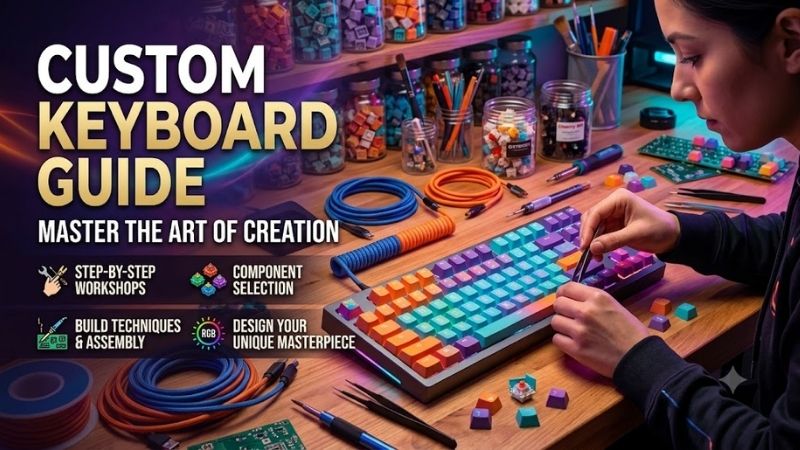
Custom Keyboard Guide insights eliminate loud rattling stabilizers, confusing layout options, and hollow metal cases for discerning creators. Many buyers waste funds on scratchy switches and stiff plates that hurt typing stamina. This comprehensive breakdown directs you toward responsive acoustic perfection with sheer confidence.
How to Choose the Right Custom Keyboard
Selecting individual keyboard components demands evaluating your workspace ergonomics, acoustic preferences, and daily typing volume. Unprepared beginners frequently battle wrist stiffness and discordant hollow acoustics after building rigid assemblies. This custom keyboard guide breaks down fundamental criteria for your desktop setup.
Form Factor and Layout Dimensions
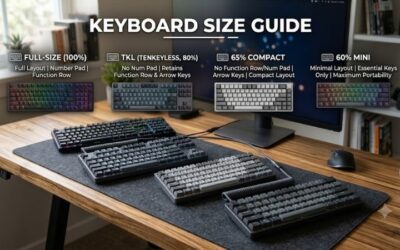
Compact sixty percent formats eliminate dedicated function keys and arrows to maximize available mouse pad territory for swift gaming swipes. However, data analysts and programmers often suffer productivity drops without instant numerical or navigation clusters. Selecting balanced dimensions preserves efficiency during daily tasks.
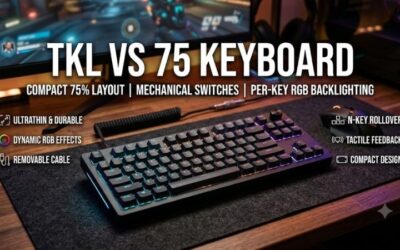
Seventy-five percent and tenkeyless footprints supply direct navigational clusters and function ribbons while retaining essential desk real estate. These sensible proportions deliver dedicated arrow clusters without forcing awkward auxiliary software layers. Choosing proportional hardware guarantees smooth multitasking workflow.
Mechanical Switch Profiles and Actuation
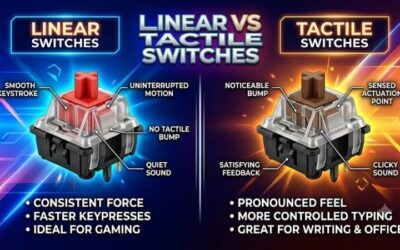
Linear stems glide downwards smoothly without providing tactile resistance, creating quiet keystrokes preferred by competitive twitch gamers. In contrast, tactile mechanisms produce a distinct physical drop indicating exact electrical activation. Selecting suitable switches prevents fingertip fatigue across long writing sprints.
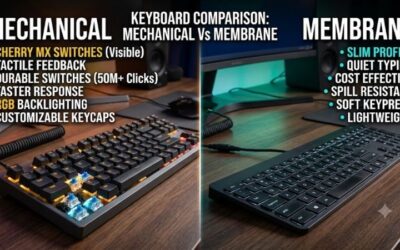
Clicky variants inject sharp acoustic feedback, yet their piercing clatter frequently irritates office colleagues and stream viewers. Modern hot-swappable circuit boards let you install alternative switches within seconds without handling dangerous soldering irons. Swapping modular stems grants limitless tactile experimentation.
Mounting Styles and Case Materials
Tray mounts screw the printed circuit board directly into the bottom frame, creating stiff feedback and irregular sound signatures. Modern gasket suspensions isolate structural plates using pliable silicone or poron strips to cushion sharp keystrokes. Soft structural mounting cushions bottoming impacts during active typing.
Machined aluminum enclosures supply substantial mass, eliminating unwanted case echo while holding the frame firmly in place. Meanwhile, lightweight polycarbonate chassis deliver deeper sound profiles and pleasant portable convenience. Relying on this custom keyboard guide ensures your chassis materials harmonize effortlessly.
Keycap Plastics and Profile Ergonomics
Inexpensive ABS plastics develop oily shine and thin brittle edges after a few months of intense daily finger friction. Thick polybutylene terephthalate formulations resist persistent finger grime and maintain pleasant textured grip surfaces indefinitely. Investing in dense plastics guarantees lasting structural durability.
Sculpted profiles like Cherry or OEM contours cradle your fingertips at natural incline angles across every horizontal row. Flat uniform profiles like DSA promote minimal desk visual clutter but demand elevated wrist elevation to type cleanly. Matching sculpted profiles to your hand posture eliminates prolonged wrist strain.
Top Picks for Premium Custom Keyboards
Finding an exceptional typing instrument requires comparing structural durability, wireless connectivity, and hot-swap reliability. We researched prominent mechanical flagships to highlight standout boards suited for diverse budgets and ergonomic needs. Our custom keyboard guide reviews top contenders to upgrade your typing station.
| Model Name | Mounting Style | Frame Material | Primary Advantage | | Keychron Q1 Pro | Double Gasket | CNC Aluminum | Seamless Wireless | | Epomaker RT100 | Gasket Mount | Polycarbonate | Retro Media Display | | GMMK Pro 75 | Gasket Mount | CNC Aluminum | Rotary Encoder Knob | | MonsGeek M1 V2 | Silicone Gasket | Anodized Aluminum | Heavy Acoustic Body |
Keychron Q1 Pro Wireless
Enthusiasts desiring robust metal craftsmanship combined with flexible Bluetooth connectivity will love this heavy seventy-five percent deck. The pre-lubricated mechanical switches and internal acoustic foams produce deep sound signatures directly from the retail box. Owners enjoy instant desktop freedom without messy desk cables.
However, the massive aluminum chassis weighs over four pounds, making it impractical for regular backpack transport to local offices. Furthermore, wireless battery duration drains quickly whenever continuous backlighting runs at high output. It remains an exemplary wireless benchmark built for demanding workstation writers.
Epomaker RT100 Retro
Typists seeking vintage visual aesthetics alongside modern typing comfort will appreciate this playful ninety-seven key layout. The detachable miniature display module exhibits CPU temperatures, battery levels, and custom animated graphics. Soft gasket padding dampens harsh internal vibrations for effortless all-day typing.
Nevertheless, the companion desktop software interface feels clunky, and the plastic chassis lacks the premium heft of metal designs. The included sea salt silent switches deliver near-silent actuation for noise-sensitive workspace rooms. It serves as a charming desktop centerpiece for casual creative typists wanting flair.
GMMK Pro 75 Percent Barebone
Hardware modders who prefer selecting bespoke switches and custom keycap sets will value this modular barebone foundation. The built-in aluminum rotary volume encoder provides tactile dial feedback for rapid multimedia adjustments. Side-profile illumination throws elegant diffused lighting gradients across your desk surface.
On the downside, the factory stabilizer padding feels overly sticky, requiring manual disassembly and alcohol cleaning to perform well. In addition, the integrated aluminum switch plate provides a rather firm typing experience without flex. It stands as an approachable modular canvas for builders craving hands-on modding.
MonsGeek M1 V2 Aluminum
Value-conscious hobbyists hunting premium aluminum acoustic resonance without astronomical price tags should explore this solid chassis. The precision silicone gasket suspension creates genuine structural flex that cushions heavy finger strikes. Tape mod sheets and sound-dampening foam are included right inside the retail bundle.
Conversely, the physical unit relies solely on wired USB connections and lacks any integrated wireless transmission options. Following this custom keyboard guide confirms that wired stability easily outperforms unstable radio signals. It delivers unmatched acoustic precision for builders demanding deep signature clacks.
Frequently Asked Questions
Prospective keyboard hobbyists often express uncertainty regarding component assembly, stem lubrication, switch categories, and mounting styles. Clarifying these technical topics prevents expensive buying mistakes and saves dozens of hours of troubleshooting. This custom keyboard guide answers essential community questions.
Are Custom Keyboards Difficult for Beginners to Assemble?
Modern hot-swappable barebone kits make building bespoke hardware as simple as slotting toy building blocks together securely. You simply align fragile metal contact pins perpendicularly and slide switches downward into individual modular sockets. No specialized soldering apparatus or technical electrical wiring skills are required.
However, beginners must exercise patience when pressing mechanical stems into sockets to avoid bending internal receiver leaves. Using dedicated plastic switch pullers ensures smooth component installation without scratching neighboring frame borders. Even first-time builders can finish fully assembled decks in under thirty minutes.
What Is the Difference Between Linear and Tactile Switches?
Linear switches actuate in a straight continuous glide down to the bottom housing without presenting tactile resistance. This effortless mechanism allows ultra-rapid double taps during competitive matches, making it favored by twitch shooter players. The sound signature remains consistently gentle, discreet, and smooth throughout.
Tactile switches incorporate a subtle physical bump along the slider rail that alerts fingertips before the bottoming out. As noted in this custom keyboard guide, that distinct sensation assists touch typists in cutting typo counts substantially. Picking the right variant comes down to your personal typing rhythm and tactile needs.
Does Gasket Mounting Truly Improve Typing Comfort?
Standard integrated tray mount frames secure the main circuit board rigidly, sending harsh impact vibrations up into finger joints. Gasket mounts suspend the entire plate assembly using flexible elastomeric strips that soak up heavy keystroke shocks. This suspension provides a softer bottom-out feel that cushions typing sessions.
In addition to ergonomic softness, gasket isolation eliminates metallic acoustic reverberation against hollow case bottom walls. Applying our custom keyboard guide techniques ensures you achieve a deeper acoustic signature with reduced desk fatigue. The resulting flexible typing feel transforms daily writing into pure tactile bliss.
How Often Should You Lubricate Mechanical Keyboard Switches?
Synthetic lubricants applied to internal stem rails and stabilizer wires generally endure two to three years of daily use. High-grade fluoropolymer lubricants like Krytox resist evaporation and migration under ordinary room temperatures. Switches stay delightfully silky without needing constant fluid top-ups or recurring reapplication.
You will recognize the moment your hardware needs fresh lubrication when switches produce scratchy sensations or rattling spring pings. Gently brushing small amounts across stems revitalizes whisper-quiet operation and restores buttery glide. Moderate maintenance keeps your custom mechanical setup feeling pristine for years.
View more products:
Final Thoughts on Selecting Your Dream Board
Creating your ideal desk setup becomes straightforward once you balance form factor dimensions, switch feedback, and chassis materials. Choosing hot-swappable circuit boards permits endless customization as your typing tastes evolve over time. Following this custom keyboard guide guarantees comfortable daily typing and enduring joy.