- Top Pick: HP Workstation PC Desktop Computer | Editing and Design | NVIDIA Quadro K1200 4GB GPU | Intel Core i5 | 32GB DDR4 RAM, 1TB SSD + 4TB HDD | Wi-Fi 5G + Bluetooth | Windows 11 Pro (Renewed)
- Best Value: Dell OptiPlex 3050 Desktop Computers PC, 32GB Ram DDR4 New 512GB M.2 NVMe SSD, Intel Built-in WiFi, Bluetooth, i5-6500 3.2GHz, Refurbished Desktop, HDMI, Windows 11 Pro (Renewed)
- Premium Choice: Getorli Mini PC AMD Ryzen 7 6800H(Beats 7640HS/7730U), 32G LPDDR5 1TB NVMe SSD Desktop Computer, Triple Display 4K, WiFi 6, BT 5.3, Dual LAN, Mini Gaming PC for Office, Video Editing, Home Theater
Video editing punishes a computer in ways gaming never does. Timeline scrubbing, multi-cam sequences, effects rendering, and 4K exports lean hard on core count, memory, and fast storage all at once. The best editing PC in 2026 is not necessarily the flashiest gaming rig; it is a balanced machine with plenty of RAM, a capable multi-core CPU, and enough GPU acceleration to speed up your export queue.
We rounded up systems that suit video editors across budgets, from compact mini PCs with modern Ryzen AI chips to full towers with discrete GPUs and workstation pedigree. Whether you cut YouTube videos, wedding films, or client commercials, one of these builds will keep your timeline responsive and your renders quick.
As an Amazon Associate we earn from qualifying purchases at no extra cost to you.




⚡ Save on Your Next PC — Amazon Prime
Prime members get fast free shipping on the systems above, plus early access to Prime Day & Black Friday PC deals. New members get a 30-day free trial.
Watch: Best PC for Video Editing — Video Review
How to Choose
- CPU cores: Editing scales with cores and threads, so an 8-core chip is a sensible floor and 16-plus cores speed up heavy exports.
- RAM capacity: 32GB is the practical minimum for 4K work; 64GB helps with multi-track timelines and background rendering.
- GPU acceleration: Premiere, DaVinci Resolve, and others use the GPU for effects and export, so a discrete card cuts render times noticeably.
- Fast NVMe storage: A quick SSD for your media cache and scratch disk keeps scrubbing smooth; add a second drive for project files.
- Form factor: Mini PCs save space and power, while towers offer expansion for more drives, RAM, and a bigger GPU later.
The Best Picks Reviewed
Dell Pro Tower (i7-14700, 16GB, 1TB)
Our balanced top pick. The 20-core i7-14700 tears through timeline rendering, and the tower form factor means you can drop in more RAM and a discrete GPU as your projects grow. It is a dependable foundation for a serious editing workstation.
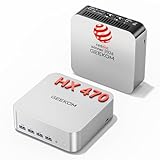
GEEKOM A9 Max Mini PC (Ryzen AI 9 HX 470)
For editors tight on desk space. This mini PC packs a Ryzen AI 9 chip, 32GB of DDR5, and a 2TB SSD into a tiny chassis, delivering strong multi-core performance and AI acceleration for modern editing tools without a bulky tower.
WIWB Gaming PC (i9-14900HX, RTX 5060 Ti)
The pick for GPU-heavy work. Pairing a high-core i9 with an RTX 5060 Ti and a 1TB NVMe drive, this system accelerates effects and exports in Resolve and Premiere, doubling nicely as a gaming rig after hours.
Getorli Mini PC (Ryzen 7 6800H, 32GB, 1TB)
A value compact option. With a Ryzen 7 6800H, 32GB of LPDDR5, and a 1TB SSD, it handles 1080p and light 4K editing affordably, making it a smart choice for hobbyists and beginners.
HP Workstation PC (NVIDIA Quadro K1200)
A refurbished workstation route for editors on a budget who value stability. The professional Quadro GPU and workstation build target reliability in editing and design apps, though newer consumer cards will export faster.
Frequently Asked Questions
How much RAM do I need for video editing?
32GB is the comfortable minimum for 4K editing, and 64GB pays off if you work with many tracks, high-resolution footage, or run other apps alongside your editor.
Does the GPU matter for editing?
Yes. Modern editors offload effects and export encoding to the GPU, so a discrete card like an RTX 5060 Ti can dramatically shorten render times compared to integrated graphics.
Is a mini PC powerful enough to edit video?
Newer mini PCs with Ryzen AI or high-core mobile chips handle 1080p and moderate 4K editing well. For heavy 8K or effects-laden work, a tower with a discrete GPU is still better.
Do I need a separate scratch disk?
It helps. Keeping your media cache and scratch files on a fast dedicated NVMe drive, separate from your project and OS drive, keeps timeline scrubbing smooth.
Final Thoughts
For most editors, the Dell Pro Tower with its 20-core i7 and room to expand is the safest long-term pick. Space-conscious creators should look at the GEEKOM A9 Max mini PC, while GPU-heavy workflows favor the RTX 5060 Ti-equipped WIWB system. Prioritize cores, 32GB or more of RAM, and GPU acceleration, and your edits will fly.