Whether you’re upgrading or cashing out, knowing where and how to sell a gaming PC helps you recoup the most value. Marketplaces like eBay, Facebook Marketplace, r/hardwareswap, and specialist buyback sites each have trade-offs in fees, reach, and buyer safety, and the machine’s components heavily influence what it will fetch.
- Best Places to Sell a Gaming PC Compared
- Watch: Best Place To Sell A Gaming PC — Video Review
- How to Sell a Gaming PC Step by Step
- Sell the Whole PC or Part It Out?
- What Makes a Gaming PC Easy to Sell
- Common Mistakes When Selling a Gaming PC
- How to Choose a Gaming PC That Holds Its Value
- The Best Resale-Friendly Gaming PCs Reviewed
- Three More Places Worth Listing: Swappa, Jawa, and PC Swaps
- When to Sell: Timing Can Move the Price
- Handling Offers: Negotiation Without the Headaches
- Scam Red Flags to Shut Down Early
- More Picks Worth Considering
- Related Guides
- Frequently Asked Questions
- Final Thoughts
- More Resale-Friendly Gaming PCs
- Related Articles
Resale value ultimately tracks the parts inside. Popular prebuilt models with recognizable CPUs and GPUs move faster and hold their price better, so below we spotlight configurations that stay in demand on the secondhand market.

Best Seller
Updated October 2026 – marketplace fees and rules change, so confirm current rates before you list.
The best place to sell a gaming PC is Facebook Marketplace for a complete local sale, eBay for the widest reach, and r/hardwareswap if you are parting out components. Local pickup avoids shipping damage and fees, which matters most for a whole tower. Shipping a built PC is where most sales go wrong, so pick the platform based on whether the buyer can inspect the machine first.
Best Places to Sell a Gaming PC Compared
| Where to sell | Best for | Typical fees | Buyer reach | Main risk |
|---|---|---|---|---|
| Facebook Marketplace | Complete PCs, local sale | None for local pickup | Local buyers | Scams and no-shows; no payment protection |
| eBay | Parts and well-packed shipped systems | Roughly 13 percent including payment processing | Nationwide | Damage in transit and return disputes |
| r/hardwareswap | GPUs, CPUs, RAM and other parts | No platform fee; PayPal Goods and Services adds about 3 percent | Enthusiasts | Needs account history; disputes handled by moderators |
| Craigslist and local classifieds | Quick cash sale | Usually none | Local buyers | Lowball offers and scams |
| Hardware resale sites and buyback services | Fast, low-effort sale | Built into a lower payout or a capped fee | Dealer network | Payout is below private-sale value |
Fee figures come from third-party seller guides and change often, so check each platform before you list.
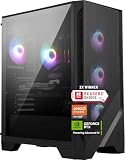
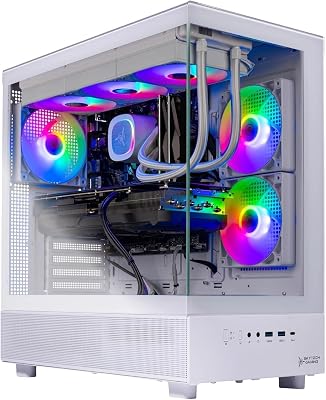
CyberPowerPC Gaming PC, Intel Core i5-14400F, GeForce RTX 5060 8GB | Gamer Xtreme, 16GB DDR5, 1TB PCIe 4.0 SSD, WiFi Ready & Windows 11 Home (GXiVR8060A47)

🎮 Get More From Your Setup — Free
Prime Gaming gives you free PC games every month, in-game loot, and a free Twitch channel sub — plus fast free shipping on all the gear above. New members get a 30-day free trial.
Watch: Best Place To Sell A Gaming PC — Video Review
How to Sell a Gaming PC Step by Step
1. Identify exactly what you have
Open Task Manager or a system information tool and write down the CPU, GPU model and VRAM, RAM capacity and speed, SSD size, motherboard, power supply wattage and case. Buyers search by GPU and CPU name, so these go in the title.
2. Clean and test it
Blow out dust, wipe the case and reseat any loose cables. Run the PC for a while under a game or stress tool before listing so you can honestly say it is stable, and so you can show it running to a local buyer.
3. Reset Windows and secure your data
Back up files, sign out of your accounts, then use the Windows reset option to remove everything. A clean install lets the buyer set up their own account and protects your data.
4. Price by sold listings, not asking prices
Filter eBay by sold items for the same GPU and CPU combination, then place your price just under comparable local listings. The graphics card sets most of the value, followed by the CPU generation and RAM type.
5. Photograph and describe it
Take clear photos of the front, both side panels, the rear I/O and a screenshot of system specs. List every component, any wear, the age of the system and whether you still have the original box, receipts or warranty.
6. Meet safely or ship carefully
For local deals, meet in a public place, let the buyer see the PC boot, and prefer cash. For shipping, use a double box, remove the GPU and pack it separately, and insure the parcel with tracking.
Sell the Whole PC or Part It Out?
Parting out can raise the total, particularly when the GPU holds its value better than the rest of the system. The tradeoff is time: you list, photograph, answer questions on and ship every part, and each sale carries its own fees and scam risk. Selling the whole PC is faster and suits balanced systems where no single part dominates the value. A good compromise is to sell the GPU separately if it is a high-demand model, and sell the remaining system with a cheap replacement or integrated graphics.
What Makes a Gaming PC Easy to Sell
- Current GPU generation: RTX 50-series and recent AMD cards attract the most interest; older or entry-level cards sell slowly.
- Standard parts: a normal ATX power supply and common case are easier to sell than proprietary designs.
- Balanced specs: 16GB or more of RAM and a 1TB SSD avoid the needs-upgrades discount.
- Proof: receipts, original listings and remaining warranty justify a higher asking price.
Common Mistakes When Selling a Gaming PC
- Pricing from current retail prices instead of used sold listings.
- Posting vague specs such as “high-end gaming PC” with no GPU name.
- Shipping a built tower without removing the GPU or bracing the cooler.
- Accepting payment methods without buyer or seller protection from someone you do not know.
- Leaving your accounts signed in or skipping a Windows reset.
How to Choose a Gaming PC That Holds Its Value
- GPU demand: The graphics card drives resale value most. Current-gen RTX 50-series cards command far more than older or entry-level GPUs.
- Recognizable brands: Well-known builders and clearly listed components reassure buyers and sell faster than obscure, vaguely specced towers.
- Balanced specs: A machine with matched CPU, RAM, and storage looks complete and avoids the “needs upgrades” discount buyers expect.
- Documentation: Original listings, spec sheets, and warranty details boost trust and let you justify a higher asking price.
- Condition and cleanliness: A dust-free, well-maintained rig with intact RGB and cabling photographs better and sells for more.
The Best Resale-Friendly Gaming PCs Reviewed
KOTIN Prebuilt (RTX 5070, Ryzen 7 9700X)
With a current-gen RTX 5070 and 9700X, this KOTIN holds strong resale appeal. Recognizable modern parts make it an easy sell to upgraders.
Evounic Gaming PC (Ryzen 7 8700F, RTX 4060 Ti)
The Evounic’s 5.0GHz Ryzen 7 and RTX 4060 Ti hit a popular mid-range sweet spot, keeping demand healthy on secondhand marketplaces.
YAWYORE Gaming PC (Ryzen 7 5700X, RTX 5060)
A balanced 5700X and RTX 5060 combo makes this YAWYORE approachable for first-time buyers, which helps it move quickly at a fair price.
STGAubron Gaming PC (Core i5, RX 560)
This budget STGAubron with 16GB RAM and a 512GB SSD appeals to entry-level buyers. It won’t top the charts, but it sells reliably at lower price points.
OKAMUS Pre-Built PC (i5, Integrated Graphics)
An integrated-graphics office-and-light-gaming box, the OKAMUS targets budget shoppers. Set expectations low on resale, but it fills a real market niche.
Three More Places Worth Listing: Swappa, Jawa, and PC Swaps
Beyond the big general marketplaces, three enthusiast-focused venues deserve a look, because their buyers already know what a used RTX card or a Ryzen build is worth, which cuts down on uninformed lowball offers.
Swappa built its reputation on phones, but its computer and gaming categories follow the same model: listings are reviewed before they go live, serial numbers are checked on many devices, and payment runs through a protected checkout rather than a peer-to-peer app. That moderation means fewer scam attempts and buyers who expect to pay fair market value. The trade-off is a smaller audience than eBay, so an unusual build can sit longer, and whole towers still carry the same shipping risk as anywhere else.
Jawa is a marketplace built specifically for gaming PCs and parts, run by people from the PC-building community. Complete systems are its core category rather than an afterthought, listings are organized around components, and buyers there comparison-shop by GPU tier the way enthusiasts do. It suits sellers with a clean, well-documented custom build who want an audience that understands the spec sheet. PC Swaps fills a similar niche with a stronger lean toward individual parts, making it a good second listing when a parted-out GPU, CPU, or motherboard has not moved elsewhere. Listing on one general marketplace and one enthusiast marketplace in parallel is a reasonable strategy, as long as you pull the duplicate down the moment the machine sells.
When to Sell: Timing Can Move the Price
Used PC prices are not static, and listing a week earlier or later can change what a build returns. Demand peaks when buyers have a reason to shop: the back-to-school period, the holiday season, and the weeks after a major game release that pushes people to upgrade. The sharpest price drops land on your hardware when a new GPU generation launches, because the card in your tower is suddenly last year’s model in every comparison chart. If a launch is rumored within a month or two and you are planning to sell anyway, listing before the announcement usually protects more value than waiting for reviews to confirm the gap.
The flip side applies to mid-cycle lulls. A fair-priced listing posted during a quiet stretch may simply need patience rather than repeated price cuts. Drop the price in small steps on a schedule you decide in advance instead of reacting to every silent day, and relist or refresh the post if the platform allows it, since stale listings sink in search results. Sellers parting out should sequence the GPU first while its value is highest, then the CPU and motherboard as a bundle, and treat the case, fans, and storage as slower-moving extras.
Handling Offers: Negotiation Without the Headaches
Most messages a seller receives fall into three groups: genuine buyers asking a real question, bargain hunters opening far below asking, and scripted scam openers covered in the next section. For the second group, the simplest defense is to build a small negotiation margin into the asking price from the start, so conceding a little still lands at the number you actually wanted. Reply to a very low offer once, politely, with your firm floor or a counter close to it, and then stop negotiating against yourself if the buyer just repeats the same figure.
Serious buyers usually reveal themselves by asking about specifics: temperatures under load, warranty status, whether the Windows license transfers, or whether you still have the GPU box. Answering those questions quickly and completely does more to close a sale at full price than defending the number in the abstract. Screenshots of a benchmark run, a photo of the system information screen, and a short video of the PC booting into a game are worth attaching to the listing itself, because documented machines attract fewer hagglers and more decisive buyers. If a local buyer wants to test the machine, let them run a game or benchmark at the meeting spot rather than arguing about condition in chat.
Scam Red Flags to Shut Down Early
A few patterns account for most seller losses, and each one is easy to end once you recognize it. The overpayment setup is the classic: a buyer sends a check or payment confirmation for more than the agreed price and asks you to refund the difference or forward the excess to a mover. The original payment is fake or gets reversed, and the refunded money is gone. Any payment larger than the agreed amount, for any reason, ends the conversation.
Fake shipping arrangements are the second pattern. A buyer who insists on using their own prepaid label, a courier you have never heard of, or a pickup agent who will supposedly pay you on delivery is trying to move the transaction outside the platform’s records. Ship only with a label you purchased through the platform or a major carrier, to the address on the order, and keep the tracking and drop-off receipt until the money is fully settled. Payment-app requests carry the same risk: a screenshot of a sent payment is not a payment, and business transactions pushed toward friends-and-family transfers strip away your dispute options if the buyer vanishes.
In person, meet where there are cameras and other people, bring the PC already wiped and ready to demonstrate, and count cash or confirm the transfer in the app before the machine leaves your hands. Trust the discomfort: a buyer who pressures you to rush, changes the meeting place at the last minute, or refuses to inspect the PC before paying is giving you information. Walk away and wait for the next buyer.
More Picks Worth Considering
Selling well is mostly preparation, and the right supplies make a used PC photograph better, benchmark cooler, and survive shipping. These are the support items sellers most often wish they had bought before listing day.
XPOWER A-2S Cyber Duster Electric Air Duster

A corded electric duster replaces disposable gas cans for the deep clean a listing deserves. Two speed settings let you blast dust out of radiator fins, fan blades, and power supply grilles, then slow down around delicate areas, and the included nozzles and brush reach into the corners a cloth cannot. Because it plugs in, airflow never fades halfway through the job the way a freezing can does. It suits anyone preparing a dusty tower for close-up listing photos, and anyone parting out several components who will clean each one before it ships. It does not suit a seller with a single lightly dusty laptop, where a basic can of air is enough, and the cord means it is a workbench tool rather than something to carry to a meetup.
ARCTIC MX-4 Thermal Paste (4 g)

Fresh thermal paste is the cheapest way to make an older gaming PC benchmark like a younger one. Dried-out paste raises CPU temperatures under load, and a buyer running a stress test at a meetup will see those numbers. Cleaning off the old compound and applying a pea-sized amount of MX-4 before you list can bring load temperatures back in line with what the cooler should deliver, which supports your asking price with evidence instead of adjectives. The syringe includes a spatula and holds enough for several applications across a CPU and a GPU. It suits sellers whose machine runs hot or loud under load. Skip it if your temperatures are already healthy, and never repaste a card that is still under a warranty that opening it would void.
Seadasyoon Anti-Static Bags, 11.8 x 15.7 Inch (30 Pack)

Parting out only works if every part arrives alive, and a bare graphics card sliding around in a bubble mailer is how good sales turn into refunds. These large resealable shielding bags are sized for motherboards and full-length graphics cards, with smaller parts like RAM and drives fitting easily, and the zip closure keeps dust and moisture out during transit. Bagging each component before it goes into its box also looks professional in listing photos and reassures buyers that the part was handled properly. The pack suits anyone selling several components from one teardown. It is unnecessary if you are selling the complete PC locally, and sellers shipping a single small drive can get away with a smaller bag size instead.
American Bubble Boy Instapak Quick RT #80 Expanding Foam Bag
The biggest risk in shipping a whole tower is the graphics card and tower cooler tearing free under their own weight. This expanding foam bag addresses exactly that: you activate it, place it inside the case around the GPU and cooler, and it expands to fill the empty space, locking the heavy parts in place for the journey. It is the same style of internal bracing that system builders use when they ship prebuilt machines, and it removes the need to remove the card and pack it separately. It suits anyone shipping a complete PC with a large air cooler or a heavy high-end GPU. It does not suit local sales, very small form factor builds with little internal space, or sellers whose buyer is collecting in person.
Related Guides
- Best Lenovo Legion Go Handheld Gaming PC 2026
- Best Gaming Wireless Headset With Microphone 2026
- Best Wireless Xbox Controller in 2026: Complete Buyer's Guide
- Best Wireless Gaming Headset For PS5 2026
- Best Mini Gaming PCs 2026: Top 5 Picks
Frequently Asked Questions
Where is the best place to sell a gaming PC?
eBay and Facebook Marketplace offer the widest reach, while r/hardwareswap suits enthusiast buyers. Buyback services are fastest but pay less.
How do I price my gaming PC?
Check completed listings for similar specs, then price competitively. The GPU generation is the biggest factor in setting a realistic figure.
Should I sell as a whole or in parts?
Parting out often nets more money but takes more effort. Selling whole is faster and easier, especially for balanced, ready-to-use rigs.
How can I sell safely?
Meet locally in public for cash deals, or use platforms with buyer protection. Document the build with photos and serial numbers before shipping.
How much can I sell my gaming PC for?
Expect roughly what comparable used systems have sold for recently, which is driven mostly by the GPU. Check sold listings for the same graphics card and CPU, then price slightly under local asking prices for a fast sale.
Is it better to sell a gaming PC on eBay or Facebook Marketplace?
Facebook Marketplace is usually better for a whole PC because the buyer can inspect it and you avoid shipping and fees. eBay reaches more buyers and suits individual parts or a carefully packed system.
Should I wipe Windows before selling a gaming PC?
Yes. Back up your files, sign out of your accounts, and reset Windows so the buyer starts clean and none of your data remains.
Can I sell a gaming PC with a dead GPU?
Yes, but list the fault clearly and price it as a parts or repair system. Selling it honestly avoids returns and disputes.
Final Thoughts
Current-gen builds like the KOTIN RTX 5070 and YAWYORE RTX 5060 hold value best, while the Evounic strikes a strong mid-range balance. List clearly, price by GPU, and choose a reputable marketplace.
More Resale-Friendly Gaming PCs
iBUYPOWER Element – Best for a known brand with a current GPU
A recognizable system builder with an RTX 5070 and a 12-core Ryzen 9 tends to be easy to describe and easy to resell. It suits buyers who want a strong all-round system rather than a bargain tower.
- CPU: AMD Ryzen 9 7900X
- GPU: NVIDIA GeForce RTX 5070 12GB
- RAM: 32GB DDR5
- Storage: 1TB SSD
Pros: current GPU generation, 32GB DDR5, well-known brand. Cons: higher entry cost; the 12-core CPU adds little for gaming alone. Skip it if you want the lowest buy-in price.
CyberPowerPC Gamer Xtreme i7-14700F – Best for a standard Intel build
Standard parts and clear component naming make this CyberPowerPC straightforward to list and to upgrade later, which buyers on the used market value.
- CPU: Intel Core i7-14700F
- GPU: NVIDIA GeForce RTX 5060 Ti 8GB
- RAM: 16GB DDR5
- Storage: 1TB PCIe 4.0 SSD
Pros: 20-core Intel CPU, DDR5, PCIe 4.0 storage. Cons: 8GB graphics memory limits it in the newest games at high resolutions. Skip it if you need 16GB of VRAM.