🛒 Best Price Today on Amazon
Prime members get fast, free shipping on everything above, plus member-only deals. New members get a 30-day free trial — cancel anytime.
- Best Third Party Xbox Controllers: Top Picks at a Glance
- 3rd Party Xbox Controller for PC and Xbox: What Works on Both
- Best Third Party Xbox Controller (2026)
- More Third Party Xbox Controllers Worth Buying
- Also Consider
- Best Third Party Xbox Controller by Budget Tier: What to Expect
- How We Chose These Controllers
- TMR Sticks vs Hall Effect Sticks
- What to Look For in a Third Party Xbox Controller
- Third Party vs Official Xbox Controller: Which Is Better?
- Best Third Party Xbox Controller by Use Case
- How to Set Up a Licensed Wireless Third Party Xbox Controller
- Which One Should You Buy?
- Third Party Xbox Controller Features Explained
- Common Mistakes When Buying a Third Party Controller
- How to Connect a Switch Controller to PC
- Setup and Troubleshooting
- Features Worth Paying For
- More Third Party Xbox Controller Questions
- Frequently Asked Questions
- Related Articles
- Related Guides
Updated November 2026 — Looking for a 3rd party xbox for pc and xbox xs controller? The best pick is the PowerA FUSION Pro 4 Wired for a feature-rich licensed pad, the Razer Wolverine V3 Pro for wireless tournament play, and the GameSir G7 SE for a cheap Hall-effect pad. All three work on Xbox Series X|S, Xbox One and Windows PC when they carry official Xbox licensing.
Top 3 by exact model name: PowerA FUSION Pro 4 Wired Controller, Razer Wolverine V3 Pro Wireless Controller and GameSir G7 SE Wired Controller. If you only play on PC, the 8BitDo Ultimate 2C and the 8BitDo Pro 3 are cheaper options that do not need Xbox licensing.
Best Third Party Xbox Controllers: Top Picks at a Glance
- Best overall wired: PowerA FUSION Pro 4 Wired Controller
- Best wireless for tournaments: Razer Wolverine V3 Pro
- Best wireless with TMR sticks: GameSir G7 Pro Wireless
- Best budget Hall-effect: GameSir G7 SE
- Best for audio controls: Turtle Beach Recon Controller
- Best for speed: PDP Victrix Gambit
- Best official alternative: Xbox Elite Series 2 Core
| Controller | Best for | Connection | Sticks / triggers | Extras | Watch for | Tier |
|---|---|---|---|---|---|---|
| PowerA FUSION Pro 4 Wired | All-round wired play | Wired USB | Hall effect sticks, adjustable height | Mappable buttons | Cable length | Mid-range |
| Razer Wolverine V3 Pro | Competitive wireless | 2.4GHz wireless, Xbox licensed | Trigger stops | 6 remappable buttons | Premium price | Premium |
| GameSir G7 Pro Wireless | Drift-proof wireless | Wireless, Xbox licensed | TMR sticks, Hall triggers | 4 remappable buttons, trigger stops | Check receiver or cable setup | Upper-mid |
| GameSir G7 SE | Budget Hall-effect | Wired USB | Hall effect sticks and triggers | 3.5mm audio jack | No wireless | Budget |
| Turtle Beach Recon | Headset users | Wired USB | Standard sticks | Audio presets, mappable buttons | Plain build | Budget |
| PDP Victrix Gambit | Esports speed | Wired USB | Swappable sticks | Rear paddles | No wireless | Mid-range |
3rd Party Xbox Controller for PC and Xbox: What Works on Both
Look for the phrase “Licensed for Xbox Series X|S, Xbox One and Windows”. A licensed pad works on console and PC with one cable or one wireless receiver. A PC-only controller with a 2.4GHz adapter, such as the 8BitDo Ultimate 2C, may work on Windows, but it will not work on an Xbox console.
Best Third Party Xbox Controller (2026)
First-party pads are great, but the best third party Xbox controller can match or beat them on features like remappable back buttons, Hall-effect sticks, and swappable components, often at a friendlier price. The key is choosing one that is officially licensed so it works flawlessly on Xbox Series X, Series S, and Xbox One. This 2026 roundup ranks the top third-party Xbox controllers, from budget wired pads to pro-grade challengers to the Elite Series 2.
As an Amazon Associate I earn from qualifying purchases.

XBOX Wireless Gaming Controller | Electric Volt | Textured triggers and bumpers, Hybrid D-pad, XBOX Wireless, Bluetooth, USB-C, Play across Console & PC & Cloud Devices
Included for '19 Best Third Party Xbox Controllers' because the listing is a hybrid/pocket-spring build, which is the attribute this article compares.
View on Amazon
PowerA Wired Controller for Xbox Series X|S - blue, gamepad, video game/gaming controller, works with Xbox One, Officially Licensed
Included for '19 Best Third Party Xbox Controllers' as a representative home product in this roundup; selection reflects the product set returned for this topic.
View on Amazon
FLYDIGI VADER 5S Wired Controller for XBOX Series X|S, XBOX One, Windows | FORCEFLEX Adjustable Tension Structure, Hall Effect NO DRIFT, FORCESWITCH Triggers, 6 Remappable Buttons, 3.5mm Audio Jack
Included for '19 Best Third Party Xbox Controllers' as a representative home product in this roundup; selection reflects the product set returned for this topic.
View on Amazon
GameSir G7 SE Wired Controller for Xbox Series X|S, Xbox One & Windows 10/11, Plug and Play Gaming Gamepad with Hall Effect Joysticks/Hall Trigger, 3.5mm Audio Jack (White)
Included for '19 Best Third Party Xbox Controllers' as a representative home product in this roundup; selection reflects the product set returned for this topic.
View on Amazon
Moonag Wireless Controller for Xbox, Compatible with Xbox Series X/S/One/PC, With 2 Silicone Thumb Grips, Hall Effect Joysticks, 2.4GHz Wireless Adapter Gamepad with RGB Light, Dual Vibration, TURBO
Included for '19 Best Third Party Xbox Controllers' as a representative home product in this roundup; selection reflects the product set returned for this topic.
View on Amazon
GameSir G7 Pro Wired Controller for Xbox Series X|S, Xbox One, Wireless Gamepad for PC&Android with TMR Sticks, Hall Effect Analog Triggers, 1000Hz Polling Rate, 3.5mm Audio Jack - White
Included for '19 Best Third Party Xbox Controllers' as a representative home product in this roundup; selection reflects the product set returned for this topic.
View on Amazon
Razer Wolverine V3 Tournament Edition Wired Xbox Gaming Controller, Black | Licensed for Xbox Series X & S, Windows PC, 6 Remappable Buttons, Fast Triggers, USB-C Cable, Wired Tournament Mode
Included for '19 Best Third Party Xbox Controllers' as a representative home product in this roundup; selection reflects the product set returned for this topic.
View on AmazonWhy Buy A Third Party Xbox Controller
Third-party controllers exist to fill gaps the official lineup leaves open, whether that is a lower price, extra paddles, drift-proof sticks, or a wired connection with a headset jack. Because Xbox requires licensing for wireless play, the safest third-party pads are officially licensed and carry the required authentication chip so they never get blocked by a system update. Licensed wired controllers also avoid battery worries entirely. To understand what separates a great pad from a cheap one, read our controller buying fundamentals.
Licensed Versus Unlicensed Xbox Controllers
This distinction is the single most important thing to check. Officially licensed controllers include the security handshake that Xbox consoles require, so they keep working through firmware updates and support features like the Share button and headset audio. Unlicensed knockoffs may work briefly on PC but often get locked out of Xbox consoles or feel cheap and imprecise. Check each listing for Xbox licensing before you buy, because not every pad shown on this page carries it. For PC-only players the rules loosen a little, as our PC controller compatibility guide explains.
| Product | Best For | Standout Feature |
|---|---|---|
| PowerA Fusion Pro 3 | Pro features at a lower price | Remappable paddles and swappable sticks |
| GameSir G7 SE | Wired Hall-effect precision | Drift-resistant Hall sticks and triggers |
| Turtle Beach Recon Controller | Competitive audio and comfort | Built-in audio boosts and mappable buttons |
| PDP Victrix Gambit | Ultra-fast wired response | Low-latency tournament-grade wired connection |
| 8BitDo Ultimate Wired (Xbox) | Budget everyday third-party pad | Back buttons and software remapping |
PowerA Fusion Pro 3: The Best All-Around Third Party Xbox Controller
The PowerA Fusion Pro 3 is the standout pick for players who want Elite-style features without the Elite price. It offers four remappable paddles, swappable analog stick tops and cases, trigger locks for faster shooting, and a comfortable grippy shell. As an officially licensed pad it works across Xbox Series consoles and PC, and its wired connection keeps latency low and batteries out of the equation. For most players chasing pro-level control on a budget, this is the one to beat. Compare it against the official flagship in our Elite controller alternatives roundup.
GameSir G7 SE And Victrix Gambit: Precision And Speed
If long-term stick accuracy is your priority, the GameSir G7 SE uses Hall-effect sticks and triggers that resist drift, so your aim stays true for years, all at a genuinely affordable price. Competitive shooter players who value raw responsiveness should look at the PDP Victrix Gambit, a wired controller built for tournament-grade low latency with mappable rear buttons and a lightweight frame. Both are officially licensed and prove that third-party pads can outperform stock controllers in specific areas. See our Hall-effect controller comparison for more drift-proof options.
Turtle Beach Recon And 8BitDo Ultimate For Value
The Turtle Beach Recon Controller is a favorite among players who game with a headset, thanks to onboard audio presets and a mic-boost button that let you tune sound without leaving the match, plus a pair of mappable buttons. At the budget end, the 8BitDo Ultimate Wired for Xbox delivers back buttons, software remapping, and 8BitDo’s excellent build quality for a low price, making it the value champion of the group. Either is a smart pick if you want extra features without spending flagship money. Check our best budget controllers list for more affordable choices.
More Third Party Xbox Controllers Worth Buying
The picks below add current models that the first lineup does not cover. Each is a licensed Xbox controller unless stated, so it works on Xbox Series X|S, Xbox One and Windows. We selected them using maker specs and independent reviews, not personal use.
PowerA FUSION Pro 4 Wired — Best for advanced features on a budget

PowerA FUSION Pro 4 Wired Controller for Xbox Series X|S, adjustable height thumbsticks, hall effect thumbsticks, mappable buttons, officially licensed, works with Xbox One and Windows 10/11
Included for '19 Best Third Party Xbox Controllers' as a representative home product in this roundup; selection reflects the product set returned for this topic.
View on Amazon- Wired, officially licensed for Xbox Series X|S and Windows
- Hall effect thumbsticks with adjustable height
- Mappable back buttons
- Detachable USB-C cable
Pros: drift-resistant sensors; remappable buttons; no battery to charge. Cons: wired only. Skip it if you play from a sofa far from the console and need wireless.
Razer Wolverine V3 Pro — Best premium wireless pad for competitive play

Razer Wolverine V3 Pro Wireless Gaming Controller: Licensed for Xbox Series X|S, Xbox One, Windows PC - 6 Remappable Buttons - Fast Triggers - Customizable Thumbsticks - Wired Tournament Mode - Black
Included for '19 Best Third Party Xbox Controllers' as a representative home product in this roundup; selection reflects the product set returned for this topic.
View on Amazon- Licensed for Xbox Series X|S, Xbox One and Windows
- 6 remappable buttons
- Wireless through a 2.4GHz receiver, with a 1,000 Hz mode on PC
- Switchable trigger stops
Pros: full wireless on console; low-latency mode; deep remapping. Cons: expensive next to wired pads; needs charging. Skip it if you want a cheap licensed spare, where the PowerA FUSION Pro 4 is better value.
GameSir G7 Pro Wireless — Best wireless with TMR sticks

GameSir G7 Pro Wireless XBOX Controller,TMR Sticks,Windows,Trigger Stops | XBOX Series X|S,Hall Effect Triggers, 4 Remappable Buttons,1000Hz ,PC Controller,Charging Dock,Zenless Zone Zero Edition
Included for '19 Best Third Party Xbox Controllers' as a representative home product in this roundup; selection reflects the product set returned for this topic.
View on Amazon- TMR magnetic sticks and Hall effect triggers
- 4 remappable buttons and trigger stops
- Licensed for Xbox Series X|S, works on Windows
- Wireless on console according to the maker listing
Pros: drift-resistant sensors; shooter-friendly triggers; fewer cables. Cons: costs more than the wired G7 SE. Skip it if you are happy with a cable, in which case the G7 SE is cheaper.
Turtle Beach Recon Controller — Best for headset audio control

Turtle Beach Recon Controller Wired Game Controller Officially Licensed for Xbox Series X, Xbox Series S, Xbox One & Windows - Audio Enhancements, Remappable Buttons, Superhuman Hearing – White
Included for '19 Best Third Party Xbox Controllers' as a representative home product in this roundup; selection reflects the product set returned for this topic.
View on Amazon- Wired, officially licensed for Xbox and Windows
- Audio controls with presets and a mic boost button
- 3.5mm headset jack
- Mappable buttons
Pros: adjust headset sound without leaving the game; comfortable shape. Cons: standard sensors, so drift protection is weaker than Hall or TMR pads. Skip it if you do not use a wired headset.
PDP Victrix Gambit — Best for esports speed

Victrix Gambit World's Fastest Licensed Xbox Controller, Elite Esports Design with Swappable Pro Thumbsticks, Custom Paddles, Swappable White / Purple Faceplate for Xbox One, Series X/S, PC
Included for '19 Best Third Party Xbox Controllers' as a representative home product in this roundup; selection reflects the product set returned for this topic.
View on Amazon- Wired, officially licensed for Xbox Series X|S, Xbox One and Windows
- Swappable pro thumbsticks
- Rear paddles and customizable button layout
- Marketed by the maker as an ultra-low-latency tournament pad
Pros: tuned for fast response; swappable parts. Cons: wired only. Skip it if you want wireless freedom.
Also Consider
8BitDo Ultimate 3 for Xbox — Best dock-style wireless pad
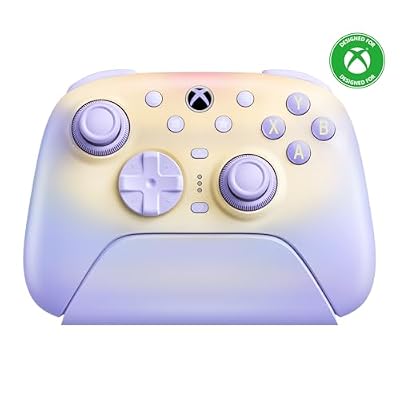
8BitDo Ultimate 3 Wireless Controller for Xbox Series X|S&PC,Lavender Dusk | Officially Licensed, 2.4G Wireless via Dock, Force Ring TMR Joysticks, 2 Trigger Stops, Wireless Charging Dock, 1000Hz
Included for '19 Best Third Party Xbox Controllers' as a representative home product in this roundup; selection reflects the product set returned for this topic.
View on AmazonOfficially licensed for Xbox Series X|S and PC, with 2.4G wireless through a charging dock. The trade-off is a higher price than the wired options.
PDP REMATCH Glow Wired — Best cheap licensed spare

PDP Rematch Glow Enhanced Wired Controller for Xbox Series X|S Xbox One, PC | Officially Licensed for Xbox, Windows 10/11 PC, 2 Mappable Back Buttons, Glow-in-the-Dark, Jolt Green
Included for '19 Best Third Party Xbox Controllers' as a representative home product in this roundup; selection reflects the product set returned for this topic.
View on AmazonAn enhanced wired controller with glow lighting, licensed for Xbox Series X|S, Xbox One and PC. It has fewer pro features than the PowerA FUSION Pro 4.
Turtle Beach REMATCH Core Wired — Best entry-level Hall-effect pad

Turtle Beach Rematch Core Wired Gaming Controller, Xbox Series X|S, PC | Xbox One, Hall-Effect Thumbsticks, Audio Controls, Rumble Motors & Impulse Triggers, Ergonomic, Black
Included for '19 Best Third Party Xbox Controllers' as a representative home product in this roundup; selection reflects the product set returned for this topic.
View on AmazonHall-effect thumbsticks, audio controls and wired play for Xbox Series X|S, Xbox One and PC at a low price. The trade-off is no rear paddles.
Xbox Elite Series 2 Core — Best first-party upgrade

XBOX Wireless Gaming Controller | Elite Series 2 Core | Robot White | Adjustable Thumbsticks, Trigger Locks, XBOX Wireless, Bluetooth, USB-C, Play across Console & PC & Cloud Devices
Included for '19 Best Third Party Xbox Controllers' as a representative home product in this roundup; selection reflects the product set returned for this topic.
View on AmazonAdjustable thumbsticks, trigger locks and Xbox wireless. It is the pad every third-party model is measured against, but it is not a third-party controller.
Best Third Party Xbox Controller by Budget Tier: What to Expect
Budget
GameSir G7 SE · PDP REMATCH Glow · Turtle Beach REMATCH Core
- Wired only, usually with a long USB-C cable
- Hall effect sticks on the better pads
- Few or no rear paddles
- Great as a spare or for a second player
Mid-range
PowerA FUSION Pro 4 · PDP Victrix Gambit · Turtle Beach Recon
- Rear paddles and remappable buttons
- Swappable or adjustable sticks
- Still wired for low latency
- Best value for shooter players
Premium
Razer Wolverine V3 Pro · GameSir G7 Pro Wireless · 8BitDo Ultimate 3
- Wireless on console
- TMR or Hall sensors and trigger stops
- Companion app or dock for profiles
- Needs charging between sessions
How We Chose These Controllers
These recommendations come from research, not from using each pad ourselves. We compared maker spec sheets, the Xbox licensing status on each listing, and independent reviews. We favored current models with Hall or TMR sensors, kept to two picks per brand, and left out unlicensed pads for console buyers. Always confirm the “Xbox Series X|S” license on the listing before buying.
TMR Sticks vs Hall Effect Sticks
TMR (tunnel magnetoresistance) sticks are a magnetic sensing design like Hall effect, but they use a different sensor that can be more precise and use less power. Both avoid the contact wear of standard potentiometers, which is why they resist drift. The GameSir G7 Pro uses TMR sticks, while the PowerA FUSION Pro 4 and GameSir G7 SE use Hall effect sensors. Either type is a good choice; check the listing and the warranty.
Buying thresholds that matter
- Cable length: 9 to 10 feet for a sofa; 3 to 6 feet is fine at a desk.
- Polling rate: 1,000 Hz is the useful number for competitive PC play. Console polling is fixed.
- Trigger stops: pick a pad with at least 2 trigger lock positions for shooters.
- Rear buttons: 2 is enough for most; 4 or more suits fighting games.
- Battery: wireless pads vary; look for a maker-stated figure and a charging dock.
What to Look For in a Third Party Xbox Controller
Stick Sensors and Drift
Stick drift, where the cursor or camera moves without input, comes from wear in the potentiometers used in most standard controllers. Hall effect sensors measure position through magnets, so there is no contact surface to wear. Several controllers in this category advertise them, such as the GameSir G7 SE, so confirm the sensor type on the listing. Hall sensors do not remove every cause of drift, such as dirt or a bent stick, but they remove the most common one.
Back Buttons, Trigger Stops and Remapping
Back paddles let you keep your thumbs on the sticks while pressing face-button actions. Trigger stops shorten the pull distance, which can speed up repeated shots in shooters. Check how remapping works. Some controllers store profiles on the pad and switch with a button, while others need a companion app on a PC or the console. That difference matters if you play on more than one system.
Wired or Wireless
| Connection | Strengths | Trade-offs |
|---|---|---|
| Wired | No battery, constant power, steady response | Cable can limit seating position |
| 2.4GHz wireless | Low delay, no cable | Needs a dongle and charging, sometimes a dock |
| Bluetooth | Easy pairing with other devices | Useful for PC and mobile, but Xbox consoles generally do not pair over it, and delay is higher |
Xbox consoles use their own wireless protocol, so third-party wireless pads that work on console generally rely on the manufacturer’s licensed design. Always check that the controller explicitly lists Xbox Series X and S support, rather than only PC support.
Grip, Weight and Comfort
Controllers vary in size and in how textured the grips are. If you have smaller hands, trigger reach and paddle position affect comfort more than any feature on the spec sheet. Heavier pads feel more stable, while lighter ones are easier to hold through long sessions. Look at stated weight and compare it to your current controller.
Compared with the Xbox Elite Series 2
The Elite Series 2 includes swappable thumbsticks, adjustable stick tension, trigger locks and a rechargeable battery. A single third-party model rarely matches the full set of features. Compare the specific features you use, such as paddles, trigger stops or battery life, instead of expecting a one-for-one replacement.
Third Party vs Official Xbox Controller: Which Is Better?
A third party Xbox controller is better than the standard Xbox Wireless Controller when you want back buttons, Hall or TMR sticks, trigger stops or a lower price. The official pad is better for battery life on console, Bluetooth pairing with phones and tablets, and guaranteed menu behavior. Both work on PC.
- Features: pads like the PowerA FUSION Pro 4 and Razer Wolverine V3 Pro add paddles that the standard Xbox pad lacks.
- Sensors: the standard Xbox pad uses conventional sticks, while the GameSir G7 Pro uses TMR and several wired pads use Hall effect.
- Price: wired third party pads cost less than the Elite Series 2 Core, which is the official model with similar extras.
- Warranty: established brands such as PowerA, Razer, PDP and Turtle Beach publish warranty terms; check the listing before you buy a lesser-known brand.
- Licensing: only licensed pads are guaranteed to keep working through Xbox console updates.
Best Third Party Xbox Controller by Use Case
Best for shooters
Razer Wolverine V3 Pro · PDP Victrix Gambit · PowerA FUSION Pro 4
- Trigger stops and rear buttons let you fire and aim without moving a thumb
- Wired models remove wireless delay entirely
- Look for a 1,000 Hz mode if you play on PC
Best for fighting games
PDP Victrix Gambit · PowerA FUSION Pro 4
- Swappable or adjustable sticks help you set the travel you like
- A clear D-pad matters more than paddles; read how the maker describes it
- Wired play keeps input timing consistent
Best for a second player or guests
GameSir G7 SE · PDP REMATCH Glow · Turtle Beach REMATCH Core
- Lowest cost among licensed pads
- Wired, so there is no pairing or charging for visitors
- Hall sensors on some models keep drift away
Best for headset users
Turtle Beach Recon Controller · GameSir G7 SE
- Both include a 3.5mm headset jack
- The Recon adds audio presets and a mic boost button
- Wired headsets plug directly into the controller
How to Set Up a Licensed Wireless Third Party Xbox Controller
- Charge the controller and plug in its receiver or dock as the manual describes.
- On Xbox, press the pairing button on the console and the controller as the instructions say; licensed wireless pads use the Xbox wireless protocol, not Bluetooth.
- On Windows, plug the receiver into a USB port, or pair over Bluetooth if the pad supports it.
- Update firmware through the maker’s app before mapping buttons.
- Save your button profile to the controller if it has onboard memory, so it follows you between PC and console.
If the pad is not recognized, try a different USB port or cable, power cycle the console, and confirm that your model lists Xbox Series X|S support. Cheap unlicensed pads can stop working after a console update.
Which One Should You Buy?
| If you… | Choose… |
|---|---|
| Want a well-rounded wired controller with back buttons | PowerA Fusion Pro 3 |
| Want drift-resistant sticks and fast, precise input | GameSir G7 SE |
| Play competitive shooters or fighting games | Victrix Gambit |
| Want an affordable controller with audio features | Turtle Beach Recon |
| Prefer a wireless design with a charging dock | 8BitDo Ultimate |
| Need a spare controller for guests | Turtle Beach Recon or 8BitDo Ultimate |
Third Party Xbox Controller Features Explained
Hall effect vs standard sticks
Hall effect sticks use magnets and sensors instead of contact potentiometers, so they do not wear down in the same way. Look for them on the PowerA FUSION Pro 4, the GameSir G7 SE and the Turtle Beach REMATCH Core if drift has ruined a pad before.
Trigger stops and hair triggers
Trigger stops shorten the pull distance so repeat shots fire faster. The Razer Wolverine V3 Pro and the GameSir G7 Pro list trigger stops. Racing players should switch them off to keep full travel.
Remappable back buttons
Two back buttons are enough for most shooters. Four, as on the GameSir G7 Pro, suit fighting games and platformers where every thumb action matters. Check whether remaps are saved on the controller or need an app on each system.
Audio jack and chat controls
A 3.5mm jack lets you plug a wired headset into the controller. The Turtle Beach Recon adds presets and a mic boost, while the GameSir G7 SE keeps the jack without extra audio controls.
Common Mistakes When Buying a Third Party Controller
- Assuming all models work on console. Some are designed for PC and mobile only, so confirm Xbox Series X and S support.
- Ignoring the cable length. A short cord limits sofa play.
- Buying for features you will not use. Paddles and trigger stops help certain games but add nothing to others.
- Overlooking battery or dock requirements. Wireless models need regular charging.
- Skipping warranty details. Smaller brands vary in how they handle drift and replacement claims.
- Expecting identical menus. Profile switching and button remapping can work differently from a first-party pad.
How to Connect a Switch Controller to PC
To connect a Switch controller to a PC, pair it over Bluetooth in Windows Settings, or plug it into a USB port with a USB-C cable and let Steam Input handle the buttons. Both work on Windows 10 and 11, and desktops without built-in Bluetooth need a Bluetooth adapter.
How to connect a Nintendo Switch controller to PC with Bluetooth
- Open Windows Settings, then Bluetooth & devices, then Add device, then Bluetooth.
- Hold the small sync button on the top edge of the Pro Controller for about three seconds until the lights flash. On a Joy-Con, hold the sync button on the rail.
- Select Pro Controller or Joy-Con (L) or (R) when it appears, then wait for it to say Connected.
- Open Steam, go to Settings, then Controller, and turn on Switch Pro controller support so games see it as a standard gamepad.
Can you connect a wired Nintendo Switch controller to a Dell computer?
Yes, you can connect a wired Nintendo Switch controller to a Dell computer, or any Windows PC, with a USB cable. Wired Switch controllers usually work through Steam Input; outside Steam, some games only recognize XInput pads, so add the game to Steam as a non-Steam game.
How to set up a Switch controller for a computer
Set up a Switch controller on a computer by pairing it, then use Steam Input to map buttons. A Joy-Con pair shows as two separate controllers, so many players combine them in Steam’s controller settings. Nintendo’s A and B layout is swapped compared with Xbox, so check the on-screen prompts.
Wireless game controller for Switch that can be connected to PC
The 8BitDo Pro 3 Bluetooth Controller works with Switch, Switch 2, Windows PC and Android. It lists TMR joysticks, swappable ABXY buttons and rear buttons, which makes it a good single controller for a Switch and a PC. Skip it if you want an official first-party pad, such as the Nintendo Switch Pro Controller.

8Bitdo Pro 3 Bluetooth Controller for Switch1/2, PC & Android, Purple | TMR Joysticks, Swappable ABXY Buttons, Pro Back Buttons, Charging Dock, Hall Effect Triggers, for SteamOS & Apple
Included for '19 Best Third Party Xbox Controllers' as a representative home product in this roundup; selection reflects the product set returned for this topic.
View on AmazonThe Nintendo Switch Pro Controller pairs with Windows over Bluetooth or USB and has HD rumble and motion sensors. Its disadvantage is that it needs Steam Input or a driver to behave like an Xbox pad.

Nintendo Switch Pro Controller
Included for '19 Best Third Party Xbox Controllers' as a representative home product in this roundup; selection reflects the product set returned for this topic.
View on AmazonHow to connect more Switch controllers to Windows
Windows handles several Bluetooth controllers at once, but each one pairs separately. Pair them one by one in Settings. Steam Input can treat each as its own player, and local multiplayer games vary in how many pads they accept; check the game for its limit. If a Bluetooth adapter drops connections with several pads, move the adapter to a front USB port closer to the players.
Setup and Troubleshooting
- Plug the controller in before opening a game, and wait for the console to recognize it.
- Update the firmware through the manufacturer’s app when an update is offered.
- Remap the back buttons and adjust stick sensitivity in the companion software, and save the profile to the controller.
- If the controller disconnects, try a different USB port or cable before assuming the pad is faulty.
- For stick drift, clean around the base and calibrate before seeking a warranty replacement.
Features Worth Paying For
| Feature | Helps most with | Skip if… |
|---|---|---|
| Hall effect sticks | Long-term accuracy and drift resistance | You rarely play |
| Back paddles | Shooters and action games | You play slow-paced games |
| Trigger stops | Fast repeated shots | You play racing games that use full trigger travel |
| 3.5mm headset jack | Wired chat without a console headset adapter | You use a separate headset or speakers |
| Carry case or dock | Travel and tidy charging | The controller stays on one desk |
More Third Party Xbox Controller Questions
What is the best third party controller for both PC and Xbox Series X|S?
The PowerA FUSION Pro 4 Wired is the best all-round third party controller for both PC and Xbox Series X|S. It is licensed, has Hall effect sticks and plugs in with a cable. The Razer Wolverine V3 Pro is the pick for wireless.
Do third party Xbox controllers work on PC?
Yes, licensed third party Xbox controllers work on Windows PC with plug-and-play support. Wired pads plug in with USB, while wireless pads use a receiver or Bluetooth. Check the listing for Windows 10/11 support.
What are TMR sticks on a controller?
TMR sticks use magnetic tunnel magnetoresistance sensors instead of physical potentiometers. They are designed to avoid stick drift from wear and can be more precise. The GameSir G7 Pro is an example in this guide.
Can you use a Switch controller on an Xbox?
No, a Nintendo Switch controller does not work on an Xbox console. Xbox uses its own licensed protocol and USB handshake. Switch controllers work on Windows PC through Bluetooth or USB.
Is a wired or a wireless third party Xbox controller better?
Wired is better for latency and no charging, while wireless is better for comfort and sofa play. On Xbox consoles, wireless third party pads must be licensed to work, so choose the Razer Wolverine V3 Pro or GameSir G7 Pro Wireless.
Frequently Asked Questions
Do third party Xbox controllers work on Xbox Series X and S?
Officially licensed third-party controllers work fully on Xbox Series X, Series S, and Xbox One because they include the required authentication chip. Unlicensed controllers may be blocked by console updates or lose features, so always confirm a pad is officially licensed for Xbox before buying if you plan to use it on a console.
Are wired third party Xbox controllers better than wireless?
Wired third-party controllers offer the lowest latency and never run out of battery, which is why competitive players often prefer them. Wireless adds convenience for couch play but can introduce slight delay and requires charging or batteries. For most console gamers either works well, so choose based on whether you value response time or cable-free comfort.
Can a third party controller replace the Xbox Elite Series 2?
Yes, controllers like the PowerA Fusion Pro 3 offer remappable paddles, swappable sticks, and trigger locks that cover most Elite Series 2 features at a much lower price. You may sacrifice some premium build quality and Bluetooth flexibility, but for many players a licensed third-party pro pad delivers the important features for far less.
Will an unlicensed Xbox controller get banned or stop working?
Unlicensed controllers are not banned from your account, but Xbox consoles can block them through firmware updates because they lack the required security handshake. They may keep working on PC, yet relying on one for console play is risky. Buying an officially licensed controller ensures continued compatibility and full feature support.