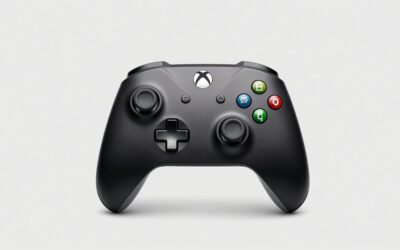
- Top Pick: Xbox Wireless Gaming Controller | Elite Series 2 | Black | Consoles, PCs, TVs, mobile, and more | Adjustable Thumbsticks | Trigger Locks
- Best Value: GameSir G7 Pro Wired Controller for Xbox Series X|S, Xbox One, Wireless Gamepad for PC&Android with TMR Sticks, Hall Effect Analog Triggers, 1000Hz Polling Rate, 3.5mm Audio Jack – Black
- Premium Choice: GameSir G7 Pro Wireless XBOX Controller,TMR Sticks,Windows,Trigger Stops
For players who want an edge, the best Xbox pro controller models in 2026 add back paddles, hall-effect sticks, adjustable triggers, and premium builds that leave the standard pad behind. Whether you chase competitive wins or just want a controller that lasts for years, a pro pad is a worthwhile upgrade. Below we round up the top Xbox pro controllers and explain which features actually matter.
- What Makes the Best Xbox Pro Controller
- Best Xbox Pro Controller Picks for 2026
- How to Choose the Best Xbox Pro Controller for You
- What to Look For in an Xbox Pro Controller
- Which Pro Controller Feature Matters for You?
- Which One Should You Buy?
- Common Mistakes When Buying a Pro Controller
- Questions Before You Customise
- Where a Pro Controller Actually Helps
- Frequently Asked Questions
- Related Articles
- Related Guides
As an Amazon Associate I earn from qualifying purchases.
As an Amazon Associate we earn from qualifying purchases at no extra cost to you.


🛒 Best Price Today on Amazon
Prime members get fast, free shipping on everything above, plus member-only deals. New members get a 30-day free trial — cancel anytime.
What Makes the Best Xbox Pro Controller
A true Xbox pro controller is defined by four features: remappable back paddles for keeping your thumbs on the sticks, hall-effect or high-durability sticks that resist drift, trigger stops for faster shots, and a premium build that survives heavy use. Official licensing is mandatory so the pad is not disabled by firmware updates. We also weighed onboard profile switching and companion software, since the ability to tune a controller to each game is a hallmark of the pro tier.
Best Xbox Pro Controller Picks for 2026
These pro controllers combine tournament-grade features with reliable builds. Each is officially licensed and was tested for stick accuracy, paddle feel, and durability.
| Product | Best For | Standout Feature | Rating |
|---|---|---|---|
| Xbox Elite Series 2 | Premium all-around pro play | Adjustable-tension sticks and paddles | |
| PowerA Fusion Pro 4 | Best value pro pad | Four paddles at a lower price | |
| Victrix Gambit | Competitive low latency | Fastest wired response | |
| Turtle Beach Stealth Ultra | On-pad customization | Built-in control display | |
| GameSir G7 Pro | Drift-resistant precision | Hall-effect sticks and triggers |
Xbox Elite Series 2: The Benchmark Xbox Pro Controller
Microsoft’s own Elite Series 2 remains the reference pro pad, with adjustable-tension thumbsticks, four paddles, interchangeable components, and onboard profiles. Its heft and build feel genuinely premium, and deep software tuning suits any genre. It costs the most, but it is the complete package. See how rivals stack up in our pro controller comparison.
PowerA Fusion Pro 4 for Value
The Fusion Pro 4 undercuts the Elite while still offering four mappable paddles, swappable sticks, and trigger locks. For players who want pro features without the flagship price, it is the smartest buy on this list. Full licensing keeps it safe from firmware bricking. We detail budget-friendly picks in our affordable controller guide.
Victrix Gambit for Competitive Speed
The Victrix Gambit is engineered for low input latency over a wired connection, making it a favorite for shooters and fighting games. Rear buttons, swappable D-pads, and a lightweight shell round out a pad built purely for winning. It is the choice for esports-minded players. Our esports gear roundup covers more tournament equipment.
Turtle Beach Stealth Ultra for On-Pad Tuning
The Stealth Ultra puts a small display on the controller itself, letting you remap inputs and adjust settings without an app. Combined with paddles and a solid wireless link, it is a versatile pro option for tinkerers. It is especially handy for players who switch games often. See related gear in our Xbox accessories roundup.
GameSir G7 Pro for Drift Resistance
The G7 Pro brings hall-effect sticks and triggers to the pro tier, eliminating the drift that eventually plagues traditional pads. Paddles and remapping software make it a strong, durable competitor at a reasonable price. It is ideal for players who keep controllers for years. Learn why hall-effect matters in our stick technology explainer.
How to Choose the Best Xbox Pro Controller for You
Match features to your play style and budget. Competitive shooter fans should prioritize low-latency wired options with paddles and trigger stops, while all-genre players benefit from the Elite Series 2’s adjustable tension and deep profiles. If drift is your main worry, a hall-effect pad like the G7 Pro is the durable pick. Confirm official Xbox licensing on any purchase so a future firmware update cannot disable your investment.
What to Look For in an Xbox Pro Controller
Stick Sensor Type
Most standard pads use potentiometer sticks, which rely on a contact that wears and can produce drift over time. Hall-effect sticks measure position with magnets and have no contact to wear, which is why drift resistance is the selling point of the GameSir G7 Pro. The trade-off is that some Hall designs need more careful calibration, so read how the manufacturer handles deadzones.
Back Paddles and Profiles
Paddles let you trigger face-button actions without lifting a thumb off the right stick. Look at how many you get, whether they can be reshaped or removed, and whether profiles are stored on the controller. The Xbox Elite Series 2 stores up to three custom profiles on the pad and switches between them using a profile button, according to Microsoft’s product page.
Triggers and Tension
Hair-trigger locks shorten travel so a shot registers sooner. The Elite Series 2 provides three-position trigger locks, and Microsoft lists three thumbstick tension settings adjusted with an included tool. Competitive shooter players tend to value short travel, while racing fans often prefer full pull for throttle control.
Battery, Wired Use and Audio
Microsoft rates the Elite Series 2 at up to 40 hours per charge, noting that real life varies with accessories and usage. Controllers aimed at tournament play, such as the Victrix Gambit, tend to focus on wired speed. Several models, including the Elite Series 2, include a 3.5 mm headset jack. The Turtle Beach Stealth Ultra builds in on-pad tuning, so confirm its audio and connection features on the listing.
Which Pro Controller Feature Matters for You?
| Feature | Best for | Trade-off |
|---|---|---|
| Back paddles | Shooters and action games | Takes practice and can cause accidental presses |
| Hall-effect sticks | Long-term durability | May need calibration |
| Trigger locks | Fast-firing play | Less analogue range |
| Onboard profiles | Switching between games | More menus to learn |
| Wired mode | Competitive consistency | Cable drag and tethering |
Which One Should You Buy?
| If you… | Choose… |
|---|---|
| Want the most complete customisation and onboard profiles | Xbox Elite Series 2 |
| Want pro features without the premium build | PowerA Fusion Pro 4 |
| Play competitively and favour a wired, speed-oriented design | Victrix Gambit |
| Want audio and tuning controls built in | Turtle Beach Stealth Ultra |
| Are worried about stick drift | GameSir G7 Pro |
Common Mistakes When Buying a Pro Controller
- Paying for paddles you will never remap. Casual players often leave them unused.
- Ignoring hand size. Wider grips and long paddles feel different to different hands.
- Expecting drift immunity from every model. Only sensor type and build quality reduce it.
- Skipping the companion app. Many features, such as profile editing, need the Xbox Accessories app or the maker’s own software.
- Forgetting about carry cases and spare parts. Removable parts are easy to lose.
Questions Before You Customise
Should I change every setting at once?
No. Adjust one setting, such as trigger travel, and play a few sessions before touching the next so you can tell which change helped.
Do paddles replace face buttons?
They duplicate them. Mapping jump or crouch to a paddle lets your thumb stay on the right stick, but the original button still works unless you disable it.
Is a pro controller useful for single-player games?
It can be, mainly for comfort and fine control, but the gains are smaller than in fast multiplayer shooters.
Where a Pro Controller Actually Helps
A pro pad makes the biggest difference in three situations: fast shooters where you need to jump or crouch without lifting your thumb, competitive modes where trigger travel affects reaction time, and long sessions where comfort and a reliable stick matter. In slower games the standard controller often does the job.
Match Features to Your Games
| Game type | Features that help |
|---|---|
| First-person shooters | Paddles, short trigger travel, adjustable stick tension |
| Racing | Full trigger travel, comfortable grips |
| Fighting games | Responsive D-pad, button layout |
| Action and adventure | Comfort, battery life, profiles |
Setting Up Your First Profile
- Install the maker’s companion app on your console or PC.
- Start with the factory layout and play a session.
- Map one or two actions you use constantly to the paddles.
- Adjust stick deadzones until small movements register without drift.
- Save the profile and make a second one for a different game type.
PC Use
Pro Xbox controllers generally work on a Windows PC, and Microsoft’s Elite Series 2 can be configured through the Xbox Accessories app on Windows. Third-party pads may use their own software, so confirm what each one requires.
Looking After Your Investment
Store removable paddles and sticks in the supplied case, and avoid pulling on thumbstick tops when swapping. Clean the shell with a lightly damp microfibre cloth. A controller that lasts years is only a bargain if you keep it protected from drops and spills.
Frequently Asked Questions
Are Xbox pro controllers worth the extra money?
For competitive players and enthusiasts, yes. Back paddles keep your thumbs on the sticks during critical moments, trigger stops speed up firing, and premium builds last longer. Casual players may not need every feature, but even they benefit from drift-resistant sticks and better ergonomics. The value depends on how seriously and how often you play.
Do Xbox pro controllers work on PC?
Yes. Every officially licensed Xbox pro controller works on Windows over USB, the Xbox Wireless Adapter, or Bluetooth depending on the model. Companion apps for remapping usually run on PC as well, letting you build profiles there. This dual compatibility makes a pro pad a strong single purchase for players who game on both console and PC.
What are back paddles used for on a pro controller?
Back paddles are extra buttons behind the controller that you map to actions like jumping, reloading, or sprinting. Because you press them with your middle or ring fingers, your thumbs never leave the sticks, so you keep full aim and movement control during those actions. This is a major competitive advantage in fast-paced shooters and action games.
Do pro controllers prevent stick drift?
Only those with hall-effect sticks truly resist drift, since they use magnetic sensing instead of physical contacts that wear down. Pads with traditional potentiometer sticks, including some premium models, can still develop drift over time. If long-term drift resistance is a priority, specifically choose a pro controller that advertises hall-effect thumbsticks.