🛒 Best Price Today on Amazon
Prime members get fast, free shipping on everything above, plus member-only deals. New members get a 30-day free trial — cancel anytime.
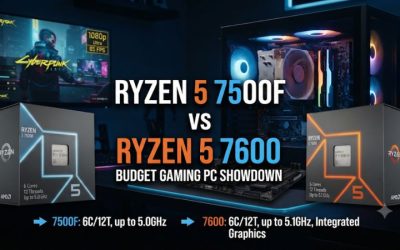
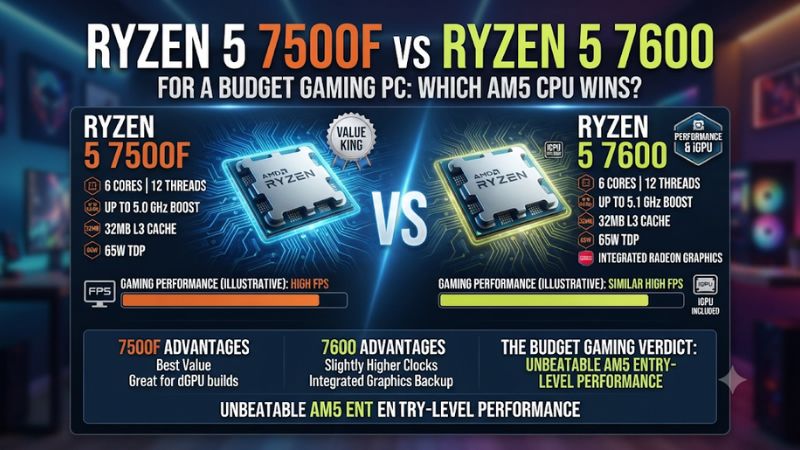
Buy the Ryzen 5 7500F if you already have a graphics card and it costs meaningfully less with a cooler. Choose the Ryzen 5 7600 when the price gap is small or you want integrated graphics for setup and troubleshooting. This Ryzen 5 7500F vs Ryzen 5 7600 for a budget gaming PC comparison shows where the differences matter.
Which CPU makes more sense for a budget AM5 build?
The Ryzen 5 7500F is the value choice when its delivered price leaves real room elsewhere in a build that already includes a graphics card. The Ryzen 5 7600 is easier to buy at a small premium because it has basic integrated graphics and slightly higher clock specifications. Both can anchor essentially the same class of gaming PC.
| Feature | Ryzen 5 7500F | Ryzen 5 7600 |
|---|---|---|
| CPU architecture | Zen 4 | Zen 4 |
| Cores and threads | 6 cores, 12 threads | 6 cores, 12 threads |
| Base and maximum boost | 3.7 GHz and up to 5.0 GHz | 3.8 GHz and up to 5.1 GHz |
| L3 cache | 32 MB | 32 MB |
| Default TDP | 65 W | 65 W |
| Socket and memory | AM5 and DDR5 | AM5 and DDR5 |
| Integrated graphics | Discrete card required | Basic AMD Radeon graphics |
| Stock cooler | AMD lists Wraith Stealth for its boxed configuration. Confirm the actual listing. | Wraith Stealth with the standard boxed CPU |
Choose the 7500F when the savings buy something useful
Start with the full amount you will pay to get the CPU running. Add a compatible cooler if the seller supplies a bare processor, and account for shipping, taxes, and any difference in return coverage. A low headline price may reflect a tray unit, overseas shipment, or a listing without the accessories of a retail package.
If a meaningful saving remains, look at where it can improve the system. A better GPU tier can raise graphics performance in demanding games.
A matched DDR5 pair can prevent a single-module compromise, and a larger SSD can make it easier to keep the games you actually play installed. Decide which item the savings will buy before prioritizing a small difference in processor clocks.
This choice is especially simple for someone reusing a known working discrete GPU. You can mount the card from the first boot and avoid needing an alternative display device.
If the graphics card will arrive later, the 7500F cannot display through the motherboard while you wait. Arrange the build order accordingly.
Choose the 7600 when you value a fallback display
The Ryzen 5 7600 can drive a display from a compatible motherboard output. Its small integrated Radeon GPU is useful for installing the operating system, checking UEFI, and isolating problems with your graphics card.
For the gaming comparison here, plan on a discrete card with either chip. The 7600’s graphics feature earns its keep through convenience rather than providing the graphics performance of an AM5 gaming APU.
A fallback display can be valuable even after the system is running. If a graphics card develops a fault, you can connect the monitor to the motherboard where supported and boot the machine for basic work. That can help you distinguish a card, cable, output, or PCIe seating problem from a system that cannot start at all.
A local boxed 7600 can also make sense for a first build if the seller provides clearer returns and includes the cooler. Compare the actual listings.
A 7600 sold as a bare tray unit may offer a different bundle or process, and a legitimately boxed 7500F may include a Wraith Stealth. Ask for details if photographs and written descriptions disagree.
How different are the two CPUs in games?
Both are six-core Zen 4 parts with the same L3 cache capacity. The 7600 has a 100 MHz higher published maximum boost, but the other parts of the build, game engine, and settings influence the observed gap. A clock specification is a maximum under suitable conditions, so it cannot establish a percentage difference by itself.
Use matched benchmarks to estimate the gaming difference
TechSpot tested both processors on the same DDR5-6000 platform with a GeForce RTX 5090. Its 12-game comparison showed the 7600 about 2% ahead of the 7500F on average. In Rainbow Six Siege X the two were closely grouped, and their average results in Space Marine 2 were also close within a group of budget Zen 4 chips.
The fast test GPU helps reveal differences in the CPU. In a budget build with a much slower graphics card and heavier quality settings, some of that difference can disappear behind the GPU limit. This is a reason to read the test conditions and inspect data for the titles you play, especially if you use a lower competitive preset.
A small suite average does not guarantee that every title follows the same ranking. Look for slow-frame results and stable measurement conditions.
Two processors can have close averages while one performs better in a particular demanding scene. When the measured differences are modest and inconsistent, the cheaper or more practical package can be the better purchase.
Match your choice to resolution, settings, and refresh rate
At 1080p with low competitive settings, a sufficiently fast GPU can finish its work quickly enough to expose what the CPU can prepare. At higher render resolution or with demanding effects, graphics work can take more of the frame budget.
A 1440p monitor does not guarantee that the GPU is the limit. Upscaling, graphics settings, and the game all change the balance.
Consider the target frame rate as well. At 144 FPS, a frame takes roughly 6.94 milliseconds.
At 240 FPS, the allowance is about 4.17 milliseconds. If the games you play routinely exceed your chosen cap on either CPU, a small uncapped difference is unlikely to change everyday play. If busy moments miss your target, inspect those scenes specifically.
The same clock difference can matter differently in an esports replay, a crowded city, and a heavy rendering workload. Match at least one benchmark to your settings and workload. For a sensible budget build, spend first on whichever component changes the result at the resolution and cap you intend to use.
Account for background work and frame-time consistency
A browser, voice chat client, recording application, or Windows update can alter the state of a budget gaming PC. The 7500F and 7600 have the same core and thread count. The 7600’s higher clock ceiling supplies only a modest specification difference, and neither gains extra cores for background work.
If you stream while playing, include the encoder and game settings in the comparison. A hardware encoder on the graphics card can move much of the encoding work off the CPU, but the streaming application still needs resources.
A CPU-based encoder shares more of the processor. Look for evidence that reflects the workflow you will use.
A meaningful test should include frame times in a demanding repeatable section. Compare average FPS and a slow-frame metric calculated the same way.
An interrupted run or a first shader compilation can exaggerate differences that have little to do with these two chips. Repeat the scene before attributing a stutter to the CPU model.
What does each processor actually cost to build around?
An AM5 processor price makes sense only as part of the package. Use the same board, RAM, and GPU when comparing the CPU choices unless the savings let you purchase a demonstrably better part. Both chips require DDR5 and a compatible AM5 motherboard.
Add the cooler and buying terms to the processor price
AMD lists a Wraith Stealth cooler for the boxed forms of both processors. A seller that lists a tray unit, pulled chip, or processor-only package may supply no cooler. Set aside enough for a compatible cooler and any thermal paste or mounting parts you need, then compare the finished prices.
A hypothetical example makes the difference easier to see. If the 7500F costs $125 delivered and needs a $25 cooler, its starting cost is $150.
A $155 boxed 7600 with a usable cooler is only $5 more in that comparison. If the 7500F instead comes with a cooler and the same practical return terms, its $30 saving is much more relevant.
The stock cooler can suit a basic build when supplied and used with appropriate airflow. Fan noise and temperature will also depend on the case and room.
If you plan to buy a tower cooler for quieter operation with either CPU, add it to both totals. This keeps a bundled accessory from distorting the comparison when you would never use it.
Check motherboard and DDR5 compatibility once
Confirm the exact board model and its CPU support list. Chipset labels tell you the platform family, while the board vendor’s documentation tells you which BIOS supports the exact processor. If the board comes from older stock, verify whether it already has appropriate firmware or supports a documented update path.
Use a matched two-module DDR5 kit and install it in the recommended slots. A stable baseline is more useful than selecting the fastest advertised memory setting on the first boot. Verify that the PC recognizes the full capacity and both modules before applying a supported memory profile.
Pay for board features you will use. Look at the number of M.2 slots, wireless support, case headers, and USB ports.
For the 7600, confirm that the board exposes the display outputs you need for its integrated graphics. For the 7500F, those connectors will not substitute for a discrete graphics card.
Compare service and upgrade scenarios on equal terms
A lower seller price can come with import fees, a shorter return period, or a tray warranty administered by the seller. Check who handles a dead-on-arrival processor and the practical cost of sending it back. With a small checkout difference, clear service can be more valuable than a small CPU discount.
Both CPUs put you on AM5, so a future upgrade depends largely on the motherboard’s support and cooling. Choose a board and case that fit the system you can realistically build later.
The 7600’s graphics fallback can be convenient when swapping or selling a GPU. The 7500F may be cheaper to buy today if a fast upgrade is already part of the plan.
If you buy used, ask whether the CPU was tested in a compatible board and what accessories come with it. Check that the seller can identify the exact model, and verify the CPU name after installation. A used bundle can be a good comparison only when you can price its board, memory, cooler, and support on a consistent basis.
What should you choose for your actual build?
The Ryzen 5 7500F and 7600 can serve the same basic gaming targets. The best tie-breaker is the cost you pay for a working PC and whether the integrated graphics have practical value to you.
Reuse a discrete card or build in stages
If you have a working card already, the 7500F can replace the CPU and platform without requiring another display device. Connect the monitor to the discrete card and verify its power connections. If the system has no video, check the card, cable, and board diagnostics rather than moving the cable to an inactive motherboard port.
If you are buying parts in stages, the 7600 can let you check memory, storage, and CPU operation before the gaming card arrives. Once the card is installed, connect the main gaming display to the card and verify that the game is using it. The integrated graphics remain useful for troubleshooting if you later need them.
For a first boot, give the board its documented time for memory training and use its status indicators if available. Both processors can go through this process on AM5. If the system does not reach UEFI, verify the processor’s BIOS support and RAM placement with a minimal configuration before replacing hardware.
Apply a simple decision checklist
- Choose the 7500F if the complete package is meaningfully cheaper and a working discrete graphics card is part of the first boot.
- Choose the 7600 if the cooler and service terms shrink the price difference or if being able to display through the motherboard would help.
- Check the same parts for both builds so the CPU decision is based on real differences in cost, compatibility, or the games you intend to run.
- Recheck the gaming target if spending the difference elsewhere moves the system to a better GPU or avoids a single-module memory setup.
For a buyer already choosing a midrange GPU, keeping the same card with either chip can be reasonable. If spending more on the CPU forces you to drop to a slower GPU, compare both complete systems at your real settings. The system with the better graphics card may deliver better results even if its CPU scores a little lower in a high-end benchmark.
For a buyer building one general-purpose PC, the 7600 can provide useful flexibility beyond game performance. If the card is delayed or away for service, basic display functionality can keep the system usable. Decide how likely you are to use it and price that convenience alongside the real cost gap.
Verify the complete system before judging performance
After assembly, check the exact CPU, memory configuration, and graphics connection. Verify that the cooler fan is connected and that temperatures remain reasonable during normal use. Install the appropriate platform and graphics software so the baseline is representative.
Run the same repeatable game after shaders have finished compiling. Compare uncapped and normal playing behavior only when you know which is which. If your goal was to build a smoother PC, record the demanding scene and cap that matter to you, rather than expecting a specific benchmark number from another setup.
Save your actual part costs for the comparison. A good outcome is a stable system whose games run as expected and whose key parts fit the budget. The small specification gap between the CPUs should rarely decide the build independently of the graphics card, cooler, and service terms.
Which everyday situations change the value of the price gap?
The savings on one CPU are useful at the point they pay for an identifiable improvement. They are less persuasive if the price gaps reflect different packaging, uncertain inventory, or features you may need while setting up the PC.
Price the board, CPU, and memory as a single transaction
A bundled 7600 can cost more on the CPU line and less for the complete build. If the bundle includes the exact DDR5 kit and board you would choose, compare the package total with the separate parts for the 7500F. A lower processor price alone says little when the other components are discounted together.
Check what you might replace immediately. A motherboard with fewer ports than you need can erase the bundle’s value through add-in cards or an early replacement. A single-module memory kit can leave an unbalanced setup, especially if a compatible matching stick costs more than a pair in the first place.
Look for the part number and version of every component. Use the seller’s included parts list instead of assuming a product photo represents the box you will receive.
Confirm that any needed Wi-Fi antennas, cooler hardware, or board accessories are supplied. A little documentation makes the final comparison more reliable.
Consider how you would handle a component failure
A builder with a spare graphics card can make practical use of the cheaper 7500F without losing much troubleshooting flexibility. The same processor is less convenient in a household where there is no other discrete card to try. If the main card fails, the monitor will have no source through the motherboard.
With a 7600 and a compatible output, you can disconnect a suspected card according to the board or case instructions and check whether the rest of the PC produces a display. That does not conclusively diagnose the card, but it gives you a practical baseline. You can also keep using the machine for basic work while the card is being checked.
Consider how much this matters before paying a premium. An everyday home office and gaming PC can benefit from the fallback more than a secondary gaming machine. On the other hand, when a shop can promptly test components for you, a meaningful CPU discount may still win.
Use a complete-cost threshold instead of a fixed price rule
Write down how much you would actually pay for the backup display, small clock difference, and service terms. If the realized saving on the 7500F exceeds that amount, use it where it helps the system. If the gap is smaller, buy the 7600 and simplify the build.
Recalculate the totals on the day you order. Shipping, a card bundle, or the cost of a bracket can move the result. This is why a dollar recommendation in an old processor comparison can outlive the store prices that originally supported it.
Conclusion
Buy the Ryzen 5 7500F when a working graphics card is already part of the plan and a real saving remains after cooler and delivery costs. Buy the Ryzen 5 7600 when prices are close or when integrated graphics, a boxed cooler, or clearer service terms improve the package. Their gaming performance is close enough that the complete build usually settles the decision.