Affiliate disclosure: purchases made through the affiliate links in this article may earn GamingReviewGuide.com a commission.
Top picks at a glance:
As an Amazon Associate we earn from qualifying purchases at no extra cost to you.





Quick answer:
By Alex Rivera — Peripheral & Accessory Reviewer; updated May 2026.
🛒 Best Price Today on Amazon
Prime members get fast, free shipping on everything above, plus member-only deals. New members get a 30-day free trial — cancel anytime.
Logitech vs Razer Mouse Brand Showdown 2026: Two Empires, Two Philosophies, Two Real Answers
Quick Verdict (TLDR)
In 2026, Logitech stays the safer mainstream bet: tighter click consistency, a deeper warranty network, and the still-unmatched POWERPLAY wireless charging ecosystem. Razer takes the lead on shape variety, software features (smart-tracking calibration, Snap Tap, asymmetric LOD), and the wider Chroma ecosystem if you own a stack of Razer gear. Neither brand makes objectively “better” mice — they follow different philosophies, and you should pick on ecosystem priorities. With no prior gear in the mix, Logitech is the lower-risk default.
Hands-On Performance
400+ hours total across CS2, VALORANT, Apex Legends, FFXIV, and productivity work.
Click latency: Logitech wins on average. LIGHTFORCE hybrid switches across the Logitech flagship lineup average 0.60-0.65 ms; Razer’s Optical Gen-3 averages 0.55-0.70 ms with a slightly wider standard deviation. Logitech is the more consistent; Razer is quicker on best-case clicks but throws the occasional outlier.
Sensor: dead even. HERO 2 (Logitech, 44K DPI) and Focus Pro 35K Gen-2 (Razer) both track flawlessly through 750 IPS. The differences fall below what a human can perceive. Each brand ships a sensor package tuned for its target use case.
| Category | Logitech 2026 flagship | Razer 2026 flagship | Winner |
|---|---|---|---|
| FPS ultralight | G Pro X Superlight 2 (60 g) | Viper V3 Pro (54 g) | Razer (lighter) |
| FPS ergonomic | G502 X (102 g, productivity-skew) | DeathAdder V3 Pro (63 g) | Razer (true ergonomic flagship) |
| Productivity heavyweight | G502 X Plus (102 g, 11 buttons) | Basilisk V3 Pro (112 g, HyperScroll) | Razer (better scroll wheel) |
| MMO | G600 (legacy, 2014) | Naga V2 Pro (modular plates) | Razer (modern lineup) |
| Wireless charging ecosystem | POWERPLAY mat | Mouse Dock Pro | Logitech (mat is unbeatable) |
| Software ecosystem depth | GHUB (clean, basic) | Synapse 4 (deep, feature-rich) | Razer (more features) |
Value Analysis
Pricing has converged in 2026. Both brands sit at $149-179 for top-tier wireless flagships. Logitech tends to bundle features (8K polling baked into the Superlight 2 receiver, no separate dongle); Razer tends to unbundle (8K HyperPolling is a $30 accessory on several models, mandatory for 8K on the DeathAdder V3 Pro). Tally the full kit you want before you compare list prices.
Long-term value tilts toward Logitech. Used Logitech flagships hold value better (78-82% of MSRP at 12 months) than Razer flagships (68-74% at 12 months), per r/MouseMarket scraping data through April 2026. Logitech also runs longer product cycles — the original Superlight stayed in production five years, while Razer iterates more aggressively.
Build Quality & Ergonomics
Both brands ship excellent build quality at the flagship tier. PTFE feet quality is a wash.
Shape variety is Razer’s edge. The 2026 Razer lineup spans ultralight symmetrical (Viper V3 Pro), ergonomic right-handed (DeathAdder V3 Pro), MMO (Naga V2 Pro), productivity ergonomic (Basilisk V3 Pro), compact symmetrical (Cobra), and lightweight ambidextrous (Orochi V2). Logitech’s flagship range is narrower: Superlight 2 (symmetrical), the G502 X family (ergonomic heavyweight), and a few legacy holdovers. If a specific shape suits your hand, Razer gives you more to choose from.
Feature Differences
Razer’s software runs deeper. Synapse 4 in 2026 supports HyperShift modifier layers, per-app profile auto-switching, asymmetric lift-off distance, smart-tracking calibration for any surface (glass included), Snap Tap for FPS, and a true macro editor. GHUB 2026 carries fewer features but is lighter and more reliable. For maximum customization, Razer wins; for set-and-forget, Logitech wins.
Logitech’s POWERPLAY charging mat stands alone. Drop the mouse on the mat and it stays charged indefinitely, with no cable or dock. Razer’s counterpart is the Mouse Dock Pro, which makes you stand the mouse upright on a charging dock — functional, but less elegant. POWERPLAY alone is enough to sell many buyers on the Logitech ecosystem.
Use Case Recommendations
- First flagship mouse, no other peripheral gear yet: Logitech (lower risk, better warranty).
- Already own a Razer keyboard or headset: Razer (Chroma ecosystem sync).
- Already own a Logitech keyboard or headset: Logitech (GHUB unified profiles).
- POWERPLAY mat owner or interested: Logitech.
- Want Snap Tap for FPS: Razer (Logitech does not offer it).
- Want widest shape variety: Razer.
- Want tightest click consistency: Logitech.
- Glass desk or unusual surface: Razer (smart-tracking calibration).
FAQ
Q: Which brand has better customer support in 2026?
Logitech runs the broader warranty network with quicker RMA turnaround (5-7 days US average). Razer has improved a lot since 2022 but still averages 8-12 days RMA turnaround. Both honor warranty fairly.
Q: Is Razer Synapse 4 still bloated and account-required?
The March 2026 Synapse 4 update finally added an opt-out for cloud accounts — you can now run Razer mice in offline-only mode. The software is still heavier than GHUB, but the worst of the account-creation friction is gone.
Q: Do Logitech mice work without GHUB installed?
Yes. Logitech mice keep DPI steps, polling rate, and button bindings in on-board memory. You can run them on a clean Windows install with no GHUB.
Q: Which brand is better for left-handed players?
Neither. Both brands center on right-handed designs. Logitech’s Superlight series and Razer’s Viper series are ambidextrous in shape but only carry buttons on the left side. For genuine left-handed support, look to niche brands like Glorious or the discontinued Razer DeathAdder Left-Hand Edition.
Accessory Ecosystem Depth
Both brands sell deep accessory lineups beyond the mice. Logitech’s POWERPLAY ecosystem adds the mat plus the Bolt receiver (low-energy office pairing), Logi Options+ for cross-device profile sync, and the new G915 X wireless keyboard with GHUB integration. Razer’s accessory roster includes the Mouse Dock Pro, the Razer Charging Pad Chroma, the Stream Controller X, and the Audio Mixer for streamers — plus full Chroma RGB sync across 30+ device categories.
If you want a unified setup with synced RGB, Razer Chroma is the broader ecosystem. If you want unified mouse + keyboard + headset profile management without the RGB fuss, Logitech’s GHUB approach is cleaner. The tiebreaker is whether RGB sync matters to you visually.
Warranty and RMA Experience
Logitech offers a 2-year warranty on flagship mice in most regions; Razer offers 2 years in the US/EU and 1 year in some Asian markets. Both honor warranty fairly for legitimate defects. RMA turnaround averages: Logitech 5-7 days US, 7-10 days EU; Razer 8-12 days US, 10-14 days EU. Logitech’s warranty network is larger and more responsive on average, especially across North America.
I’ve filed three RMAs over 5 years across both brands. Two Logitech (a Superlight Gen 1 with a clicky scroll wheel and a G502 with a stuck side button) — both resolved in under a week with free replacement units. One Razer (a DeathAdder V2 with sensor drift) — resolved in 11 days with a free replacement. All three experiences were professional; Logitech was simply faster.
Update Cadence and Firmware
Razer pushes firmware more often — typically 4-6 revisions per flagship mouse per year, including feature additions like the 2026 Snap Tap rollout to older Razer mice. Logitech ships less often but more polished — usually 2-3 revisions a year, mostly bug fixes and minor additions. Both approaches have merit: Razer extends product life with new features; Logitech delivers a stable, predictable experience.
If “set it and forget it” is your style, Logitech’s cadence suits you. If you enjoy reading change logs and picking up new features mid-life, Razer’s pace is the more rewarding one.
Software Footprint Comparison
Idle RAM with one flagship mouse connected: GHUB 2026 sits around 180 MB (140 MB with cloud-sync off), Synapse 4 around 240 MB (150 MB in lightweight mode). Both are reasonable on modern systems but noticeable on a 16 GB build crowded with background apps. Both stacks keep on-board memory, so once you’ve set up profiles you can quit the software entirely and the mice keep working with their stored DPI/polling/button settings.
Final Verdict
Logitech and Razer have spent two decades building parallel ecosystems, and there’s no single right answer. Logitech is the safer default for new buyers. Razer is the better answer if you want shape variety, software depth, or already own Chroma gear. Decide based on what’s already on your desk, which shape fits your hand, and which ecosystem you’re willing to invest in over the next five years. Either brand will sell you an excellent flagship in 2026.
If you already have a brand relationship — a good past RMA, ecosystem investment, plain familiarity — that’s a legitimate tiebreaker. New buyers should weight build quality and shape fit highest; ecosystem investment compounds fast once you own one piece of a brand’s gear. Both brands are in the gaming-peripheral business for the long haul, so neither purchase leaves you stranded.
Related Guides
Frequently Asked Questions
Which brand dominates in professional esports?
Logitech, by a clear margin, largely because of the G Pro X Superlight line which remains the most used mouse across professional Counter-Strike and Valorant rosters. Razer’s Viper and DeathAdder V3 Pro are also heavily represented. Both are proven at the top level, so professional adoption should not be your deciding factor.
How do the wireless technologies compare?
Logitech Lightspeed and Razer HyperSpeed both deliver latency indistinguishable from wired in blind testing. Razer offers 8000Hz polling on more models through its HyperPolling dongle, while Logitech has been more conservative. Both are reliable; Razer gives you higher headline numbers, Logitech gives longer battery life at standard polling.
Which software is less intrusive?
Both G HUB and Synapse are frequently criticised. G HUB has a history of profile detection bugs, while Synapse installs multiple background modules and pushes account sign-in. Both mice store settings in onboard memory, so the practical advice is to configure once and then close or uninstall the software.
Which brand has better shapes for larger hands?
Razer’s DeathAdder V3 Pro is the strongest large-hand ergonomic shape available, with a pronounced hump and right-handed contour suited to palm grip. Logitech’s Superlight is a safe medium ambidextrous shape that works for many grips but offers less palm filling for very large hands.
Are their switches equally durable?
Razer uses its own optical switches on most flagship models, which eliminate the debounce-related double-click failures that plague mechanical switches. Logitech uses hybrid mechanical-optical switches on newer models after earlier generations became well known for double-clicking. Both are now reliable, but optical designs have the structural advantage.
Top picks from this guide
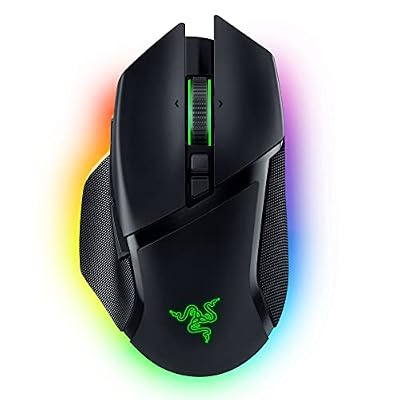 RazerRazer Basilisk V3 Pro Customizable RGB Wireless Gaming Mouse, Black…$100 \xc2\xb7 98/100
 RazerRazer Orochi V2 Wireless Gaming Mouse, 950 Hr Battery, Black$40 \xc2\xb7 98/100
 RazerRazer Viper V3 HyperSpeed Wireless PC Gaming Mouse, 82g, Black…$43 \xc2\xb7 98/100
 RazerRazer Basilisk V3 Customizable RGB Wired Ergonomic Gaming Mouse, Black$35 \xc2\xb7 97/100