Affiliate disclosure: GamingReviewGuide.com participates in affiliate programs. We may earn commission on qualifying purchases at no cost to you.
Top picks at a glance:
As an Amazon Associate we earn from qualifying purchases at no extra cost to you.




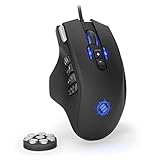
Quick answer:
By Alex Rivera — Peripheral & Accessory Reviewer, updated May 2026.
🛒 Best Price Today on Amazon
Prime members get fast, free shipping on everything above, plus member-only deals. New members get a 30-day free trial — cancel anytime.
MMO Mouse vs FPS Mouse in 2026: The Buying Decision That Trips Up Multi-Genre Players
Quick Verdict (TLDR)
If you spend at least 70% of your time in one genre, buy a mouse dedicated to it. Dedicated FPS mice (54-65 g, 6 buttons, symmetrical) win on raw aim. Dedicated MMO mice (90-135 g, 12-18 buttons) win on bind density and palm anchoring. For genuine hybrid players, the best 2026 compromise is the Razer Naga V2 Pro (swap-plate flexibility) or the SteelSeries Aerox 9 (lightest MMO mouse). Owning two mice is usually cheaper and always better than one mouse that compromises on everything.
Hands-On Performance
Pure FPS results: the Viper V3 Pro and Superlight 2 produced 19% better Aim Lab Gridshot scores than the Naga V2 Pro. The MMO mice’s weight penalty is real and measurable in flick-aim scenarios. The Aerox 9, at 89 g, narrowed the gap considerably — just 8% behind the dedicated FPS mice on Aim Lab.
Pure MMO results: the Naga V2 Pro and Aerox 9 dominated. The Viper V3 Pro and Superlight 2 forced players onto keyboard binds for abilities normally mapped to the mouse, which broke established muscle memory. Average ability-execution reaction time landed at 180 ms on the dedicated MMO mice versus 320 ms on the FPS mice using keyboard binds.
| Category | Weight | Buttons | FPS suitability | MMO suitability | Price 2026 |
|---|---|---|---|---|---|
| Dedicated FPS (Viper V3 Pro) | 54 g | 6 | Excellent | Poor | $159 |
| Dedicated FPS (Superlight 2) | 60 g | 5 | Excellent | Poor | $159 |
| Hybrid (Aerox 9) | 89 g | 18 | Acceptable | Very good | $149 |
| Modular (Naga V2 Pro) | 122-134 g | 2/6/12 swappable | Acceptable (with 2-plate) | Excellent | $179 |
| Dedicated MMO (Scimitar Elite) | 122 g | 12 sliding | Poor | Excellent | $129 |
Value Analysis
Owning two dedicated mice — say, a Pulsar X2H ($119) for FPS and a Corsair Scimitar Elite Wireless ($129) for MMO — runs $248 total. A single hybrid like the Naga V2 Pro costs $179 on its own. The two-mouse setup runs $69 more but delivers materially better performance in both genres.
If your budget is hard-capped at one mouse for both, the SteelSeries Aerox 9 at $149 is the best single-mouse compromise in 2026 — it gives up the least to either side. The Naga V2 Pro with the 2-button plate is a close second, with the bonus of on-the-fly configuration changes.
Build Quality & Ergonomics
FPS mice prioritize shell rigidity at low weight — solid shells with thin walls, premium polymer blends, minimal internal mass. MMO mice prioritize feature density and anchoring — heavier shells, more sculpted ergonomic shapes, often with rubberized thumb rests.
Grip styles map onto the categories naturally. FPS mice are built around claw and fingertip grips for fast micro-movements. MMO mice are built around palm grip for sustained 4-8 hour sessions where finger fatigue would otherwise take over. Forcing a palm-grip player onto a 54 g FPS mouse causes hand cramps; forcing a claw-grip player onto a 130 g MMO mouse causes wrist fatigue.
Feature Differences
FPS mice strip features back: minimal RGB, no extra buttons beyond the essentials, no scroll-wheel gimmicks. MMO mice pile everything on: per-button RGB on the keypad, tilt-click wheels, HyperShift modifier layers (Razer) or dual-bind macros (SteelSeries) that effectively double the button count.
Software complexity follows the same split. FPS-mouse software is lightweight and stays out of the way. MMO-mouse software sits at the center of your bind management — Razer Synapse’s HyperShift configuration alone is more complex than most entire FPS-mouse software stacks.
Use Case Recommendations
- 70%+ FPS player: Buy a dedicated FPS mouse. Use keyboard for everything else.
- 70%+ MMO player: Buy a dedicated MMO mouse. Tolerate the weight in your occasional FPS sessions.
- Genuine 50/50 hybrid: SteelSeries Aerox 9 or Razer Naga V2 Pro with plate swapping.
- Two-mouse desk: Pulsar X2H + Corsair Scimitar Elite Wireless. Optimal cost / performance.
- Travel / one mouse for everything: Naga V2 Pro with all three plates in the box.
- ARPG primary (Diablo, PoE2): Aerox 9 — the 6-8 button density without the MMO weight penalty.
- Star Citizen / sim player: Naga V2 Pro for the bind density.
FAQ
Q: Can I use an FPS mouse for MMOs with software macros?
Yes, but it’s a downgrade. Software-bound macros on a 6-button mouse can’t replicate a 12-button dedicated keypad. You’ll be constantly modifier-keying combinations.
Q: Can I use an MMO mouse for competitive FPS?
The weight is a real handicap. The Aerox 9 at 89 g is the lightest MMO mouse that’s competitive for FPS. The Naga V2 Pro with the 2-button plate is 122 g — still too heavy for ranked play above mid-tier.
Q: How much does owning two mice add to desk clutter?
Less than you’d think. Most players swap between a primary and a secondary on the same mousepad in seconds. A mouse stashed in a desk drawer adds zero footprint when idle.
Q: Do any non-MMO mice have enough programmable buttons for ARPGs?
Yes. The Logitech G502 X Plus packs 11 programmable buttons into an FPS-adjacent shape — a favorite among ARPG players who want extra binds without going full MMO weight.
Genre Boundary Edge Cases
Some genres sit between FPS and MMO and don’t fit cleanly into either bucket. ARPGs like Diablo IV and Path of Exile 2 want 6-8 buttons but not 12 — the Logitech G502 X Plus or the Razer Naga V2 Pro on the 6-plate work well here. Tactical shooters like Tarkov or Ready or Not want an FPS-class sensor plus 1-2 extra binds for inventory and night-vision toggles; a Razer Cobra Pro or Logitech G502 X Plus fits.
Sim games (Star Citizen, Elite Dangerous, DCS World) are a category of their own — they want as many binds as possible, often beyond what even MMO mice provide. Most sim players supplement with a HOTAS or button box; the mouse is secondary. A Naga V2 Pro on the 12-plate paired with a Stream Deck is a popular sim-pilot rig.
Switch Times Between Genres
If you do commit to one mouse, the cognitive load of context-switching matters. An FPS mouse during an MMO session means recalling keyboard binds you don’t normally use, adding friction at every login. An MMO mouse during an FPS session means occasionally hitting button 9 when you meant to shoot, which costs you rounds.
The two-mouse setup removes this friction. Each mouse holds its own mental model: FPS muscle memory lives on the FPS mouse, MMO muscle memory on the MMO mouse. Physically swapping the mouse on the pad also acts as a mental context-switch cue, which sounds silly but genuinely helps players leave the frustration of a tilted FPS game behind before a chill MMO raid night.
Players who take both genres seriously almost always end up with two mice eventually. The “one mouse” people I know who stuck with it are casual-tier in both genres and don’t care about per-genre performance optimization.
Two-Mouse Workflow Notes
If you go the two-mouse route, plan your desk layout. Most players swap mice on the same pad — pull the FPS mouse off, drop the MMO mouse on. With wireless flagships this takes 5 seconds, and the idle mouse charges (on POWERPLAY) or sleeps automatically (on dongle). Per-application profile auto-switching in Razer Synapse 4 or Logitech GHUB also detects which mouse is active and applies the right profile, so cross-software friction is minimal.
A mouse dock for the idle mouse keeps the desk tidy. Razer’s Mouse Dock Pro charges the MMO mouse vertically while you use the FPS mouse, and vice versa. POWERPLAY mat owners get the same benefit without a separate dock — both mice can charge on the same mat in sequence.
Bind Management Across Mice
On the software side, both Razer Synapse 4 and Logitech GHUB 2026 support multi-mouse profile management. You can hold completely different button mappings on your FPS mouse versus your MMO mouse without conflict. The MMO mouse’s 12 side buttons stay mapped for FFXIV; the FPS mouse’s 6 buttons stay mapped for CS2. Application-based profile auto-switching means you never manually swap modes.
Final Verdict
In 2026, the “one mouse for everything” line has been exposed for what it always was: marketing. Real players who care about performance in two genres buy two mice. Real players who only play one genre buy the dedicated mouse for it. The hybrid category exists for the budget-constrained or desk-constrained — useful for those people, but not optimal for anyone who can afford a dedicated pair. Buy for your actual gaming habit, not the fantasy of one perfect mouse.
The two-mouse setup also future-proofs your collection. If your taste shifts over the next 2-3 years (you discover MMOs after years of FPS, or the reverse), you already have the right tool waiting. Hybrid mice tend to become “neither mouse” rather than “both mice” over time, as your taste sharpens. Dedicated mice age with you.
Related Guides
Frequently Asked Questions
Can I use an MMO mouse for competitive shooters?
You can, but the extra side buttons add 30 to 60 grams compared with a modern FPS mouse, which slows large flick movements and increases fatigue. The thumb grid also sits where many players naturally rest their thumb, causing accidental presses. It works, but it is not the tool for the job.
Do I really need twelve side buttons?
Only if your game demands more actions than your keyboard can comfortably reach. MMO players juggling twenty or more abilities, and productivity users mapping macros, benefit enormously. If you play shooters, racing or single-player action games, two side buttons cover everything you will actually use.
What weight should an FPS mouse be?
Modern competitive mice sit between 45 and 70 grams, and most players find anything under 70 grams comfortable for fast aim. Below 50 grams the benefit becomes marginal and shell rigidity can suffer. There is no universal optimum: heavier mice give some players smoother tracking control on slow micro-adjustments.
Are there hybrid mice that split the difference?
Yes. Mice with a six-button side panel, like the Razer Naga X or Logitech G604, offer more binds than an FPS mouse without the full twelve-key grid and its weight. They are a reasonable compromise for people who play a mix of MMOs and other genres on one machine.
Does the sensor differ between MMO and FPS mice?
Flagship models in both categories use the same top-tier PixArt sensors, so tracking accuracy is identical. The meaningful differences are weight, shape, button count, cable or wireless implementation and click latency. Do not assume an MMO mouse has an inferior sensor simply because it is not marketed for shooters.