🛒 Best Price Today on Amazon
Prime members get fast, free shipping on everything above, plus member-only deals. New members get a 30-day free trial — cancel anytime.

Dell AMD Radeon R5 240 1GB DDR3 DVI/ D-Port Video Card F9P1R 0F9P1R (Renewed)
Included for 'Best Graphics Card for Dell OptiPlex 3020: Top GPU Picks' as a relevant option in this category; details come from the product listing.
View on Amazon
AMD Radeon HD 8570 1GB DDR3 PCIe x16 DVI/ DP Graphics Video Card Dell YT0RH
Included for 'Best Graphics Card for Dell OptiPlex 3020: Top GPU Picks' as a relevant option in this category; details come from the product listing.
View on AmazonChoosing a graphics card for Dell OptiPlex 3020 requires more than checking gaming performance. The Mini Tower and Small Form Factor versions use different slot heights and power supplies, so the safest upgrade is a low-power GPU that physically fits, avoids extra power connectors, and matches the system’s limits.
Best Graphics Cards for Dell OptiPlex 3020 Compared
| Graphics Card | Best For | VRAM | Power | Form Factor |
|---|---|---|---|---|
| Radeon RX 6400 Low Profile | Best Overall | 4GB GDDR6 | 53W | Low Profile |
| GeForce GTX 1650 Low Profile | Best NVIDIA Option | 4GB GDDR5 | 75W | Low Profile |
| GeForce GT 1030 GDDR5 | Best Low-Power Upgrade | 2GB GDDR5 | Low Power | Low Profile |
| AMD Radeon R5 240 | Best Compatibility Pick | 1GB | Under 35W | Dell-Supported |
| Intel Arc A310 Low Profile | Best for Media Features | 4GB GDDR6 | 40–75W | Low Profile |
Before buying, identify exactly which OptiPlex 3020 chassis you own. Dell lists a full-height PCIe x16 slot and 290W power supply for the Mini Tower, while the Small Form Factor uses a half-height PCIe x16 slot and 255W PSU. The Micro model does not provide a conventional discrete-GPU expansion slot.
Radeon RX 6400 Low Profile
Best For: Best overall performance-oriented upgrade
The Radeon RX 6400 is one of the most attractive modern GPUs for an older office PC because AMD designed it with a typical board power of only 53 watts and no additional PCIe power connector requirement. Low-profile versions can therefore fit many SFF systems while drawing power directly from the motherboard slot.
It uses 4GB of GDDR6 memory, a 64-bit interface, 768 stream processors, and twelve compute units. Those specifications make it substantially more capable than basic display adapters such as the GT 1030 or R5 240, particularly when the goal is 1080p esports gaming or playing older AAA titles at reduced settings.
Key Features
- 4GB GDDR6 memory
- 53W typical board power
- PCIe slot powered
- 768 stream processors
- Low-profile versions available
- HDMI and DisplayPort support
- DirectX 12 support
What Makes It Different
The RX 6400 provides a useful balance between power consumption and gaming performance. It does not require the six-pin or eight-pin GPU connector that many stronger graphics cards need, which is important because standard OptiPlex 3020 power supplies were not designed around modern high-power gaming GPUs.
One important limitation is the interface. The RX 6400 uses a PCIe 4.0 x4 connection, while an OptiPlex 3020 platform is much older. It can operate in a compatible PCIe slot, but available bandwidth will be lower than on a modern PCIe 4.0 system, so some games may lose performance compared with newer PCs.
AMD recommends a 350W system power supply for the RX 6400, while the OptiPlex 3020 uses 290W in Mini Tower form and 255W in SFF form. That means this upgrade sits outside AMD’s official PSU recommendation even though the GPU itself draws only 53W, so buyers should assess total system power carefully.
Pros
- Strong performance for low power
- 4GB GDDR6 memory
- No auxiliary GPU connector
- Low-profile options available
- Good for esports and older games
Cons
- AMD recommends a 350W PSU
- PCIe x4 interface can be limited on older platforms
- Not ideal for demanding new AAA games
Use Case and Who It’s For
The RX 6400 is best for users who want the strongest practical gaming upgrade without rebuilding the entire OptiPlex platform. It makes the most sense in a carefully verified Mini Tower or SFF configuration where case clearance is confirmed and the user accepts that the stock Dell PSU falls below AMD’s stated recommendation.
GeForce GTX 1650 Low Profile
Best For: Best NVIDIA option
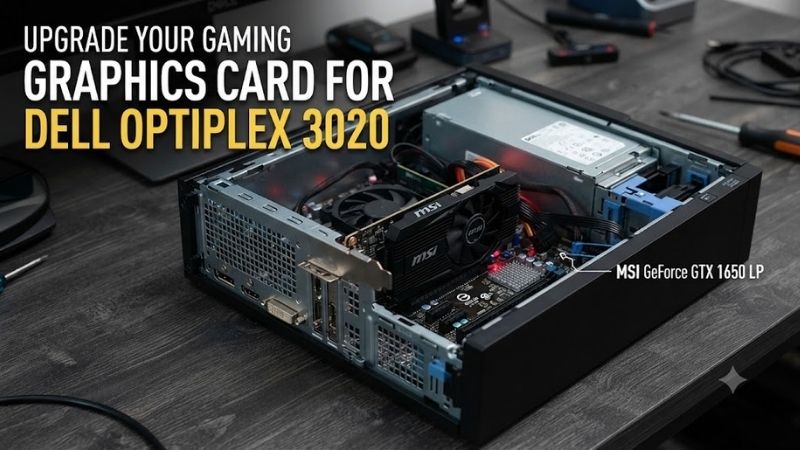
A low-profile GTX 1650 remains one of the most popular upgrade classes for older prebuilt PCs. MSI’s GTX 1650 4GT LP OC uses 4GB of GDDR5, 896 CUDA cores, a 128-bit memory interface, and a PCIe 3.0 x16 connection. The card consumes 75W and fits within a low-profile chassis.
Gigabyte’s low-profile GTX 1650 is approximately 167 mm long and specifically lists no external power connector. That is important for an OptiPlex because the GPU can draw its power through the PCIe slot rather than depending on a six-pin cable that the original Dell power supply may not provide.
Key Features
- 4GB GDDR5
- 896 CUDA cores
- PCIe 3.0 x16
- 75W power consumption
- Low-profile design
- No external power connector on selected models
- HDMI and DisplayPort outputs
What Makes It Different
The GTX 1650 has an advantage over some newer low-end cards because it uses a full x16 PCIe interface on the cited low-profile models. That makes it less sensitive to the limited PCIe generation of an older platform than GPUs that depend on only four PCIe lanes for communication with the CPU.
For 1080p gaming, the GTX 1650 can handle lighter esports titles, older AAA games, and many less demanding releases with sensible settings. The 4GB memory capacity is restrictive by modern standards, but it remains far more practical for gaming than basic 1GB or 2GB office-oriented graphics cards.
The problem is power guidance. MSI and Gigabyte recommend a 300W system PSU for their low-profile GTX 1650 models. Dell lists 290W for the OptiPlex 3020 Mini Tower and only 255W for the SFF, so neither stock configuration technically meets the graphics-card manufacturer’s PSU recommendation.
Pros
- Good 1080p entry-level gaming performance
- 4GB memory
- Full PCIe x16 interface
- Low-profile versions available
- Selected models need no external connector
Cons
- 75W board power
- Recommended PSU exceeds Dell stock PSU ratings
- Aging architecture
- Limited for modern demanding games
Use Case and Who It’s For
Choose the GTX 1650 if you specifically want an NVIDIA GPU and have confirmed the exact card dimensions, bracket type, and power situation. The Mini Tower offers a little more PSU headroom than the SFF, but users who want strict adherence to manufacturer power recommendations should consider a suitable PSU solution or a lower-power GPU.
GeForce GT 1030 GDDR5
Best For: Low-power gaming and display upgrade
The GT 1030 is considerably slower than the GTX 1650 or RX 6400, but its simple design makes it easier to use in older systems. Gigabyte’s low-profile GDDR5 version uses 2GB of memory, a 64-bit bus, 384 CUDA cores, and a compact 150 mm low-profile board design.
The key detail is choosing the GDDR5 version rather than slower DDR4 variants that have appeared under the same GPU name. The GDDR5 model is better suited to lightweight games, emulation, older titles, media playback, and general desktop acceleration when integrated graphics no longer provide the outputs or performance needed.
Key Features
- 2GB GDDR5
- 384 CUDA cores
- Low-profile PCB
- Approximately 150 mm card length
- HDMI 2.0b
- DVI-D
- No high-end cooling requirement
What Makes It Different
The GT 1030 is aimed more at basic graphics acceleration than serious modern gaming. Its relatively modest hardware reduces heat and power demands, which is valuable inside an older OptiPlex chassis where airflow and PSU capacity are much more restricted than in a purpose-built gaming tower.
Gigabyte lists a 300W PSU recommendation even for this model, so the same caution applies to the stock Dell supplies. The card itself is modest, but buyers should not assume that low-profile automatically means officially approved for every SFF computer. PSU guidance and motherboard slot limitations still need checking.
Pros
- Compact low-profile design
- Low heat output
- GDDR5 version performs better than DDR4 variants
- Useful for older games and media
- Easy physical fit in many SFF PCs
Cons
- Only 2GB VRAM
- Weak for current AAA gaming
- Manufacturer recommends 300W PSU
- Easy to confuse with slower DDR4 versions
Use Case and Who It’s For
The GT 1030 is appropriate for users upgrading from Intel integrated graphics who mainly play lighter games such as older esports titles, indie games, emulators, or classic PC releases. It also works as a practical multi-display and media upgrade when maximum gaming performance is less important than simplicity and low heat.
AMD Radeon R5 240
Best For: Safest Dell-supported compatibility option
The Radeon R5 240 is much older and dramatically slower than the modern GPUs above, but it has one major advantage: Dell documented it as a discrete graphics option for the OptiPlex 3020. Dell’s technical material lists the 1GB Radeon R5 240 with maximum power consumption below 35W.
That makes it an interesting choice when compatibility and basic display functionality matter more than gaming speed. Because it was part of the platform’s documented graphics options, there is less uncertainty around the original system design compared with installing a later GPU that Dell never validated on the 3020.
Key Features
- 1GB graphics memory
- Maximum consumption below 35W
- Dell-documented OptiPlex 3020 option
- PCIe interface
- DisplayPort output
- DVI support
What Makes It Different
The R5 240 is not recommended for modern gaming. Its value lies in restoring a system, adding additional display outputs, accelerating older software, or building a very inexpensive legacy gaming machine. It also provides a useful baseline for understanding how conservative Dell’s original graphics configuration was.
Dell documentation also lists the Radeon R7 250 on some OptiPlex 3020 configurations, showing that discrete AMD graphics were part of the platform’s supported design. However, specific card dimensions and configurations vary, so buyers should still match any replacement card to the exact chassis before installation.
Pros
- Officially documented by Dell
- Very low power consumption
- Suitable for basic displays
- Low compatibility risk compared with modern cards
Cons
- Extremely weak for current gaming
- Only 1GB memory
- Outdated architecture
- Poor choice for demanding titles
Use Case and Who It’s For
Choose the R5 240 only when your priorities are compatibility, low power, basic video output, or legacy gaming. Anyone trying to transform an OptiPlex 3020 into a budget gaming PC should generally look toward the RX 6400 or GTX 1650 class instead, provided power and physical compatibility are properly addressed.
Intel Arc A310 Low Profile
Best For: Media encoding and modern display features
Intel’s Arc A310 uses six Xe cores, 4GB of GDDR6 memory, a 64-bit memory interface, and supports AV1 hardware encoding and decoding. Intel lists low-profile A310 power between 40W and 75W, making compact versions potentially attractive for media servers and video workloads.
Its strongest feature is not gaming speed but media capability. Hardware support for H.264, H.265, and AV1 encoding and decoding gives the card value for video conversion, streaming, or a home media machine. Those capabilities are significantly newer than the video engines found in GPUs originally offered with the OptiPlex 3020.
Key Features
- 4GB GDDR6
- Six Xe cores
- AV1 encode and decode
- H.264 and H.265 hardware support
- Low-profile power range of 40–75W
- Modern display outputs
What Makes It Different
Arc GPUs work best on modern platforms with features such as Resizable BAR available and enabled. The OptiPlex 3020 predates Intel Arc by many years, so an A310 can involve more platform uncertainty than an NVIDIA or AMD card from an earlier generation. That makes it a specialist option rather than the safest recommendation.
The card can still be attractive for a media-focused build where AV1 matters, but anyone buying specifically for gaming should prioritize compatibility and driver behavior before raw specifications. An older OEM platform is not the ideal environment for extracting the full capabilities of Intel’s Arc architecture.
Pros
- 4GB GDDR6
- AV1 hardware encoding
- Modern media engine
- Low-profile versions exist
- Relatively low board power
Cons
- Old-platform compatibility is less straightforward
- Not the safest plug-and-play gaming choice
- Performance can depend heavily on platform features
Use Case and Who It’s For
The Arc A310 is best considered for experienced users building a compact media or transcoding machine from an existing OptiPlex 3020. It is less appropriate for someone who simply wants to install a GPU and start gaming without checking firmware, driver support, and platform behavior first.
Mini Tower vs Small Form Factor Compatibility
The Mini Tower is easier to upgrade because Dell provides one full-height PCIe x16 slot and a 290W power supply. The larger chassis also gives more physical room around the card. This makes full-height or low-profile slot-powered GPUs easier to accommodate, although total power consumption must still remain reasonable.
The Small Form Factor uses a half-height PCIe x16 slot and a 255W PSU. That means a low-profile bracket is mandatory, and physical thickness becomes important because neighboring components can restrict dual-slot coolers. SFF owners should measure available space rather than assuming every card labeled low profile will fit.
The Micro version is fundamentally different. Dell’s specification lists only an M.2 expansion position rather than the full PCIe x16 slot available in MT and SFF versions. It should therefore not be treated as a conventional graphics-card upgrade platform.
How to Choose a Graphics Card for Dell OptiPlex 3020
Check the Chassis First
Identify whether the machine is MT, SFF, or Micro before shopping. Mini Tower cards can use a normal full-height bracket, while SFF models require half-height hardware. Buying the right GPU but the wrong physical bracket is one of the easiest ways to end up with an unusable upgrade.
Avoid GPUs Requiring Auxiliary Power
The stock OptiPlex power supply is not intended for powerful gaming cards requiring dedicated six-pin or eight-pin PCIe connectors. Slot-powered cards are therefore much easier to integrate. Even then, total system power and the GPU manufacturer’s recommended PSU rating should still be considered.
Measure Card Thickness
A low-profile label describes height, not necessarily thickness. Some low-profile cards occupy two expansion slots because their heatsinks and fans extend outward. Inspect the motherboard layout and nearby expansion slot before ordering, especially in the tightly packed Small Form Factor chassis.
Consider the CPU Bottleneck
Most OptiPlex 3020 systems use fourth-generation Intel processors. Installing an excessively powerful GPU does not turn the platform into a modern high-end gaming PC because older CPUs, DDR3 memory, PCIe limitations, and platform age can restrict performance in current CPU-heavy games.
Upgrade to an SSD
If the OptiPlex still boots from a mechanical hard drive, installing a SATA SSD can make everyday use feel dramatically faster. It will not increase GPU rendering performance, but Windows startup, game loading, application launching, and file access improve enough that an SSD should accompany most budget gaming conversions.
Use 16GB RAM When Practical
Dell lists support for up to 16GB of DDR3 memory in MT and SFF versions. For an upgraded gaming machine, 16GB is much more practical than the 4GB or 8GB configurations often found in refurbished office systems, particularly when running Windows, launchers, browsers, and games simultaneously.
FAQ
What is the best graphics card for Dell OptiPlex 3020?
The Radeon RX 6400 is one of the strongest low-power options when physical and electrical compatibility are carefully verified. It offers 4GB of GDDR6 and consumes only 53W, but AMD recommends a 350W system PSU, which exceeds the stock 290W MT and 255W SFF supplies.
Can a GTX 1650 run in an OptiPlex 3020?
A low-profile or full-height slot-powered GTX 1650 can physically suit some 3020 configurations, depending on the chassis. However, MSI and Gigabyte specify a 300W recommended PSU, while Dell provides 290W in the MT and 255W in the SFF, so stock systems fall below that recommendation.
Does the OptiPlex 3020 SFF need a low-profile GPU?
Yes. Dell specifies a half-height PCIe x16 expansion slot for the Small Form Factor model. A normal full-height graphics-card bracket will not fit correctly. The Mini Tower uses a full-height x16 slot instead, giving it a wider range of physical graphics-card options.
Can the OptiPlex 3020 Micro use a graphics card?
Not in the conventional internal desktop-GPU sense. Dell’s specifications do not list a full PCIe x16 expansion slot for the Micro chassis, unlike the Mini Tower and SFF models. Users wanting a normal discrete GPU should start with one of the larger OptiPlex 3020 chassis.
Is the Dell OptiPlex 3020 still worth upgrading for gaming?
It can still work as a low-cost machine for esports, indie games, emulation, and older AAA titles when paired with an SSD, sufficient memory, and a sensible low-power GPU. For demanding modern games, however, the fourth-generation Intel platform and restricted power supply make a newer PC a better long-term investment.
Conclusion
The best graphics card for Dell OptiPlex 3020 depends first on chassis and power limits. RX 6400 and GTX 1650 low-profile cards offer the strongest gaming potential, while GT 1030 and R5 240 reduce power demands. Verify slot height, card thickness, PSU guidance, and CPU limitations before buying any GPU for this aging platform.