- Top Pick: WD_BLACK 2TB SN850P NVMe M.2 SSD Officially Licensed Storage Expansion for PS5 Consoles, up to 7,300MB/s, with heatsink – WDBBYV0020BNC-WRSN
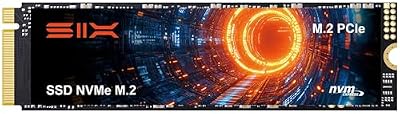
- Best Value: SIX NVME M.2 SSD PCIe 4.0-1TB m.2 2280 ssd, Read UP to 7350MB/s 1TB for Gaming PS5 Memory Storage Expansion with Heatsink, Internal Solid State Hard Drive PCIe gen 4×4 Nvme for Laptop Desktop pc
- Premium Choice: WD_BLACK 1TB SN850P NVMe M.2 SSD Officially Licensed Storage Expansion for PS5 Consoles, up to 7,300MB/s, with heatsink – WDBBYV0010BNC-WRSN
Your PS5’s built-in storage disappears faster than you would expect once a few 100GB blockbusters land on the console, and by 2026 the situation is only tighter. A PCIe Gen 4 M.2 drive dropped into the console’s expansion slot is the cleanest way to reclaim that space without deleting your library, and thankfully the market is now packed with drives that hit the speeds Sony recommends.
- Watch: Best M.2 SSD For PS5 2026 — Video Review
- How to Choose an M.2 SSD for Your PS5
- The Best PS5 M.2 SSDs Reviewed
- Sony’s Requirements for a PS5 Expansion Drive
- Which Drive Suits Which Buyer?
- Installing and Setting Up the Drive
- Common Mistakes When Buying a PS5 SSD
- Capacity Math: How Much Space Will You Really Get?
- Troubleshooting a New Drive
- Gen 4 Versus Gen 5 and the Role of Cache
- Frequently Asked Questions
- Final Thoughts
- Related Articles
The catch is that not every fast NVMe SSD is a good PS5 SSD. Sony asks for sustained sequential reads above 5,500MB/s and, crucially, adequate cooling, which is why a heatsink is no longer optional. Below we break down how to shop for the right drive and review the standout models worth installing this year.
As an Amazon Associate we earn from qualifying purchases at no extra cost to you.



⚡ Save on Your Next PC — Amazon Prime
Prime members get fast free shipping on the systems above, plus early access to Prime Day & Black Friday PC deals. New members get a 30-day free trial.
Watch: Best M.2 SSD For PS5 2026 — Video Review
How to Choose an M.2 SSD for Your PS5
- Read speed: Aim for a rated sequential read of at least 5,500MB/s; drives like the Samsung 990 PRO at 7,450MB/s give you comfortable headroom above Sony’s floor.
- Heatsink: The PS5 slot runs hot, so pick a drive with a low-profile heatsink already fitted, such as the WD_BLACK SN850P or the Bestoss 2TB, rather than a bare board.
- Capacity: 1TB is the sensible entry point, but 2TB is the sweet spot in 2026 given modern install sizes, and most listed drives here offer that tier.
- Form factor: Confirm the drive is a single-sided M.2 2280 module so it physically fits under the console’s expansion cover without fouling the bay.
- Warranty and NAND: Favor TLC NAND and a five-year warranty, which the MOVE SPEED HB7450 and Acer Predator GM7 both back, for long-term endurance under heavy write loads.
The Best PS5 M.2 SSDs Reviewed
WD_BLACK 2TB SN850P
Officially licensed by Sony, the WD_BLACK 2TB SN850P is the closest thing to a plug-and-play answer. Its pre-installed heatsink is tuned specifically for the PS5 bay, and reads up to 7,300MB/s mean load times are indistinguishable from the console’s native storage. If you want zero guesswork, this is the drive to buy.
Samsung 990 PRO 2TB
The Samsung 990 PRO 2TB is the enthusiast pick, topping out at 7,450MB/s and running with excellent efficiency. Note it ships without a heatsink in this configuration, so budget for a compatible cooler, but the raw performance and Samsung’s endurance record make it a benchmark others chase.
Acer Predator GM7 2TB
Delivering up to 7,400MB/s from a PCIe Gen 4 x4 NVMe 2.0 controller, the Acer Predator GM7 2TB punches well above its price. It doubles as a desktop or laptop drive, so if you upgrade your PC later it will not go to waste. A great value-focused choice.
MOVE SPEED HB7450 2TB
With a bundled heatsink, TLC NAND and rated reads of 7,450MB/s, the MOVE SPEED HB7450 2TB covers every PS5 requirement in one box. Its heatsink profile is designed to clear the console cover, making installation genuinely tool-light and stress-free.
WD_BLACK 1TB SN850P
For players on a tighter budget, the WD_BLACK 1TB SN850P offers the same licensed heatsink and 7,300MB/s speeds as its larger sibling at a lower entry cost. It is the smart pick if you keep a curated library rather than hoarding every title you own.
Sony’s Requirements for a PS5 Expansion Drive
Not every fast M.2 drive fits and works in the console. Sony publishes compatibility guidance, and the numbers below summarize the key points; confirm them against Sony’s current support page before buying.
Interface and Speed
The slot expects an NVMe SSD using PCIe Gen 4 x4. Sony recommends a sequential read speed of 5,500 MB/s or faster. Drives that advertise higher numbers, including Gen 5 models, can be used but will run at Gen 4 speeds in the console, and they can run hotter, so a faster label does not bring extra benefit here.
Size and Cooling Clearance
Sony supports capacities from 250GB up to 8TB and several module lengths, including the standard 2280 size. The overall package, including any heatsink, has a thickness limit of about 11.25 mm, and Sony requires a cooling structure on the drive. That means a drive with a thick, tall heatsink may not fit. Check the stated total height when a drive comes with its own cooler.
Cooling Options
Drives with a built-in heatsink save a step. A bare drive plus a separate low-profile heatsink works too, as long as the combined height stays within the limit. Avoid oversized gaming heatsinks with tall fins unless the maker states PS5 compatibility.
Endurance and Controller Design
Terabytes written, or TBW, shows how much data a drive is rated to handle. Higher capacities typically have higher ratings. Drives with a DRAM cache usually keep speeds steadier under sustained writes, while DRAM-less designs can cost less but may slow down when writing large installs.
Which Drive Suits Which Buyer?
| If you… | Choose… |
|---|---|
| Want a drive that is widely used in PS5 upgrades and carries a heatsink option from a gaming-focused brand | WD_BLACK 2TB SN850P |
| Want a premium-brand drive with a strong reputation for sustained performance | Samsung 990 PRO 2TB |
| Want a drive from a gaming hardware brand with a large capacity | Acer Predator GM7 2TB |
| Want a lesser-known brand for value at 2TB | MOVE SPEED HB7450 2TB |
| Want to add storage with a smaller commitment | WD_BLACK 1TB SN850P |
Whichever you pick, verify the heatsink height and PS5 compatibility on the listing.
Installing and Setting Up the Drive
- Power the console off completely and unplug the cables.
- Remove the console’s side cover and the slot cover using a screwdriver.
- Move the retaining screw to the hole that matches the drive length, then insert the drive at an angle.
- Press it down and fasten it with the screw.
- Replace the covers, power on, and follow the on-screen prompt to format the drive.
- Run the built-in speed test, and move your games across in the storage menu.
The built-in storage is 825GB with roughly 667GB usable by games, which is why many owners see the console fill quickly.
Common Mistakes When Buying a PS5 SSD
- Choosing a Gen 3 drive. It will not meet Sony’s speed recommendation.
- Buying a thick heatsink. A tall cooler can prevent the cover from closing.
- Paying for Gen 5 speed. The console cannot use it.
- Ignoring the screwdriver. Keep a small Phillips on hand, since installation needs one.
- Forgetting to check the model. Make sure the drive uses a standard M.2 2280 shape.
Capacity Math: How Much Space Will You Really Get?
The console’s built-in drive is 825GB, with roughly 667GB available for games after the system takes its share. Drive makers label capacity in decimal units, so a drive marked 2TB shows a bit less once formatted, typically around 1.8TB. Many current blockbusters exceed 100GB each, so the table below shows approximately how many such large titles fit.
| Storage | Approximate usable space | Roughly how many 100GB games |
|---|---|---|
| Built-in drive only | About 667GB | About 6 |
| Add a 1TB drive | About 1.6TB combined | About 16 in total |
| Add a 2TB drive | About 2.5TB combined | About 25 in total |
These figures are estimates for planning; actual game sizes vary widely, and smaller titles fit in much less space.
Troubleshooting a New Drive
- The console does not detect the drive: Reseat the drive and confirm it is fully inserted and screwed down.
- The speed test result is low: Check that the drive is a Gen 4 model and that the heatsink makes contact.
- The system reports a temperature warning: Make sure the heatsink is installed and the console has ventilation.
- The cover will not close: The heatsink is probably too tall. Swap it for a lower-profile one.
Gen 4 Versus Gen 5 and the Role of Cache
Because the console’s slot is limited to PCIe Gen 4, the extra bandwidth on Gen 5 drives goes unused. Those drives also tend to run hotter and often ship with large coolers that may not fit. A Gen 4 drive that meets the recommended read speed delivers the same load times in the console. The more meaningful differences come from sustained write behavior, which depends on cache design and the heat the drive can shed, along with the warranty length and endurance rating. When two drives are close in speed, favor the one with a clearer heatsink height specification and a longer warranty term.
It is also worth remembering that games stored on the extension drive can be played directly on a PS5, while external USB storage is intended for archiving, so the internal M.2 slot is where speed matters.
Frequently Asked Questions
Do I really need a heatsink for a PS5 SSD?
Yes. Sony explicitly requires effective cooling because the expansion slot restricts airflow. A drive with an integrated heatsink like the SN850P prevents thermal throttling and possible shutdowns during long sessions.
Will a slower Gen 4 drive still work in the PS5?
It may install, but if its sustained read falls below 5,500MB/s the console will warn you and performance can suffer. Stick to drives rated at 7,000MB/s or higher to stay safely within spec.
Can I move already-installed PS5 games to the new SSD?
Absolutely. After formatting the drive in the storage menu you can relocate existing PS5 and PS4 titles freely, and you can even install new games directly to the M.2 slot.
Is 1TB or 2TB the better buy in 2026?
2TB is the value sweet spot now that flagship games routinely exceed 100GB. Choose 1TB only if you rotate a small set of titles and want to save money up front.
Final Thoughts
Any of these drives will end your storage headaches, but the officially licensed WD_BLACK SN850P remains the safest all-round recommendation thanks to its ready-fitted heatsink and Sony validation. Bargain hunters should look hard at the Acer Predator GM7, while the Samsung 990 PRO rewards those willing to add their own cooler with class-leading speed.