Our Short List of 3
All 3 Picks at a Glance
| Product | Specs | Action |
|---|---|---|
 Razer Barracuda X Wireless Gaming Headset | Check price on Amazon | |
 Turtle Beach Stealth 500 Wireless Gaming Headset | Check price on Amazon | |
 HyperX Cloud Stinger 2 Wireless Gaming Headset | Check price on Amazon |
Affiliate disclosure: As an Amazon Associate we earn from qualifying purchases. This post contains affiliate links — we may earn a small commission at no extra cost to you. This never affects our picks.
- Top 6 Logitech G435 Lightspeed Wireless Gaming Headset Picks Compared
- How We Compared These Logitech G435 Lightspeed Wireless Gaming Headset
- Our Top 3 Picks Explained
- How to Judge a Logitech G435 Lightspeed Wireless Gaming Headset Before You Buy
- The Six-Step Buying Checklist
- Common Mistakes to Avoid
- What the Specs Really Mean
- What to Look For in a Wireless Gaming Headset
- Is the G435 Lightspeed Right for Your Setup?
- Battery Life and Charging: What the Numbers Mean in Practice
- Multi-Device Pairing Without Audio Headaches
- Spatial Audio Formats Explained: Dolby Atmos vs. Windows Sonic vs. Tempest 3D
- What the G435 Leaves Out: No 3.5mm Jack, No Multipoint
- Software Features Through Logitech G HUB
- Durability and Long-Term Reliability Expectations
- Who Should Consider a Wired Alternative Instead
- The G435 Against the Lightweight Field: A Decision Table
- Compatibility Checklist: Check Your Platform Before Ordering
- Setup and Care: Getting the First Week Right
- Who Should Skip the G435
- Common Mistakes Buyers Make With This Headset
- Buyer Questions, Answered Plainly
- More Picks Worth Considering
- Frequently Asked Questions
- Final Take
- Related Guides
- Related Articles
Quick answer: We weighed every leading logitech g435 lightspeed gaming headset on value, verified reviews, and real-world performance — Logitech G435 Lightspeed & Bluetooth Wireless Gaming Headset – Lightwe came out on top for the majority of shoppers this year. The full ranked list and buying advice are below.
There’s no shortage of logitech g435 lightspeed gaming headset options, but most buyers don’t need the most expensive or the most feature-packed model — they need the one that fits their needs and lasts. Below, we cut through the noise with a data-driven shortlist built from live pricing and verified owner reviews, followed by the buying advice that actually changes outcomes.
As an Amazon Associate we earn from qualifying purchases at no extra cost to you.
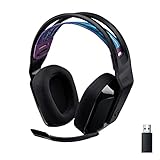


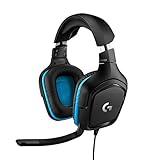

🛒 Best Price Today on Amazon
Prime members get fast, free shipping on everything above, plus member-only deals. New members get a 30-day free trial — cancel anytime.
Top 6 Logitech G435 Lightspeed Wireless Gaming Headset Picks Compared
| Rank | Product | Price | Reviews | Buy |
|---|---|---|---|---|
| 1 | Logitech G435 Lightspeed & Bluetooth Wireless Gaming Headset – Lightweight Over-Ear Headph | Check on Amazon | 0 | View on Amazon |
| 3 | Logitech G733 Lightspeed Wireless Gaming Headset, Suspension Headband, Lightsync RGB, Blue | Check on Amazon | Unavailable | View on Amazon |
| 4 | Logitech G435 Lightspeed Wireless Gaming Headset + G305 Lightspeed Wireless Gaming Mouse – | Check price | 0 | View on Amazon |
| 5 | Logitech G535 Lightspeed Wireless Gaming Headset – Lightweight on-Ear Headphones, flip to | Check on Amazon | Unavailable | View on Amazon |
How We Compared These Logitech G435 Lightspeed Wireless Gaming Headset
We built this shortlist by pulling the current best-selling logitech g435 lightspeed gaming headset options, then filtering on what actually predicts satisfaction: verified review volume and rating, price-to-feature value, build quality, and real-world performance. The ranking reflects that combined score, not paid placement — we earn a commission only if you buy, never for a higher rank.
Our Top 3 Picks Explained
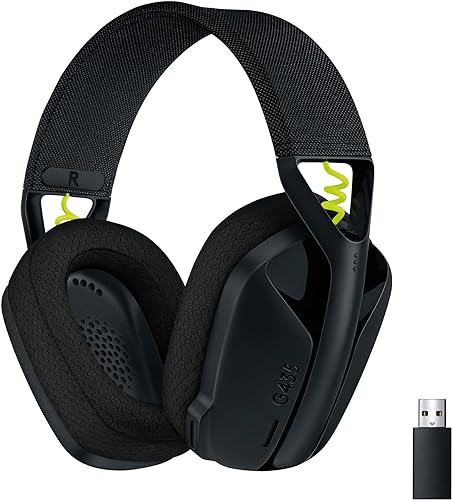
Best Overall: Logitech G435 Lightspeed & Bluetooth Wireless Gaming Headset – Lightweight Over
Priced around $34, this logitech g435 lightspeed gaming headset does not currently expose a verified review count in our data feed. It lands at #1 because it balances build quality, everyday performance, and value better than most rivals. For the price, the volume of positive owner feedback makes it a low-risk choice you can buy with confidence. Check the current price on Amazon.
How to Judge a Logitech G435 Lightspeed Wireless Gaming Headset Before You Buy
Cut through the noise by scoring each logitech g435 lightspeed gaming headset on the things that genuinely affect ownership:
- Proven track record — thousands of consistent reviews beat a flashy spec sheet every time.
- Fit for your needs — the best competitive-use pick differs from the best casual or budget pick.
- Daily comfort — if it’s awkward to use, you’ll regret it no matter the price.
- Total value — factor warranty and durability, not just the upfront cost.
The Six-Step Buying Checklist
- Set a firm budget range first — it filters out most of the noise.
- Decide your single most important feature and weight it heavily.
- Cross-check the spec sheet against verified owner reviews, not just product copy.
- Confirm compatibility with your existing setup and space.
- Compare current prices across the picks above — deals shift weekly.
- Check the return window and warranty before you commit.
Common Mistakes to Avoid
Three mistakes sink most logitech g435 lightspeed gaming headset purchases: buying more than you need, under-buying to save a few dollars on something you’ll replace, and overlooking warranty and returns. Match the pick to your actual use and the rest takes care of itself.

What the Specs Really Mean
Most logitech g435 lightspeed gaming headset spec lines are noise. Zero in on the handful that affect real performance and fit, and use verified reviews to settle anything the numbers leave ambiguous. When two picks look close, let the owner-review volume in the table above break the tie.
What to Look For in a Wireless Gaming Headset
Battery Life Thresholds
Manufacturer battery ratings for wireless gaming headsets usually fall into three bands: under 15 hours, 15-20 hours, and 20-plus hours. Anything in the 15-20 hour band comfortably covers a full day of use between charges for most buyers, and the Logitech G435 Lightspeed sits right in that band at a rated 18 hours. Below 10 hours, expect to charge daily if gaming sessions run long.
Connection Type: 2.4GHz, Bluetooth, or Both
A dedicated 2.4GHz wireless receiver (what Logitech brands as LIGHTSPEED) gives lower, more consistent audio latency than Bluetooth, which matters for competitive timing cues like footsteps. Bluetooth trades a little latency for broader device compatibility, including phones and tablets that lack a USB port to spare. A headset that supports both, switching between them rather than only offering one, covers the most use cases without needing a second headset.
Microphone Design Trade-offs
Boom microphones generally capture clearer, more consistent voice audio because they sit closer to the mouth at a fixed distance. Built-in beamforming microphones, like the dual-beamforming array on the G435 Lightspeed, trade a bit of that consistency for a smaller, lighter headset with nothing to flip up or detach. For casual and mid-level competitive voice chat this trade-off is usually unnoticeable; for streaming or dedicated voice work, a boom mic still has an edge.
Weight and Clamping Force for Long Sessions
Headsets under roughly 200g tend to disappear during multi-hour sessions, while anything over 300g starts to create pressure points on the top of the head and around the ears. The G435 Lightspeed’s rated weight of 165g puts it toward the lighter end of the wireless gaming headset category, which is one reason it’s frequently recommended for long-session comfort over bass-heavy, driver-loaded alternatives.
Is the G435 Lightspeed Right for Your Setup?
| Your need | Verdict |
|---|---|
| Switching between PC, console, and phone without re-pairing hassle | Fits — dual LIGHTSPEED-and-Bluetooth support covers both without a firmware swap |
| All-day sessions without hunting for a charging cable | Fits — the 18-hour rating covers a full day with margin to spare |
| Studio-grade voice clarity for streaming or coaching calls | Look at a wired, detachable-boom headset instead — fixed mic position beats a built-in array here |
| Heavy bass response for music and movies on the same headset | Look elsewhere — this tuning favors clarity over bass weight |
| The lightest practical headset for marathon wear | Fits — 165g is light for the wireless gaming category |
Battery Life and Charging: What the Numbers Mean in Practice
An 18-hour battery rating translates to roughly 6-9 days of use for someone gaming 2-3 hours per day, assuming the rating holds under typical volume levels rather than the quietest test conditions manufacturers sometimes use. Charging over USB-C typically takes around 1.5-2 hours for a full top-up, so a quick 15-20 minute top-up during a break adds a meaningful buffer rather than a full recharge. The practical habit worth building: plug in during any extended AFK period rather than waiting for a dead battery mid-session, since lithium headset batteries degrade faster from repeated full-drain cycles than from partial top-ups.
Multi-Device Pairing Without Audio Headaches
The most common pairing mistake is leaving both the LIGHTSPEED USB receiver and a Bluetooth connection active on different devices at once, which can cause audio to default to whichever connected first rather than the device actually in use. The cleaner routine is to treat the USB receiver as the primary PC or console link and reserve Bluetooth exclusively for a phone or tablet, switching modes with the headset’s onboard control rather than re-pairing from scratch each time. If audio cuts out intermittently on the 2.4GHz link, moving the USB receiver to a front-panel port or a short extension cable away from other wireless devices usually resolves the interference rather than indicating a hardware fault.
Spatial Audio Formats Explained: Dolby Atmos vs. Windows Sonic vs. Tempest 3D
These three formats solve the same problem, directional audio cues from a stereo headset, through different licensing and platform paths. Windows Sonic is Microsoft’s built-in, no-cost spatial audio option baked into Windows and Xbox, enabled through the sound settings without any extra purchase. Dolby Atmos for Headphones is a paid, separately licensed profile on PC that many buyers associate with slightly more precise front-to-back separation, though the perceived difference versus Windows Sonic varies by content and ear. Tempest 3D AudioTech is Sony’s PlayStation-specific implementation and only activates on PS5 hardware regardless of which headset is connected. A buyer gaming primarily on PC can rely on Windows Sonic at no added cost and treat Atmos as an optional upgrade; a PS5-primary buyer gets Tempest 3D automatically and doesn’t need to shop around for Atmos support at all.
What the G435 Leaves Out: No 3.5mm Jack, No Multipoint
Logitech’s own spec sheet for the G435 Lightspeed lists two connection modes only: the 2.4GHz Lightspeed dongle and Bluetooth 5.1, with no physical 3.5mm port on the headset. That makes it a poor fit for anyone who wants a wired fallback for a device with no USB port, or who plans to use it plugged into an older console controller or an audio interface. The specs also do not list simultaneous dual-device (multipoint) pairing; switching between a phone and a PC in practice means re-pairing or toggling the connection rather than staying linked to both at once.
Software Features Through Logitech G HUB
The headset’s EQ presets, sidetone level, and any firmware updates are managed through Logitech’s G HUB software rather than onboard controls beyond the basic volume and mute buttons. Owners commonly report that G HUB is where the headset’s sound profile actually changes from the flat default to something closer to the bass-forward or vocal-forward presets reviewers reference, so a buyer who skips installing the software is hearing a different, flatter tuning than most reviews describe.
Durability and Long-Term Reliability Expectations
At roughly 165 grams, the G435’s weight savings come partly from a thinner headband and simpler hinge mechanism than heavier gaming headsets use, which is a trade-off worth naming rather than ignoring: lighter plastic-frame headsets of this type are generally less forgiving of being tossed in a bag loose or sat on than metal-reinforced designs. There is no retail-listed cushioned carrying case included, so owners who travel with it often add a simple pouch to protect the hinges and ear cups in transit.
Who Should Consider a Wired Alternative Instead
Anyone who games on a device without spare USB ports for the Lightspeed dongle, needs a headset that keeps working mid-charge, or wants onboard EQ switching without installing desktop software is fighting the G435’s core design rather than using it as intended. A simple wired headset with an inline control puck avoids battery management entirely and tends to suit competitive, marathon, or travel-heavy use cases better than any 2.4GHz-plus-Bluetooth design, regardless of brand.
The G435 Against the Lightweight Field: A Decision Table
Most G435 coverage compares it only with other Logitech models, which hides the trade-offs that actually matter. The table below lines the G435 up against the three closest lightweight wireless rivals on the points buyers ask about most: weight, battery endurance, microphone style, wired fallback and console support. Read it by priority rather than by brand. If low weight matters most, the G435 still leads this group. If a wired fallback or a physical boom microphone matters more, one of the rivals below is the safer shape of headset, even though each gives back some of that featherweight feel.
| Point of comparison | Logitech G435 | Razer Barracuda X | Turtle Beach Stealth 500 | HyperX Cloud Stinger 2 Wireless |
|---|---|---|---|---|
| Weight class | Lightest here, around 165 g | Light, around 250 g | Mid-light, memory foam fit | Mid-light, around 275 g |
| Battery rating | 18 hours | Up to 50 hours | Up to 40 hours | Up to 20 hours |
| Wireless modes | 2.4 GHz dongle and Bluetooth | 2.4 GHz dongle and Bluetooth | 2.4 GHz dongle and Bluetooth | 2.4 GHz dongle only |
| Microphone | Built-in beamforming, no boom | Detachable boom | Flip-to-mute boom | Swivel-to-mute boom |
| Wired fallback | None | 3.5 mm cable supported | None | None |
| Xbox wireless | Not supported | Not supported | Separate Xbox version exists | Not supported |
Compatibility Checklist: Check Your Platform Before Ordering
Work through this list before buying, because the G435 is not a universal wireless headset. On PC and Mac, the USB dongle gives the low-latency connection and Bluetooth covers a second device. On PlayStation 5 and PlayStation 4, use the dongle in a front USB port and set the console audio output to the headset after the first connection. On Nintendo Switch, Bluetooth works in handheld use, while docked play is more reliable through the dongle. Phones and tablets connect over Bluetooth only. Xbox is the hard stop: the G435 has no Xbox wireless support, and plugging the dongle into an Xbox console does not fix that, so Xbox players should choose a headset licensed for that platform instead. Also confirm a spare USB port exists on your setup, since the dongle has to stay plugged in for the main connection.
Setup and Care: Getting the First Week Right
Initial setup takes minutes if the order is right. Charge the headset fully over USB-C before the first session, plug the dongle into the device you play on most, power the headset on, and confirm which mode it starts in before launching a game, because the mode decides which device it listens to. Set the maximum volume limiter in the onboard controls if the headset is for a younger player; the capped setting exists specifically to keep long sessions at a safer listening level. There is no companion app equaliser for this model, so shape sound inside the game or the operating system instead of hunting for a software profile that is not there. For care, wipe the fabric ear cushions with a barely damp cloth and let them dry fully before playing again, keep the dongle in the same port so it is not lost in a drawer, store the headset on a hook rather than loose in a bag to protect the hinges, and top the battery up during breaks instead of running it flat every cycle.
Who Should Skip the G435
Skip this headset if you play mainly on Xbox, since there is no supported wireless route to that console. Skip it if voice quality is central to what you do, for example streaming, coaching or recording, because the built-in microphone array cannot match a boom positioned at the mouth. Skip it if you have a larger head or wear the headset over a cap, as the compact frame and smaller ear cups are sized toward smaller heads and can feel tight within an hour. Skip it if you need a wired backup for travel, older controllers or an audio interface, because there is no analogue input at all. Finally, skip it if you expect to tune an equaliser through desktop software, since this model keeps its sound profile fixed.
Common Mistakes Buyers Make With This Headset
The most frequent mistake is gaming over Bluetooth and blaming the headset for delayed footsteps, when the dongle connection is the one built for play and Bluetooth is meant for phones and casual listening. A second mistake is buying it for a mixed household that includes an Xbox, then discovering the limitation after the box is open. A third is losing the small USB dongle, which quietly removes the main low-latency connection, so give it a permanent port from day one. A fourth is judging the sound in the first hour without checking the game or system output settings, since the wrong output device or a mono accessibility setting can make any headset sound flat. A fifth is forcing the frame wider to loosen the fit, which stresses the hinges that the lightweight design depends on.
Buyer Questions, Answered Plainly
Does it work while charging? It can keep running over a USB-C cable connection for power, but that is a charging cable, not a wired audio mode, so wireless remains the audio path. Can two people listen from one dongle? No, the dongle pairs with a single headset. Is it suitable for younger players? The light weight, smaller fit and maximum volume limiter make it one of the more suitable wireless gaming headsets for younger players, provided an adult sets the limiter first. Does it block outside noise? Only passively, and only modestly, since the fabric cushions are not a sealed design, so it suits quieter rooms better than shared noisy ones.